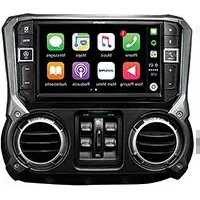
INE-NAV60HDMI - Gps ALPINE - Free user manual and instructions
Find the device manual for free INE-NAV60HDMI ALPINE in PDF.


Pick your language and provide your email: we'll send you a specifically translated version.
| Product Type | In-Dash GPS Navigation Receiver |
| Brand | Alpine |
| Model | INE-NAV60HDMI |
| Display Size | 7-inch WVGA (800x480) Touchscreen |
| Chassis Size | Double DIN (178 x 100 mm) |
| Weight | Approximately 2.3 kg (5.1 lbs) |
| Power Supply | 12V DC (13.2V allowed), negative ground |
| Maximum Power Output | 50W x 4 (peak) |
| Navigation System | Built-in Garmin GPS with maps of USA/Canada |
| Audio Playback | CD, DVD, MP3, WMA, AAC, FLAC, WAV |
| Video Playback | MPEG-1/2/4, DivX, H.264, WMV, AVI |
| Connectivity | Bluetooth (HFP/A2DP/AVRCP), USB, AUX 3.5mm |
| HDMI Input | 1x HDMI (compatible with smartphones) |
| Radio Tuner | AM/FM (24 presets), RDS, SiriusXM ready |
| Preamp Outputs | 3 sets (Front, Rear, Subwoofer) 4V |
| Rear Camera Input | Yes (composite video), with parking guidelines |
| Additional Features | iPod/iPhone direct control, Pandora, Spotify |
| Maintenance | Clean with soft, dry microfibre cloth; avoid harsh chemicals |
| Safety | Parking brake interlock for video; do not watch while driving |
| Spare Parts & Repairability | Contact Alpine authorized service center; shroud and mounting parts available |
| General Information | Designed for 12V vehicles; includes remote control, wiring harness, microphone |
Frequently Asked Questions - INE-NAV60HDMI ALPINE
How do I update the maps on my Alpine INE-NAV60HDMI?
Map updates are available via Garmin Express. Visit the Garmin website, install Garmin Express on your PC, and connect the navigation unit via USB to apply updates. Check your model's compatibility for free or paid updates.
Can I play video from my smartphone through the HDMI input?
Yes, the HDMI input allows video playback from compatible smartphones. Use an HDMI adapter for your phone, connect to the unit, and select HDMI as the source. Note: video is only displayed when the parking brake is engaged for safety.
Why is there no sound from my speakers?
Check that the unit is powered on and volume is not muted. Verify speaker wire connections and ensure fader/balance settings are correct. If using an external amplifier, confirm it is properly connected and powered.
How do I pair my phone via Bluetooth?
On the unit, go to Settings > Bluetooth > Pairing. On your phone, enable Bluetooth and search for Alpine devices. Select 'INE-NAV60HDMI' and confirm the PIN if prompted. Once paired, you can make hands-free calls and stream audio.
Can I install a rearview camera?
Yes, the unit has a dedicated rear camera input (RCA composite). Connect the camera to the 'CAMERA IN' on the back, enable the rear camera option in settings, and the display will automatically show camera feed when in reverse.
What are the supported audio file formats for USB?
The unit supports MP3, WMA, AAC, FLAC, and WAV files from USB drives formatted as FAT32. ID3 tags are displayed for artist and track info. Playback may vary depending on file bitrate.
How do I reset the unit to factory defaults?
Press and hold the reset button (small hole) on the front panel using a paperclip for about 5 seconds. Alternatively, go to Settings > System > Factory Reset and confirm. This will erase all user data and settings.
Does the unit support Apple CarPlay or Android Auto?
No, the Alpine INE-NAV60HDMI does not have native CarPlay or Android Auto. However, it supports HDMI mirroring for compatible smartphones and basic Bluetooth connectivity. For full smartphone integration, consider a newer model.
What should I do if the touchscreen is unresponsive?
First, clean the screen with a soft cloth to remove dirt. If still unresponsive, try a soft reset by pressing the reset button. If the issue persists, the unit may require service. Avoid using sharp objects on the screen.
Can I watch DVD movies while driving?
No, for safety, video playback is disabled when the vehicle is moving unless the parking brake wire is connected and engaged. This is a legal requirement; do not attempt to bypass it.
User questions about INE-NAV60HDMI ALPINE
0 question about this device. Answer the ones you know or ask your own.
Ask a new question about this device
No questions yet. Be the first to ask one.
Download the instructions for your Gps in PDF format for free! Find your manual INE-NAV60HDMI - ALPINE and take your electronic device back in hand. On this page are published all the documents necessary for the use of your device. INE-NAV60HDMI by ALPINE.
USER MANUAL INE-NAV60HDMI ALPINE

Manual assistant
Powered by Anthropic
Waiting for your message
Product information
Brand : ALPINE
Model : INE-NAV60HDMI
Category : Gps