X108U - Gps ALPINE - Free user manual and instructions
Find the device manual for free X108U ALPINE in PDF.


Pick your language and provide your email: we'll send you a specifically translated version.
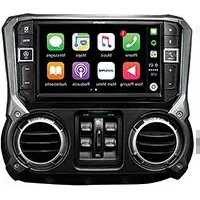
| Product Type | GPS Navigation System |
| Brand | Alpine |
| Model | X108U |
| Display | 7-inch TFT LCD Touchscreen |
| Dimensions (W x H x D) | 178 mm x 100 mm x 25 mm |
| Weight | 0.8 kg |
| Power Supply | 12V DC |
| Screen Resolution | 800 x 480 pixels |
| Main Functions | GPS Navigation, Route Planning, Voice Guidance, POI Database |
| Storage | SD Card Slot |
| Connectivity | USB, Bluetooth |
| Operating Temperature | -10°C to 60°C |
| Battery Type | Internal Lithium-Ion (Backup) |
| GPS Antenna | External Magnetic Antenna |
| Map Coverage | Preloaded Maps of North America & Europe |
| Care and Cleaning | Clean with soft damp cloth; avoid solvents |
| Safety | Do not obstruct driver's view; secure mounting |
| Spare Parts Available | Antenna, Power Cord, Mounting Bracket |
| Repairability | Service by Alpine Authorized Centers |
Frequently Asked Questions - X108U ALPINE
How do I update the maps on my Alpine X108U?
To update maps, download the latest map software from the Alpine website to an SD card. Insert the card into the device and follow the on-screen instructions. Ensure you have a valid map license.
Can I use third-party maps?
The Alpine X108U is designed to work with Alpine proprietary maps. Third-party maps are not officially supported and may cause compatibility issues.
How to reset to factory settings?
Go to Settings > System > Factory Reset. Confirm the reset. This will erase all user data and restore default settings.
Why is my GPS not acquiring signal?
Ensure the GPS antenna is properly connected and has a clear view of the sky. Avoid metallic window tints or obstructions. Try moving the vehicle to an open area.
How to change the voice language?
Navigate to Settings > Language & Voice. Select your preferred language from the list. Voice prompts will switch accordingly.
Is the battery replaceable?
The internal backup battery is not user-replaceable. Contact an Alpine service center for replacement if needed.
How to mount the device in the car?
Use the included mounting bracket and adhesive pad. Attach the bracket to a flat, non-slip surface on the dashboard. Secure the device into the bracket.
Can I play music through the GPS?
Yes, via Bluetooth audio streaming or using the USB port to play music files. Navigate to the Media menu to select source.
How to set home address?
Go to Navigation > My Places. Select Add Home and enter your address. You can then navigate to it with one tap.
What is the warranty period?
The Alpine X108U comes with a 1-year limited warranty against manufacturing defects. Register your product online to extend coverage.
User questions about X108U ALPINE
0 question about this device. Answer the ones you know or ask your own.
Ask a new question about this device
No questions yet. Be the first to ask one.
Download the instructions for your Gps in PDF format for free! Find your manual X108U - ALPINE and take your electronic device back in hand. On this page are published all the documents necessary for the use of your device. X108U by ALPINE.
USER MANUAL X108U ALPINE

Manual assistant
Powered by Anthropic
Waiting for your message
Product information
Brand : ALPINE
Model : X108U
Category : Gps