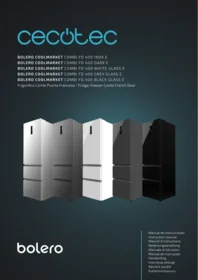
Bolero Coolmarket Combi Fd 400 Glass E - Refrigerator CECOTEC - Free user manual and instructions
Find the device manual for free Bolero Coolmarket Combi Fd 400 Glass E CECOTEC in PDF.


| Product Type | Combined refrigerator with freezer |
| Brand | Cecotec |
| Model | Bolero Coolmarket Combi Fd 400 Glass E |
| Dimensions (H x W x D) | 185 x 60 x 65 cm |
| Net weight | Approximately 70 kg |
| Power supply | 220-240 V, 50 Hz |
| Energy class | E |
| Total capacity | 400 L |
| Refrigerator capacity | Approximately 280 L |
| Freezer capacity | Approximately 120 L |
| Cooling technology | Ventilated cooling in refrigerator, No Frost in freezer |
| Lighting | Interior LED |
| Shelves | Removable tempered glass shelves |
| Reversible door | Yes, possible to reverse door opening direction |
| Main functions | Quick cooling, quick freezing, holiday mode, open door alarm |
| Maintenance and cleaning | Automatic defrosting (No Frost); clean with a soft cloth and soapy water |
| Safety | Child lock, automatic shutdown in case of overheating |
| Spare parts and reparability | Parts available on request from Cecotec customer service |
| General information | Manual available online; 2-year warranty |
Frequently Asked Questions - Bolero Coolmarket Combi Fd 400 Glass E CECOTEC
User questions about Bolero Coolmarket Combi Fd 400 Glass E CECOTEC
0 question about this device. Answer the ones you know or ask your own.
Ask a new question about this device
Download the instructions for your Refrigerator in PDF format for free! Find your manual Bolero Coolmarket Combi Fd 400 Glass E - CECOTEC and take your electronic device back in hand. On this page are published all the documents necessary for the use of your device. Bolero Coolmarket Combi Fd 400 Glass E by CECOTEC.
USER MANUAL Bolero Coolmarket Combi Fd 400 Glass E CECOTEC
Instrucciones de seguridad 4
Safety instructions 11
Instructions de sécurité 17
Sicherheitshinweise 24
Istruzioni di sicurezza 31
Instruções de segurança 38
Veiligheidsinstructies 45
Instrukcja bezpieczeństwa 52
Bezpečnostní pokyny 59
Güvenlik talimatları 65
ÍNDICE
- Parts and components 89
- Before use 89
- Appliance installation 89
- Operation 92
- Instructions on food storage 96
- Cleaning and maintenance 98
- Troubleshooting 100
- Technical specifications 102
- Disposal of old electrical and electronic appliances 103
- Technical support and warranty 103
- Copyright 104
SOMMAIRE
Read these instructions thoroughly before using the appliance. Keep this instruction manual for future reference or new users.
- It is important to make sure all users are familiar with the operation and safety features of the appliance to prevent faults and unnecessary accidents.
- Make sure that the mains voltage in your house matches the voltage stated on the rating label of the appliance.
- This appliance can be used by children aged 8 years and above and people with reduced physical, sensory, or mental capabilities or lack of experience and knowledge if they have been given supervision or instruction concerning use of the appliance in a safe way and understand the hazards involved. Children must not play with the appliance. Cleaning and user maintenance should not be carried out by unsupervised children.
- Do not store explosive substances such as aerosol cans with flammable propellant in this appliance.
- This appliance is designed for domestic use only and is not intended for bars, restaurants, farmhouses, hotels, motels, and offices.
- To avoid food contamination, please follow the instructions below:
- Opening the door for a long period of time may cause a significant increase in temperature in the appliance's compartments.
- Regularly clean the surfaces that might be in contact with food and accessible evacuation systems.
-
If the appliance remains empty for a long period of time, unplug it, defrost it, clean it, dry it, and leave the door open to prevent interior mould formation.
-
WARNING: when positioning the appliance, make sure the power cable does not get trapped or damaged. A crushed or damaged connector may heat up and cause a fire.
- Make sure the appliance plug is accessible after installation.
- WARNING: do not attach multi-socket adaptors or multiple power supplies to the rear part of the appliance.
- WARNING: keep the ventilation grilles on the enclosure of the appliance or the cabinet in which the appliance is located clear.
- WARNING: do not use mechanical appliances or other means to accelerate the defrosting process other than those recommended by Cecotec.
- WARNING: do not use electrical appliances inside the refrigerator.
- WARNING: do not damage the refrigeration circuit.
- If the cable is damaged, it must be replaced by the manufacturer, the supplier, or qualified personnel to avoid hazards.
- We recommend you check the power cable regularly to detect any sign of possible damage. Do not use the appliance if the cable is damaged.
- WARNING: to avoid any risk due to the instability of the refrigerator, you must install it according to the instructions.
- WARNING! It is dangerous for anyone other than authorised personnel to carry out maintenance or repairs involving the removal of covers. To prevent the electric shock risk do not attempt to repair the appliance yourself.
- Do not place carbonated beverages in the freezer compartment. Ice cream can cause frostbites. This can happen if they are ingested after removal from the freezer.
- Do not remove items from the freezer with wet/moist hands, as this may cause skin abrasions or frostbites. Bottles and
cans should not be placed in the freezer, as they may burst when their contents freeze.
- Frozen food can cause frostbites if consumed right after removing it from the freezer compartment.
- See the storage times recommended by the manufacturer.
- Do not allow children to play with the controls or the refrigerator. The refrigerator is a heavy household appliance. Caution must be taken when moving the appliance. It is dangerous to alter specifications or attempt to modify this appliance in any way.
- WARNING: doors or covers fitted with locks and keys must be kept out of the reach of children and not in the vicinity of the freezing appliance to prevent children from being locked inside.
- WARNING: the refrigerant used in your appliance and the insulation materials must be disposed of correctly.
- Keep the packaging material away from children, as there is a risk of suffocation.
- WARNING: if the interior light is damaged, contact the official Cecotec Technical Support Service. Do not try to repair it on your own.
- Make sure the appliance plug is accessible after installation.
- Do not place food directly against the air outlet on the interior of the appliance.
- Do not place hot food or drinks in the refrigerator, allow them to cool down to room temperature beforehand.
- This appliance has a built-in earthed plug. Make sure the power supply in your house is properly earthed.
- Keep the ventilation openings clear from obstructions.
-
Wait 5 minutes after a power failure before turning the appliance back on. Otherwise, the compressor may get damaged.
-
Do not place carbonated or fizzy drinks in the freezer compartment, as this creates pressure in the container, which could explode and damage the appliance.
- To avoid injuries or death caused by electric shock, do not use the appliance with your hands wet or over a wet surface.
- You should never use this refrigerator with an extension lead or a multi-socket adaptor. Make sure the appliance is plugged in directly to a power supply.
- When positioning the appliance, make sure there is enough free space at the rear, as it is the main heat outlet. This will allow for adequate ventilation.
- Do not place any other appliance on the refrigerator and do not wet it.
- This appliance is not intended to be operated by means of an external timer or separate remote-control system.
- It is advisable to wait for at least four hours before connecting the appliance to allow oil to flow through the compressor.
- Do not use the appliance outdoors or in damp environments.
- Always handle the appliance carefully to avoid any damage on it.
- Never use the base, drawers, or door as support.
- Do not overload the door shelves or place too much food on the drawers to prevent items from falling off and damaging the appliance.
- Store raw meat and fish in proper containers in the freezer, so they do not come into contact with or leak on other food.
- The two-star compartments are suitable for storing pre-frozen food, storing, or making ice cream, and making ice cubes.
- Compartments with one, two, or three stars are not suitable for freezing fresh food.
- Air must flow around the appliance. Lack of air leads
to overheating. To achieve good ventilation, follow the installation instructions.
- Make sure that the mains plug is accessible after installation of the appliance.
- All electrical work required to maintain this appliance must be carried out by a qualified electrician.
Temperature range
The appliance temperature range information can be found on its marking. It indicates the optimum room temperature for proper operation of the appliance.
| Climate range | Optimum room temperature |
| SN | From +10 °C to +32 °C |
| N | From +16 °C to +32 °C |
| ST | From +16 °C to +38 °C |
| T | From +16 °C to +43 °C |
- WARNING: if the refrigerator is operated outside the climate class for which it is rated (SN/N/ST/T), it may not be able to maintain satisfactory internal temperatures.
Note:
- Bearing in mind the limiting values of the room temperature range for the climates for which the cooling appliance is designed and that internal temperatures may be affected by factors such as the location of the cooling appliance, room temperature and frequency of door opening, it may be necessary to modify the setting of any temperature-control device according to these factors.
- If the appliance is operated in an environment other than the specified climate type (i.e. beyond the rated ambient temperature range), it may not be able to maintain the desired compartment temperatures.
Cooling
- This refrigerator uses freon-free refrigerant (R600a) and foaming insulation material (cyclopentane), which are environmentally friendly, do not cause damage to the ozone layer, and have a very low impact on global warming. R600a is flammable and does not leak during normal use when sealed in a refrigeration system. In the event of refrigerant leakage due to damage to the refrigerant circuit, be sure to keep the appliance away from open flames and open the windows to ventilate as soon as possible.
- WARNING: the refrigerant and the insulator gas are flammable. When disposing of the appliance, only dispose of it at an authorised waste-disposal facility. Do not expose it to flames.
- WARNING: the appliance contains refrigerant and gases in the insulation. The appliance and gases must be disposed of professionally, as they may cause injuries to eyes or ignition. Make sure the refrigeration-circuit pipe is not damaged before disposing of it correctly.
- This symbol means: Warning: Risk of fire/flammable materials
-
If the refrigeration circuit is damaged:
This symbol means: Warning: Risk of fire/flammable materials -
Avoid open flames and sources of ignition.
- Completely air the room where the appliance is located.

INSTRUCTIONS DE SÉCURITÉ
- Control panel
- Refrigerator compartment shelf
- Crisper drawer
- Crisper drawer cover
- Fresh Zone drawer
- Freezer drawers
- Adjustable feet
- Door shelves
NOTE:
The graphics in this manual are schematic representations and may not exactly match the device.
2. BEFORE USE
- This appliance is packaged in a way as to protect it during transport. Take the appliance out of its box and remove all packaging materials. You can keep the original box and other packaging elements in a safe place. This will help you prevent damage to the appliance when transporting it in the future. In case the original packaging is disposed of, make sure all packaging materials are recycled accordingly.
- Make sure all parts and components are included and in good conditions. If there is any piece missing or in bad conditions, contact the official Cecotec Technical Support Service immediately.
Box content
- Refrigerator
- Instruction manual
3. APPLIANCE INSTALLATION
Location
1. Ventilation
- The location you choose to install the refrigerator should be well ventilated.
- Do not place the refrigerator near heat sources, like a hob, and avoid direct sunlight to ensure the cooling effect and save on energy consumption.
- Do not place the refrigerator in a damp place to avoid rust or loss of power.
ENGLISH
- The result of dividing the amount of cooling capacity of the refrigerator by the total space of the room in which the refrigerator is installed must be less than 1 m^3 (space) / 8 g (refrigerant).
Note: the amount of refrigerant used by the refrigerator is specified on the rating plate.
2. Heat dissipation space
- During operation, the refrigerator releases heat into the environment. Therefore, you should leave at least 30 mm of free space at the top, more than 100 mm on both sides, and more than 50 mm at the rear of the refrigerator. Fig. 2
Note: Figure 2 only shows the space occupied by the appliance.
Dimensions in mm:
| W | D | H | A | B | C (°) | E | F |
| 600 | 638 | 1908 | 935 | 1200 | 125 ± 5 | 50 | 100 |
3. Flat surface
- Place the refrigerator on a solid, flat surface to keep it stable, otherwise vibrations and noises will occur. When the refrigerator is placed on a carpet, straw mat, or polyvinyl chloride, solid support plates should be placed underneath the refrigerator to avoid colour change due to heat dissipation.
⚠ The place where the refrigerator is placed must be well ventilated.
Preparation
1. Waiting time
- Once the refrigerator is properly installed and cleaned, do not switch it on immediately. Wait at least one hour before switching it on to ensure normal operation.
2. Cleaning
- Check that all refrigerator accessories are securely in place and wipe the inside with a soft cloth.
3. Connecting the refrigerator to the mains power supply
- Connect the plug into a power socket to switch on the compressor. After one hour, open the freezer door. If the temperature has clearly dropped, the cooling system is operating normally.
4. Food storage
- When the refrigerator has been in operation for a considerable period of time, you can adjust the internal temperature. Once the refrigerator has cooled down completely, put the food in. It will take 2 to 3 hours for the food to cool down. In summer, when the temperature is high, it may take more than 4 hours for food to cool down completely (try to open the refrigerator door as rarely as possible).
NOTE:
- If the refrigerator is installed in a wet place, be sure to check if the earthed cord and the leakage breaker are working normally.
- If vibration noises occur due to contact of the refrigerator with the wall or if the wall turns black due to air convection around the compressor, keep the refrigerator further away from the wall.
- The installation of the refrigerator may cause interference in mobile phones, landline phones, radio receivers, or televisions near the refrigerator, so in this case, keep the refrigerator as far away from these objects as possible.
Instructions for changing the door opening direction Fig. 4
Below are the steps to follow to reverse the opening direction of the refrigerator door.
- Remove the screws from the top hinge cover to remove it.
- Place the communication cable in the junction box on the top of the refrigerator.
- Remove the three screws from the top hinge to remove it.
- Remove the plug bolt from the left-hand hole at the top of the refrigerator, then remove the cover.
- Unscrew the two bolts and the screw securing the centre hinge to remove it.
- Remove the screw cover on the left side of the refrigerator. Then, also remove the screw and the plug from the hole. Once these three elements have been removed, place them on the right-hand side.
- Unscrew the screw on the trim cover to remove it.
- Unscrew the two screws on the door stop to remove it.
- Remove the left-hand (plastic) stopper from the accessory bag and place it on the other side of the door together with the metal stopper previously removed from the right-hand side. Then, fix both with two screws.
- Remove the decorative cover from the accessory bag and place it on the right side of the door (place the door communication cable inside the trim cover). Fix it using screws.
- Remove the left centre hinge from the accessory bag and secure it to the refrigerator frame with two screws and a bolt.
- Place the door on the refrigerator.
- Remove the top left hinge from the accessory bag and bolt it to the refrigerator. Then connect the wiring harness.
- Remove the top left hinge cover from the accessory bag and place it on the refrigerator.
- Finally, install the hole plug on the right side of the refrigerator and secure it with a bolt.
ENGLISH
4. OPERATION
Functions
The display is located on the refrigerator door.
Fig. 3
Control panel
- Child-lock indicator light
- Temperature indicator
- ECO mode indicator light
- Fast Cooling mode indicator light
- Fast Freezing mode indicator light
- Refrigerator compartment icon
- Freezer compartment icon
- Fresh Zone drawer icon
- Vegetables mode indicator light
- Fruit mode indicator light
- Chill mode indicator light
- Modes icon
- OK/Lock icon
Function settings
- When the cooling system is connected to the mains for the first time, all indicator lights on the display will light up for 5 seconds. When all doors are closed, and 3 minutes pass without any operation being performed, the display will automatically switch off.
- The display will turn on again when you open a door or press one of the icons.
NOTE: the icons shall only work when they are not locked and are illuminated on the display.
1. Functions
1.1 Temperature settings
- Setting the refrigerator compartment temperature
Press Fridge to set the refrigerator compartment temperature. When you have selected the desired temperature, press the OK icon for 5 seconds to confirm the setting. At this point, the temperature indicator will stop flashing.
The temperature setting cycles of the refrigerator compartment are:
$$ 5 ^ {\circ} \mathrm{C} \rightarrow 6 ^ {\circ} \mathrm{C} \rightarrow 7 ^ {\circ} \mathrm{C} \rightarrow 8 ^ {\circ} \mathrm{C} \rightarrow 0 \mathrm{F} \rightarrow 2 ^ {\circ} \mathrm{C} \rightarrow 3 ^ {\circ} \mathrm{C} \rightarrow 4 ^ {\circ} \mathrm{C} \rightarrow 5 ^ {\circ} \mathrm{C} $$
NOTE: OF means that the refrigerator compartment will stop cooling.

Make sure you remove all the food from the refrigerator compartment before setting the perature to OF.
2. Setting the freezer compartment temperature
Press Freezer to set the freezer compartment temperature. When you have selected the desired temperature, press the OK icon within 5 seconds to confirm the setting. At this point, the temperature indicator will stop flashing.
The freezer temperature setting cycle is as follows:
$$ - 1 8 ^ {\circ} \mathrm{C} \rightarrow - 1 7 ^ {\circ} \mathrm{C} \rightarrow - 1 6 ^ {\circ} \mathrm{C} \rightarrow - 2 4 ^ {\circ} \mathrm{C} \rightarrow - 2 3 ^ {\circ} \mathrm{C} \rightarrow - 2 2 ^ {\circ} \mathrm{C} \rightarrow - 2 1 ^ {\circ} \mathrm{C} \rightarrow - 2 0 ^ {\circ} \mathrm{C} \rightarrow - 1 9 ^ {\circ} \mathrm{C} \rightarrow - 1 8 ^ {\circ} \mathrm{C} $$
3. Setting the Fresh Zone temperature
Press Fresh Zone to set the temperature of this drawer. When you have selected the desired temperature, press the OK icon within 5 seconds to confirm the setting. At this point, the corresponding indicator light will stop flashing.
The setting cycle of the Fresh Zone drawer modes are as follows:
Vegetables → Fruits → Chill (fish or meat) → Vegetables
1.2 ECO mode
- When this mode is activated, the refrigerator compartment temperature will be 5 °C, and the freezer compartment temperature will be -18 °C. This ensures that food is properly preserved, and that the refrigerator operates with optimum efficiency and performance.
When ECO mode is activated, you cannot change the temperature setting of the refrigerator compartment or freezer compartment.
2. Activating the ECO mode
Press ≡ until the ECO mode indicator light ⏻ starts flashing. To confirm the setting, press the OK icon within 5 seconds. When the setting is confirmed, the ECO mode indicator light ⏻ will remain steady.
3. Deactivating the ECO mode
When ECO mode is activated, press ≡ until the ECO mode indicator light ⏻ starts flashing. To confirm the setting, press the OK icon within 5 seconds. When you have deactivated the ECO mode, the corresponding indicator light ⏻ will switch off.
NOTE: when the Fast Freezing or Fast Cooling mode is activated, ECO mode will be deactivated automatically.
1.3. Fast Cooling mode
- When this mode is activated, the refrigerator compartment temperature will be 2 °C. Fast Cooling mode preserves the taste, freshness, and nutritional value of food.
NOTE:
- This mode will be automatically deactivated after 8 hours from its activation.
- When Fast Cooling mode is activated, you cannot change the temperature setting of the refrigerator compartment.
ENGLISH
2. Activating the Fast Cooling mode
Press ≡ until the Fast Cooling mode indicator light ⚙️ starts flashing. To confirm the setting, press the OK icon within 5 seconds. When the setting is confirmed, the Fast Cooling mode indicator light ⚙️ will remain steady.
3. Deactivating the Fast Cooling mode
When Fast Cooling mode is activated, press ≡ until the Fast Cooling mode indicator light ⚙️ starts flashing. To confirm the setting, press the OK icon within 5 seconds. When you have deactivated this mode, the corresponding indicator light will switch off.
NOTE:
- This mode will be automatically deactivated after 8 hours from its activation.
- If ECO mode is activated, Fast Cooling mode will be automatically deactivated.
1.4 Fast Freezing
- When Fast Freezing mode is activated, the freezer temperature will drop to -32 ^ . This mode will be automatically deactivated after 26 hours from its activation. The Fast Freezing mode ensures that food retains its freshness and does not lose nutrients.
When the Fast Freezing mode is activated, you cannot change the temperature setting of the freezer compartment.
- Activating the Fast Freezing mode
- Press ≡ until the Fast Freezing mode indicator light ⚙️ starts flashing. To confirm the setting, press the OK icon within 5 seconds. When the setting is confirmed, the Fast Freezing mode indicator light will remain steady.
- Deactivating the Fast Freezing mode
- When Fast Freezing mode is activated, press ≡ until the Fast Freezing mode indicator light (⊗) starts flashing. To confirm the setting, press the OK icon within 5 seconds. When you have deactivated this mode, the corresponding indicator light will switch off.
NOTE:
- This mode will be automatically deactivated after 26 hours from its activation.
- if ECO mode is activated, Fast Freezing mode will be automatically deactivated.
1.5 Child lock function
When you activate the Child lock function, you cannot change the temperature or activate any additional modes or functions.
- Activating the Child lock function
- Press and hold OK for 3 seconds to activate the Child lock function.
NOTE: if 3 minutes pass without any operation being performed, the Child lock function will be activated automatically.
- Deactivating the Child lock function
- Press and hold OK 3s to unlock again for 3 seconds to deactivate the Child lock function.
If the refrigerator door is left open for more than 3 minutes, an alarm will sound; to stop it, press any icon. If the door is still open after 3 minutes, the alarm will go off again. It will not stop beeping until the door is closed.
1.7. Memory function
If there is a power failure, when the power is restored, the refrigerator will maintain the same settings as before.
1.8 Delayed start-up for safety reasons
If there is a power failure lasting less than 5 minutes, the refrigerator compressor will not start immediately after switching on to prevent damage to the compressor.
1.9 Overheating warning (only after a power failure)
When the refrigerator is switched on again, if the freezer sensor temperature is above -10 °C, the corresponding icon and temperature indicator will flash. You can check the freezer temperature by pressing any icon. The display will stop showing the freezer temperature after 10 seconds or if you press any icon again.
1.10. Fault warning
Error codes appear on the display, which means that a fault has occurred in the refrigerator. Contact the official Cecotec Technical Support Service.
The error codes are listed below:
| Type of error | Display |
| Refrigerator sensor fault. | The corresponding refrigerator temperature zone icon lights up and the digital area displays “E0”. |
| Failure of the variable ambient sensor. | The corresponding refrigerator temperature zone icon lights up and the digital area shows “Eb”. |
| Freezer sensor fault. | The corresponding freezer temperature zone icon lights up and the digital area shows “E0”. |
| Fault in the evaporator sensor. | The corresponding freezer temperature zone icon lights up and the digital area shows “E1”. |
| Failure of the ambient temperature sensor. | The digital area displays “EH”. |
| Communication failure. | The digital area displays “EC”. |
| Fault in the freezer sensor and at the same time in the evaporator sensor. | The corresponding freezer temperature zone icon lights up and the digital area shows “E2”. |
5. INSTRUCTIONS ON FOOD STORAGE
Food location
- Due to the circulation of cold air in the refrigerator, the temperature in each zone is different. This should be taken into account when placing the food.
- The refrigerator compartment is suitable for storing food that does not need to be frozen, cooked food, beer, eggs, some seasoning that needs to be kept cold, milk, fruit juice, etc. The crisper drawer is the best place to store these foods.
- The freezer compartment is suitable to store ice cream, frozen foods, and foods that need to be kept for a long time.
Use of the refrigerator compartment
- Set the temperature of the Fresh Zone between 2 °C and 8 °C.
- Refrigerator compartment shelves (not the ones on the door): to remove them, first lift them up and then pull them out. Make sure that food does not come into contact with the walls of the refrigerator. When removing and fitting shelves, hold them firmly and handle them carefully to avoid damage.
- Crisper drawer: after using or cleaning the bottom shelf of the refrigerator compartment (the drawer cover), put it back in place so that the internal temperature of the drawer is not affected.
Tips for food storage
- Clean and dry food completely before storing it in the refrigerator. Before putting food in the refrigerator, it is advisable to store it in an airtight container or container to prevent water evaporation and thus keep fruit and vegetables fresh on the one hand, and to prevent odours on the other.
- Do not put too much or too heavy food in the refrigerator. Leave enough space between the food; if they are too close together, they will block the flow of cold air, which will affect the cooling effect. When storing food in the refrigerator compartment, do not stick it to any wall to prevent it from freezing.
- Place your most frequently consumed foods at the front of the shelves, so that you keep the door open as little as possible.
- Tips on energy saving: let hot food cool down to room temperature before putting it in the freezer compartment. Place frozen food in the refrigerator compartment to defrost it. Frozen food helps to cool fresh food, which saves energy.
Storing fruits and vegetables
- Store fruit and vegetables in the crisper drawer provided for this purpose, so that they retain moisture and freshness.
- Store vegetables in the opposite direction of growth, as this will keep them fresh for longer.
- Store radishes with the leaves cut off, to prevent them from absorbing nutrients.
- Do not store unripe tomatoes; if you do, they will lose freshness.
- Do not store bananas, pineapple, melon, papaya, or similar tropical fruits for a long time in the refrigerator, as refrigeration will accelerate their metabolism and cause them to spoil.
- Root vegetables such as pumpkin, potatoes, sweet potatoes, garlic, ginger, and onion do not require cold storage.
Using the Fresh Zone
The Fresh Zone drawer of this refrigerator is a drawer for storing fresh food. You can select the desired mode for this compartment depending on the type of food you store inside.
- Vegetables: the Fresh Zone compartment will maintain the right temperature and humidity of the vegetables, which will prolong their shelf life. Fruits mode will do the same for fruits.
- Chill: the Fresh Zone compartment will reach the right temperature for storing meat or fish.
Using the freezer
- Store food that you want to keep for a long period of time in the freezer drawers, the temperature of which is below -18 °C.
- Large fish and meat should be cut into small pieces and placed in freezer bags before placing them in the freezer-compartment drawers.
Tips for freezing food
- Let hot food cool down to room temperature before putting it in the freezer compartment.
- Do not place liquids in glass or canned containers in the freezer; if you do, they may explode.
- Divide food into small portions.
- It is best to package food before freezing. Make sure that the container to be used is dry.
- Food should be packaged or covered with durable, non-toxic, non-polluting, tasteless, air-and water-tight materials to prevent cross-contamination and odour transfer.
ENGLISH
- Do not place too much food for freezing at the same time.
- Prevent food that has just been put in the freezer from coming into contact with food that is already completely frozen to prevent it from freezing together.
Tips on storing frozen food
- Place foods of the same type together to reduce door opening time to a minimum.
- Keep each frozen food for the period indicated on its packaging.
- If you buy frozen foods, place them in the freezer as soon as possible, before they start to thaw.
- Only take out the food you want to defrost. Once food has thawed, do not refreeze it unless you have cooked it. Otherwise, their quality will be affected.
Note: for best food preservation, consider the temperature of each compartment.
Tips on food storage
Do not put food that does not need to be kept cold in the refrigerator.
- Examples of foods that should not be kept in the refrigerator:
o Tropical fruits such as banana, melon, pineapple, and papaya. This is because, if refrigerated, they will continue to ripen and will eventually deteriorate. However, you can put them in the refrigerator for a short time before consumption.
- The following foods are not suitable for freezing:
- Raw eggs and hard-boiled eggs: The shell of the raw egg will crack and the white of the hard-boiled egg will harden. - Raw vegetables, raw potatoes, dairy products, salad dressings, pulses, tofu, etc.
- Foods that do not require cold storage:
o Potato, pumpkin, onion, garlic, etc.
Reference storage time
- The shelf life varies depending on the freshness of the food before storage and the conditions in the refrigerator.
- Consume food as soon as possible and take into account the best-before date.
6. CLEANING AND MAINTENANCE
Cleaning the interior and exterior
- Food residues in the refrigerator can cause unpleasant odours, so you should clean the refrigerator regularly.
- The refrigerator compartment should be cleaned once a month.
- Before cleaning the appliance, disconnect it from the mains.
-
Do not touch the plug with wet hands; doing so may result in electric shock.
-
Avoid spilling water on the refrigerator, so that it does not rust or cause an accident.
- Do not reach into the bottom of the refrigerator, as this may cause damage.
- Remove all shelves, the crisper drawer, etc., and clean them with a soft cloth or sponge dampened with lukewarm water. You can also use a little neutral detergent.
- Clean the dust that accumulates on the rear panel and side plates of the refrigerator regularly.
- If you have used detergent, be sure to rinse it off with clean water. Next, dry it with a dry cloth.
- Do not use any abrasive materials or corrosive products to clean the refrigerator.
- Carefully dry the door gasket and clean the slot with a wooden stick wrapped with cotton. To refit the gasket after cleaning, first fix the four corners and then push it into the slot a little at a time.
- This refrigerator includes an automatic defrost function, so there is no need to defrost it manually.
- The refrigerator has a LED light with low consumption and a long shelf life. In case of any malfunction or anomaly, contact the official Cecotec Technical Support Service.
Interrupted use
- In the event of a power failure or blackout, try to open the refrigerator door as little as possible and do not introduce new food. If you know that the power failure is going to occur in advance, do not add more food and activate the Fast Freezing mode before it happens. In addition, it is also advisable to make ice cubes in advance and place them on top of the Fresh Zone until the power supply is restored.
- If the refrigerator is out of operation for a prolonged period of time, be sure to clean the internal and external surfaces and all accessories. In addition, open the door and place the refrigerator in a dry and ventilated place to prevent odours from forming.
- It is recommended that, once it has been set up, it should be used continuously. Stopping the operation of the refrigerator may affect its lifetime.
Safety check after maintenance
- Check that the power cable is not broken or damaged.
- Check that the plug is correctly inserted into the socket.
- Check that the plug does not overheat.
Note: if the power cord and plug are damaged or dusty, electric shock and fire may occur. If there is any malfunction, disconnect the power cable and contact the official Cecotec Technical Support Service.
Removing the shelves
Door shelves
- Hold the shelves with both hands and push them upwards.
ENGLISH
- Refrigerator compartment shelves (not the ones on the door):
- Hold one end of the shelf and lift it up while pulling it out.
Refrigerator not in use for a prolonged period of time
- When the refrigerator is not to be used for more than a week or is to be transported, clean it with water and dry it thoroughly.
- Be sure to remove all food inside and disconnect it from the mains.
7. TROUBLESHOOTING
For the following minor malfunctions, please try to solve the problem yourself before contacting the official Cecotec Technical Support Service.
| Fault | Possible causes | Possible solutions |
| The refrigerator does not cool | It is not plugged into the mains.Circuit breakers or fuses are damaged.There is no electricity. | Reconnect it to the mains.Open the door and check the light is on. |
| Abnormal noise | The refrigerator is not levelled.The refrigerator is in contact with the wall. | Set the adjustable feet of the refrigerator.Separate the refrigerator from the wall. |
| Cooling is insufficient | The food inside is hot or there is too much food.You open the door too often.The door gasket has objects that do not allow to close it completely.The refrigerator receives direct sunlight or is close to a heat source.The place where the refrigerator is placed is not well ventilated.The selected temperature is too high. | Store food in the refrigerator when at room temperature.Keep the door closed.Remove the refrigerator from the heat source.Ventilate the room.Select a suitable temperature. |
| The refrigerator gives off unpleasant odours | There is spoiled food inside.Clean the refrigerator.Food with a strong odour stored inside the refrigerator. | Dispose of food which is spoiled.Clean the refrigerator.Pack the strong smelling foods. |
| The icons do not work | Check whether the Child lock function is activated. | Press and hold the OK/Child lock function icon for 3 seconds to deactivate the Child lock function.For more information, see section “Child lock function”. |
| You cannot change the temperature | Check whether the ECO, Fast Cooling or Fast Freezing modes are activated. | If the ECO, Fast Cooling or Fast Freezing modes are activated,you will not be able to set the temperature of the affected compartment. Deactivate the activated mode to be able to adjust the temperature. |
| The freezer temperature flashes on the display | Check if there has been a power failure. | Press any icon to make the overheating warning disappear (see “Overheating warning” section for more information). Check whether the food in the refrigerator and freezer compartment has spoiled. |
Note:
- If none of these situations match your problem, do not attempt to disassemble or repair the refrigerator yourself. All repairs must be carried out by qualified personnel. Contact the official Cecotec Technical Support Service.
- In addition, only original spare parts may be used.
- When the refrigerator is not to be used for a long period of time, disconnect it from the mains, remove all food and clean it. Leave the door ajar to avoid unpleasant odours.
8. TECHNICAL SPECIFICATIONS
You can find more information on this model by scanning the QR code (and the energy label as well).
| Reference | 02080 | 02081 | 02082 | 02083 | 02084 |
| Model | Bolero CoolMarket Combi FD 400 Inox E | Bolero CoolMarket Combi FD 400 Dark E | Bolero CoolMarket Combi FD 400 White Glass E | Bolero CoolMarket Combi FD 400 Grey Glass E | Bolero CoolMarket Combi FD 400 Black Glass E |
| QR code |  |  |  |  |  |
| Voltage | 220-240 V | ||||
| Rated frequency | 50/60 Hz | ||||
| Rated current | 1.6 A | ||||
| Climate class | SN/N/ST/T(*) | ||||
| Refrigerant | R600a/50g | ||||
| Insulating foam | Cyclopentane | ||||
(*) Refrigerator intended for use at room temperatures between 10 °C and 43 °C.
This appliance features a light source with an energy efficiency grade G.
Technical specifications may change without prior notification to improve product quality. Made in China | Designed in Spain
9. DISPOSAL OF OLD ELECTRICAL AND ELECTRONIC APPLIANCES

This symbol indicates that, according to the applicable regulations, the product and/or batteries must be disposed of separately from household waste. When this product reaches the end of its shelf life, you should dispose of the cells/batteries/accumulators and take them to a collection point designated by the local authorities.
Consumers must contact their local authorities or retailer for information concerning the correct disposal of old appliances and/or their batteries.
Compliance with the above guidelines will help protecting the environment.
10. TECHNICAL SUPPORT AND WARRANTY
Cecotec shall be liable to the end user or consumer for any lack of conformity that exists at the time of delivery of the product under the terms, conditions, and deadlines established by the applicable regulations.
It is recommended that repairs be carried out by qualified personnel.
If at any moment you detect any problem with your product or have any doubt, do not hesitate to contact the official Cecotec Technical Support Service at +34 963 210 728.
ENGLISH
11. COPYRIGHT
The intellectual property rights over the texts in this manual belong to CECOTEC INNOVACIONES, S.L. All rights reserved. The contents of this publication may not, in whole or in part, be reproduced, stored in a retrieval system, transmitted, or distributed by any means (electronic, mechanical, photocopying, recording or similar) without the prior authorization of CECOTEC INNOVACIONES, S.L.
1. PIÈCES ET COMPOSANTS
Image 1.
3. INSTALLATION DU PRODUIT
Localisation :
1. Ventilation
Retirer les balconnets/clayettes
Retirar as prateleiras
Prateleiras das portas
3. INSTALLATIE VAN HET APPARAAT
Locatie:
1. Ventilatie
“Groente” → “Fruit” → “Chill” (vlees of vis) → “Groente”.
1.2 ECO modus
7. PROBLEEMOPLOSSING

Fig./Img./Abb./Afb./Rys.1


Fig./Img./Abb./Afb./Rys. 2
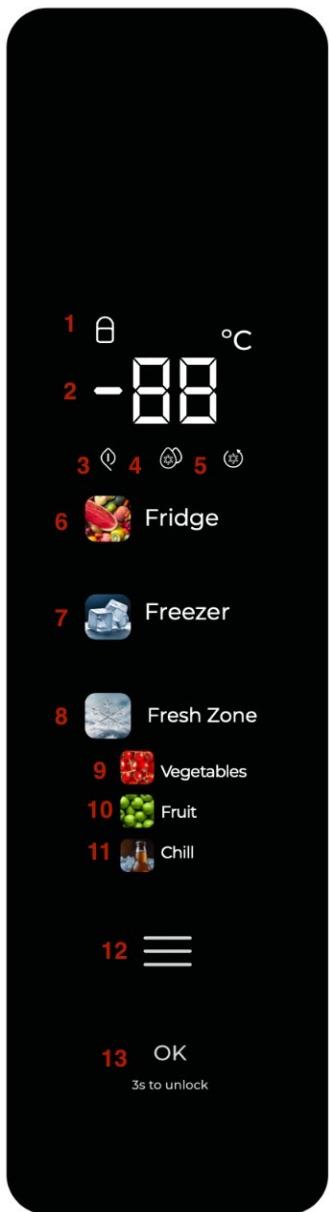
Fig./Img./Abb./Afb./Rys. 3
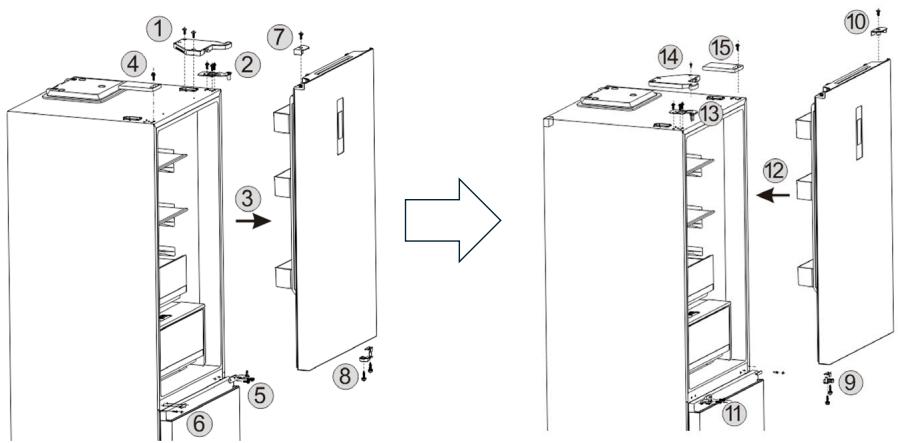
Fig./Img./Abb./Afb./Rys. 4
www.cecotec.es
- ÍNDICE
- SOMMAIRE
- Temperature range
- Note:
- Cooling
- INSTRUCTIONS DE SÉCURITÉ
- BEFORE USE
- Box content
- APPLIANCE INSTALLATION
- Location
- Ventilation
- ENGLISH
- Heat dissipation space
- Flat surface
- Preparation
- Waiting time
- Cleaning
- Connecting the refrigerator to the mains power supply
- Food storage
- Instructions for changing the door opening direction Fig. 4
- OPERATION
- Functions
- Fig. 3
- Control panel
- Function settings
- Functions
- Temperature settings
- Setting the freezer compartment temperature
- Setting the Fresh Zone temperature
- ECO mode
- Activating the ECO mode
- Deactivating the ECO mode
- Fast Cooling mode
- Activating the Fast Cooling mode
- Deactivating the Fast Cooling mode
- Fast Freezing
- Child lock function
- Memory function
- Delayed start-up for safety reasons
- Overheating warning (only after a power failure)
- Fault warning
- INSTRUCTIONS ON FOOD STORAGE
- Food location
- Use of the refrigerator compartment
- Tips for food storage
- Storing fruits and vegetables
- Using the Fresh Zone
- Using the freezer
- Tips for freezing food
- Tips on storing frozen food
- Tips on food storage
- Reference storage time
- CLEANING AND MAINTENANCE
- Cleaning the interior and exterior
- Interrupted use
- Safety check after maintenance
- Removing the shelves
- Refrigerator not in use for a prolonged period of time
- TROUBLESHOOTING
- TECHNICAL SPECIFICATIONS
- DISPOSAL OF OLD ELECTRICAL AND ELECTRONIC APPLIANCES
- TECHNICAL SUPPORT AND WARRANTY
- COPYRIGHT
- PIÈCES ET COMPOSANTS
- Image 1.
- INSTALLATION DU PRODUIT
- Localisation :
- Retirer les balconnets/clayettes
- Retirar as prateleiras
- INSTALLATIE VAN HET APPARAAT
- Locatie:
- Ventilatie
- ECO modus
- PROBLEEMOPLOSSING
Brand : CECOTEC
Model : Bolero Coolmarket Combi Fd 400 Glass E
Category : Refrigerator