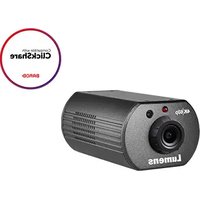
VC-A20P - Security Camera Lumens - Free user manual and instructions
Find the device manual for free VC-A20P Lumens in PDF.


Pick your language and provide your email: we'll send you a specifically translated version.
| Product Type | Security Camera |
| Brand | Lumens |
| Model | VC-A20P |
| Resolution | Full HD 1080p (1920x1080) |
| Night Vision | Up to 30m with IR LEDs |
| Field of View | 90° horizontal |
| Pan/Tilt | Motorized pan: 360°, tilt: 90° |
| Dimensions (WxHxD) | 150mm x 120mm x 150mm |
| Weight | 1.2 kg |
| Power Supply | 12V DC, 1A |
| Connectivity | Ethernet (PoE), Wi-Fi optional |
| Storage | MicroSD slot (up to 128GB) |
| Audio | Built-in microphone and speaker |
| Weather Rating | IP66 (outdoor use) |
| Motion Detection | Yes, with customizable zones |
| Mobile App | Compatible with Lumens Viewer (iOS/Android) |
| Mounting | Wall or ceiling mount included |
| Operating Temperature | -20°C to 50°C |
| Compliance | CE, FCC, RoHS |
| Maintenance | Clean lens with microfiber cloth; avoid harsh chemicals |
| Safety Tips | Install away from water sources; use surge protector |
Frequently Asked Questions - VC-A20P Lumens
How do I reset the Lumens VC-A20P camera to factory settings?
Press and hold the reset button on the bottom of the camera for 10 seconds until the LED flashes red. The camera will reboot and restore default settings.
Can the VC-A20P be used outdoors?
Yes, it is rated IP66 for dust and water resistance, suitable for outdoor use.
What is the maximum resolution of the camera?
The camera records in Full HD (1920x1080) at 30 frames per second.
Does the camera support night vision?
Yes, it has infrared LEDs that provide clear night vision up to 30 meters in complete darkness.
How can I access the camera remotely?
Download the Lumens Viewer app from the App Store or Google Play, then scan the QR code on the camera to pair.
What type of storage does the camera support?
It supports a MicroSD card up to 128GB for local recording, or you can use cloud storage via the app.
Is the VC-A20P compatible with smart home systems?
It works with Amazon Alexa and Google Assistant for voice control.
How do I clean the camera lens?
Use a soft, dry microfiber cloth to gently wipe the lens. Avoid using alcohol or abrasive cleaners.
What power source is required?
The camera can be powered via 12V DC adapter or Power over Ethernet (PoE) for a single-cable setup.
Can I mount the camera on a ceiling?
Yes, the included mount allows for both wall and ceiling mounting. Make sure to secure it to a sturdy surface.
User questions about VC-A20P Lumens
0 question about this device. Answer the ones you know or ask your own.
Ask a new question about this device
No questions yet. Be the first to ask one.
Download the instructions for your Security Camera in PDF format for free! Find your manual VC-A20P - Lumens and take your electronic device back in hand. On this page are published all the documents necessary for the use of your device. VC-A20P by Lumens.
USER MANUAL VC-A20P Lumens


Manual assistant
Powered by Anthropic
Waiting for your message
Product information
Brand : Lumens
Model : VC-A20P
Category : Security Camera