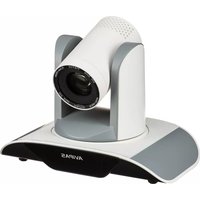
AV-1281 - Camera AViPAS - Free user manual and instructions
Find the device manual for free AV-1281 AViPAS in PDF.


Pick your language and provide your email: we'll send you a specifically translated version.
| Product Type | Digital Camera |
| Model | AV-1281 |
| Brand | AViPAS |
| Image Sensor | CMOS, 20 Megapixels |
| Optical Zoom | 8x |
| Digital Zoom | 4x |
| Display | 3.0-inch LCD |
| Video Resolution | Full HD 1080p at 30fps |
| Storage Media | SD/SDHC card (up to 32GB) |
| Battery | Lithium-ion rechargeable (NP-45 or equivalent) |
| Dimensions (W x H x D) | 4.1 x 2.4 x 1.2 inches (104 x 61 x 30 mm) |
| Weight (with battery and card) | 5.6 oz (159 g) |
| Power Source | Rechargeable battery or USB charging |
| Main Functions | Auto mode, scene modes, face detection, panorama, self-timer |
| Connectivity | USB 2.0, HDMI micro |
| Image Stabilization | Electronic |
| Flash | Built-in, auto/on/off/slow synchro |
| Shutter Speed | 1/2000 to 8 seconds |
| ISO Sensitivity | Auto, 100-3200 |
| White Balance | Auto, daylight, cloudy, fluorescent, incandescent |
| Exposure Compensation | -2.0 to +2.0 EV in 1/3 EV steps |
| Focus Modes | TTL autofocus, manual focus |
| Cleaning Instructions | Wipe lens with soft dry cloth; clean body with slightly damp cloth |
| Safety Precautions | Do not remove battery while recording; avoid water and extreme heat |
| Spare Parts Available | Batteries, chargers, USB cables, carrying case |
| Repairability | User-replaceable battery; other repairs by authorized service center |
| General Information | User manual available in PDF; designed for home use |
Frequently Asked Questions - AV-1281 AViPAS
How do I charge the battery?
Use the included USB cable and plug it into a computer or USB wall charger. The charging indicator light will turn off when fully charged.
What type of memory card is compatible?
The camera accepts SD and SDHC memory cards up to 32GB. Ensure the card is formatted in the camera before first use.
How can I transfer photos to my computer?
Connect the camera to your computer using the USB cable. The camera will appear as a removable drive. You can also remove the memory card and use a card reader.
Why won't my camera turn on?
Make sure the battery is charged and properly inserted. If still not working, try a different battery or charge the current one for at least 2 hours.
How do I adjust the zoom?
Use the zoom lever around the shutter button. Push toward T (telephoto) for optical zoom, and toward W (wide-angle) to zoom out.
What to do if pictures are blurry?
Ensure the lens is clean and that you are using the autofocus (half-press the shutter). Use a tripod in low light or enable image stabilization in the menu.
Can I record videos with this camera?
Yes, press the movie button to start recording. The camera records Full HD video at 1080p. Press again to stop.
How do I reset to factory settings?
Go to the setup menu, select 'Reset' or 'Factory Reset', and confirm. This will erase all custom settings but not your photos.
Is it waterproof?
No, the AV-1281 is not waterproof. Avoid exposure to rain, splashes, and dusty environments. Use a protective case if needed.
Where can I download the manual?
The user manual is available for free download on the AViPAS website or through services like notice-facile.com. Search for 'AV-1281 manual'.
User questions about AV-1281 AViPAS
0 question about this device. Answer the ones you know or ask your own.
Ask a new question about this device
No questions yet. Be the first to ask one.
Download the instructions for your Camera in PDF format for free! Find your manual AV-1281 - AViPAS and take your electronic device back in hand. On this page are published all the documents necessary for the use of your device. AV-1281 by AViPAS.
USER MANUAL AV-1281 AViPAS
Manual assistant
Powered by Anthropic
Waiting for your message
Product information
Brand : AViPAS
Model : AV-1281
Category : Camera