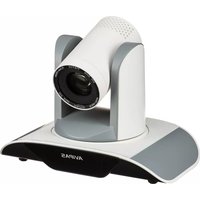
AV-1082 - Camera AViPAS - Free user manual and instructions
Find the device manual for free AV-1082 AViPAS in PDF.


Pick your language and provide your email: we'll send you a specifically translated version.
| Product Type | Digital Camera |
| Brand | AViPAS |
| Model | AV-1082 |
| Dimensions | Approx. 108 x 65 x 35 mm |
| Weight | Approx. 150 g (with battery) |
| Power Source | Rechargeable Li-ion battery, USB charging |
| Sensor | 20 MP CMOS |
| Lens | 28mm wide-angle, f/2.8 |
| Image Stabilization | Electronic |
| Memory Card Slot | SD/SDHC |
| Video Resolution | 1080p Full HD |
| Scene Modes | Portrait, Landscape, Night, Sports |
| Face Detection | Yes |
| Maintenance | Clean lens with microfiber cloth; keep dry |
| Safety | Avoid water and extreme temperatures |
| Spare Parts | Battery, charger, USB cable |
| Accessories Included | Wrist strap, user manual |
Frequently Asked Questions - AV-1082 AViPAS
How do I turn on the AViPAS AV-1082 camera?
Press and hold the Power button located on the top of the camera until the lens extends and the screen lights up.
How do I charge the battery?
Connect the provided USB cable to the camera's USB port and plug the other end into a USB power adapter or computer. The charging indicator will turn red and then green when fully charged.
How to transfer photos to a computer?
Remove the SD card from the camera and insert it into a card reader connected to your computer. Alternatively, connect the camera via USB cable and select 'Mass Storage' mode on the camera.
How do I set the date and time?
Go to the Menu, select Setup, then Date/Time. Use the directional buttons to adjust the values and press OK to confirm.
My camera won't turn on. What should I do?
Ensure the battery is charged and properly inserted. If the camera still doesn't turn on, try a reset by removing the battery and reinserting it after 30 seconds.
How do I take a selfie?
Rotate the lens or flip the screen (if applicable) to face you. Look at the lens, then press the shutter button. Some models have a dedicated self-timer or smile detection.
Why are my pictures blurry?
Blurry photos can result from camera shake or incorrect focus. Hold the camera steady or use a tripod. Ensure the autofocus is active by pressing the shutter button halfway.
How do I clean the camera lens?
Use a microfiber cloth to gently wipe the lens in a circular motion. Avoid using harsh chemicals or water. For stubborn smudges, use a lens cleaning solution specifically designed for optical lenses.
What memory card does the AV-1082 support?
The camera supports SD and SDHC memory cards up to 32 GB for optimal performance. Insert the card with the label facing the front of the camera.
How do I reset the camera to factory settings?
Go to Menu > Setup > Reset. Confirm the reset. All settings will be restored to default values, including date/time and custom modes.
User questions about AV-1082 AViPAS
0 question about this device. Answer the ones you know or ask your own.
Ask a new question about this device
No questions yet. Be the first to ask one.
Download the instructions for your Camera in PDF format for free! Find your manual AV-1082 - AViPAS and take your electronic device back in hand. On this page are published all the documents necessary for the use of your device. AV-1082 by AViPAS.
USER MANUAL AV-1082 AViPAS
Manual assistant
Powered by Anthropic
Waiting for your message
Product information
Brand : AViPAS
Model : AV-1082
Category : Camera