
B2 - Guitar Effects ZOOM - Free user manual and instructions
Find the device manual for free B2 ZOOM in PDF.


| Product type | Multi-effects for bass guitar |
| Brand | ZOOM |
| Model | B2 |
| Dimensions (L x D x H) | 156 mm x 162 mm x 65 mm |
| Weight (without batteries) | 700 g |
| Power supply | AC adapter 9V DC, 300 mA (negative center, ZOOM AD-0006) or 4 LR6 (AA) alkaline batteries |
| Battery life | Approximately 7.5 hours with alkaline batteries |
| Number of effects | 47 effect types |
| Simultaneous modules | Up to 9 modules (including ZNR) |
| Patches | 80 (40 presets + 40 user) |
| Sampling frequency | 96 kHz |
| A/D and D/A conversion | 24-bit, 64x/128x oversampling |
| Internal processing | 32-bit |
| Input | 6.35 mm mono jack (1 MΩ impedance) |
| Output | 6.35 mm stereo jack (headphone/line, 10 kΩ min. impedance) |
| Control input | For FP01/FP02 expression pedal or FS01 footswitch |
| Built-in tuner | Chromatic tuner with silent tuning function |
| Built-in rhythms | 40 rhythm patterns (PCM), adjustable tempo 40-250 BPM |
| Cleaning | Soft, dry cloth. Do not use solvents or abrasive cleaners. |
| Safety | Use only the specified adapter. Do not expose to moisture, extreme temperatures, or shocks. Do not open the casing. |
| Spare parts / accessories | AD-0006 adapter, FS01 footswitch, FP01/FP02 expression pedal, LR6 (AA) batteries |
| Repairability | Contact ZOOM customer service or an authorized technician. Do not open the device. |
Frequently Asked Questions - B2 ZOOM
User questions about B2 ZOOM
0 question about this device. Answer the ones you know or ask your own.
Ask a new question about this device
Download the instructions for your Guitar Effects in PDF format for free! Find your manual B2 - ZOOM and take your electronic device back in hand. On this page are published all the documents necessary for the use of your device. B2 by ZOOM.
USER MANUAL B2 ZOOM
Reproduction of this manual, in whole or in part, by any means, is prohibited.
SAFETY PRECAUTIONS Usage Precautions
SAFETY PRECAUTIONS
In this manual, symbols are used to highlight warnings and cautions for you to read so that accidents can be prevented. The meanings of these symbols are as follows:

This symbol indicates explanations about extremely dangerous matters. If users ignore this symbol and handle the device the wrong way, serious injury or death could result.

This symbol indicates explanations about dangerous matters. If users ignore this symbol and handle the device the wrong way, bodily injury and damage to the equipment could result.
Please observe the following safety tips and precautions to ensure hazard-free use of the B2.

Power requirements
Since power consumption of this unit is fairly high, we recommend the use of an AC adapter whenever possible. When powering the unit from batteries, use only alkaline types.
[AC adapter operation]
- Be sure to use only an AC adapter which supplies 9 V DC, 300mA and is equipped with a "center minus" plug (Zoom AD-0006). The use of an adapter other than the specified type may damage the unit and pose a safety hazard.
- Connect the AC adapter only to an AC outlet that supplies the rated voltage required by the adapter.
- When disconnecting the AC adapter from the AC outlet, always grasp the adapter itself and do not pull at the cable.
- During lightning or when not using the unit for an extended period, disconnect the AC adapter from the AC outlet.
[Battery operation]
- Use four conventional IEC R6 (size AA) batteries (alkaline).
- The B2 cannot be used for recharging.
- Pay close attention to the labelling of the battery to make sure you choose the correct type.
- When not using the unit for an extended period, remove the batteries from the unit.
- If battery leakage has occurred, wipe the battery compartment and the battery terminals carefully to remove all remnants of battery fluid.
- While using the unit, the battery compartment cover should be closed.
![ZOOM B2 - [Battery operation] - 1](/content/2025/01/152191/images/c770d8e779126238b2438288d19c9542f95ef631ec842f2535821cb8c514049d.jpg)
Environment
To prevent the risk of fire, electric shock or malfunction, avoid using your B2 in environments where it will be exposed to:
- Extreme temperatures
- Heat sources such as radiators or stoves
High humidity or moisture
- Excessive dust or sand
- Excessive vibration or shock

Handling
- Never place objects filled with liquids, such as vases, on the B2 since this can cause electric shock.
- Do not place naked flame sources, such as lighted candles, on the B2 since this can cause fire.
- The B2 is a precision instrument. Do not exert undue pressure on the keys and other controls. Also take care not to drop the unit, and do not subject it to shock or excessive pressure.
Take care that no foreign objects (coins or pins etc.) or liquids can enter the unit.

Connecting cables and input and output jacks
You should always turn off the power to the B2 and all other equipment before connecting or disconnecting any cables. Also make sure to disconnect all connection cables and the power cord before moving the B2.

Alterations
Never open the case of the B2 or attempt to modify the product in any way since this can result in damage to the unit.

Volume
Do not use the B2 at a loud volume for a long time since this can cause hearing impairment.
Usage Precautions
Electrical interference
For safety considerations, the B2 has been designed to provide maximum protection against the emission of electromagnetic radiation from inside the device, and protection from external interference. However, equipment that is very susceptible to interference or that emits powerful electromagnetic waves should not be placed near the B2, as the possibility of interference cannot be ruled out entirely.
With any type of digital control device, the B2 included, electromagnetic interference can cause malfunctioning and can corrupt or destroy data. Care should be taken to minimize the risk of damage.
Cleaning
Use a soft, dry cloth to clean the B2. If necessary, slightly moisten the cloth. Do not use abrasive cleanser, wax, or solvents (such as paint thinner or cleaning alcohol), since these may dull the finish or damage the surface.
Please keep this manual in a convenient place for future reference.
Contents
SAFETY PRECAUTIONS Usage Precautions 2
SAFETY PRECAUTIONS 2
Usage Precautions 2
Features 4
Terms Used in This Manual 5
Controls and Functions / Connections 6
Selecting a Patch 8
Using the Tuner 10
Using the Rhythm Function 12
Editing a Patch. 14
Storing/Copying Patches 16
Using an Optional Foot Switch or Pedal 18
Using the foot switch (FS01) 18
Using the expression pedal (FP01/FP02) 19
Restoring Factory Defaults 20
Linking Effects 21
Effect Types and Parameters 22
How to read the parameter table 22
COMP/LIMIT 23
WAH/EFX 23
DRIVE/SYNTH 25
ZNR/MIX 26
LOEQ 26
HI EQ 27
MOD/SFX 27
DELAY 29
REVERB 29
CONTROL 30
Specifications 31
Troubleshooting 31
B2 Preset Pattern Back cover
The FCC regulation warning (for U.S.A.)
This equipment has been tested and found to comply with the limits for a Class B digital device, pursuant to Part 15 of the FCC Rules. These limits are designed to provide reasonable protection against harmful interference in a residential installation. This equipment generates, uses, and can radiate radio frequency energy and, if not installed and used in accordance with the instructions, may cause harmful interference to radio communications. However, there is no guarantee that interference will not occur in a particular installation. If this equipment does cause harmful interference to radio or television reception, which can be determined by turning the equipment off and on, the user is encouraged to try to correct the interference by one or more of the following measures:
- Reorient or relocate the receiving antenna.
- Increase the separation between the equipment and receiver.
- Connect the equipment into an outlet on a circuit different from that to which the receiver is connected.
- Consult the dealer or an experienced radio/TV technician for help.
Features
Thank you for selecting the ZOOM B2 (hereafter simply called the "B2"). The B2 is a multi effect processor with the following features and functions.
- Latest technology for outstanding performance
96 kHz / 24 bit sampling (with 32 bit internal processing) assures excellent sound quality. The B2 curves out a sonic outline in superb detail while preserving the original sound character of the bass guitar.
- Versatile palette of effects
Out of a total of 47 effects, up to nine (including ZNR) can be used simultaneously. The dazzling choices provided by the B2 include distortion effects modeled on famous amps and compact effects, compressor/limiter effects for dynamic punch, a parametric equalizer essential for working on sonic nuances, as well as various delay and modulation effects. Both in quality and versatility, the B2 far surpasses anything in its class. You can even transform the output into a cool synth bass or fretless bass sound.
- Really usable patches straight out of the box
Effect module combinations are stored and called up in units referred to as patches. The B2 comes with a full complement of 40 read-only plus 40 user-programmable patches, giving you 80 great reasons to start grooving.
- Great for live performances and direct recording
The distortion effects have a special parameter that selects whether to apply only the head amp characteristics or add also the cabinet sound. This lets you use the B2 effectively not only for a live performance but also when feeding the signal directly to a recorder.
- Integrated auto-chromatic tuner and rhythm functions
Realistic PCM sound sources are available to auto-play a number of rhythm patterns. This is convenient for use as a metronome during practice or to provide a simple rhythm part for a quick session. An autochromatic tuner for bass guitar is also built right into the unit, including a function for silent tuning which lets you easily tune your instrument on stage.
Sophisticated user interface
The combination of a rotary type selector and three parameter knobs make the effect editing process intuitive and quick. The mute interval when switching patches has been reduced to less than 8 milliseconds. Seamless patch changing is now a reality.
- Dual power supply principle allows use anywhere
The B2 can be powered from four IEC R6 (size AA) batteries or an AC adapter. Continuous operating time on batteries is approximately 7.5 hours with alkaline batteries.
- Easy operation with foot switch and expression pedal
An optional foot switch (FS01) or expression pedal (FP01/FP02) can be connected to the CONTROL IN jack. The foot switch is convenient for quickly switching effect programs, setting the tempo for the rhythm function, or switching delay hold on and off. The expression pedal can be used to adjust the volume or the tonal quality of an effect in real time.
Please take the time to read this manual carefully so as to get the most out of the unit and to ensure optimum performance and reliability.
Terms Used in This Manual
This section explains some important terms that are used throughout the B2 documentation.
IN COMP/LIMIT-WAH/EFX-DRIVE/SYNTH-ZNR/MIX-LO EQ-HI EQ-MOD/SFX-DELAY-REVERB OUT
■ Effect module
As shown in the illustration above, the B2 can be thought of as a combination of several single effects. Each of these effects is referred to as an effect module. In addition to modules comprising compressor and limiter effects (COMP/LIMIT), amp simulator/synth bass effects (DRIVE/SYNTH), and modulation/special effects (MOD/SFX), the B2 also provides a module for ZNR (ZOOM Noise Reduction). Various parameters such as effect intensity can be adjusted for each module individually, and modules can be switched on and off as desired.
■ Effect type
Within some effect modules, there are several different effects which are referred to as effect types. For example, the modulation/SFX effect module (MOD/SFX) comprises chorus, flanger, pitch shifter, delay, and other effect types. Only one of these can be selected at a time.
■ Effect parameter
All effect modules have various parameters that can be adjusted. These are called effect parameters. In the B2, effect parameters are adjusted with the parameter knobs 1 - 3. Similar to the knobs on a compact effect, these change aspects such as tonal character and effect intensity. Which parameter is assigned to each knob depends on the currently selected effect module and effect type.
Patch
In the B2, effect module combinations are stored and called up in units referred to as patches. A patch comprises information about the on/off status of each effect module, about the effect type used in each module, and about effect parameter settings. The internal memory of the B2 holds up to 80 patches (including 40 patches which allow read/write).
Bank and area
A group of ten patches is called a bank. The memory of the B2 comprises a total of eight banks, labelled A to d and 0 to 3. Banks A - d form the user area which allows read/write. Banks 0 to 3 are the preset area containing read-only patches.
The patches within each bank are numbered 0 through 9. To specify a patch of the B2, you use the format "A1" (patch number 1 from bank A), "06" (patch number 6 from bank 0), etc.
Play mode/edit mode
The internal status of the B2 is referred to as the operation mode. The two major modes are "play mode" in which you can select patches and use them for playing your instrument, and "edit mode" in which you can modify the effects. The module selector serves for switching between the play mode and edit mode.
Operating the B2 on batteries
-
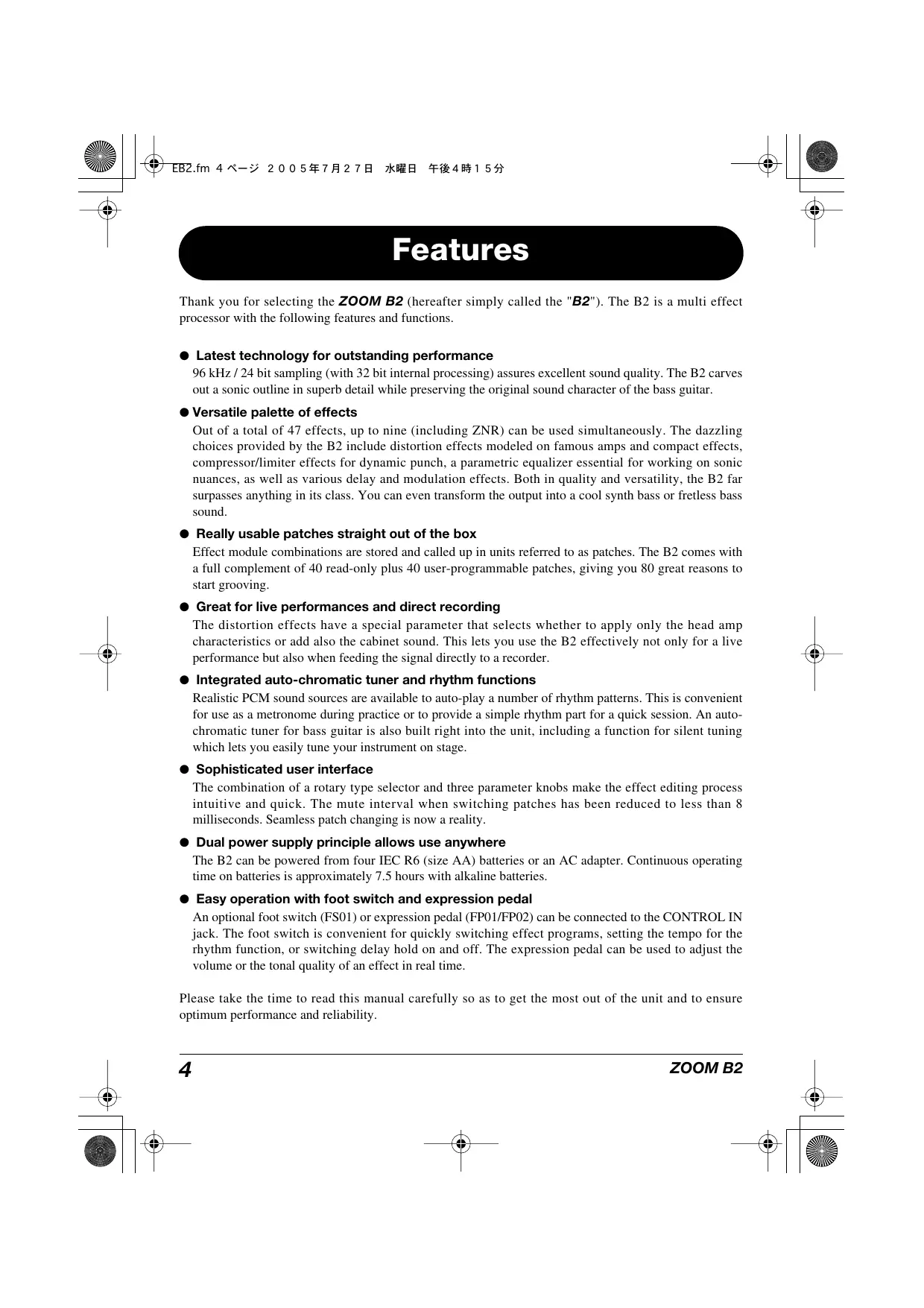
Turn the B2 over and open the cover of the battery compartment on the bottom.
-
Insert four fresh IEC R61. (size AA) batteries.
-
Close the cover of the battery compartment. Push the cover in until the latch audibly snaps into place.
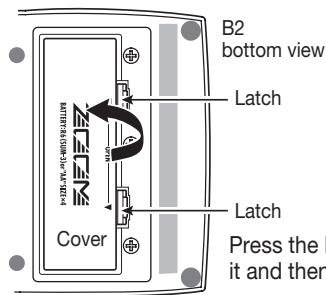
Insert batteries facing in alternate directions.
Use four IEC R6 (size AA) batteries.
When the batteries are getting low, the indication "bt" appears on the display.
Controls and Functions / Connections
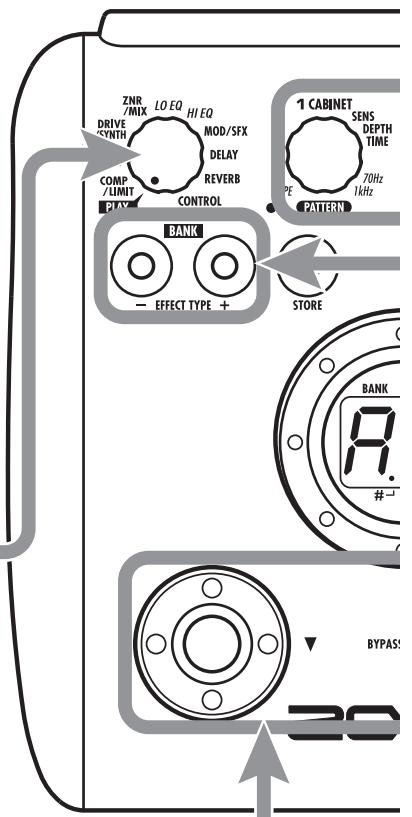
Module selector
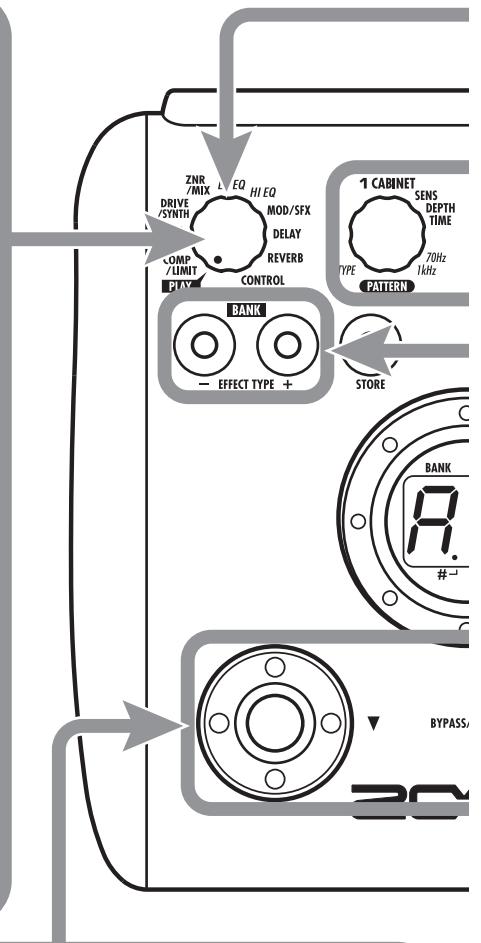
Switches between play mode and edit mode. In edit mode, the knob selects the module for operation.
BANK[-]/[+]keys
In play mode, the keys serve for directly switching to the next lower or higher bank.
In edit mode, the keys switch the effect type for the currently selected module.
[STORE] key
Serves for storing edited patches in memory.
[▼]/[▲] foot switches
These switches are used for selecting patches, switching effect modules on and off, controlling the tune, and other functions.
![ZOOM B2 - [▼]/[▲] foot switches - 1](/content/2025/01/152191/images/55c055434a0898d232f5617e50325e0a91ecb6e7d7420d5946968adff44bef88.jpg)
Top Panel
Rear Panel
[INPUT] jack
Serves for connecting the bass guitar.
Bass guitar
[OUTPUT/PHONES] jack
This stereo phone jack serves for connection to the bass guitar amplifier or for monitoring with headphones. It is also possible to use a Y cable for sending the output to two amplifiers, to produce a spacious stereo effect sound.
![ZOOM B2 - [OUTPUT/PHONES] jack - 1](/content/2025/01/152191/images/58fb0a353682d0136a8bd805fa5928ae77ffd5c98f9c141f8ec6c11ef80e8dc1.jpg)
![ZOOM B2 - [OUTPUT/PHONES] jack - 2](/content/2025/01/152191/images/1dbbb049695acf9dd4da9463890792fa9de8dd8ecd0054c14f262b18d90e496b.jpg)
Headphones
Bass guitar amplifier
![ZOOM B2 - [OUTPUT/PHONES] jack - 3](/content/2025/01/152191/images/6f1ce9c995bfab894ff03c963f1c5945be4f95984e216329bc7a4742b81a82df.jpg)
Selecting a Patch
To try out the various effects of the B2, we recommend that you simply play your instrument while switching patches.
1 Turn power on
- Use a shielded cable with mono phone plug to connect the bass guitar to the [INPUT] jack of the B2.
- When using the B2 with the AC adapter, plug the adapter into the outlet and plug the cable from the adapter into the [DC IN] jack on the B2.
- Set the [POWER] switch on the rear panel of the B2 to ON.
- Turn the bass guitar amplifier on and adjust the volume to a suitable position.
Set the B2 to play mode
- If the Module selector is set to a position other than "PLAY", set it to "PLAY".
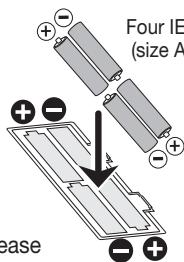
The bank and patch that were selected when the power was last turned off will appear on the display.
HINT Immediately after turning the B2 on, the unit will be in play mode, even if the Module selector is set to a position other than "PLAY".
3 Select a patch
- To switch the patch, press one of the [] / [] foot switches.
Pressing the [] foot switch calls up the next lower patch, and pressing the [] foot switch calls up the next higher patch.
Repeatedly pressing one foot switch cycles through patches in the order A0 - A9 ... d0 - d9 00 - 09 ... 30 - 39 A0 or the reverse order.
Adjust tone and volume
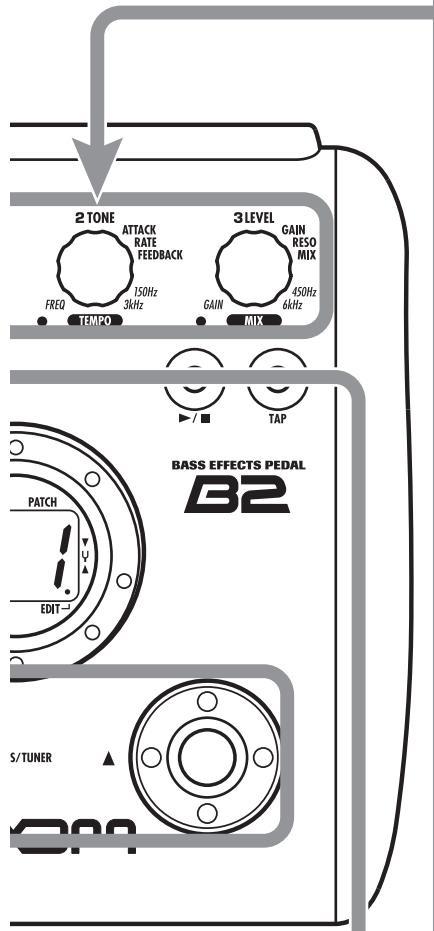
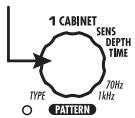
- To adjust the effect sound and volume levels in play mode, the Parameter knobs 1 - 3 can be used. Each knob controls a specific parameter.
Parameter knob 1
Adjusts the CABINET parameter of the DRIVE/SYNTH module (cabinet simulator effect intensity).
Parameter knob 3
Adjusts the PATCH LEVEL parameter (output level of the entire patch).
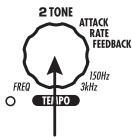
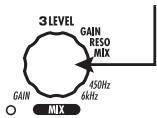
Parameter knob 2
Adjusts the TONE parameter of the DRIVE/SYNTH module (mainly distortion sound character).
When you turn a Parameter knob, the corresponding LED lights up and the display briefly shows the current value of the respective parameter.
NOTE
- If the DRIVE/SYNTH module is set to OFF for the currently selected module (indication "oF" is shown on the display), Parameter knobs 1 and 2 have no effect.
- The higher the setting value of Parameter knob 1 (CABINET parameter), the more will the cabinet character be emphasized.
- Changes made here are temporary and will be lost when you select another patch. To retain the changes, store the patch in the user area.
- The master level in common to all patches is set in edit mode ( p. 30).
4 Directly selecting a bank
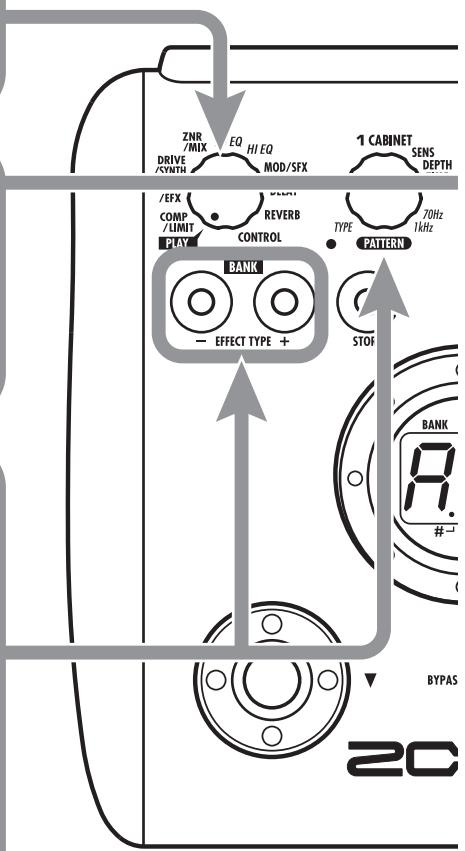
To select the banks A - d, 0 - 3 directly, use the BANK [-]/[+] keys.
Pressing the BANK [-] key calls up the next lower bank, and pressing the BANK [+] key calls up the next higher bank.
Using the Tuner
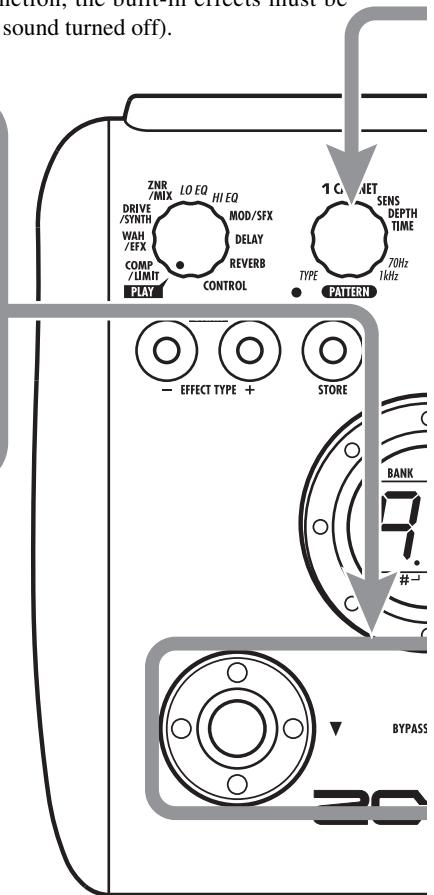
The B2 incorporates an auto-chromatic tuner. To use the tuner function, the built-in effects must be bypassed (temporarily turned off) or muted (original sound and effect sound turned off).
Switch to bypass or mute
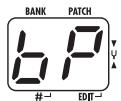
- Setting the B2 to the bypass state
In play mode, press both [] / [] foot switches together briefly and release.
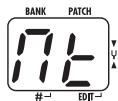
- Setting the B2 to the mute state
In play mode, press both [] / [] foot switches together and hold for at least 1 second.

Patch change at bypass/mute
When you press both [] / [] foot switches together while playing your instrument, the bypass/mute condition is activated. However, the sound may change momentarily just before the condition is activated. This is because the B2 switches to the next higher or lower patch when one of the foot switches is pressed slightly earlier. (When you cancel the bypass/mute condition, the original patch number will be active again.)
This kind of behavior is not a defect. It is due to the very high speed at which the B2 responds to patch switching. To prevent the sound change caused by the above condition, do not produce sound with your instrument until the bypass/mute condition is fully established.

Play the string to tune
- Play the open string to tune, and adjust the pitch.
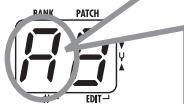
The left side of the display shows the note which is closest to the current pitch.
A = D = G =
A^# = D^# = G^# = _
B = E =
C = & F =
C^# = · . . F^# =

Adjusting the reference pitch of the tuner
If required, you can fine-adjust the reference pitch of the B2 tuner. The default setting after power-on is center A = 440Hz
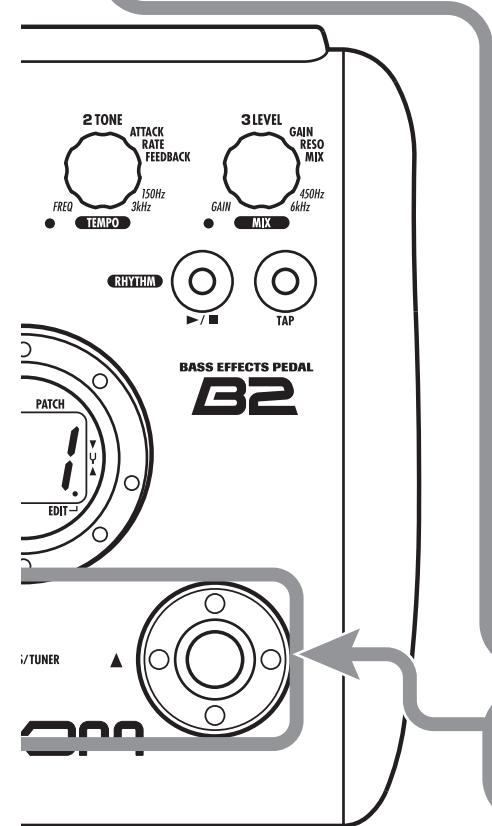
- Turn Parameter knob 1.
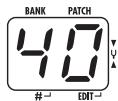
The current reference pitch is shown.
The adjustment range is 35 - 45 (center A = 435 to 445Hz ).
- While the reference pitch value is shown, turn Parameter knob 1 to adjust it.
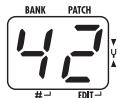
When you release the Parameter knob, the display indication will return to the previous condition after a while.
NOTE
When you turn the B2 off and on again, the reference pitch setting will be reset to 40 (center A = 440 Hz).

Return to play mode
- Press one of the [] / [] foot switches.
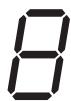
The right side of the display shows a symbol that indicates by how much the tuning is off.
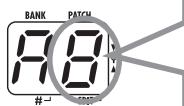
Tune other strings in the same way.
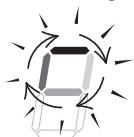
Pitch is high
Pitch is correct Pitch is low

Indication turns faster the more the pitch is off
Using the Rhythm Function
The B2 has a built-in rhythm function that plays realistic drum sounds in various patterns. The rhythm function is available in play mode or in the bypass/mute condition.
1 Set the B2 to play mode
- If the Module selector is set to a position other than "PLAY", set it to "PLAY".
2 Start the rhythm function
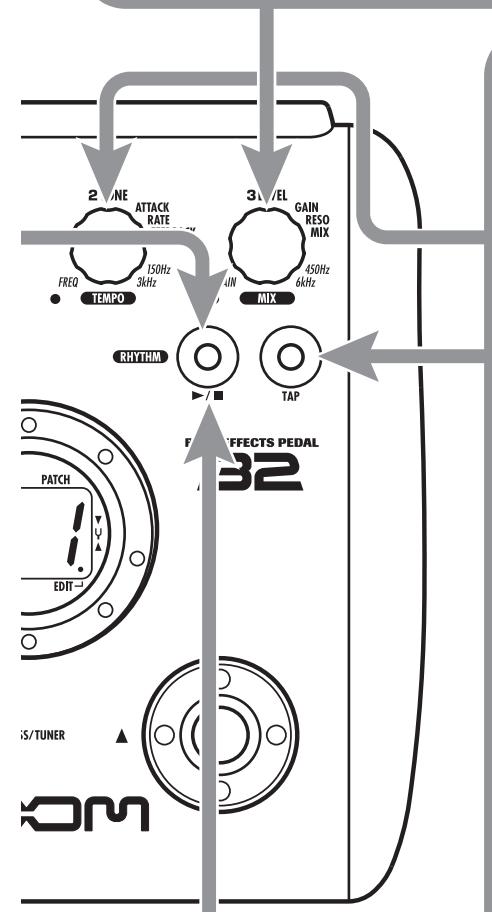
- To start the rhythm function, press the RHYTHM [▶/■] key.
NOTE During rhythm playback, the REVERB module is OFF.
3 Select a rhythm pattern
The B2 has 40 built-in rhythm patterns. For more information on the pattern contents, see the back cover of this manual.
- To continuously switch rhythm patterns, turn Parameter knob 1.
To select the next higher or next lower rhythm pattern, press one of the BANK [-]/[+] keys.
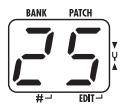
When the above steps are carried out, the current rhythm pattern number (01 - 40) is briefly shown on the display.
4 Adjust the rhythm volume
- To adjust the rhythm volume, turn Parameter knob 3.
When you turn the Parameter knob, the current setting (0 - 30) is shown on the display.
Adjust the tempo
The rhythm pattern tempo can be adjusted in the range of 40 - 250 BPM (beats per minute).
- To continuously change the rhythm tempo, turn Parameter knob 2.
- To manually specify the rhythm tempo, hit the [TAP] key at least three times in the desired interval.
At the first push of the [TAP] key, the current tempo value is shown on the display. The B2 then automatically detects the interval for the second and subsequent keystresses and sets the tempo accordingly.
While the above steps are carried out, the current tempo value (40 - 250) is shown on the display. For values in the range from 100 to 199, a dot is shown after the first digit. For values of 200 and above, dots are shown after the first and second digits.
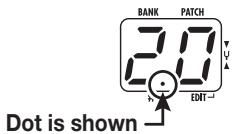
Tempo = 120 BPM
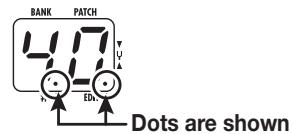
Tempo =240 BPM
Stop the rhythm
- To stop the rhythm, press the RHYTHM [▶/■] key.
The B2 returns to the previous condition.
Editing a Patch
The patches of the B2 can be freely edited by changing the effect parameter settings. Try editing the currently selected patch to create your own sound.
1 Select the effect module
- Turn the Module selector to select the effect module to edit. The following settings are available.
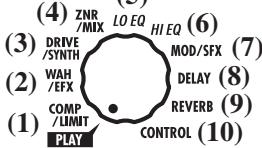
(5)
(1) COMP/LIMIT module
(2) WAH/EFX module
(3) DRIVE/SYNTH module
(4) ZNR/MIX module
(5) LO EQ module
(6) HI EQ module
(7) MOD/SFX module
(8) DELAY module
(9) REVERB module
(10) Pedal/foot switch related parameters
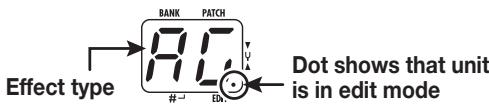
When you switch to a different module, the effect type currently selected for that module is shown on the display. While the B2 is in edit mode, a dot appears in the bottom right of the display.
To switch an effect module on and off
- To switch the selected module between ON and OFF, press one of the [] / [] foot switches.
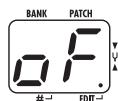
The indication "oF" appears on the display. When you press one of the foot switches again, the indication returns to the previous condition.
HINT
The ZNR/MIX module cannot be turned off in this way. To disable ZNR, set the effect parameter value to "oF".
5 Terminate the edit mode
- To terminate the edit mode and return to the play mode, set the Module selector to the "PLAY" position.
NOTE
When you return to play mode and select another patch, the changes you have made in edit mode will be lost unless you store the patch first. To retain the changes, store the patch as described on page 16.
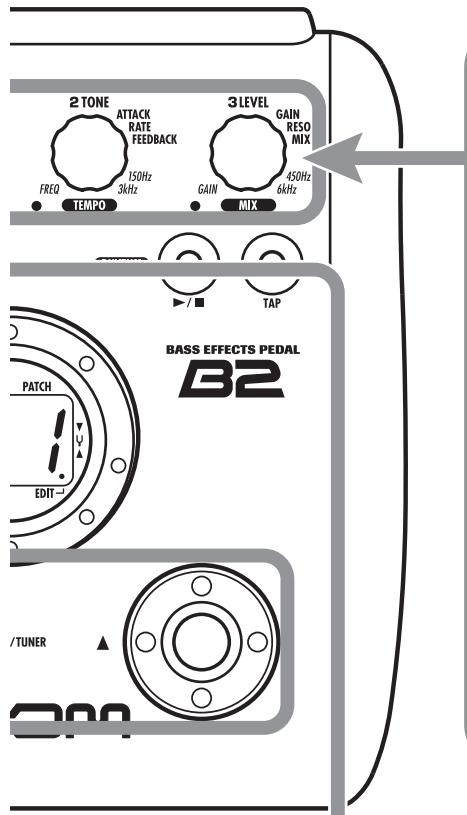
4 Change the parameter value
- To change the setting value of effect parameters, use the Parameter knobs 1 - 3.
Which parameter is assigned to a knob depends on which effect module/effect type is selected. For information on parameters for effect modules/effect types, see page 23 - 30.
When you turn a Parameter knob, the corresponding LED lights up and the display briefly shows the current value of the respective parameter.
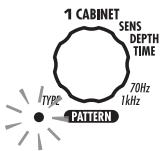
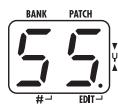
NOTE When a module that is set to OFF is selected, the display will show "oF".
3 Select the effect type
- To switch the effect type of the selected module, use the BANK [-]/[+] keys.
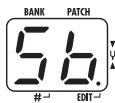
NOTE
If you press the BANK [-]/[+] keys for a module that is set to OFF, the module will be turned ON. For modules that have only one effect type, pressing the BANK [-]/[+] keys has no effect.
Storing/Copying Patches
An edited patch can be stored in a bank of the user area (A - d). It is also possible to store an existing patch in another location to create a copy.
In play mode or edit mode, press the [STORE] key
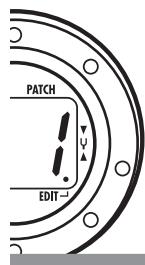
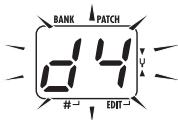
- The bank and patch number are shown on the display as a flashing indication.
![ZOOM B2 - In play mode or edit mode, press the [STORE] key - 1](/content/2025/01/152191/images/b1e09b1848fe9c790315d2d8e9800f71dab5fba00b9411ba6e9118d4aa6e13c6.jpg)
NOTE
Patches of banks in the preset area (0 - 3) are read-only. No patches can be stored or copied into these locations. If you press the [STORE] key while a patch from the preset area is selected, the patch "A0" (bank A, patch number 0) will be selected automatically as default store/copy target.

Select the store/copy target bank
- To select the store/copy target bank, use the BANK [-]/[+] keys.
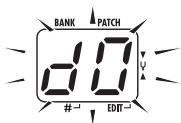
NOTE
Only a bank of the user area (A-d) can be selected as store/copy target bank.
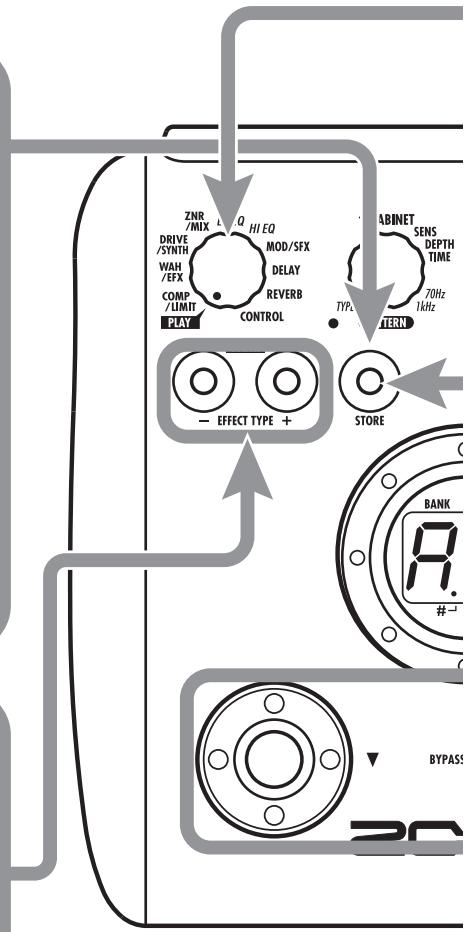
5 To cancel the store process
- To cancel the store process, operate the Module selector before pressing the [STORE] key again (4).
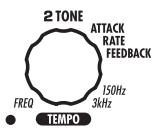
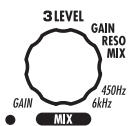
BASS EFFECTS PEDAL B2
S/TUNER
4 Press the [STORE] key once more
- When the store/copy process is completed, the B2 returns to the previous mode, with the target patch being selected.
![ZOOM B2 - Press the [STORE] key once more - 1](/content/2025/01/152191/images/607546cbce8a17ad6e9ca78eebc4ce76a56e1747f510ecda38376c7a9f80721e.jpg)
3 Specify the store/copy target patch number
- To specify the store/copy target patch number, use the [] / [] foot switches.
Using an Optional Foot Switch or Pedal
The B2 is equipped with a [CONTROL IN] jack designed for connection of an optional foot switch or expression pedal. This section explains how to use these accessories.
Using the foot switch (FS01)
Connecting the optional foot switch FS01 to the [CONTROL IN] jack allows changing banks with the foot switch while the unit is in play mode. It is also possible to switch bypass/mute on and off, control the tap tempo function, or perform other functions with the foot switch.
1. Plug the cable from the FS01 into the [CONTROL IN] jack, and then turn the B2 on.
2. Set the Module selector to the "CONTROL" position.
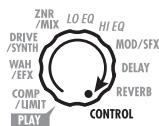
The B2 goes into edit mode. You can now make settings for the expression pedal and foot switch.
3. Turn Parameter knob 2 to select one of the following functions for the foot switch.
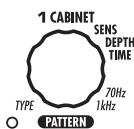
bP (bypass/mute)
The foot switch controls bypass or mute on/off. This has the same effect as pressing both [ ]/ [▲] foot switches at the same time in play mode.
tP (tap tempo)
Pressing the foot switch repeatedly can be used to set the interval for the rhythm function or to make settings for effect parameters supporting the tap function. This has the same effect as pressing the [TAP] key.
bU (bank up)
Each push of the foot switch switches to the next higher bank. This has the same effect as pressing the BANK ([+] key.
- rH (rhythm on/off)
The foot switch controls start/stop of the rhythm function. This has the same effect as pressing the RHYTHM [▶/■] key.
dH (delay hold)
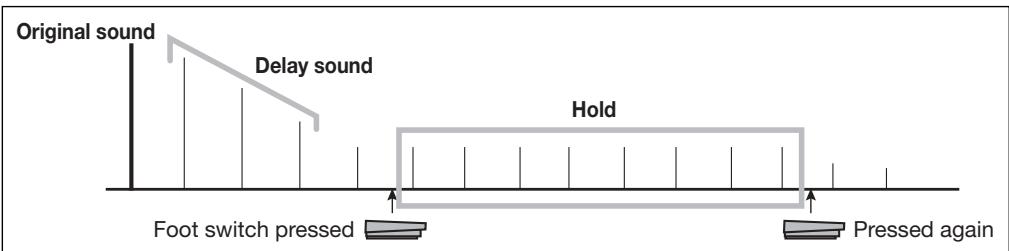
The foot switch controls on/off of the delay hold function. When a patch using the hold function is selected, pressing the foot switch will activate hold, causing the current delay sound to be repeated (see illustration below). Pressing the foot switch once more cancels the hold condition, and the delay sound will decay normally.
dM (delay input mute)
Switches the delay module input muting between on and off.
HINT
- For information on effect parameters supporting the tap function, see pages 23 - 29.
- To use the hold function, an effect type that supports the hold function must be selected in the patch. For details, see pages 23 - 29.
- While the delay module is set to hold or mute, the dot in the center of the display flashes.
4. Select the patch in play mode and operate the foot switch.
The selected function will be activated. This function applies to all patches.
Using the expression pedal (FP01/FP02)
Connecting an expression pedal (FP01/FP02) to the [CONTROL IN] jack allows using it as a volume pedal or for adjusting an effect parameter in real time.
The function selection for the expression pedal is saved for each patch individually.
For information on parameters that can be adjusted with the expression pedal, please refer to pages 23 - 29.
- Plug the cable from the expression pedal into the [CONTROL IN] jack, and then turn the B2 on.
- Select the patch for which you want to use the expression pedal.
- Set the Module selector to the "CONTROL" position.
The B2 goes into edit mode.
- Turn Parameter knob 1 to select one of the following modulation targets for the expression pedal (see page 30).
oF
Pedal is inactive.
- VL
Volume
WU, Wd, WH, WL
WAH/EFX module
bU, bd, bH, bL
ZNR/MIX module
NOTE
When the modulation target is set to the ZNR/MIX module, the mixing balance between the original sound and effect sound of the DRIVE/SYNTH module can be adjusted with the pedal. (If the DRIVE/SYNTH module is set to OFF, the pedal has no effect.)
MU, Md, MH, ML
MOD/SFX module
dU, dd, dH, dL
DELAY module
rU,rd,rH,rL
REVERB module
HINT
- Which parameter changes when the expression pedal is operated depends on the selected module. For details, see pages 23 - 29.
- The pattern in which the expression pedal alters the parameter can be selected in edit mode. There are four choices ( p. 30).
5. If necessary, save the patch.
The expression pedal setting is saved as part of the patch.
6. Select the patch in play mode and operate the expression pedal.
The selected function will be activated.
In the bypass condition, the expression pedal always operates as a volume pedal, regardless of the setting made in step 4.
Restoring Factory Defaults
In the factory default condition, the patches of the user area (A0 - d9) contain the same settings as the patches of the preset area (00 - 39). Even after overwriting the user patches, their original content can be restored in a single operation ("All Initialize" function).
1. Turn the B2 on while holding down the [STORE] key.
The indication "AL" appears on the display.
![ZOOM B2 - Turn the B2 on while holding down the [STORE] key. - 1](/content/2025/01/152191/images/ea27d73db282d91cca0f378c61f6af8e4b0f77ede24188b28fc25a2cb7202946.jpg)
2. To carry out the All Initialize function, press the [STORE] key once more.
All patch settings are returned to the factory default condition, and the unit switches to play mode. To cancel All Initialize, press the RHYTHM [▶/■] key instead of the [STORE] key.
NOTE
When you carry out All Initialize, any newly created patches that were stored in the user area will be deleted (overwritten). Perform this operation with care to prevent losing any patches that you want to keep.
Linking Effects
The patches of the B2 consist of nine serially linked effect modules, as shown in the illustration below. You can use all effect modules together or selectively use certain modules by setting them to on or off.
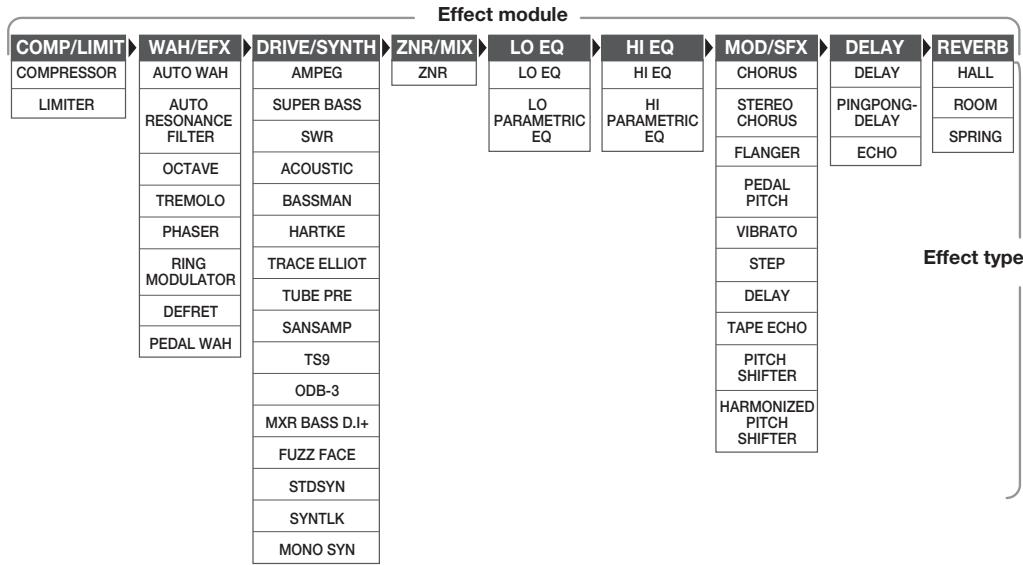
* Manufacturer names and product names mentioned in this table are trademarks or registered trademarks of their respective owners. The names are used only to illustrate sonic characteristics and do not indicate any affiliation with ZOOM CORPORATION.
For some effect modules, you can select an effect type from several possible choices. For example, the COMP/LIMIT module gives a choice between COMPRESSOR, LIMITER, and other effect types. The REVERB module comprises HALL, ROOM, and other effect types from which you can choose one. Because the ZNR/MIX module has only one effect type, you cannot choose the type for this module.
HINT
-
The DRIVE/SYNTH module has a "CABINET" parameter that controls how the speaker cabinet characteristics are reproduced. This allows you to match the cabinet character effect to various requirements of a live performance or of direct recording.
-
The mixing balance of the DRIVE/SYNTH module original sound and the effect sound/synth sound, as well as the signal level after passing the module can be adjusted with the ZNR/MIX module.
- When "STDSYN", "SYNTLK", or "MONO SYN" is selected as effect type for the DRIVE/SYNTH module, the action of the COMP/LIMIT module and WAH/EFX module (connection position set to "bF") will apply only to the original sound after passing the DRIVE/SYNTH module and not to the synth sound.
- The ZNR/MIX module cannot be turned off with the foot switch. To disable ZNR, set the effect parameter value to "0F".
How to read the parameter table
Effect parameters 1 - 3
These are the parameters that can be adjusted with Parameter knobs 1 - 3 when the effect type is selected. The setting range for each parameter is shown.
Three-digit setting values are shown with a dot between the two numerals.
Example: 1 - 98,1.0 = 1 - 98 ,100
Module selector
The Module selector symbol shows the position of the knob at which this module/parameter is called up.
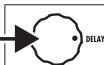
Effect module
Effect type
TIME
1-99
1.0-5.0
EEDBA
CK 0-98,1.0
3MIX
0-98,1.0
TAP Adju range
dL dL
DELAY
DELAY module
This is a delay module which a
ows long delay time
and use of the hold function.
dL dL
DELAY
delay with a maximum setting of 5000 ms.
HOLD Th
PINGPONG DELAY
HOLD
s is a ping-pong type delay where the delay sound alternat
between left and right.
HOLD Th
effeLsimula
s have the same parameters
with 1
long delay time of up to 5000 ms.
Adjusts the delay time. In the
range from 10 - 990ms the
adjustment is made in 10-ms
142
Love, the adjustment is made in
0-ms steps (1.0-2.0).
Adjuststhe mixing ratio of
original sound and effect sound.
Expression pedal
A pedal icon ( ) in the listing indicates a parameter that can be controlled with the expression pedal (FP01/FP02).
Specify the respective module as modulation target for the expression pedal ( p. 19), and then select the respective effect type of the module. The parameter can then be controlled in real time with a connected expression pedal.
Tap
A [TAP] key icon (©TAP) in the listing indicates a parameter that can be set by hitting the [TAP] key.
In edit mode, when the respective module/effect type is selected, repeatedly hitting the [TAP] key will set the parameter according to the key press interval (modulation cycle, delay time, etc.).
In play mode, if the DELAY module is ON for the currently selected patch, repeatedly hitting the [TAP] key will temporarily change the parameter.
Hold
A foot switch icon (HOLD) in the listing indicates an effect type for which hold can be turned on and off with the foot switch (FS01).
Set the foot switch function to "dH" (delay hold) ( p. 18) for the respective patch. When this patch is then selected in play mode, the hold function can be switched on and off by pressing the foot switch.
| COMP/LIMIT | |||||
| COMP/LIMIT (Compressor/Limiter) module | |||||
| This module includes a compressor that keeps the overall signal level within a certain range by attenuating high-level signal components or boosting low-level signal components, and a limiter that suppresses peak components. | |||||
| CP | CP | COMPRESSOR | |||
| The compressor attenuates high-level signal components and boosts low-level signal components to keep the overall signal level within a certain range. | |||||
| 1 | SENSE | 0-10 | 2 | ATTACK | 1-10 |
| Adjusts the compressor sensitivity. Higher setting values result in higher sensitivity. | Adjusts the time between the sound attack point and the start of compression. Higher setting values result in faster compression action. | ||||
| L | LM | LIMITER | |||
| This is a limiter that suppresses signal peaks above a certain reference level. | |||||
| 1 | THRESHOLD | 0-10 | 2 | RATIO | 1-10 |
| Adjusts the reference signal level for the limiter action. | Adjusts the limiter intensity. Higher setting values result in stronger compression of the input signal. | ||||
| WAN/EFX | WAH/EFX | ||||
| WAH/EFX (Wah/Effects) module | |||||
| Comprises wah and filter effects as well as VCA type effects. | |||||
| RH AW AUTO WAH | |||||
| This effect varies wah in accordance with playing intensity. | |||||
| Ar AUTO RESONANCE FILTER | |||||
| This effect varies the frequency band of the resonance filter according to the picking intensity. | |||||
| The two effect types above have the same parameters. | |||||
| 1 | POSTI & DIR MIX | b0-b9, A0-A9 | 2 | SENSE | -10--1, 1-10 |
| Selects the connection position of the WAH/EFX module. The b0-b9 settings specify connection before the DRIVE/SYNTH module, and the A0-A9 settings specify connection after the HI EQ module. The numbers 0-9 specify the original sound mixing balance, with higher values resulting in stronger original sound. | 4 | Adjusts the effect sensitivity. When set to a negative value, the filter characteristics are inverted. | |||
| oC OCTAVE | |||||
| This effect adds a 1-octave lower component to the original sound. | |||||
| 1 | OCT LVL | 0-98, 1.0 | 2 | DIR LVL | 0-98, 1.0 |
| Adjusts the mixing balance of the effect sound (1-octave lower sound). | Adjusts the mixing balance of the original sound. | ||||
| Lr TR TREMOLO | |||||
| This effect periodically varies the volume. | |||||
| 1 DEPTH | 0-98, 1.0 | 2 RATE | 0-50 | 3 WAVE | u0-u9, d0-d9, t0-t9 |
| Adjusts the modulation depth. | 3TAP Adjusts the effect rate. | Allows selection of the modulation waveform. Available settings are "u" (rising sawtooth), "d" (falling sawtooth), and "t" (triangular). Higher setting values result in more clipping of wave peaks, which reinforces the effect. | |||
| PH PH PHASER | |||||
| This effect produces sound with a pulsating character. | |||||
| 1 POSITION | bF, AF | 2 RATE | 0-50 | 3 COLOR | 1-4 |
| Selects the connection position of the WAH/EFX module. The bF setting specifies connection before the DRIVE/SYNTH module, and the AF setting specifies connection after the HI EQ module. | 3TAP Adjusts the modulation rate. | Adjusts the type of sound. | |||
| rG RING MODULATOR | |||||
| This effect produces a metallic ringing sound. Adjusting the FREQUENCY parameter results in a drastic change of sound character. | |||||
| 1 POSITION | bF, AF | 2 FREQUENCY | 1-50 | 3 BALANCE | 0-98, 1.0 |
| Selects the connection position of the WAH/EFX module. The bF setting specifies connection before the DRIVE/SYNTH module, and the AF setting specifies connection after the HI EQ module. | Adjusts the frequency that is used for modulation. | Adjusts the balance between the original sound and the effect sound. | |||
| dF dF DEFRET | |||||
| This effect changes the sound of any bass into a sound resembling a fretless bass. | |||||
| 1 SENSE | 0-30 | 2 TONE | 1-50 | 3 COLOR | 1-10 |
| Adjusts the effect sensitivity. | 3 Adjusts the sound quality. | Adjusts the amount of harmonics. Higher setting values result in stronger sonic character. | |||
| PW PEDAL WAH | |||||
| Simulates a Vox wah pedal | |||||
| 1 POSI & DIR MIX | b0-b9, A0-A9 | 2 FREQUENCY | 1-50 | 3 LEVEL | 2-98, 1.0 |
| Selects the connection position of the WAH/EFX module. The b0-b9 settings specify connection before the DRIVE/SYNTH module, and the A0-A9 settings specify connection after the HI EQ module. The numbers 0-9 specify the original sound mixing balance, with higher values resulting in stronger original sound. | 3 Adjusts the frequency that is emphasized. When no expression pedal is used, the effect is the same as with a half-raised pedal. | Adjusts the signal level after passing the module. | |||
| DRIVE/SYNTH | DRIVE/SYNTH | ||||
| DRIVE/SYNTH module | |||||
| This module provides special effects such as 13 types of amp and stomp box simulations and a synth bass sound. The mixing balance of original sound and effect sound/synth sound, and the signal level after passing the module are adjusted with the ZNR/MIX module. * Manufacturer names and product names mentioned in this table are trademarks or registered trademarks of their respective owners. The names are used only to illustrate sonic characteristics and do not indicate any affiliation with ZOOM CORPORATION. | |||||
| AC AG AMPEG | SB Sb SUPER BASS | ||||
| Simulation of the AMPEG SVT that is one of the most popular bass guitar amps in Rock. | Simulation of the MARSHALL SUPER BASS, a milestone in the history of Rock. | ||||
| SW SWR | AC ACOUSTIC | ||||
| Simulation of the SWR SM-900 famous for its hi-fi sound. | Simulation of the ACOUSTIC 360 known for its special midrange sound. | ||||
| BM BASSMAN | HA HARTKE | ||||
| Simulation of the FENDER BASSMAN 100. | Simulation of the HARTKE HA3500 famous for its aluminum cone. | ||||
| EE tE TRACE ELLIOT | |||||
| Simulation of the TRACE ELLIOT AH-500. | |||||
| All above effect types have the same parameters. | |||||
| 1 CABINET | oF, 1-3 | 2 TONE | 0-10 | 3 GAIN | 0-98,1.0 |
| With the "oF" setting, only the head amp characteristics are applied. A numeric setting adds cabinet sound of differing intensity as well. | Adjusts the sound quality. | Adjusts the distortion intensity. | |||
| EU TU TUBE PRE | SA SA SANSAMP | ||||
| ZOOM original tube preamplifier sound. | Simulation of the SANSAMP BASS DRIVER DI, very popular among bassists. | ||||
| ES TS TS9 | od od ODB-3 | ||||
| Simulation of the Tube Screamer used by many guitarists as a booster. | Simulation of the Boss Overdrive ODB-3 for bass guitar. | ||||
| DS dS MXR BASS D.I. + | FF FF FUZZ FACE | ||||
| Simulation of the distortion channel of the MXR Bass D.I+. | Simulation of the Fuzz Face that made rock history with its zany look. | ||||
| All above effect types have the same parameters. | |||||
| 1 CABINET | oF, 1-3 | 2 TONE | 0-10 | 3 GAIN | 0-98,1.0 |
| With the "oF" setting, only the stomp box characteristics are applied. A numeric setting adds cabinet sound of differing intensity as well. | Adjusts the sound quality. | Adjusts the distortion intensity. | |||
| SS STDSYN (Standard Synth) | |||||
| ZOOM standard synth bass sound. | |||||
| 1 CABINET | oF, 1-3 | 2 VARI | 1-4 | 3 SENSE | 0-98,1.0 |
| Numeric settings select different cabinet types. | Selects the synth sound variation. | Adjusts the trigger detection sensitivity. | |||
| St SYNTLK (Synth Talk) | |||||
| This effect produces a synth sound like a talking modulator using vowels for vocalization. | |||||
| 1 CABINET | oF, 1-3 | 2 VARI | iA, UE, UA, oA | 3 DECAY | 0-98,1.0 |
| Numeric settings select different cabinet types. | Selects the type of vocalization. | Adjusts the rate of sound change. | |||
| 75 MS MONO SYN (Mono Synth) | ||||||
| This is a monophonic (single-note) bass synthesizer that detects the input signal pitch. | ||||||
| 1 CABINET | oF, 1-3 | 2 VARI | s1-s5, p1-p5, m1-m5 | 3 DECAY | 0-98, 1.0 | |
| Numeric settings select different cabinet types. | Selects the waveform type and sound variation. "s" produces a sawtooth wave, "p" produces a square wave, and "m" uses PWM (pulse width modulation). | Adjusts the rate of sound change. | ||||
| ZNR/MIX | ZNR/MIX | ||||
| ZNR/MIX module | This module serves for reducing noise during playing pauses. The module also is used to control the mixing balance of original sound and effect sound for the DRIVE/SYNTH module, and the signal level after the module. The ZNR/MIX module cannot be turned off with the foot switch. To disable ZNR, set the effect parameter value to "oF". | ||||
| nr | nr ZNR (ZOOM Noise Reduction) | ||||
| This is ZOOM's original noise reduction that suppresses noise in playing pauses without affecting the tonal quality of the sound. Also allows adjusting the mixing balance and level of the DRIVE/SYNTH module. | |||||
| 1 ZNR | oF, Z0 - Z9 | 2 MIX BALANCE | 0 - 98, 1.0 | 3 LEVEL | 2 - 98, 1.0 |
| Adjusts the ZNR sensitivity. For maximum noise reduction, set the value as high as possible without causing the sound to cut in or decay unnaturally. | 4 Adjusts the mixing balance between the signal before input to the DRIVE/SYNTH module and the signal after passing the module. Higher setting values result in stronger WET sound. When the DRIVE/SYNTH module is set to Off, the indication "oF" is shown. | Adjusts the signal level after passing the DRIVE/SYNTH module. When the DRIVE/SYNTH module is set to Off, the indication "oF" is shown. | |||
| LO EQ LO EQ module | |||||
| This is an equalizer for the low frequency range. You can select either a 3-band equalizer or parametric equalizer. | |||||
| LE LO EQ (Low EQ) | |||||
| This is a 3-band equalizer that adjusts the frequency range below 450 Hz. | |||||
| 70Hz | ±12 | 150Hz | ±12 | 450Hz | ±12 |
| 70 Hz, shelving type equalizer. | 150 Hz, peaking type equalizer. | 450 Hz, peaking type equalizer. | |||
| LP LP LO PARAMETRIC EQ (Low Parametric EQ) | |||||
| This is a parametric equalizer that adjusts the frequency range below 650 Hz. | |||||
| TYPE | 1, 2, SH | FREQUENCY | See Table 1 | GAIN | ±12 |
| Selects the type of filter. "1" gives a peaking type filter with narrow Q, "2" gives a peaking type filter with wide Q, and "SH" produces a shelving type LO EQ. | Selects a frequency within the range of 100 - 650 Hz. | Adjusts the gain. | |||
Table 1
| Display | Frequency | Display | Frequency |
| 10 | 100Hz | 50 | 500Hz |
| 25 | 250Hz | 65 | 650Hz |
| 35 | 350Hz |
| HI EQ HI EQ module This is an equalizer for the high frequency range. You can select either a 3-band equalizer or parametric equalizer. | |||||
| HE HE HI EQ (High EQ) | |||||
| This is a 3-band equalizer that adjusts the frequency range above 1 kHz. | |||||
| 1 kHz | ±12 | 3 kHz | ±12 | 6 kHz, shelving type equalizer. | ±12 |
| 1 kHz, peaking type equalizer. | 3 kHz, peaking type equalizer. | ||||
| HP HP HI PARAMETRIC EQ (High Parametric EQ) | |||||
| This is a parametric equalizer for the frequency range above 800 Hz. | |||||
| TYPE | 1, 2, SH | FREQUENCY | See Table 2 | GAIN | ±12 |
| Selects the type of filter. "1" gives a peaking type filter with narrow Q, "2" gives a peaking type filter with wide Q, and "SH" produces a shelving type LO EQ. | Selects a frequency within the range of 800 Hz - 4.8 kHz. | Adjusts the gain. | |||
Table 2
| Display | Frequency | Display | Frequency |
| 80 | 800Hz | 3.6 | 3.6kHz |
| 1.2 | 1.2kHz | 4.8 | 4.8kHz |
| 2.4 | 2.4kHz |
| MOD/SFX | MOD/SFX | ||||
| MOD/SFX(Modulation/SFX) module | |||||
| Comprises modulation and delay effects such as chorus, pitch shifter, delay, and echo. | |||||
| CH CH CHORUS | |||||
| This effect mixes a variable pitch-shifted component to the original signal, resulting in full-bodied resonating sound. | |||||
| 1 DEPTH | 0-98, 1.0 | 2 RATE | 1-50 | 3 MIX | 0-98, 1.0 |
| Adjusts the modulation depth. | 4 Adjusts the modulation rate. | Adjusts the level of the effect sound mixed to the original sound. | |||
| SC STEREO CHORUS | |||||
| This is a stereo chorus with clear sound. | |||||
| 1深度 | 0-98, 1.0 | 2RATE | 1-50 | 3MIX | 0-98, 1.0 |
| Adjusts the modulation depth. | Adjusts the modulation rate. | Adjusts the level of the effect sound mixed to the original sound. | |||
| FL FL FLANGER | |||||||
| This effect produces a resonating and strongly undulating sound. | |||||||
| 1深度 | 0-98, 1.0 | 2RATE | 0-50 | 3RESONANCE | -10--1,0,1-10 | ||
| Adjusts the modulation depth. | 4TAP Adjusts the modulation rate. | Adjusts the modulation resonance intensity. | |||||
| PP PP PEDAL PITCH | ||||||||
| This effect allows using a pedal to shift the pitch in real time. | ||||||||
| 1 | COLOR | See Table 3 | MODE | UP, dn | TONE | 0-10 | ||
| Selects the type pitch change type effected by the pedal. | Selects the direction of the pitch change. | Adjusts the sound quality. | ||||||
| Table 3 COLOR MODE Pedal minimum value Pedal maximum value COLOR MODE Pedal minimum value Pedal maximum value | ||||||||
| 1 | UP dn | -100 cent Original sound only | Original sound only -100 cent | 5 | UP dn | -1 octave + DRY +1 octave + DRY | +1 octave + DRY -1 octave + DRY | |
| 2 | UP dn | DOUBLING Detune + DRY | Detune + DRY DOUBLING | 6 | UP dn | -700 cent + DRY 500 cent + DRY | 500 cent + DRY -700 cent + DRY | |
| 3 | UP dn | 0 cent +1 octave | +1 octave 0 cent | 7 | UP dn | -∞ (0 Hz) + DRY +1 octave | +1 octave -∞ (0 Hz) + DRY | |
| 4 | UP dn | 0 cent -2 octaves | -2 octaves 0 cent | 8 | UP dn | -∞ (0 Hz) + DRY +1 octave + DRY | +1 octave + DRY -∞ (0 Hz) + DRY | |
| Ub Vb VIBRATO | |||||
| Effect with automatic vibrato. | |||||
| 1深度 | 0-98, 1.0 | 2RATE | 0-50 | 3BALANCE | 0-98, 1.0 |
| Adjusts the modulation depth. | 4TAP Adjusts the modulation rate. | Adjusts the balance between original sound and effect sound. | |||
| 5T | St | STEP | ||||
| Special effect that changes the sound in a staircase pattern. | ||||||
| 1 | DEPTH | 0-98, 1.0 | 2 | RATE | 0-50 | |
| Adjusts the modulation depth. | 3 | TAP Adjusts the modulation rate. | ||||
| 4 | RESONANCE | 0-10 | ||||
| 5 | Adjusts the modulation resonance intensity. | |||||
| dL | dL | DELAY | |||||
| This is a delay with a maximum setting of 2000 ms. | |||||||
| 1 TIME | 1-99,1.0-2.0 | 2 FEEDBACK | 0-98,1.0 | 3 MIX | 0-98,1.0 | ||
| ○TAP Adjusts the delay time. In the range from 10-990 ms, the adjustment is made in 10-ms steps (1-99). For 1 second and above, the adjustment is made in 100-ms steps (1.0-2.0). | Adjusts the feedback amount. | 4 Adjusts the level of the effect sound mixed to the original sound. | |||||
| tE TAPE ECHO | |||||
| This effect simulates a tape echo. | |||||
| 1 TIME | 1-99, 1.0-2.0 | 2 FEEDBACK | 0-98, 1.0 | 3 MIX | 0-98, 1.0 |
| TAP Adjusts the delay time. In the range from 10-990 ms, the adjustment is made in 10-ms steps (1-99). For 1 second and above, the adjustment is made in 100-ms steps (1.0-2.0). | Adjusts the feedback amount. | 4 Adjusts the level of the effect sound mixed to the original sound. | |||
| Pt Pitch SHIFT | ||||||||||||
| This effect shifts the pitch of the original sound up or down. | ||||||||||||
| 1 SHIFT | -12 - -1, dt, 1 - 12, 24 | 2 TONE | 0 - 10 | 3 BALANCE 0 - 98, 1.0 | ||||||||
| Adjusts the pitch shift amount in semitones. Selecting "dt" gives a detuning effect. | Adjusts the sound quality. | Adjusts the balance between original sound and effect sound. | ||||||||||
| HP | HP HARMONIZED PITCH SHifter | |||||||||||
| This is an intelligent pitch shifter that automatically generates harmonies according to a preset key and scale. | ||||||||||||
| 1 SCALE | -6, -5, -4, -3, -m, m, 3, 4, 5, 6 | 2 KEY | C, Co, d...b | 3 MIX | 0-98, 1.0 | |||||||
| Determines the interval for the pitch shifted sound (see Table 4). | Determines the tonic for the scale used for pitch shifting (see Table 5). | Adjusts the level of the effect sound mixed to the original sound. | ||||||||||
| Table 4 | Table 5 | |||||||||||
| Setting | Type of scale | Interval | Setting | Type of scale | Interval | Setting | Tonic | Setting | Tonic | |||
| -6 | Major scale | Sixth down | 3 | Major scale | Third up | C | C | Fo | F# | |||
| -5 | Fifth down | 4 | Fourth up | Co | C# | G | G | |||||
| -4 | Fourth down | 5 | Fifth up | d | D | Go | G# | |||||
| -3 | Third down | 6 | Sixth up | do | D# | A | A | |||||
| -m | Minor scale | Third down | E | E | Ao | A# | ||||||
| m | Third up | F | F | b | B | |||||||
| DELAY | DELAY | ||||
| DELAY module | |||||
| This is a delay module which allows long delay times and use of the hold function. | |||||
| dL dL DELAY | |||||
| HOLD This is a delay with a maximum setting of 5000 ms. | |||||
| Pd Pd PINGPONG DELAY | |||||
| HOLD This is a ping-pong type delay where the delay sound alternates between left and right. | |||||
| EC EC ECHO | |||||
| HOLD This is a warm sounding long delay of up to 5000 ms duration. | |||||
| These three effect types have the same parameters. | |||||
| 1 TIME | 1-99,1.0-5.0 | 2 FEEDBACK | 0-98,1.0 | 3 MIX | 0-98,1.0 |
| TAP Adjusts the delay time. In the range from 10-990 ms, the adjustment is made in 10-ms steps (1-99). For 1 second and above, the adjustment is made in 100-ms steps (1.0-5.0). | Adjusts the feedback amount. | Adjusts the level of the effect sound mixed to the original sound. | |||
| REVERB | REVERB | ||||
| REVERB module | |||||
| This is a module with various kinds of reverb effects. | |||||
| HL HL HALL | |||||
| This reverb simulates the acoustics of a concert hall. | |||||
| r7 rM ROOM | |||||
| This reverb simulates the acoustics of a room. | |||||
| SP SPRING | |||||
| This effect simulates a spring-type reverb. | |||||
| The above three effect types have the same parameters. | |||||
| 1 DECAY | 1-30 | 2 TONE | 0-10 | 3 MIX | 0-98, 1.0 |
| Adjusts the duration of the reverb. | Adjusts the sound quality. | 4 Adjusts the level of the effect sound mixed to the original sound. | |||
| CONTROL | CONTROL module | ||||
| Serves for making pedal settings and lets you control the foot switch function and master level setting applying to all patches. | |||||
| 1 RTM DESTINATION | See Table 6 | 2 FS | See Table 7 | 3 MASTER LEVEL | 0-98,1.0 |
| When an expression pedal (FP01/FP02) is connected to the [CONTROL IN] jack, this selects the modulation target module for the RTM function (See Table 6). | When a foot switch (FS01) is connected to the [CONTROL IN] jack, this selects the function that can be operated with the foot switch (See Table 7). The function selected here applies to all patches. | Adjusts the master level for all patches. | |||
RTM (Real Time Modulation): The effect parameter can be changed with the expression pedal in real time.
Table 6
| Setting | Modulation target |
| oF | OFF |
| VL | Volume |
| WU, Wd, WH, WL | WAH/EFX module (*) |
| bU, bd, bH, bL | ZNR/MIX module (*) |
| MU, Md, MH, ML | MOD/SFX module (*) |
| dU, dd, dH, dL | DELAY module (*) |
| rU, rd, rH, rL | REVERB module (*) |
Table 7
| Setting | Function |
| bP | Bypass/Mute |
| tP | Tap tempo |
| bU | Bank up |
| rH | Rhythm function on/off |
| dH | Delay hold |
| dM | Delay mute |
The operation of modules denoted by (^*) changes as follows, according to the letter at right.

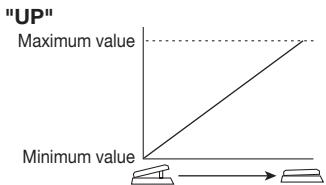
UP
The parameter is at minimum when the pedal is fully raised and at maximum when the pedal is fully pushed down.

DOWN
The parameter is at maximum when the pedal is fully raised and at minimum when the pedal is fully pushed down.

HIGH
When the pedal is fully raised, the parameter is at the value set in the patch. When the pedal is fully pushed down, the parameter is at maximum.

LOW
When the pedal is fully raised, the parameter is at minimum. When the pedal is fully pushed down, the parameter is at the value set in the patch.
HINT
When the ZNR/MIX module is selected as modulation target, the pedal adjusts the mixing balance of the DRIVE/SYNTH module ( p. 26).
"DOWN"
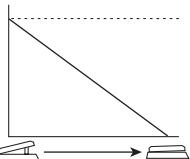
Maximum value
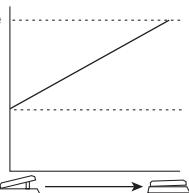
"HIGH"
Maximum value
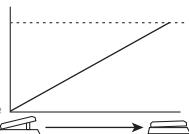
"LOW"
Value set in patch
Specifications
| Effect types | 47 |
| Effect modules | Max. 9 simultaneous modules |
| Patches | User area: 10 patches x 4 banks |
| Preset area: 10 patches x 4 banks | |
| Sampling frequency | 96 kHz |
| A/D converter | 24 bit, 64 times oversampling |
| D/A converter | 24 bit, 128 times oversampling |
| Signal processing | 32 bit |
| Frequency response | 20 Hz - 40 kHz +1 dB -3 dB (with 10 kilohms load) |
| Display | 2-digit 7-segment LED |
| Parameter LEDs | |
| Input | Standard mono phone jack |
| Rated input level | -20 dBm |
| Input impedance | 1 megohm |
| Output | Standard stereo phone jack (doubles as line and headphone jack) |
| Maximum output level | Line: +5 dBm (output load impedance 10 kilohms or more) |
| Phones: 20 mW + 20 mW (into 32 ohms load) | |
| Control input | For FP02 (FP01)/FS01 |
| Power requirements | |
| AC adapter | 9 V DC, 300 mA (center minus plug) (ZOOM AD-0006) |
| Batteries | Four IEC R6 (size AA) batteries, |
| Approx. 7.5 hours continuous operation (alkaline batteries) | |
| Dimensions | 162 mm (D) x 156 mm (W) x 65 mm (H) |
| Weight | 700 g (without batteries) |
| Options | Expression pedal FP02/ Foot switch FS01 |
- 0dBm = 0.775Vrms
- Design and specifications subject to change without notice.
Troubleshooting
No power
Refer to "Turn power on" on page 8.
- Reverb effect does not operate
While a rhythm pattern is playing, the reverb effect is not available. Stop the rhythm pattern first ( p. 12).
High level of noise
Is ZOOM AC adapter being used? Be sure to use only adapter for 9VDC 300mA with center minus plug (ZOOM AD-0006).
Battery life is short
Are manganese batteries being used? The use of alkaline batteries is recommended.
| # | PatternName | TimSig | # | PatternName | TimSig | |
| 1 | 8beat_1 | 4/4 | 21 | POP_3 | 4/4 | |
| 2 | 8beat_2 | 4/4 | 22 | DANCE_1 | 4/4 | |
| 3 | 8beat_3 | 4/4 | 23 | DANCE_2 | 4/4 | |
| 4 | 8shuffle | 4/4 | 24 | DANCE_3 | 4/4 | |
| 5 | 16beat_1 | 4/4 | 25 | DANCE_4 | 4/4 | |
| 6 | 16beat_2 | 4/4 | 26 | 3per4 | 3/4 | |
| 7 | 16shuffle | 4/4 | 27 | 6per8 | 3/4 | |
| 8 | ROCK | 4/4 | 28 | 5per4_1 | 5/4 | |
| 9 | HARD | 4/4 | 29 | 5per4_2 | 5/4 | |
| 10 | METAL_1 | 4/4 | 30 | LATIN | 4/4 | |
| 11 | METAL_2 | 4/4 | 31 | BALLAD_1 | 4/4 | |
| 12 | THRASH | 4/4 | 32 | BALLAD_2 | 3/4 | |
| 13 | PUNK | 4/4 | 33 | BLUES_1 | 4/4 | |
| 14 | DnB | 4/4 | 34 | BLUES_2 | 3/4 | |
| 15 | FUNK_1 | 4/4 | 35 | JAZZ_1 | 4/4 | |
| 16 | FUNK_2 | 4/4 | 36 | JAZZ_2 | 3/4 | |
| 17 | HIPHOP | 4/4 | 37 | METRO_3 | 3/4 | |
| 18 | R'nR | 4/4 | 38 | METRO_4 | 4/4 | |
| 19 | POP_1 | 4/4 | 39 | METRO_5 | 5/4 | |
| 20 | POP_2 | 4/4 | 40 | METRO |
ZEEM
CATCH US IF YOU CAN
ZOOM CORPORATION
ITOHPIA Iwamotocho 2chome Bldg. 2F, 2-11-2, Iwamoto-cho,
Chiyoda-ku, Tokyo 101-0032, Japan
Web Site: http://wwwzoomo.co.jp
B2 Patch List
| Category | No. | Patch name | Description | Main effect |
| DEMO | A0 | ROCK | Based on the ultimate rock bass amp, the AMPEG SVT, this sound is great both for bare finger playing and when using a pick. | AMPEG |
| A1 | Heavy Comp | Simulates the sound of a HARTKE HA3500 with 4.5XL that became the Will Lee trademark. | COMP & HARTKE | |
| A2 | No Holds Barred | All-rounder distortion sound. Turn on pedal wah, flanger, and echo for even more excitement. | ODB-3 | |
| A3 | AUTO WAH | Traditional-style auto wah. Transform percussive play with ghost notes straight into a funky sound. | AUTO WAH | |
| A4 | Yes! | Progressive rock sound, taking a hint from Yes bassist Chris Squire. | CHORUS & ECHO | |
| A5 | Pop Style | Straightforward but addictive sound for pop and rock. A slight dash of room rever is the secret ingredient. | BASSMAN | |
| A6 | -12 Below | Classic sub-octaver sound created by Pino Palladino. | OCTAVE | |
| A7 | No Worries | Fretless bass sound using the defret effect. Add a slide to a phrase and turn your instrument into a fretless bass. | DEFRET | |
| A8 | Stream | Flanging sound for those smooth and flowing phrases, supported by a solid backbone. | FLANGER | |
| A9 | Synth Bass | PAD type synth bass sound. Great for lead bass and for programing sound during live play. | MONO SYN | |
| MODELING | B0 | SVT | Combines the all-tube SVT from AMPEG with an 810E cabinet. Experience that gutsy tube amp sound. | AMPEG |
| B1 | HARTKE | Simulation of HARTKE HA3500 head amp combined with aluminum-cone cabinet 4.5XL. Note the characteristically straightforward punch of aluminum. | HARTKE | |
| B2 | SUPER BASS | Simulation of MARSHALL 1992 Super Bass head amp combined with 1935A cabinet, tailored into Marshall style drive-oriented sound. | SUPER BASS | |
| B3 | TRACE | Simulation of TRACE ELLIOT head amp AH-500 combined with two cabinets (1048H & 1518), producing the typical midrange character of British rock. | TRACE ELLIOT | |
| B4 | BASSMAN | Simulates the Fender Bassman 100 also used by Paul McCartney. Enjoy that special Beatles sound with Rickenbacker and Hofner violin basses. | BASSMAN | |
| B5 | ACOUSTIC | Simulation of ACOUSTIC 360 head amp combined with 301 cabinet, characterized by a tight midrange. | ACOUSTIC | |
| B6 | SWR | SWR sound modeled on a SM-900 head amp combined with the Goliath cabinet. Rich low range and clear highs are bound to impress. | SWR | |
| B7 | TUBE | Simulates a high-class tube preamplifier such as used in recording studios. The fat and supple sound fits every genre. | TUBE PRE | |
| B8 | SANSAMP | Simulates the lightly distorted sound of the SANSAMP BASSDRIVER DI, beloved by many bass players. | SANSAMP | |
| B9 | TUBE SCREAMER | Simulation of the Tube Screamer used by many guitarists as a booster. Get that cool overdrive sound, whether picking or fingering. | TS9 | |
| C0 | MXR | Simulates the MXR BASS D.I. + distortion channel. A gutsy low end plus the right amount of original sound creates distortion with a solid core. | MXR BASS D.I.+ | |
| C1 | ODB | Simulates the ODB-3 overdrive bass machine from Boss. Proper mixing of original sound gives fat overdrive without losing bass response. | ODB-3 | |
| C2 | FUZZ FACE | Simulates the Fuzz Face famous for its unique look. Wildly distorted fuzz sound is great for those aggressive bass lines. | FUZZ FACE | |
| ARTIST | C3 | Slang | Chorus sound often used by Jac Pastorius in the late seventies. Lets you play his "Slang" loop solos with hold delay. | CHORUS & ACOUSTIC |
| C4 | Slapstick | Rock style sound as personified by Flea of the Red Hot Chili Peppers. Use a Stingray or Modulus bass and whip up some slap bass action. | AMPEG | |
| C5 | BootSea | Bootsy Collins sound using auto wah. Dress up in a fancy costume, wear star-shaped sunglasses, and let it rip! | AUTO WAH & PITCH | |
| C6 | Mo'Soul | Motown sound made famous by James Jamerson. Sixties Motown comes alive again. | TUBE PRE | |
| C7 | Miller's Crossing | Marcus Miller type slap sound. Typically deep SWR bass sound is complemented by glossy highs. | SWR | |
| C8 | Leadist | Simulation of distortion sound suitable for Tony Levin style lead play. Connect an expression pedal and turn pedal wah on to create highly effective wah sound. | SUPER BASS | |
| C9 | In Your Fingers | Emulate the midrange-oriented fingering work of artists such as Me'Shell Ndegeocello or Jeff Berlin. Stated as a tube preamplifier sound. | TUBE PRE | |
| D0 | Grovin' With Vinny | Designed to sound like Sting when he was playing with The Police. Fairly traditional approach covers a wide variety of genres. | TUBE PRE | |
| D1 | Little Muddy | Blues sound from the days of Muddy Waters. The range is low-fi, but the impact is powerful. | SANSAMP | |
| VARIATION | D2 | STEP SYNTH DELAY | Collaboration of synth and step may surprise at first, but will show its potential when played with long tones. | MONO SYN & STEP |
| D3 | PHASER SLAP | Phaser sound lets you embellish your slap playing with modulation effects. | PHASER | |
| D4 | Sublime | Sub bass sound such as used for Techno, Electronica, and Drum'n Bass. Experience a sine wave so low it seems to hug the ground. | MONO SYN & PHASER | |
| D5 | A Major Harmony | Harmonized pitch shifter sound in an A major key. Good for bass solos. | HARMONIZED PITCH SHIFTER | |
| D6 | Dark Side/Octave | Combination patch of fuzz and octave. Heavy sound lets you lay down the rhythm with wild picking or play a strong lead. | FUZZ FACE & OCTAVE | |
| D7 | Tremolo | Enchanting tremolo sound with rever creates a dreamy backdrop or enhances a moody solo. | TREMODO | |
| D8 | ManTap | Stereo chorus and delay in the style of Michael Manring. Control hold delay with a foot switch to play loop solos. | PINGPONG-DELAY & HALL | |
| D9 | Les Thumbs | Modeled on the typical slap style of Primus frontman Les Claypool, this sound combines TS9 and resonance filter. Use it to create your very own style. | AUTO RESONANCE FILTER |
- The preset area of banks 0 - 3 contains the same patches as A - d.
- The ZNR value may need to be adjusted depending on the bass guitar and amplifier.
- In play mode, parameter knob 1 can be used to adjust the CABINET parameter of the DRIVE/SYNTH module. Higher values result in stronger cabinet character.
- When using a bass amplifier, selecting the flat EQ setting is recommended.
Manufacturer names and product names mentioned in this patch list are trademarks or registered trademarks of their respective owners. These names as well as artist's names are used only to illustrate sonic characteristics and do not indicate any affiliation with ZOOM CORPORATION.
- SAFETY PRECAUTIONS Usage Precautions
- SAFETY PRECAUTIONS
- Power requirements
- [AC adapter operation]
- [Battery operation]
- Environment
- Handling
- Connecting cables and input and output jacks
- Alterations
- Volume
- Usage Precautions
- Electrical interference
- Cleaning
- Contents
- SAFETY PRECAUTIONS Usage Precautions 2
- Features 4
- Terms Used in This Manual 5
- Controls and Functions / Connections 6
- Selecting a Patch 8
- Using the Tuner 10
- Using the Rhythm Function 12
- Editing a Patch. 14
- Storing/Copying Patches 16
- Using an Optional Foot Switch or Pedal 18
- Restoring Factory Defaults 20
- Linking Effects 21
- Effect Types and Parameters 22
- Specifications 31
- Troubleshooting 31
- The FCC regulation warning (for U.S.A.)
- Features
- - Latest technology for outstanding performance
- - Versatile palette of effects
- - Really usable patches straight out of the box
- - Great for live performances and direct recording
- - Integrated auto-chromatic tuner and rhythm functions
- Sophisticated user interface
- - Dual power supply principle allows use anywhere
- - Easy operation with foot switch and expression pedal
- Terms Used in This Manual
- ■ Effect module
- ■ Effect type
- ■ Effect parameter
- Patch
- Bank and area
- Play mode/edit mode
- Operating the B2 on batteries
- Controls and Functions / Connections
- Module selector
- BANK[-]/[+]keys
- [STORE] key
- [▼]/[▲] foot switches
- [INPUT] jack
- [OUTPUT/PHONES] jack
- Selecting a Patch
- Turn power on
- Set the B2 to play mode
- Select a patch
- Adjust tone and volume
- Parameter knob 1
- Parameter knob 3
- Parameter knob 2
- NOTE
- Directly selecting a bank
- Using the Tuner
- Switch to bypass or mute
- - Setting the B2 to the bypass state
- - Setting the B2 to the mute state
- Patch change at bypass/mute
- Play the string to tune
- Adjusting the reference pitch of the tuner
- - Turn Parameter knob 1.
- Return to play mode
- Using the Rhythm Function
- Set the B2 to play mode
- Start the rhythm function
- Select a rhythm pattern
- Adjust the rhythm volume
- Adjust the tempo
- Stop the rhythm
- Editing a Patch
- Select the effect module
- To switch an effect module on and off
- HINT
- Terminate the edit mode
- Change the parameter value
- Select the effect type
- Storing/Copying Patches
- In play mode or edit mode, press the [STORE] key
- Select the store/copy target bank
- To cancel the store process
- Press the [STORE] key once more
- Specify the store/copy target patch number
- Using an Optional Foot Switch or Pedal
- Using the foot switch (FS01)
- Plug the cable from the FS01 into the [CONTROL IN] jack, and then turn the B2 on.
- Set the Module selector to the "CONTROL" position.
- Turn Parameter knob 2 to select one of the following functions for the foot switch.
- bP (bypass/mute)
- tP (tap tempo)
- bU (bank up)
- - rH (rhythm on/off)
- dH (delay hold)
- dM (delay input mute)
- Select the patch in play mode and operate the foot switch.
- Using the expression pedal (FP01/FP02)
- If necessary, save the patch.
- Select the patch in play mode and operate the expression pedal.
- Restoring Factory Defaults
- Turn the B2 on while holding down the [STORE] key.
- To carry out the All Initialize function, press the [STORE] key once more.
- Linking Effects
- How to read the parameter table
- Effect parameters 1 - 3
- Effect module
- DELAY
- Expression pedal
- Tap
- Hold
- UP
- DOWN
- HIGH
- LOW
- Specifications
- Troubleshooting
- ZEEM
- CATCH US IF YOU CAN
- B2 Patch List
Brand : ZOOM
Model : B2
Category : Guitar Effects