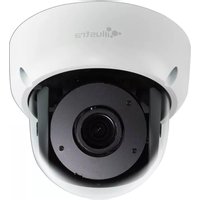
Illustra Pro IPS02D2ISWIT - Security Camera Tyco - Free user manual and instructions
Find the device manual for free Illustra Pro IPS02D2ISWIT Tyco in PDF.


Pick your language and provide your email: we'll send you a specifically translated version.
| Product Type | Security Camera |
| Brand | Tyco |
| Model | Illustra Pro IPS02D2ISWIT |
| Resolution | 2 Megapixel (1920x1080) |
| Sensor | 1/2.8" Progressive Scan CMOS |
| Lens | 2.8-12mm varifocal, motorized |
| Night Vision | Up to 30m (98ft) IR |
| Weatherproof Rating | IP67 |
| Power | PoE (IEEE 802.3af) or 12V DC |
| Power Consumption | Max 7W |
| Dimensions (mm) | 76 x 68 x 165 (WxHxD) |
| Weight | Approx. 540g |
| Video Compression | H.265, H.264, MJPEG |
| Frame Rate | Up to 30fps at 1080p |
| Audio | Two-way audio (built-in mic/speaker) |
| Storage | MicroSD slot (up to 128GB), NVR |
| Alarm I/O | 1 alarm input, 1 alarm output |
| Network | 10/100 Base-T, PoE |
| Operating Temperature | -30°C to 60°C (-22°F to 140°F) |
| Installation | Indoor/Outdoor, ceiling or wall mount |
Frequently Asked Questions - Illustra Pro IPS02D2ISWIT Tyco
How do I reset the camera to factory defaults?
Press and hold the reset button located on the camera base for 10 seconds until the LED blinks. The camera will reboot with factory settings.
Can I use this camera without an NVR?
Yes, the camera supports local storage via a MicroSD card (up to 128GB) for continuous recording or event triggers. You can also view live stream via the Tyco mobile app.
What is the maximum PoE cable length?
For reliable power and data, use a quality Cat5e or Cat6 cable up to 100 meters (328 feet).
How do I adjust the camera angle after mounting?
The camera has a 3-axis adjustment mechanism: pan 360°, tilt 75°, and rotate 180°. Loosen the adjustment screws, position the camera, and tighten.
Does the camera support ONVIF?
Yes, it is ONVIF Profile S/G/T compliant, allowing integration with third-party NVRs and software.
How can I access the camera remotely?
Download the Tyco Illustra mobile app or use a web browser. Configure port forwarding or use P2P via QR code scanning for easy remote access.
What is the IR range for night vision?
The built-in IR LEDs provide effective night vision up to 30 meters (98 feet) in complete darkness.
Is the camera suitable for outdoor use?
Yes, it has an IP67 weatherproof rating and operating temperature from -30°C to 60°C, making it ideal for outdoor installations.
How do I clean the camera?
Use a soft, dry cloth to clean the housing. For the lens, use a lens cleaning wipe or microfiber cloth. Avoid harsh chemicals.
Can I connect an external microphone or speaker?
The camera has a built-in microphone and speaker for two-way audio. It does not have external audio input/output; however, you can use an external speaker via the alarm output if supported.
User questions about Illustra Pro IPS02D2ISWIT Tyco
0 question about this device. Answer the ones you know or ask your own.
Ask a new question about this device
No questions yet. Be the first to ask one.
Download the instructions for your Security Camera in PDF format for free! Find your manual Illustra Pro IPS02D2ISWIT - Tyco and take your electronic device back in hand. On this page are published all the documents necessary for the use of your device. Illustra Pro IPS02D2ISWIT by Tyco.
USER MANUAL Illustra Pro IPS02D2ISWIT Tyco

Manual assistant
Powered by Anthropic
Waiting for your message
Product information
Brand : Tyco
Model : Illustra Pro IPS02D2ISWIT
Category : Security Camera