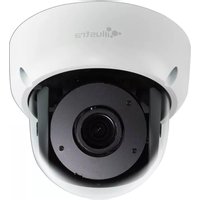
Illustra Pro IPS12FFOCWIYA - Security Camera Tyco - Free user manual and instructions
Find the device manual for free Illustra Pro IPS12FFOCWIYA Tyco in PDF.


Pick your language and provide your email: we'll send you a specifically translated version.
| Brand | Tyco |
| Model | Illustra Pro IPS12FFOCWIYA |
| Product Type | Security Camera |
| Resolution | 12 Megapixels (4K Ultra HD) |
| Lens Type | Fixed focal lens, 3.6mm (typical) |
| Night Vision | Infrared LEDs, up to 30m range |
| Day/Night Mode | Auto-switching with IR cut filter |
| Video Compression | H.265, H.264, MJPEG |
| Field of View | Horizontal: 80°, Vertical: 45° (typical) |
| Power Supply | PoE (Power over Ethernet) IEEE 802.3af |
| Power Consumption | Max 10W |
| Dimensions (H x W x D) | 7.5 cm x 7.5 cm x 15 cm (approx. bullet style) |
| Weight | 0.5 kg |
| Housing Material | Aluminum and polycarbonate |
| Weatherproof Rating | IP66 (suitable for outdoor use) |
| Operating Temperature | -20°C to 50°C |
| Main Features | Motion detection, tamper alarm, privacy masking, ONVIF compliant |
| Maintenance | Clean lens with a soft, dry cloth; keep ventilation clear |
| Safety | Install in accordance with local electrical codes; use proper mounting |
| Spare Parts & Repairability | Lens replacement, IR LED board, power board available through authorized service |
| General Information | Part of Tyco Illustra Pro series, backed by 2-year warranty |
Frequently Asked Questions - Illustra Pro IPS12FFOCWIYA Tyco
What is the resolution of the Tyco Illustra Pro IPS12FFOCWIYA?
The camera offers 12 megapixels (4K Ultra HD) resolution, providing crisp and detailed video.
Does this camera support night vision?
Yes, it has built-in infrared LEDs with a night vision range of up to 30 meters, allowing clear monitoring in complete darkness.
What type of power connection does it use?
The camera supports Power over Ethernet (PoE) IEEE 802.3af, simplifying installation with a single cable for both power and data.
Can the camera be used outdoors?
Yes, it has an IP66 weatherproof rating, making it suitable for outdoor use in rain, snow, and dust.
How do I clean the camera lens?
Use a soft, lint-free dry cloth to gently wipe the lens. Avoid harsh chemicals to prevent damage.
Is the camera compatible with third-party video management systems?
Yes, the camera is ONVIF compliant, ensuring compatibility with a wide range of software and recording devices.
What is the field of view of this camera?
The fixed lens provides a horizontal field of view of about 80 degrees and a vertical view of about 45 degrees, ideal for monitoring entryways or corridors.
Does the camera support motion detection?
Yes, it includes intelligent motion detection that can trigger alerts or recordings when movement is detected in the scene.
What video compression formats are supported?
The camera supports H.265, H.264, and MJPEG compression, balancing quality and bandwidth efficiency.
Where can I find spare parts if needed?
Spare parts such as lenses, IR LED boards, and power supply units are available through Tyco authorized service centers.
User questions about Illustra Pro IPS12FFOCWIYA Tyco
0 question about this device. Answer the ones you know or ask your own.
Ask a new question about this device
No questions yet. Be the first to ask one.
Download the instructions for your Security Camera in PDF format for free! Find your manual Illustra Pro IPS12FFOCWIYA - Tyco and take your electronic device back in hand. On this page are published all the documents necessary for the use of your device. Illustra Pro IPS12FFOCWIYA by Tyco.
USER MANUAL Illustra Pro IPS12FFOCWIYA Tyco

Manual assistant
Powered by Anthropic
Waiting for your message
Product information
Brand : Tyco
Model : Illustra Pro IPS12FFOCWIYA
Category : Security Camera