
BPDVD14 - DVD player BLAUPUNKT - Free user manual and instructions
Find the device manual for free BPDVD14 BLAUPUNKT in PDF.
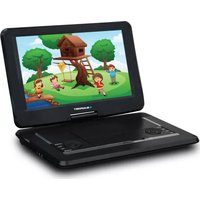


| Brand | Blaupunkt |
| Model | BPDVD14 |
| Product Type | DVD Player |
| Disc Compatibility | DVD, DVD±R/RW, CD, CD-R/RW, MP3, JPEG, DivX |
| Playback Formats | DVD Video, DVD Audio, CD Audio, MP3, WMA, JPEG, DivX, Xvid |
| Video Output | HDMI, Composite (RCA), Component (YUV) |
| Audio Output | Stereo RCA, Coaxial Digital, Optical Digital |
| USB Port | USB 2.0 for media playback |
| Dimensions (W x D x H) | Approx. 28 x 22 x 5 cm |
| Weight | Approx. 0.8 kg |
| Power Supply | AC 100-240V, 50/60Hz |
| Power Consumption | Operating: ~10 W; Standby: <1 W |
| Remote Control | Included (batteries not included) |
| Region Code | Region 2 (may be changeable) |
| Parental Control | Yes (rated lock) |
| Supported Languages | Multi-language OSD and subtitle |
| Cleaning | Clean with soft dry cloth; use lens cleaning disc if needed |
| Safety | Do not expose to moisture; use in ventilated area |
| Spare Parts | Remote, power cable available from service centers |
| Repairability | Designed for professional repair; user-replaceable fuse |
| Warranty | Standard manufacturer warranty (check local terms) |
Frequently Asked Questions - BPDVD14 BLAUPUNKT
User questions about BPDVD14 BLAUPUNKT
0 question about this device. Answer the ones you know or ask your own.
Ask a new question about this device
Download the instructions for your DVD player in PDF format for free! Find your manual BPDVD14 - BLAUPUNKT and take your electronic device back in hand. On this page are published all the documents necessary for the use of your device. BPDVD14 by BLAUPUNKT.
USER MANUAL BPDVD14 BLAUPUNKT
14" Portable DVD Player - BPDVD14

CONTENTS
| General | Safety | |
| Product | Overview | |
| Remote | Control | |
| Getting | Started | |
| Setup | 11 | |
| Troubleshooting | 13 | |
| Specifications | 13 | |
| Support |
GENERAL SAFETY
Read this manual thoroughly before you start using the Portable DVD Player.
Store this manual, the completed warranty card, your receipt and the product packaging. The safety precautions instructions reduces the risk of fire, electric shock and injury when correctly complied to.
Please follow all instructions and take notice of all warnings.

The cover (or back) of the unit should not be removed to prevent risk of electric shock.
This unit must be serviced by a qualified service personnel only.
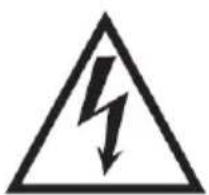

The lightning flash with symbol within the triangle is intended to warn you of a non-insulated dangerous voltage in the product's enclosure that could be of sufficient magnitude to generate a risk of electric shock to persons.
The exclamation point within the triangle is intended to warn you to the presence of important operating and maintenance instructions in the documents included with the product.
IMPORTANT INFORMATION
The lightning flash symbol within the triangle is intended to warn you of non-insulated dangerous voltage the product's enclosure that could be of sufficient magnitude to generate a risk of electric shock to persons.
• Using Cabinets or stands recommended by the manufacturer of the DVD Player.
- Only using furniture that can safely support the Products.
- Ensure the Product is not overhanging the edge of the supporting furniture.
- Do not place the product on a high furniture without securing both the furniture and the product to a stable support.
- Do not place the product on cloth or other conductive materials.
- Warn children of the dangers of climbing on furniture to reach the television or its controls and to call for an adult to assist.
GENERAL SAFETY (CONT.)
IMPORTANT INFORMATION
- Do not expose this appliance to rain or moisture as it may result in fire or an electric shock hazard
- Do not tamper or change or modify the product in any way.
- Only use Accessories outlined and recommended by the manufacturer.
- Please do not expose the product to splashing or water contact
- Please do not place any object on top of the product including objects filled with liquids such as vases.
- Danger of explosion if battery is incorrectly placed. Replace with same or equivalent type.
This product must be positioned in a sufficiently stable location, it can be potentially hazardous due to falling when mounted and can cause injury, particularly to children if it positioned incorrectly.
- Do not use a damaged power cord, plug or loose outlet. Doing so may cause an electric shock.
- Do not plug several devices into the same outlet. Doing so may cause the outlet to overheat and start a fire. Make sure the outlet is readily accessible during operation of the equipment.
- Do not bend, twist or kink the power cord excessively.
- The apparatus shall not be exposed to dripping or splashing and no objects filled with liquids, such as vases, shall be placed on the product. Dry location use only.
- Do not run the power cord near heat-producing appliances such as radiators, stoves or irons. The excessive heat could melt the insulation and expose live wires, resulting in fire or electric shock.
- No naked flame source, such as candles, should be placed on the product.
- Do not allow anything to rest on or roll over the power cord. Doing so may cause fire or electric shock.
- Unplug this product during lightning storms or when unused for long periods of time. Not doing so may result in fire or electric shock.
- Do not cover the ventilation openings of the product with items such as newspapers, tablecloths, curtains etc or insert objects into the slots available on the products. As this could result in the product temperature rising and could cause a fire.
GENERAL SAFETY (CONT.)
Please make sure upon positioning this product, the place is:
- Not wet or damp and Well ventilated
- Away from direct sunlight or heaters.
- Away from splashes or food.
- Protected from excessive dust or grease.
- Do not install this equipment in a confined space such as a bookcase or similar unit.
- Do not install the DVD Player set near heat sources such as radiators, stoves or other audio visual equipment that produce heat.
- Do not place containers with liquids, if liquid falls inside the products it may result in short-circuit, fire or electric shock.
- Do not place small metallic objects on top of the unit. Metal object falls inside the product it may result in short-circuit, fire or electric shock.
- Do not use or store flammable or combustible materials near the unit. Doing so may result in fire or explosion. Do not place any naked flame sources, such as lit candles, cigarettes or incense sticks.
- Do not expose the DVD player and remote control to direct sunlight and excessive heat inside vehicles.
- Only use the power adaptor provided with this unit.

LASER SAFETY
This set employs an optical laser beam system in the disc mechanism designed with built-in safeguards. Do not attempt to disassemble. Exposure to this invisible laser light beam may be harmful to the human eye.
This is a Class-1 laser product. Use of controls, adjustments or procedures other than those specified herein may result in hazardous laser light beam exposure.
This DVD player should not be adjusted or repaired by anyone except qualified service personnel. The laser mechanism in the set corresponds to the stylus (needle) of a record player. Although this product uses a laser pick-up lens, it is completely safe when operated according to directions.
PRODUCT OVERVIEW


- TFT Off: LCD on/off.
• Audio: Press to adjust the current audio settings for the loaded DVD. - Mode: Press to switch between AV In and DVD mode.
- Mute: Press to mute volume.
• Volume: Press to adjust the volume. - Skip Back/Fwd: Press to skip between chapters or tracks.
- Menu: Press to access the DVD menu.

- OK/Arrows: Press to select and navigate on-screen menus.
- Setup: Press to access the setup menu.
- Stop: Press to stop play of the loaded disc.
- Play/Pause: Press to play or pause the loaded disc.
PRODUCT OVERVIEW (Cont.)


REMOTE CONTROL
DVD/SD/USB
Press to select DVD, SD memory card, or USB modes.
Mute
Press to mute the volume.
Zoom
Press to zoom in or out on a
loaded DVD.
Wide
Press to switch between
different aspect ratio settings.
Setup
Press to access the setup menu.
Arrows/OK
Press to make selections
in the on screen or disc menus.
Menu
Press to access the loaded DVD's
menu.
Title
Press to access the title
menu of a loaded DVD.
Audio
Press to adjust the current audio settings for the loaded DVD.
Rewind/F.Fwd
Press to search through an individual chapter or track.
Batteries
Requires 2 x AAA batteries (included)


Mode
Press to switch between AV IN and DVD mode.
OSD
Displays current title and menu information.
A-B
Press to create a repeating loop on a specified section of a loaded DVD.
Repeat
Press to repeat the current chapter or track.
Play/Pause
Stop
Subtitle
Toggle subtitles on or off.
NumberKeypad
Volume +/-
Angle
On supported DVDs, press and hold to view alternate angles.
Program
Press to program a loaded disc to play chapters or tracks in a specified order.
Search
Skip Back/Fwd
Press to skip between chapters
GETTING STARTED
Power and Charging the battery
DC Power input: Requires an AC/DC adapter, or 12V DC car adapter (included).
To Power the unit, plug the included AC/DC adapter into the unit and a standard wall outlet.
If using in a car, plug the 12V DC car adapter into the unit and a standard 12V Power outlet in the car.
The Power Indicator will turn green whenever the portable DVD player is Powered on.
The Charge Indicator will turn red whenever the battery is charging.

SETUP
LOADING A DVD OR CD
Loading a Disc
- Press the Open button to open the Disc Door.
- Load a disc into the DD player, label side facing up.
- Manually close the Disc Door.
After a disc is loaded, it will begin playing automatically.
Playing a Loaded Disc
- Follow the instructions for Loading a Disc.
- If the disc does not begin playing automatically, press the Play/Pause button.
Programming a Loaded Disc
- Follow the instructions for Loading a Disc and Playing a Loaded Disc.
- While the loaded disc is playing, press the Program button on the remote.
- Use the Number Keypad to enter in the titles and chapters in the order you want to view them.
DVD Titles and chapters or CD tracks will play in the order they are programmed. - Repeat step 3 until the desired DVD titles and chapters or CD trcks are programmed.
USB PORT
Connecting a USB Thumb Drive
Connect a USB Thumb Drive to the USB Port. Picture formats are supported (Jpeg).
Accessing the Content on a USB Drive
- Follow the instructions for Connecting a USB thumb drive.
- Press the DVD/SD/USB button to enter DVD/SD/USB mode.
SD CARD
Connecting a SD CARD
Note: Formats are not universally compatible. Playback may be dependent on recording conditions.
- Follow the instructions for Connecting a Memory Card.
- Press the DVD/SD/USB Button to enter DVD/SD/USB mode.
SETUP (Cont.)
AV OUTPUT AND INPUT
Using the 3.5mm AV Output
Connect the 3.5mm to 3 x RCA audio/Video cable to the 3.5 mm AV output on the portable DVD player and the composite video and audio input on a television.
Audio and video played through the portable DVD player will now be output through the connected television.
Using the 3.5mm AV Input
Connect the 3.5mm to 3 x RCA audio/video cable to the 3.5mm AV Input on the portable DVD player and a composite video outputs on an audio/video source such as a television. Press the Mode button on the remote to switch to AV in mode Audio and video played through the connected television will now be output to the portable DVD player.
TROUBLESHOOTING
| No Power | Ensure the AC adaptor is securely fitted into the main power supply. If using from the battery ensure battery is fully charged. |
| No Picture | Check whether the disc is scratched or stained; Check whether the AV connector and outputt erminal is stained. |
| No Sound | Check audio settings in general setup page |
| Disc not loading | Ensure the disc has been correctly loaded, is clean without scratches and ensure the formati s compatible. |
| Remote Control not working | Check the batteries are not exhausted. |
| USB Not loading | Ensure you are in USB mode, Check USB device is securely fitted; Check files are compatible with player. |
| Cannot Advance through start of move | The disc programming prohibits this action |
SPECIFICATIONS
| Power Supply DC 12V 1.5A; | --- |
| Power Consumption 18W | |
| Battery Type Lithium-polymer | |
| Compatible Disc Formats DVD,CD,CD-RW, JPEG | |
| Signal System PAL/NTSC/AUTO | |
| Frequency Response 20Hz to 20KHz | |
| Operating Temperature 5-40°C | |
| Car Adaptor Fuse 3A |

BLAUPUNKT
CUSTOMER HELPLINE:
1300 296 699
info@ayonz.com
DISTRIBUTED BY:
Ayonz Pty Ltd


- CONTENTS
- GENERAL SAFETY
- IMPORTANT INFORMATION
- GENERAL SAFETY (CONT.)
- PLEASE MAKE SURE UPON POSITIONING THIS PRODUCT, THE PLACE IS
- LASER SAFETY
- PRODUCT OVERVIEW
- PRODUCT OVERVIEW (CONT.)
- REMOTE CONTROL
- DVD/SD/USB
- BATTERIES
- MODE
- OSD
- A-B
- REPEAT
- PLAY/PAUSE
- STOP
- SUBTITLE
- NUMBERKEYPAD
- ANGLE
- PROGRAM
- SEARCH
- SKIP BACK/FWD
- GETTING STARTED
- POWER AND CHARGING THE BATTERY
- SETUP
- LOADING A DVD OR CD
- LOADING A DISC
- PLAYING A LOADED DISC
- PROGRAMMING A LOADED DISC
- USB PORT
- CONNECTING A USB THUMB DRIVE
- SD CARD
- CONNECTING A SD CARD
- SETUP (CONT.)
- AV OUTPUT AND INPUT
- USING THE 3.5MM AV OUTPUT
- USING THE 3.5MM AV INPUT
- TROUBLESHOOTING
- SPECIFICATIONS
- BLAUPUNKT
Brand : BLAUPUNKT
Model : BPDVD14
Category : DVD player