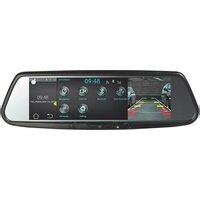
Gentex ADVGENADLN - Dashboard camera AUDIOVOX - Free user manual and instructions
Find the device manual for free Gentex ADVGENADLN AUDIOVOX in PDF.


Pick your language and provide your email: we'll send you a specifically translated version.
| Product Type | Dashboard Camera |
| Brand | Audiovox |
| Model | Gentex ADVGENADLN |
| Dimensions (approx) | 2.5 x 2.5 x 1.5 inches (6.4 x 6.4 x 3.8 cm) |
| Weight (approx) | 100 g (3.5 oz) |
| Power Supply | 12V car cigarette lighter adapter / Built-in rechargeable battery |
| Video Resolution | Full HD 1080p (1920x1080) @ 30 fps |
| Lens Angle | 120° wide angle |
| Recording Modes | Loop recording, G-sensor event recording, manual recording |
| Storage | MicroSD card (up to 32GB, Class 10 recommended) |
| Display | 2.0-inch LCD screen |
| G-Sensor | Built-in, auto locks footage upon impact |
| Night Vision | Infrared LEDs for low-light recording |
| Parking Mode | Motion detection when parked (requires hardwire kit) |
| Audio Recording | Built-in microphone (can be disabled) |
| Mounting | Suction cup mount to windshield |
| Interface | Buttons on device; menu navigation via LCD |
| Power Consumption | ~5W (max) |
| Cleaning | Use a soft, dry cloth to clean the lens and body |
| Safety | Secure mount to avoid obstruction; keep away from airbags |
| Spare Parts / Repairability | Replacement suction cup mount, USB cable, and car charger available |
| General Information | Designed for continuous recording while driving; supports up to 32GB microSD; loop recording overwrites oldest files |
Frequently Asked Questions - Gentex ADVGENADLN AUDIOVOX
How do I install the Gentex ADVGENADLN dashcam?
Clean your windshield area, attach the suction cup mount, and press firmly. Plug the power adapter into your car's 12V outlet and connect the USB cable to the camera. Adjust the lens angle before driving.
What memory card should I use?
Use a MicroSD card up to 32GB, Class 10 or higher for smooth recording. Format the card in the camera before first use.
How do I enable parking mode?
Parking mode requires a hardwire kit (not included) to provide constant power. Once installed, the camera will automatically start recording when motion is detected while the car is off.
Why is the camera not recording?
Check if the memory card is inserted correctly and formatted. Ensure the camera is receiving power (cigarette lighter adapter or battery). If the battery is low, charge it via the car adapter.
How do I set up loop recording?
Loop recording is enabled by default. Go to settings and choose the clip length (e.g., 1, 3, 5 minutes). The camera will overwrite the oldest files when the card is full.
Can I view footage on my computer?
Yes, remove the MicroSD card and insert it into your computer's card reader. The files are saved in AVI or MOV format and can be played with standard media players.
How do I disable audio recording?
Go to the settings menu, find the Audio Recording option, and set it to Off.
What does the G-sensor do?
The G-sensor detects sudden impact or vibration. When triggered, it automatically locks the current video file so it won't be overwritten during loop recording.
Why is the footage blurry or poor quality?
Ensure the lens is clean and free of fingerprints. Adjust the focus ring (if available) or check that the resolution is set to 1080p. Also, avoid mounting the camera too low on the windshield.
How can I update the firmware?
Visit the official Audiovox support website to check for updates. Download the firmware file, copy it to a formatted MicroSD card, insert into the camera, and follow the on-screen instructions.
User questions about Gentex ADVGENADLN AUDIOVOX
0 question about this device. Answer the ones you know or ask your own.
Ask a new question about this device
No questions yet. Be the first to ask one.
Download the instructions for your Dashboard camera in PDF format for free! Find your manual Gentex ADVGENADLN - AUDIOVOX and take your electronic device back in hand. On this page are published all the documents necessary for the use of your device. Gentex ADVGENADLN by AUDIOVOX.
USER MANUAL Gentex ADVGENADLN AUDIOVOX


Manual assistant
Powered by Anthropic
Waiting for your message
Product information
Brand : AUDIOVOX
Model : Gentex ADVGENADLN
Category : Dashboard camera