
ME-50 - Guitar Effects BOSS - Free user manual and instructions
Find the device manual for free ME-50 BOSS in PDF.

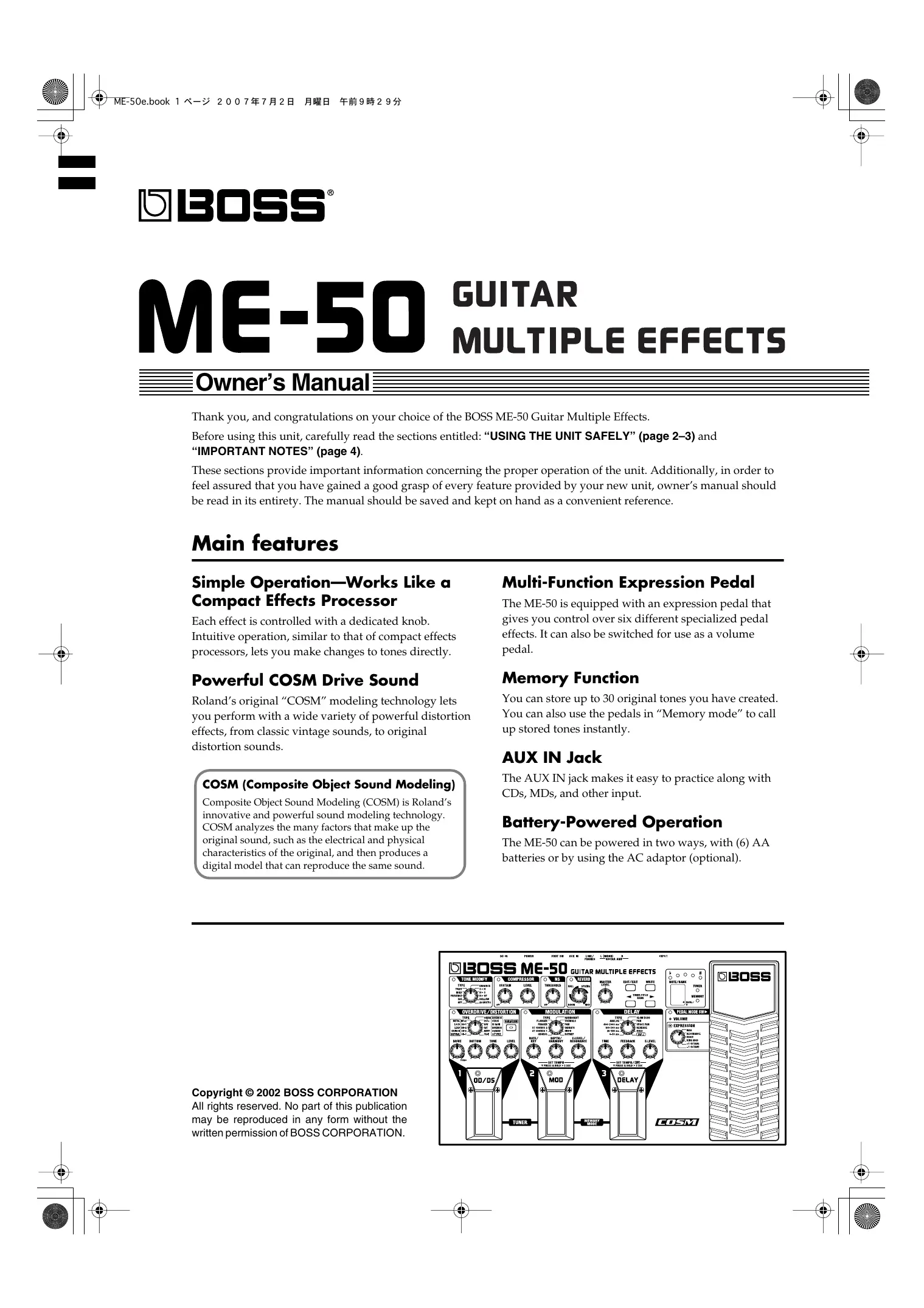

| Product Type | Multi-effects processor for guitar |
| Dimensions (W x D x H) | 173 x 158 x 57 mm |
| Weight | 1.1 kg (without batteries) |
| Power Supply | 9 V DC adapter (BOSS PSA series) or 6 AA/LR6 batteries |
| Current Consumption | 80 mA (with adapter), 200 mA (with batteries) |
| Battery Life | Approx. 7 hours (alkaline batteries) |
| Display | 2-digit LED display |
| Patch Memory | 30 user patches |
| Built-in Effects | Overdrive, Distortion, Modulation, Delay, Reverb, Wah, Volume, Compressor, Filter, etc. |
| Expression Pedal | Built-in, assignable to various parameters |
| Connectors | Input, Output (A/B), Send/Return, Footswitch, Expression Pedal, DC In |
| Effects Loop | Yes (Send/Return) |
| Tuner | Built-in chromatic tuner |
| Additional Functions | Factory presets, manual mode, tap tempo, level control for each effect |
| Care and Cleaning | Wipe with a soft, dry cloth; do not use solvents |
| Safety | Do not expose to moisture, high temperatures, or strong shocks |
| Spare Parts and Repairability | Contact BOSS after-sales service or an authorized center |
| Included Accessories | User manual, owner's manual, power adapter (depending on version) |
Frequently Asked Questions - ME-50 BOSS
User questions about ME-50 BOSS
0 question about this device. Answer the ones you know or ask your own.
Ask a new question about this device
Download the instructions for your Guitar Effects in PDF format for free! Find your manual ME-50 - BOSS and take your electronic device back in hand. On this page are published all the documents necessary for the use of your device. ME-50 by BOSS.
USER MANUAL ME-50 BOSS
ME-50 GUITAR MULTIPLE EFFECTS
Owner's Manual
Thank you, and congratulations on your choice of the BOSS ME-50 Guitar Multiple Effects.
Before using this unit, carefully read the sections entitled: "USING THE UNIT SAFELY" (page 2-3) and "IMPORTANT NOTES" (page 4).
These sections provide important information concerning the proper operation of the unit. Additionally, in order to feel assured that you have gained a good grasp of every feature provided by your new unit, owner's manual should be read in its entirety. The manual should be saved and kept on hand as a convenient reference.
Main features
Simple Operation—Works Like a Compact Effects Processor
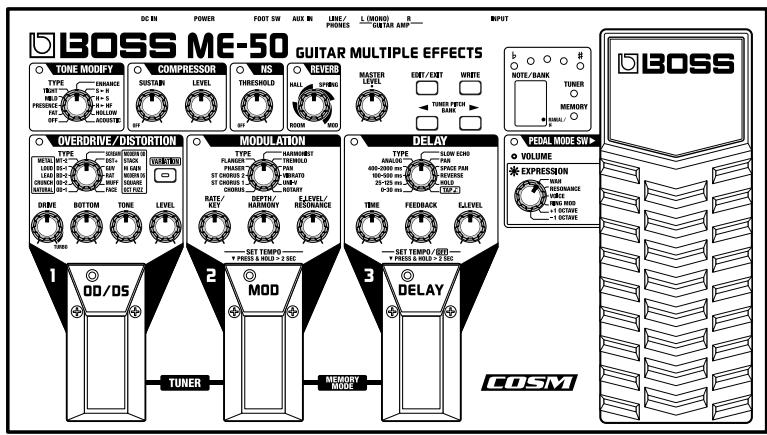
Each effect is controlled with a dedicated knob.
Intuitive operation, similar to that of compact effects processors, lets you make changes to tones directly.
Powerful COSM Drive Sound
Roland's original "COSM" modeling technology lets you perform with a wide variety of powerful distortion effects, from classic vintage sounds, to original distortion sounds.
COSM (Composite Object Sound Modeling)
Composite Object Sound Modeling (COSM) is Roland's innovative and powerful sound modeling technology. COSM analyzes the many factors that make up the original sound, such as the electrical and physical characteristics of the original, and then produces a digital model that can reproduce the same sound.
Multi-Function Expression Pedal
The ME-50 is equipped with an expression pedal that gives you control over six different specialized pedal effects. It can also be switched for use as a volume pedal.
Memory Function
You can store up to 30 original tones you have created. You can also use the pedals in "Memory mode" to call up stored tones instantly.
AUX IN Jack
The AUX IN jack makes it easy to practice along with CDs, MDs, and other input.
Battery-Powered Operation
The ME-50 can be powered in two ways, with (6) AA batteries or by using the AC adaptor (optional).
USING THE UNIT SAFELY
INSTRUCTIONS FOR THE PREVENTION OF FIRE, ELECTRIC SHOCK, OR INJURY TO PERSONS
About WARNING and CAUTION Notices
| ▲WARNING | Used for instructions intended to alert the user to the risk of death or severe injury should the unit be used improperly. |
| ▲CAUTION | Used for instructions intended to alert the user to the risk of injury or material damage should the unit be used improperly. * Material damage refers to damage or other adverse effects caused with respect to the home and all its furnishings, as well to domestic animals or pets. |
About the Symbols
| ▲ | The △ symbol alerts the user to important instructions or warnings. The specific meaning of the symbol is determined by the design contained within the triangle. In the case of the symbol at left, it is used for general cautions, warnings, or alerts to danger. |
| ◎ | The ⊙ symbol alerts the user to items that must never be carried out (are forbidden). The specific thing that must not be done is indicated by the design contained within the circle. In the case of the symbol at left, it means that the unit must never be disassembled. |
| ◎ | The ● symbol alerts the user to things that must be carried out. The specific thing that must be done is indicated by the design contained within the circle. In the case of the symbol at left, it means that the power-cord plug must be unplugged from the outlet. |
ALWAYS OBSERVE THE FOLLOWING
WARNING
Before using this unit, make sure to read the instructions below, and the Owner's Manual.

- Do not open (or modify in any way) the unit or its AC adaptor.

- Do not attempt to repair the unit, or replace parts within it (except when this manual provides specific instructions directing you to do so). Refer all servicing to your retailer, the nearest Roland Service Center, or an authorized Roland distributor, as listed on the "Information" page.

- Never use or store the unit in places that are:


- Subject to temperature extremes (e.g., direct sunlight in an enclosed vehicle, near a heating duct, on top of heat-generating equipment); or are
- Damp (e.g., baths, washrooms, on wet floors); or are
- Humid; or are
- Exposed to rain; or are
- Dusty; or are
-
Subject to high levels of vibration.
-
Make sure you always have the unit placed so it is level and sure to remain stable. Never place it on stands that could wobble, or on inclined surfaces.

- Use only the specified AC adaptor (PSA series), and make sure the line voltage at the installation matches the input voltage specified on the AC adaptor's body. Other AC adaptors may use a different polarity, or be designed for a different voltage, so their use could result in damage, malfunction, or electric shock.

WARNING
- Do not excessively twist or bend the power cord, nor place heavy objects on it. Doing so can damage the cord, producing severed elements and short circuits. Damaged cords are fire and shock hazards!

- This unit, either alone or in combination with an amplifier and headphones or speakers, may be capable of producing sound levels that could cause permanent hearing loss. Do not operate for a long period of time at a high volume level, or at a level that is uncomfortable. If you experience any hearing loss or ringing in the ears, you should immediately stop using the unit, and consult an audiologist.

- Do not allow any objects (e.g., flammable material, coins, pins); or liquids of any kind (water, soft drinks, etc.) to penetrate the unit.


- Immediately turn the power off, remove the AC adaptor from the outlet, and request servicing by your retailer, the nearest Roland Service Center, or an authorized Roland distributor, as listed on the "Information" page when:

- The AC adaptor or the power-supply cord has been damaged; or
- If smoke or unusual odor occurs
- Objects have fallen into, or liquid has been spilled onto the unit; or
- The unit has been exposed to rain (or otherwise has become wet); or
- The unit does not appear to operate normally or exhibits a marked change in performance.
WARNING
- In households with small children, an adult should provide supervision until the child is capable of following all the rules essential for the safe operation of the unit.

- Protect the unit from strong impact. (Do not drop it!)

- Do not force the unit's power-supply cord to share an outlet with an unreasonable number of other devices. Be especially careful when using extension cords—the total power used by all devices you have connected to the extension cord's outlet must never exceed the power rating (watts/amperes) for the extension cord. Excessive loads can cause the insulation on the cord to heat up and eventually melt through.

- Before using the unit in a foreign country, consult with your retailer, the nearest Roland Service Center, or an authorized Roland distributor, as listed on the "Information" sheet.

- Batteries must never be recharged, heated, taken apart, or thrown into fire or water.


CAUTION
- The unit and the AC adaptor should be located so their location or position does not interfere with their proper ventilation.

- Always grasp only the output plug or the body of the AC adaptor when plugging into, or unplugging from, this unit or an outlet.

- Any accumulation of dust between the AC adaptor and the power outlet can result in poor insulation and lead to fire. Periodically wipe away such dust with a dry cloth. Also, disconnect the power plug from the power outlet whenever the unit is to remain unused for an extended period of time.

- Try to prevent cords and cables from becoming entangled. Also, all cords and cables should be placed so they are out of the reach of children.

- Never climb on top of, nor place heavy objects on the unit.

CAUTION
- Never handle the AC adaptor body, or its output plugs, with wet hands when plugging into, or unplugging from, an outlet or this unit.

- Before moving the unit, disconnect the AC adaptor and all cords coming from external devices.

- Before cleaning the unit, turn off the power and unplug the AC adaptor from the outlet.

- Whenever you suspect the possibility of lightning in your area, disconnect the AC adaptor from the outlet.

- If used improperly, batteries may explode or leak and cause damage or injury. In the interest of safety, please read and observe the following precautions (p. 6).

- Carefully follow the installation instructions for batteries, and make sure you observe the correct polarity.

-
Avoid using new batteries together with used ones. In addition, avoid mixing different types of batteries.
-
Remove the batteries whenever the unit is to remain unused for an extended period of time.
-
If a battery has leaked, use a soft piece of cloth or paper towel to wipe all remnants of the discharge from the battery compartment. Then install new batteries. To avoid inflammation of the skin, make sure that none of the battery discharge gets onto your hands or skin. Exercise the utmost caution so that none of the discharge gets near your eyes. Immediately rinse the affected area with running water if any of the discharge has entered the eyes.
-
Never keep batteries together with metallic objects such as ballpoint pens, necklaces, hairpins, etc.
-
Used batteries must be disposed of in compliance with whatever regulations for their safe disposal that may be observed in the region in which you live.

In addition to the items listed under "USING THE UNIT SAFELY" on page 2-3, please read and observe the following:
Power Supply: Use of Batteries
- Do not use this unit on the same power circuit with any device that will generate line noise (such as an electric motor or variable lighting system).
- The AC adaptor will begin to generate heat after long hours of consecutive use. This is normal, and is not a cause for concern.
- The use of an AC adaptor is recommended as the unit's power consumption is relatively high. Should you prefer to use batteries, please use the alkaline type.
- When installing or replacing batteries, always turn off the power on this unit and disconnect any other devices you may have connected. This way, you can prevent malfunction and/or damage to speakers or other devices.
- Batteries are supplied with the unit. The life of these batteries may be limited, however, since their primary purpose was to enable testing.
- Before connecting this unit to other devices, turn off the power to all units. This will help prevent malfunctions and/or damage to speakers or other devices.
Placement
- Using the unit near power amplifiers (or other equipment containing large power transformers) may induce hum. To alleviate the problem, change the orientation of this unit; or move it farther away from the source of interference.
- This device may interfere with radio and television reception. Do not use this device in the vicinity of such receivers.
- Noise may be produced if wireless communications devices, such as cell phones, are operated in the vicinity of this unit. Such noise could occur when receiving or initiating a call, or while conversing. Should you experience such problems, you should relocate such wireless devices so they are at a greater distance from this unit, or switch them off.
- Do not expose the unit to direct sunlight, place it near devices that radiate heat, leave it inside an enclosed vehicle, or otherwise subject it to temperature extremes. Excessive heat can deform or discolor the unit.
- When moved from one location to another where the temperature and/or humidity is very different, water droplets (condensation) may form inside the unit. Damage or malfunction may result if you attempt to use the unit in this condition. Therefore, before using the unit, you must allow it to stand for several hours, until the condensation has completely evaporated.
Maintenance
- For everyday cleaning wipe the unit with a soft, dry cloth or one that has been slightly dampened with water. To remove stubborn dirt, use a cloth impregnated with a mild, non-abrasive detergent. Afterwards, be sure to wipe the unit thoroughly with a soft, dry cloth.
- Never use benzine, thinners, alcohol or solvents of any kind, to avoid the possibility of discoloration and/or deformation.
Additional Precautions
- Please be aware that the contents of memory can be irretrievably lost as a result of a malfunction, or the improper operation of the unit. To protect yourself against the risk of loosing important data, we recommend that you periodically save a backup copy of important data you have written on the paper.
- Unfortunately, it may be impossible to restore the contents of data that was stored in the unit's memory once it has been lost. Roland Corporation assumes no liability concerning such loss of data.
- Use a reasonable amount of care when using the unit's buttons, sliders, or other controls; and when using its jacks and connectors. Rough handling can lead to malfunctions.
- When connecting / disconnecting all cables, grasp the connector itself—never pull on the cable. This way you will avoid causing shorts, or damage to the cable's internal elements.
- To avoid disturbing your neighbors, try to keep the unit's volume at reasonable levels. You may prefer to use headphones, so you do not need to be concerned about those around you (especially when it is late at night).
- When you need to transport the unit, package it in the box (including padding) that it came in, if possible. Otherwise, you will need to use equivalent packaging materials.
-
Use a cable from Roland to make the connection. If using some other make of connection cable, please note the following precautions.
-
Some connection cables contain resistors. Do not use cables that incorporate resistors for connecting to this unit. The use of such cables can cause the sound level to be extremely low, or impossible to hear. For information on cable specifications, contact the manufacturer of the cable.
Security Slot (R)
http://www.kensington.com/
USING THE UNIT SAFELY 2
IMPORTANT NOTES 4
Playing Sounds 6
Installing Batteries 6
Making the Connections. 6
Turning on the Power 7
Adjusting the Volume. 7
Turning Off the Power 7
Using the Effects 8
About the Effect Connection Sequence. 8
TONE MODIFY 9
Switching Tone Modify On and Off with the Foot Switch 9
COMPRESSOR 10
Switching the Compressor On and Off with the Foot Switch 10
OVERDRIVE/DISTORTION 11
MODULATION 12
Adding an Effect Synchronized to the Performance Tempo 14
DELAY 15
Adding a Delay Synchronized to the Performance Tempo. 16
Using the HOLD Function. 17
Using the Pedal as a Volume Pedal 19
Using the Pedal as an Expression Pedal. 19
Saving and Loading the Created Tones (Memory Mode)..... 20
Switching Between Manual and Memory Mode .... 20
About the Patch 20
Write Procedure 21
Calling Up and Using Stored Tones (Patch Change) 21
Switching Numbers 21
Switching Banks 21
Switching Banks with the Foot Switch 22
Notes When Using Memory Mode 22
About Tone Changes 22
About the Tempo Setting 22
About the DELAY HOLD. 23
DELAY TAP 23
Changing the Patch Settings (Patch Edit mode) 23
Convenient Functions 24
Tuning theGuitar(Tuner) 24
Practicing Along with CDs and MDs (AUX IN).....25
Appendices 26
Returning the ME-50 to Its Factory Settings (Factory Reset) 26
Adjusting the Expression Pedal 26
Troubleshooting 27
Specifications 28
Patch List. 29
Factory Settings. 30
Blank Chart 32
Index 34
Conversions Used in This Manual
- Words in square brackets [ ] indicate panel buttons or knobs. (Example)
[VARIATION]: VARIATION button
[WRITE]: WRITE button
(p. **) indicates a reference page.
Playing Sounds
Installing Batteries
- Batteries are supplied with the unit. The life of these batteries may be limited, however, since their primary purpose was to enable testing.
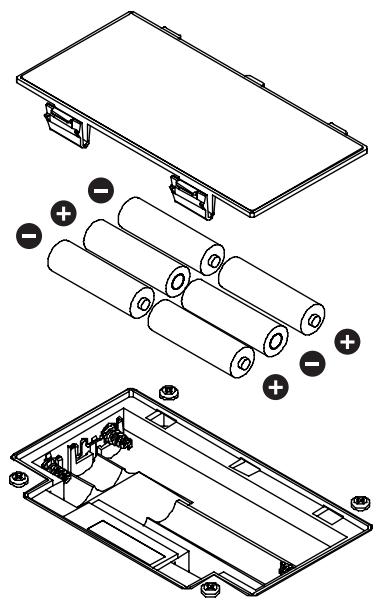
Insert the included batteries as shown in figure, being careful to orient the batteries correctly.

- When turning the unit upside-down, get a bunch of newspapers or magazines, and place them under the four corners or at both ends to prevent damage to the buttons and controls. Also, you should try to orient the unit so no buttons or controls get damaged.
- When turning the unit upside-down, handle with care to avoid dropping it, or allowing it to fall or tip over.
- Make sure the "+" and "-" ends of the batteries are oriented correctly.
- When the batteries run down, the POWER indicator gets dim. If this happens, replace with new batteries.
- When replacing the batteries, use six AA type.
- Avoid using new batteries together with used ones. In addition, avoid mixing different types of batteries. Doing so can result in fluid leakage.
- Battery life can vary depending on battery type.
MEMO
Continuous usage time under battery power is about 12 hours with alkaline batteries and about 3.5 hours with carbon batteries.
(This may vary according to usage conditions.)
Making the Connections
The ME-50 is not equipped with any internal amplifier or speakers. To listen to sound with the ME-50, connect it to a guitar amp, stereo headphones, or other such sound equipment.
- To prevent malfunction and/or damage to speakers or other devices, always turn down the volume, and turn off the power on all devices before making any connections.
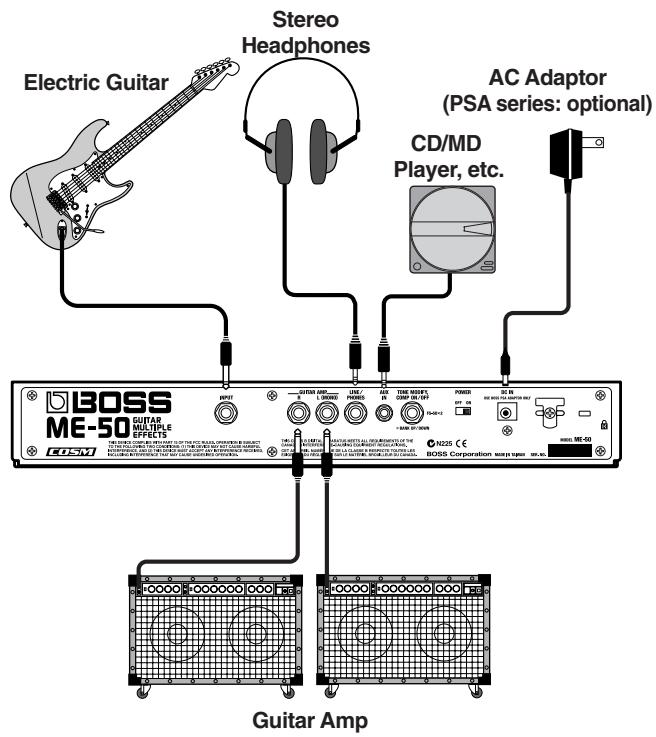
- To prevent the inadvertent disruption of power to your unit (should the plug be pulled out accidentally), and to avoid applying undue stress to the AC adaptor jack, anchor the power cord using the cord hook, as shown in the illustration.
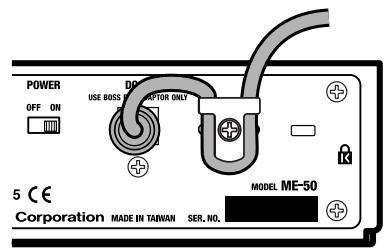
- When outputting monaurally, connect a cable only to the OUTPUT L (MONO) jack.
- Do not use a cable containing a resistor to connect CD or MD players to the AUX IN jack.
-
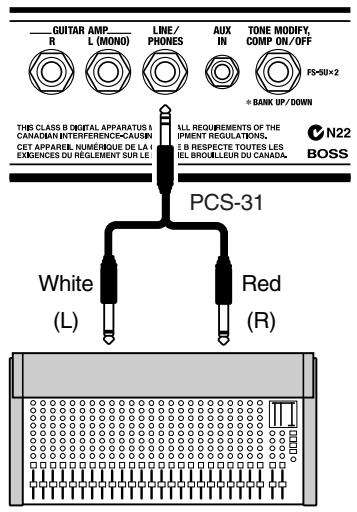
When you use the LINE/PHONES jack, the built-in guitar-amp simulator lets you enjoy impressive guitar sound, even with headphones.
-
Use a special cable (the optional PCS-31) to send output from the LINE/PHONES jack to equipment such as a mixer. Using an ordinary cable will cause only the left-channel sound to be output.
Turning on the Power
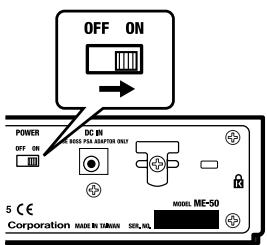
Once the connections have been completed, turn on power to your various devices in the order specified. By turning on devices in the wrong order, you risk causing malfunction and/or damage to speakers and other devices.
- (CD/MD Player)
- ME-50
-
Guitar Amp / Stereo, Etc.
-
Turn up the volume on amps and other equipment only after all connections are completed and the power for connected devices is turned on.
- This unit is equipped with a protection circuit. A brief interval (several seconds) after power up is required before the unit will operate normally.
Adjusting the Volume
Adjust the ME-50's volume with the MASTER LEVEL knob.
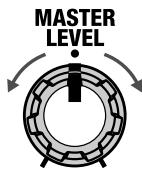
- Raising the MASTER LEVEL knob too much may result in sound distortion.
- When the effects are all off, input and output are at the same levels as when the MASTER LEVEL knob is at the center position.
- The setting of the MASTER LEVEL knob is stored in memory for each Patch (p. 20).
If There Is No Sound/If the Volume is Low
- Are connections to other devices correctly made?
Check the connections once more.
- Is the volume turned down?
Check the volume levels on any connected amp or mixer.
- Can you hear sound through the headphones when headphones are connected?
If you can hear sounds, it may be that there is a short in the cable used to connect the amp or other device, or perhaps a mistake in an external device's settings. Check the connecting cables and external devices once more.
- Has the level been lowered with the expression pedal?
Sounds are not output when the toe of the expression pedal is in the raised position while the pedal is set to function as a volume pedal. (p. 19)
Is the ME-50 in Tuner mode (p. 24)?
Output is muted in Tuner mode.
Is a cable containing a resistor being used to connect a CD or MD player to the AUX IN jack?
Using a cable containing a resistor may prevent sound from CD and MD players from being audible.
Turning Off the Power
- Turn down the volume of the ME-50 and any connected device.
- Turn off the power to Guitar Amp / Stereo, Multitrack Recorder, etc.
- Tuen the ME-50's power off.
Using the Effects

When the power is turned on, the ME-50 always switches to Manual mode, and the OVERDRIVE/DISTORTION, MODULATION, and DELAY are switched off.
- When the DELAY TYPE is set to HOLD, the DELAY indicator goes on, the DELAY pedal's indicator flashes at a fixed interval, indicating recording standby is enabled. (p. 17)
All product names mentioned in this document are trademarks or registered trademarks of their respective owners. Those companies are not affiliated with BOSS and have not licenced or authorized BOSS's ME-50. Their marks are used solely to identify the equipment whose sound is simulated by BOSS's ME-50.
About the Effect Connection Sequence
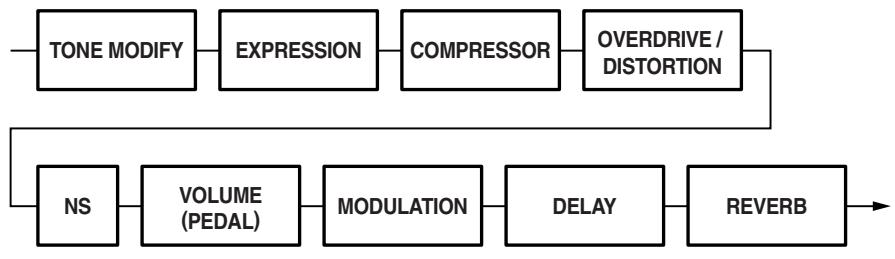
The ME-50 automatically selects the optimum sequence for connecting the effects according to the effect (p. 19) you select with the expression pedal.
- When WAH, RING MOD, +1OCTAVE, or -1OCTAVE is Selected
- When RESONANCE and VOICE is Selected
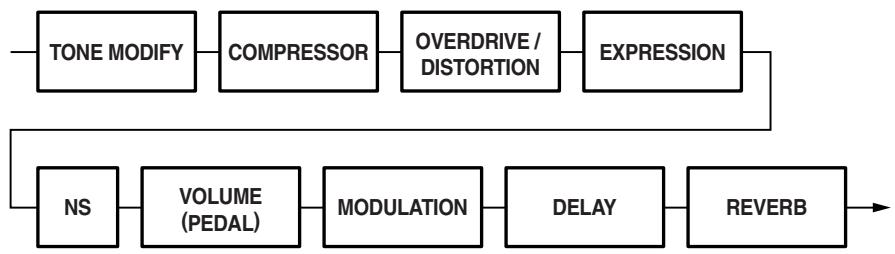
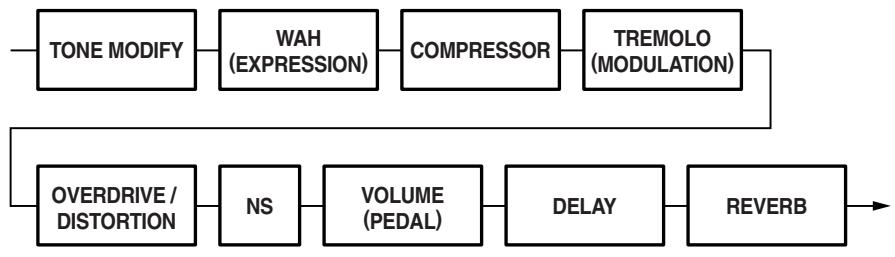
Also, when the MODULATION type is TREMOLO or UNI-V, MODULATION is connected before OVERDRIVE/DISTORTION.
(Example) EXPRESSION: WAH; MODULATION: TREMOLO
TONE MODIFY
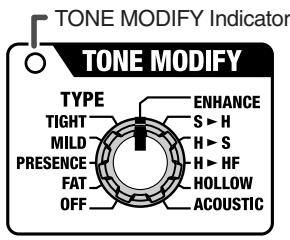
This changes the characteristics of the connected guitar.
TYPE knob
OFF
The sound is bypassed.
- When switched OFF, the TONE MODIFY indicator goes out.
FAT
Fat tone with boosted mid range.
PRESENCE
Bright tone with boosted high-mid range.
MILD
Mild tone with the high end cut back.
TIGHT
Tone with the low frequencies cut.
ENHANCE
Tone with the high frequencies boosted.
S▶H
Changes from a single-coil pickup tone to a humbucking pickup tone.
H▶S
Changes from a humbucking pickup tone to a mixed tone of two single-coil pickups.
HHF
Changes from a humbucking pickup tone to a single-coil pickup half tone.
HOLLOW
Adds body resonance to create a tone like that of an full-acoustic guitar.
ACOUSTIC
Changes the electric guitar's tone to that of an acoustic guitar.
Switching Tone Modify On and Off with the Foot Switch
With a foot switch (the optional FS-5U) connected to the FOOT SW jack on the rear panel, you can use the foot switch to switch Tone Modify on and off.
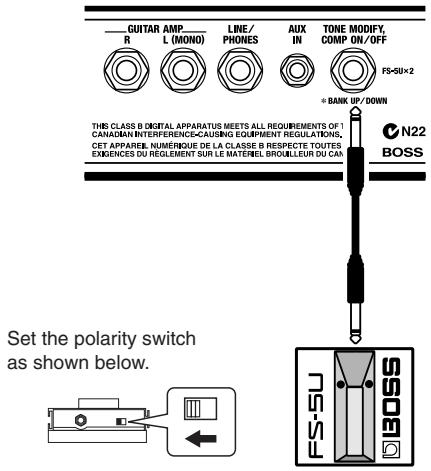
- When in Memory mode, the bank-switching function is enabled (p. 22).
MEMO
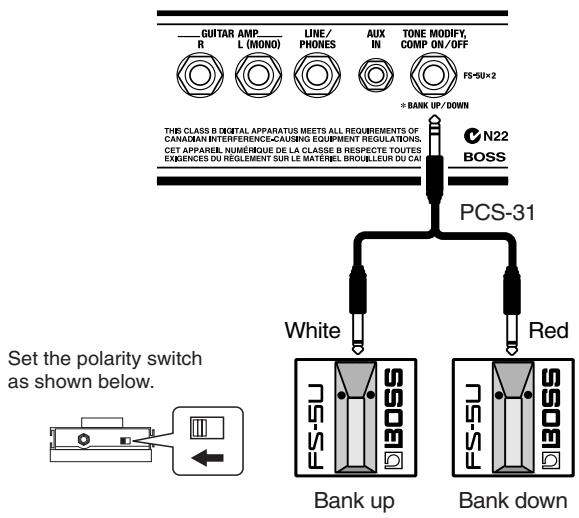
By connecting with a special cable (the optional PCS-31), you can connect two foot switches, one for Tone Modify ON/OFF, and one to switch the Compressor on and off (p. 10).
COMPRESSOR
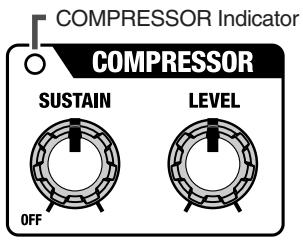
This is an effect that produces a long sustain by evening out the volume level of the input signal. You can also use it as a "limiter" to suppress only the sound peaks and prevent distortion.
SUSTAIN knob
This adjusts the depth of the effect. Turning it to the right (clockwise) produces a longer sustain. When using this as a limiter, turn the SUSTAIN knob to the left (counterclockwise).
- When not using the Compressor, turn the SUSTAIN knob to OFF. When switched OFF, the COMPRESSOR indicator goes out.
LEVEL knob
Adjusts the volume level when the Compressor is on. Use this in achieving a volume balance when switching the Compressor on and off.
Switching the Compressor On and Off with the Foot Switch
With the special cable (the optional PCS-31) used to connect two foot switches (the optional FS-5U) to the FOOT SW jack on the rear panel, you can use one foot switch for Tone Modify ON/OFF, and one to switch the Compressor on and off (p. **). Connect as shown below.
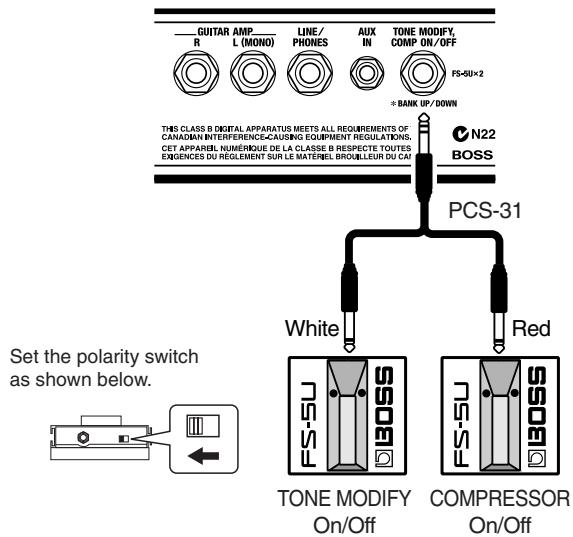
- When in Memory mode, the bank-switching function is enabled (p. 22).
OVERDRIVE/DISTORTION
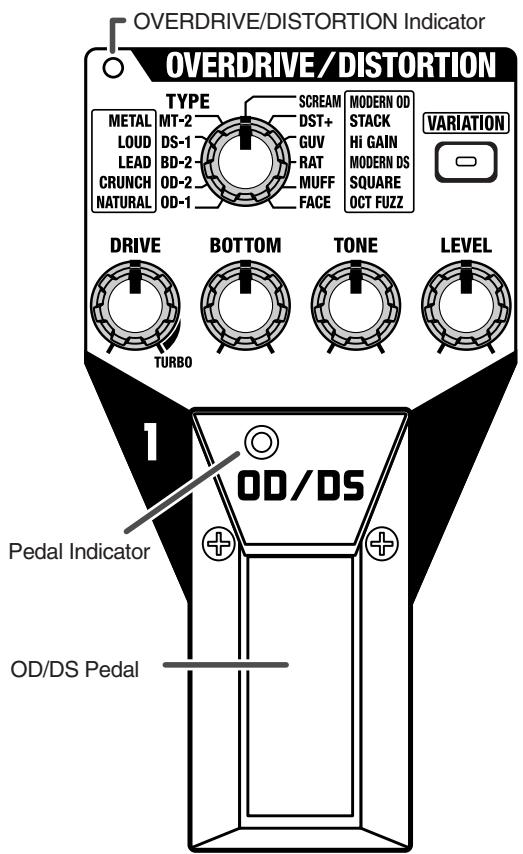
These are effects that distort the sound.
You can use the TYPE knob in combination with
[VIARIATION] to get 22 different types of distortion.
OD/DS pedal
Each time you press the pedal, the effect switches through Overdrive/Distortion ON and OFF. When switched on, the OVERDRIVE/DISTORTION indicator and pedal indicator light up.
DRIVE knob
Adjusts the amount of distortion. Turning the knob to the right (clockwise) creates a stronger distortion and increases the volume. Turning this all the way to the TURBO range increases the effect even more.
BOTTOM knob
Adjusts the low frequency range. Turning the knob to the left (counterclockwise) cuts the low end more; the low frequencies are boosted as the knob is turned to the right.
TONE knob
Adjusts the tone. Turning the knob to the left creates a milder sound; a sharper sound is produced as the knob is turned to the right.
LEVEL knob
Adjusts the volume.
- Noise may be mixed in if you turn the LEVEL knob up too high. Adjust the LEVEL knob so that the apparent volume level remains the same whether the effects are on or off.
Type List
| [VARIATION] Off | [VARIATION] Lit | ||
| OD-1 | Models the BOSS OD-1. | NATURAL | Overdrive that gives a more natural sounding distortion. |
| OD-2 | Models the BOSS OD-2. | CRUNCH | A lustrous crunch sound with an added element of amp distortion. |
| BD-2 | Models the BOSS BD-2. | LEAD | Produces a distortion sound with both the smoothness of an overdrive along with a deep distortion. |
| DS-1 | Models the BOSS DS-1. | LOUD | A heavy distortion with a boosted low end. |
| MT-2 | Models the BOSS MT-2. | METAL | An intense, radical distortion sound. |
| SCREAM | Models the Ibanez TS-808 TUBESCREAMER. | MODERN OD | Overdrive with special mid range tone. |
| DST+ | Models the MXR DISTORTION+. | STACK | A fat sound with an added element of a stack amp's distortion. |
| GUV | Models the Marshall GUV'NOR. | Hi GAIN | Sound of Overdrive through a stack amp. |
| RAT | Models the Proco RAT. | MODERN DS | Sound of a large high gain amp. |
| MUFF | Models the Electro-Harmonix Big Muff π. | SQUARE | Synth square wave sound. |
| FACE | Models the FUZZFACE. | OCT FUZZ | Fuzz sound produced by octave harmonics. |
MODULATION

An effect that broadens sound and adds undulations is called "modulation."
The ME-50 comes with 11 different types of Modulation effects. Select any one of these as the effect to be used.
MOD pedal
Depress the pedal to toggle Modulation on/off.
When switched on, the MODULATION indicator and pedal indicator light up.
TYPE knob
Select the effect to be used from the eleven effects available.
CHORUS
This chorus effect outputs the same sound from both L and R.
MEMO
"Chorus" adds a subtle sway to the guitar sound for a beautiful sound featuring more breadth and fullness.
RATE/KEY knob
Adjusts the rate of modulation.
DEPTH/HARMONY knob
Adjusts the depth of modulation.
E.LEVEL/RESONANCE knob
Adjusts the volume of the chorus sound.
ST CHORUS 1
This is a stereo chorus effect that adds different chorus sounds to L and R.
RATE/KEY knob
Adjusts the rate of modulation.
DEPTH/HARMONY knob
Adjusts the depth of modulation.
E.LEVEL/RESONANCE knob
Adjusts the volume of the chorus sound.
ST CHORUS 2
This is a stereo chorus effect produced by synthesizing the spatial characteristics of the direct sound and the effect sound.
RATE/KEY knob
Adjusts the rate of modulation.
DEPTH/HARMONY knob
Adjusts the depth of modulation.
E.LEVEL/RESONANCE knob
Adjusts the volume of the chorus sound.
PHASER
By adding varied-phase portions to the direct sound, adds a twisting "warp" effect to the sound.
RATE/KEY knob
Adjusts the rate of phaser effect.
DEPTH/HARMONY knob.
Adjusts the depth of phaser effect.
E.LEVEL/RESONANCE knob
Adjusts the amount of resonance.
FLANGER
Adds a undulation like that of a jet ascending or descending.
RATE/KEY knob
Adjusts the rate of flanging effect.
DEPTH/HARMONY knob
Adjusts the depth of flanging effect.
E. LEVEL/RESONANCE knob
Adjusts the amount of resonance.
HARMONIST
"Harmonist" is an effect which the amount of shifting is adjusted according to an analysis of the guitar input, allowing you to create harmonics based on diatonic scales.
- Because of the need to analyze the pitch, chords (two or more sounds played simultaneously) cannot be played.
RATE/KEY knob
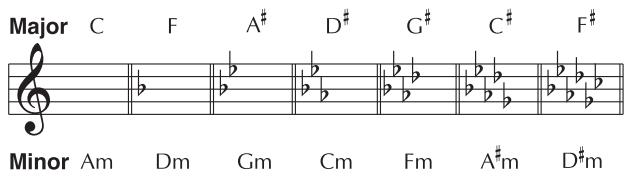
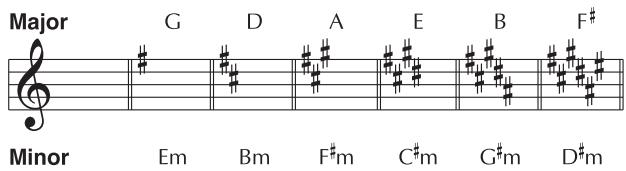
Specify the key of the song you are playing. By specifying the key, you can create harmonies that fit the key of the song.
The selected key is shown in the display.
The key setting corresponds to the key of the song (#, b) as follows.
DEPTH/HARMONY knob
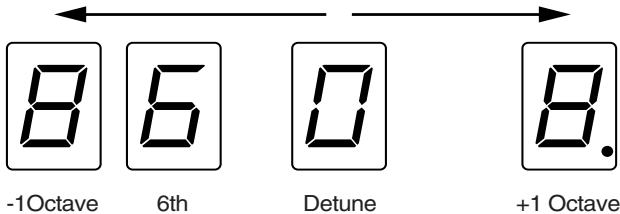
This determines the pitch of the sound added to the input sound, when you are making a harmony. It allows you to set it by up to 1 octave higher or lower than the input sound.
When set to "0," this yields a "detuned" effect that adds sound of slightly different pitch to the input sound.
E.LEVEL/RESONANCE knob
Adjusts the volume balance between the direct sound and the harmony sound.
TREMODO
Tremolo is an effect that creates a cyclic change in volume.
RATE/KEY knob
Adjusts the frequency (speed) of the change.
DEPTH/HARMONY knob
Adjusts the depth of the effect.
- Operating the E.LEVEL/RESONANCE knob produces no effect.
PAN
With the volume level of the left and right sides alternately changing, when playing sound in stereo, you can get an effect that makes the guitar sound appear to fly back and forth between the speakers.
RATE/KEY knob
Adjusts the frequency (speed) of the change.
DEPTH/HARMONY knob
Adjusts the depth of the effect.
- Operating the E.LEVEL/RESONANCE knob produces no effect.
VIBRATO
This effect creates vibrato by slightly modulating the pitch.
RATE/KEY knob
Adjusts the rate of the vibrato.
DEPTH/HARMONY knob
Adjusts the depth of the vibrato.
- Operating the E.LEVEL/RESONANCE knob produces no effect.
UNI-V
Although this resembles a phaser effect, it also provides a unique undulation that you can't get with a regular phaser.
RATE/KEY knob
Adjusts the rate of the UNI-V effect.
DEPTH/HARMONY knob
Adjusts the depth of the UNI-V effect.
E.LEVEL/RESONANCE knob
Adjusts the volume of the UNI-V effect.
ROTARY
Produces the effect of a rotary speaker.
RATE/KEY knob
Adjusts the speed of rotation for the speaker.
DEPTH/HARMONY knob
Adjusts the depth of the rotary effect.
E. LEVEL/RESONANCE knob
Adjusts the volume of the rotary effect.
Adding an Effect Synchronized to the Performance Tempo
When any effect other than HARMONIST is selected, you can set the tempo so you get an effect that is synchronized to the performance tempo.
-
The allowable rate cycles for the tempo settings range from 62 ms to 2000 ms.
-
Hold down the MOD pedal for at least two seconds.
-
If the MOD pedal is pressed when the effect is on, the pedal indicator goes out, and the effect is turned off.
- If the MOD pedal is pressed when the effect is off, the pedal indicator turns red, and the effect is turned on.
When you continue to depress the pedal, after two seconds the pedal's indicator starts to flash, and the tempo can then be set with the effect on.
Here, the tempo is indicated by the value set with the RATE/KEY knob.
- Press the MOD pedal in timing with the tempo more than two times.
The tempo is set according to the time interval between each press of the pedal. The pedal indicator flashes in time with the tempo.
MEMO
Setting the RATE near the desired tempo beforehand allows you to make faster and more natural tempo settings.
- Hold down the MOD pedal for at least two seconds to complete the tempo setting.
The effect goes on, and instead of flashing, the pedal indicator will light.
- If you move the RATE/KEY knob after finishing this setting, the rate corresponding to the knob position takes effect.
DELAY
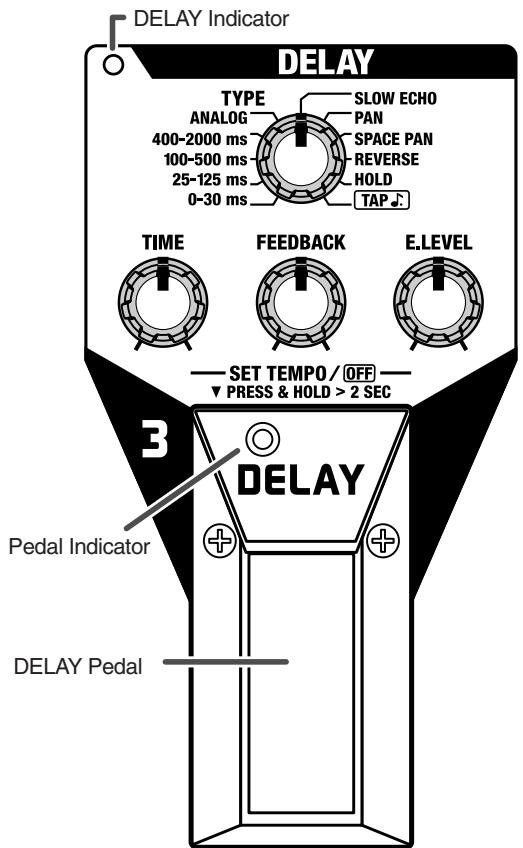
This effect adds delayed sound to the direct sound, giving more body to the sound or creating special effects.
DELAY pedal
The Delay is switched on or off each time you press the pedal. When switched on, the DELAY indicator and pedal indicator light up.
- DELAY ON/OFF switches the Delay at the input to provide a more natural effect. For this reason, if the FEEDBACK is turned up when the Delay is turned off, the delay sound will remain briefly.
TYPE knob
Sets the type of the delay
- When a setting other than HOLD is selected, you can use the DELAY pedal to input the tempo, and set the delay time synchronized to the performance tempo.

"TAP(p.16)
"Adding Synchronized Delay to the Performance Tempo" (p. 16)
0-30 ms
Delay sound of 0 to 30~ms delay time.
25-125 ms
Delay sound of 25 to 125ms delay time.
100-500 ms
Delay sound of 100 to 500ms delay time.
400-2000 ms
Delay sound of 400 to 2000ms delay time.
ANALOG
This gives a mild analog delay sound. The delay time can be set within the range of 100ms to 500ms .
SLOW ECHO
This produces an effect combining a volume-swell sound with delay. The delay time can be set within the range of 200 ms to 1000 ms.
PAN
A panned delay in which the repeated sounds come alternately from the left and right channels. The delay time can be set within the range of 200ms to 1000ms .
- When using the ME-50 in mono, the panning delay is not effective, even when PAN is selected.
SPACE PAN
This is a panning delay that gives an even wider spatial effect than PAN. The delay time can be set within the range of 200 ms to 1000 ms.
- When using the ME-50 in mono, or when using headphones, the panning delay is not effective, even when SPACE PAN is selected.
REVERSE
This produces an effect where the sound is played back in reverse.
You can get two different effects, "direct sound + effect sound," or "effect sound only," depending on the position of the E. LEVEL knob. When the E. LEVEL knob is turned up to MAX, the unit switches to "effect sound only."
The delay time can be set within the range of 400ms to 2000 ms.
HOLD
Up to 2 seconds of performance content is recorded, then played back repeatedly. You can also layer this as you perform something else, then record these together (overdub).
You can keep the recorded content playing continuously as backing and produce other special effects.

"Using the HOLD Function"

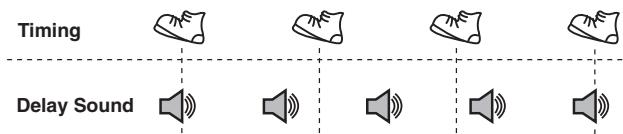
This is a tempo delay that lets you set a dotted eighth note delay time for the performance tempo by pressing the DELAY pedal in time with the performance tempo.
-
The delay time can be set within the range of 46.5 ms to 1500 ms.
-
Set the TYPE knob to "TAP"
The pedal indicator flashes in time with the current tempo.
- Press the DELAY pedal in timing with the tempo more than two times.
The reference tempo is determined by the time interval between each press of the pedal. The reference tempo is calculated in terms of quarter notes, and the delay time setting is the dotted eight note as referenced to the reference tempo.
The pedal indicator flashes in time with the tempo.
TIME knob
Adjuts the delay time.
- When the type is set to "HOLD" or "TAP", "operating the TIME knob produces no effect.
FEEDBACK knob
Adjusts the amount of feedback (number of repeats). Turning the knob to the right increases the number of times the sound repeats.
- When the type is set to "HOLD," operating the FEEDBACK knob produces no effect.
E. LEVEL knob
Adjusts the volume of the delay sound. When TYPE is set to REVERSE, this adjusts the balance of direct and effect sound.
Adding a Delay Synchronized to the Performance Tempo
Using tempo input, the delay time can be set within the range of 62 ms to 2000 ms.
You can set this regardless of whether the effect is on or off.
- Select the delay type. (except HOLD, TAP)
-
Hold down the DELAY pedal for at least two seconds.
-
If the DELAY pedal is pressed when the effect is on, the pedal indicator goes out, and the effect is turned off.
- If the DELAY pedal is pressed when the effect is off, the pedal indicator turns red, and the effect is turned on.
When you continue to depress the pedal, after two seconds the pedal's indicator starts to flash, and the tempo can then be set with the effect on.
Here, the delay time is indicated by the value set with the TIME knob.
- Press the DELAY pedal in timing with the tempo more than two times.
The delay time is set according to the time interval between each press of the pedal.
The pedal indicator flashes in time with the tempo.
- Press the pedal to set the tempo while no guitar sound is playing.
-
When the type is set to "PAN" or "SPACE PAN," the delay time is set to half the interval between the presses of the pedal.
-
Hold down the pedal switch for at least two seconds to complete the tempo setting.
The effect goes on, and instead of flashing, the pedal indicator will light.
- The tempo may become confused momentarily when you go from Step 3 to Step 4.
- If you move the TIME knob after finishing this setting, the delay time corresponding to the knob position takes effect.
Write Procedures (p. 21) When the Tempo Has Been Set
The delay time stored in a Patch (p. 20) is determined as follows.
- If it is within the delay time range that can be set for the type currently selected, it is stored without change.
- If it exceeds the maximum delay time that can be set for the type currently selected, the maximum value for the type is stored.
- If it is less than the minimum delay time that can be set for the type currently selected, the minimum value for the type is stored.
(Example) When TYPE is 100-500 ms
When the delay time for the tempo setting is 600 ms: Stored as 500 ms.
When the delay time for the tempo setting is 80 ms: Stored as 100 ms.
Using the HOLD Function
- Set the TYPE knob to HOLD.
The unit goes into recording standby and the pedal's indicator flashes at a fixed interval.
- After switching to HOLD, wait two seconds before you carry out the next operation.
- Press the DELAY pedal to start recording.
Recording starts when you press the DELAY pedal. Hold down the pedal switch for the duration of the recording (the pedal indicator flashes).
- Release the DELAY pedal to stop recording.
Playback of the recorded content begins simultaneously (the CHECK indicator remains lit).
- The maximum recording time is 2 seconds. If the DELAY pedal is held down for more than 2 seconds, the recording stops automatically, and the recorded content is then played back.
-
An oscillating sound may be audible with extremely short recording times.
-
When layering recordings, repeat Steps 2 and 3.
- Adjust the volume
Adjust the volume of the playback sound with the E. LEVEL knob.
- Press the pedal switch to stop the playback (the pedal indicator goes out).
The unit returns to recording standby, and the pedal's indicator flashes at a fixed interval.
- When playback is stopped, the recorded content is erased.
- To start recording again, wait two seconds, then carry out step 2.
This effect reduces the noise and hum picked up by guitar pickups. Since it suppresses the noise in synchronization with the envelope of the guitar sound (the way in which the guitar sound decays over time), it has very little effect on the guitar sound, and does not harm the natural character of the sound.
THRESHOLD knob
Adjust this parameter as appropriate for the volume of the noise. If the noise level is high, a higher setting is appropriate. If the noise level is low, a lower setting is appropriate. Adjust this value until the decay of the guitar sound is as natural as possible.
- Turn the knob to OFF when not using the noise suppressor. When switched OFF, the NS indicator goes out.
- High settings for the threshold parameter may result in there being no sound when you play with your guitar volume turned down.
REVERB
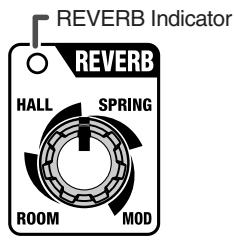
This effect adds reverberation to the sound.
Use the knob to switch to any of four different reverb, ROOM, HALL, SPRING, or MOD. You can adjust the amount of effect applied according to the knob position.
- The panel markings for ROOM, HALL, SPRING, or MOD are for approximate settings. Check the sound of the effects as you make adjustments.
- The indicator is lit when Reverb is on, and goes off when Reverb is turned off.
ROOM
This simulates the reverb sound of a smaller room.
HALL
This simulates the reverb sound of a larger hall.
SPRING
This simulates the sound of a guitar amp's built-in spring reverb.
MOD
This is a reverb that adds modulation to the hall reverb to produce an extremely pleasant reverb sound.
Pedal
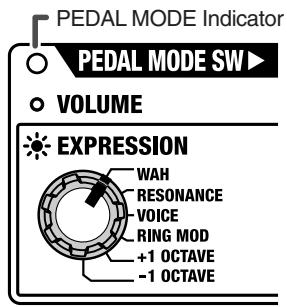
You can make the setting that determines whether the ME-50's expression pedal functions as a volume pedal or as an expression pedal. In addition, when using it as an expression pedal, you can use it to control one of the special pedal effects that you select.
Using the Pedal as a Volume Pedal
When using the expression pedal as a volume pedal, press the expression pedal all the way forward and then give it a stronger push, the PEDAL MODE indicator goes off.
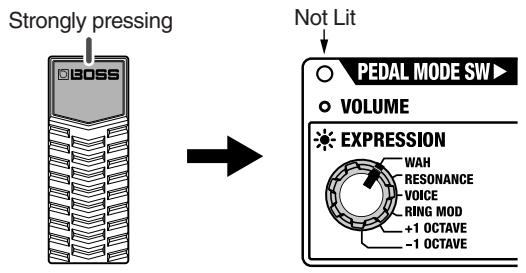
The volume decreases as the pedal's toe is raised, and increases when the pedal is pressed down.
Using the Pedal as an Expression Pedal
When using the pedal as an expression pedal, press the expression pedal all the way forward and then give it a stronger push, the PEDAL MODE indicator lights up.
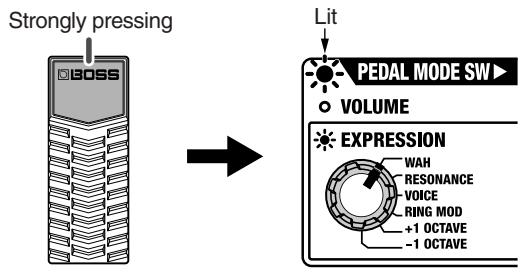
You can select one of the following effects with the expression pedal.
WAH
The effect will function as a pedal wah.
RESONANCE
This completely original effect offers enhancements on the characteristic resonances produced by analog synth filters. Using the effect in combination with the OVERDRIVE/ DISTORTION TYPE set to "SQUARE" produces a sound like a synthesizer.
And using it together with delay, chgorus, and reverb makes them even more effective.
VOICE
A further advancement beyond the BOSS HUMANIZER, this effect produces "talking" modulation sounds and realistic human voice sounds.
RING MOD
This is an effect that crosses the ME-50's internal oscillator with the guitar source sound to change the sound to a metallic sound devoid of any feeling of pitch.
Pressing the pedal down even more changes the internal oscillator's frequency, creating a particular undulation sound.
- Because of the need to analyze the pitch, chords (two or more sounds played simultaneously) cannot be played.
+1 OCTAVE
Allows the pitch to be raised up to one octave above the original guitar sound.
- Because of the need to analyze the pitch, chords (two or more sounds played simultaneously) cannot be played.
-1 OCTAVE
Allows the pitch to be lowered up to one octave below the original guitar sound.
- Because of the need to analyze the pitch, chords (two or more sounds played simultaneously) cannot be played.
Saving and Loading the Created Tones (Memory Mode)
The ME-50 features a "Memory mode" that allows you to store the various settings within the ME-50 itself, and then call up and use the settings.
Switching Between Manual and Memory Mode
The mode in which the tone produced reflects the panel settings just as they are is called "Manual mode." A dot appears in the display when the ME-50 is in Manual mode.
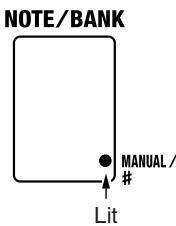
- When switching from Manual mode to Memory mode, press the No. 2 and No. 3 pedals simultaneously; this causes the MEMORY indicator to light up (and the dot in the display disappears).
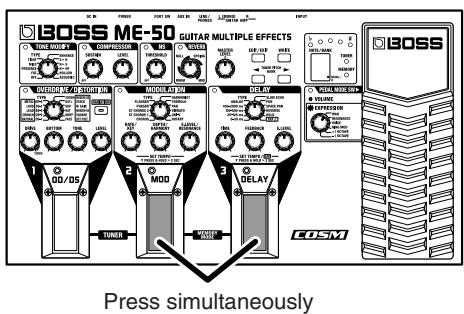
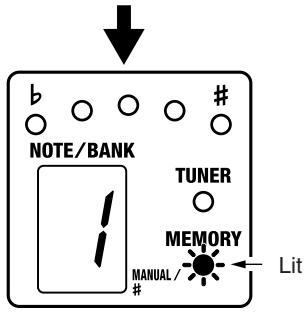
- Pressing the No. 2 and 3 pedals at the same time while in Memory mode switches you to Manual mode.
- Manual mode is the power-up default mode of the ME-50.
About the Patch
When actually performing on a guitar, a variety of tones are required to suit whatever the situation may be. The effects that you may want to have turned on and parameter settings for such effects vary according to the selected tone.
With the ME-50, you can set these parameters, volume levels, and so on, store a number of the aggregate settings in memory, and use the pedals to switch the stored settings, allowing you to change tones instantly.
Such stored sets of settings are known as "Patches." You can create up to 30 Patches.
The thirty patches are divided into ten "banks," each of which contains three patches.
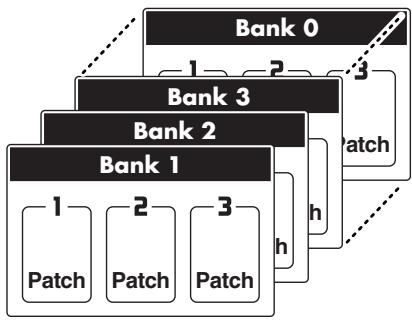
- The setting for the MASTER LEVEL knob is also stored individually for each patch.
Write Procedure
The "Write procedure" enables you to save the created tone settings using the panel knobs and pedals, MASTER LEVEL knob setting, and expression pedal settings to Patches.
- You can carry out the Write procedure in both Manual mode and Memory mode.
- If the Write procedure is not carried out, then the tone you have created is erased when the power is turned off or when you switch to a different Patch.
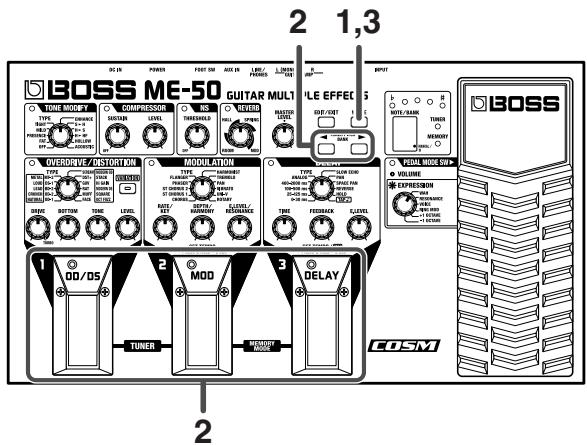
1. Press [WRITE].
The MEMORY indicator flashes. At the same time, the bank indication in the display and the pedal indicator flash, and the currently selected Patch Bank and Number are shown.
2. Select the Patch to be used as the save destination.
Press BANK[ ] [ ] to select the bank.
Press a number pedal (1-3) to select the number.
- To stop the Write procedure, press [EDIT/EXIT], and return to the previous mode.
3. Press [WRITE] once more.
The tone is stored, and Memory mode is then enabled (the MEMORY indicator lights up).
- When a Write procedure is performed while the DELAY type is set to "TAP" (p. 16) and DELAY is on, after the operation the indicator for the number pedal where the tone was stored flashes to indicate that you can input the tempo.
- When a Write procedure is carried out while the DELAY type is set to "HOLD" (p. 16), after the operation the indicator for the number pedal where the tone was stored flashes at a fixed interval to indicate that recording standby is enabled.
![BOSS ME-50 - Press [WRITE] once more. - 1](/content/2025/01/151956/images/49c0551105f984011d092fb0c3d744709eab967a821e39c45f6dad16d2d32afa.jpg)
The tone stored in the patch designated as the save destination is erased once the Write procedure is executed.
Calling Up and Using Stored Tones (Patch Change)
To switch patches, use BANK [ ] [ ] and the number pedals (1-3).
- Bank 1, Number 1 is always selected at first when Memory mode is entered after the power is turned on.
Switching Numbers
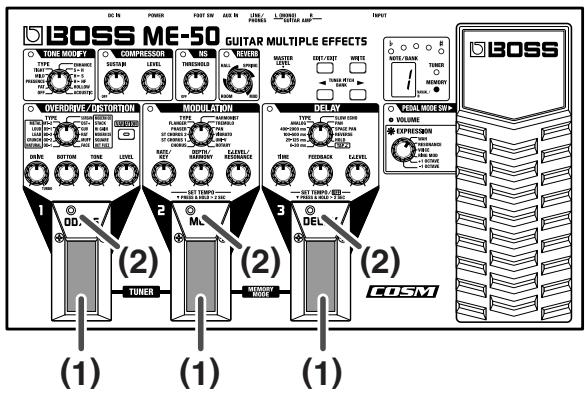
When the number pedal (1) is pressed, the number indicator (2) above the pedal lights up, the patch with that number in the currently selected group and bank is called up, and the tone is switched instantly.
Switching Banks
The bank is switched each time the BANK [] [] (1) is pressed. The currently selected bank flashes in the Display (2). (At this time, tones are not yet switched.)
- You can switch among ten banks 1-0.
While in this state, if you press any of the number pedals (3), the tone instantly switches to the sound of the patch at the currently selected bank/number.

If the Patch Does Not Change
Is the ME-50 in Manual mode (p. 20)?
Is the ME-50 in Patch Edit mode (p. 23)?
Is the ME-50 in Tuner mode (p. 24)?
Switching Banks with the Foot Switch
With a foot switch (the optional FS-5U) connected to the FOOT SW jack on the rear panel, you can use the foot switch to switch Banks (switching up).
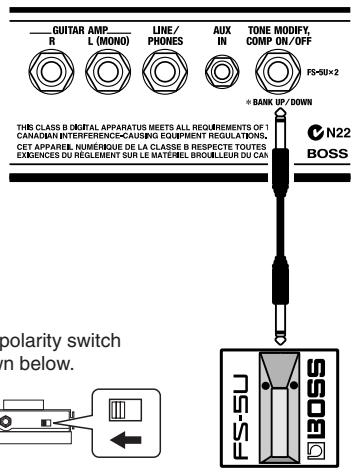
By connecting with a special cable (the optional PCS-31), you can connect two foot switches, and use them to switch Banks up and down.
Notes When Using Memory Mode
About Tone Changes
By operating the knobs, you can change the tone of a patch while it's called up. Note, however, that the changed tone is only temporary, and will be lost when you switch patches or switch to the Tuner mode (p. 24).
If you want to store it in memory, carry out the Write procedure (p. 21).
- If there is a discrepancy between the current knob position and the parameter stored in the patch, the change in the parameter begins at the point when the knob is moved past the position matching the parameter value as stored in the patch.
- In Memory mode, you cannot switch effects on or off using the No. 1, 2, and 3 pedals.
About the Tempo Setting
If you hold down the currently selected number pedal for at least two seconds, the pedal indicator flashes, and the ME-50 switches to tempo setting mode, and the number pedal can then be used to input the tempo.
The unit functions as follows depending on the on/off status of MODULATION and DELAY.
- When DELAY and MODULATION are both off, you cannot change to tempo setting mode.
When DELAY is ON (but TYPE is not set to HOLD or TAP).
You can use the tap input to set the delay time.
- If both DELAY and MODULATION are on, only the delay can be set.
When MODULATION is ON
You can set the RATE for the effect selected with the TYPE knob (except for HARMONIST).
Note, however, that the tempo setting is only temporary, and will be lost when you switch patches or switch to the Tuner mode (p. 24).
If you want to store it in memory, carry out the Write procedure (p. 21).
About the DELAY HOLD
When DELAY is ON and a Patch that has a TYPE setting of HOLD is called up, the pedal indicator flashes slowly, indicating that the ME-50 is in recording standby. Afterwards, the following conditions are in effect.
- Holding down the number pedal: begins recording
- Releasing the number pedal: stops recording, starts Loop Playback
- Continuing to press the pedal over and over: overdub recording
- Pressing the Pedal rapidly; releases the HOLD, switches to recording standby
DELAY TAP
When DELAY is ON and a Patch that has a TYPE setting of TAP is called up, the pedal indicator flashes, and you can then set the delay time (p. 16) using tap input.
Changing the Patch Settings (Patch Edit mode)
Use the following procedure when editing the settings of a Patch you have called up.
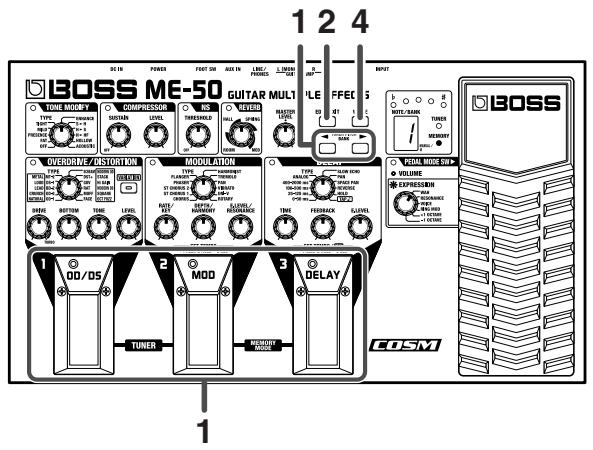
- Switch to the Patch whose settings you want to edit (p. 21).
- Press [EDIT/EXIT].
The MEMORY indicator flashes, and editing of the Patch settings is enabled (Patch Edit mode).
- Use the knobs and pedals to change the settings.
When settings are changed, the indicator for the changed effect flashes (except for MASTER LEVEL).
When the OVERDRIVE/DISTORTION type is changed to VARIATION, the [VARIATION] indicator flashes.
-
If there is a discrepancy between the current knob position and the parameter stored in the patch, the change in the parameter begins at the point when the knob is moved past the position matching the parameter value as stored in the patch.
-
If you want to save the contents of your edit, carry out the Write procedure. (p. 21)
-
Pressing [EDIT/EXIT] switches you to Memory mode without saving the settings.
- When the unit is not in Patch Edit mode, you cannot switch the following effects on or off.
OVERDRIVE/DISTORTION
- MODURATION
- DELAY
* Operating OVERDRIVE/DISTORTION [VARIATION] does not make the tone change until the position of the OVERDRIVE/DISTORTION TYPE knob matches the settings stored in the patch.
Convenient Functions
Tuning the Guitar (Tuner)
The ME-50 features a built-in chromatic auto-tuner, which allows you to tune your guitar easily, without any need to change any of your connections.
Moreover, the sound output is muted in Tuner mode, making it unnecessary for you to turn down your amp volume each time you tune.
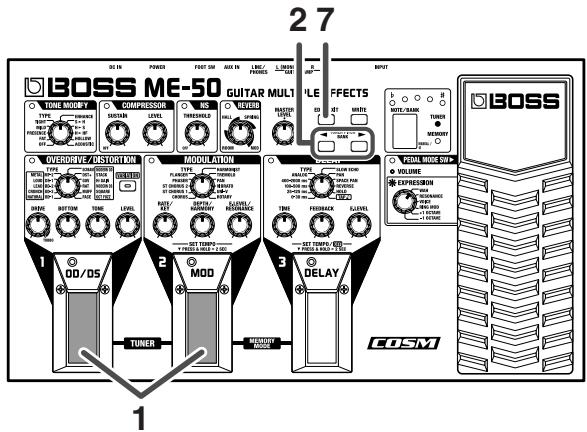
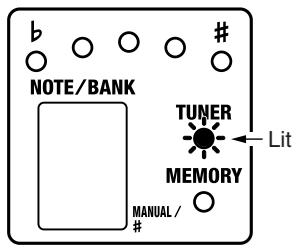
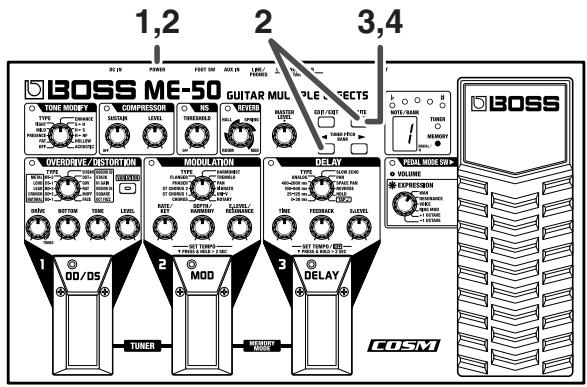
- Press the number 1 and 2 pedals simultaneously to switch to Tuner mode.
The TUNER indicator lights.
- Tune to the reference pitch.
You can change the reference pitch by pressing TUNER PITCH [ ] [▶]. The reference pitch can be set in one-Hertz units in the range of 435 - 445Hz .
| Display | 5-9 | 0 | 1.-5. (dot flash) |
| Pitch (Hz) | 435-439 | 440 | 441-445 |
-
If changing the reference pitch, always be sure to exit Tuner mode before turning off the power. The new setting is stored upon exiting Tuner mode. If you turn off the power with the ME-50 still in Tuner mode, the changed reference pitch is not saved.
-
Play a single note on the string to be tuned; play the string open.
The name of the note closest to the string that is played appears in the Display.
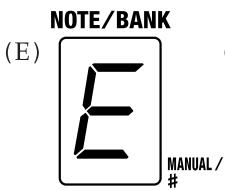
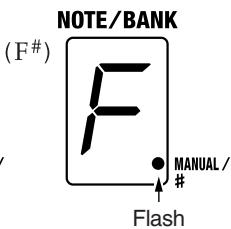
- The dot (flash) in the lower right of the Display changes to a sharp sign (#).
-
Use your hand or other way to mute the other strings. You may be unable to tune the string accurately if other strings are vibrating during tuning.
-
First do a rough tuning so that the name of the note for the string appears in the display.
(General Tuning)
| 7th | 6th | 5th | 4th | 3rd | 2nd | 1st | |
| Regular | B | E | A | D | G | B | E |
| 1/2 step Down | A# | D# | G# | C# | F# | A# | D# |
| 1 step Down | A | D | G | C | F | A | D |
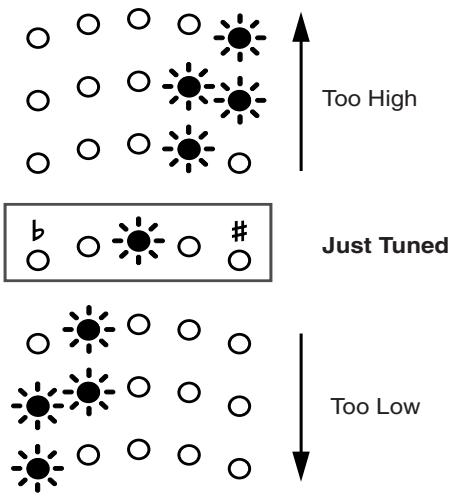
- Tune the instrument even more accurately until the tuning meter's center (green) indicator is lit.
- Repeat Steps 3-5 to tune the other strings.

One useful technique that makes tuning less confusing is to start slightly under the target pitch and then tune upwards little by little until the string is in tune.
- When tuning guitars equipped with tremolo arms, you may find that after tuning one string, other strings may go out of tune. In such instances, first do a rough tuning of each string in order to get them close to their respective notes, then repeat with the fine-tuning of each string.
7. Press [EDIT/EXIT] to return to the previous mode.
You can also return to the previous mode by pressing the number 1 and 2 pedals simultaneously.
Practicing Along with CDs and MDs (AUX IN)
When playing CDs, MDs, tapes, or other such input, connect the CD or MD player, tape recorder, or other device to the AUX IN jack.
- AUX IN is a stereo mini jack.
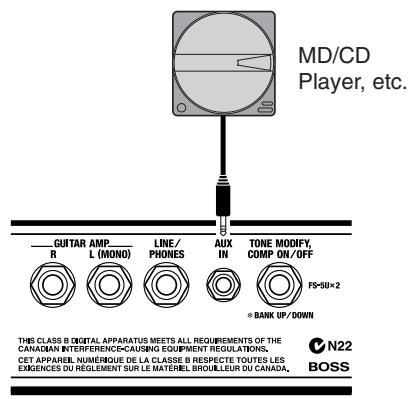
Sound input to the AUX IN jack is mixed in the ME-50 with the guitar sounds, a convenient feature when using headphones for home practice and other such situations.
- On the ME-50, you cannot adjust the volume level of the sound input from the AUX IN jack. Adjust this on the connected equipment.
- Do not use a cable containing a resistor to connect CD or MD players to the AUX IN jack. If a cable incorporating resistance is used, audio from CD and MD players may become inaudible.
Appendices
Returning the ME-50 to Its Factory Settings (Factory Reset)
You can restore all of the ME-50's settings (thirty patches and tuner reference pitch) to what they were at the time the unit was shipped from the factory.
This is referred to as "Factory Reset."
To perform Factory Reset, carry out the following steps.
- Turn off the power.
- While simultaneously pressing BANK [ ] and [WRITE], turn on the power.
"F" appears in the Display.
-
To cancel Factory Reset, first turn off the power, and then turn it on again.
-
Press [WRITE].
The MEMORY indicator flashes.
- Press [WRITE] once more.
"F" flashes in the Display, and Factory Reset is executed.

Never turn off the power while Factory Reset is in progress.
when Factory Reset is completed, the ME-50 returns to Manual mode.
Adjusting the Expression Pedal
Although the ME-50's expression pedal has been set for optimum operation at the factory, extended use and the operating environment can result in the pedal going out of adjustment.
If you encounter problems such as being unable to switch the PEDAL MODE SW on or off or fully cut off the sound with the volume pedal, you can use the following procedure to readjust the pedal.

When you operate the expression pedal, please be careful not to get your fingers pinched between the movable part and the panel.

In households with small children, an adult should provide supervision until the child is capable of following all the rules essential for the safe operation of the unit.
- While simultaneously pressing BANK [▶] and [WRITE], turn on the power.
"P" appears in the Display, then changes to "U."
- Press the heel of the expression pedal to the base, press [WRITE].
"d" appears in the Display.
- Press the toe of the expression pedal to the base, press [WRITE].
"5" appears in the Display.
- Adjust the PEDAL MODE SW.
Press BANK [ ] [ ] to set the value (1-9).
The smaller the value, the lighter is the depression force needed to switch the pedal on or off.
- Press [WRITE].
Save the settings in memory, then return to Manual mode.
- If the TUNING indicator flashes during steps 2 and 3, press the pedal again, then press [WRITE].
Troubleshooting
If there is no sound, or if it appears the ME-50 is not functioning correctly, first check the points below.
If the following measures do not solve the problem, contact your dealer or the nearest Roland Service Center.
No Sound/Volume is Low
- Are connections to other devices correctly made?
Check the connections once more.
- Is the volume turned down?
Check the volume levels on any connected amp or mixer.
- Can you hear sound through the headphones when headphones are connected?
If you can hear sound, it may be that there is a short in the cable used to connect the amp or other device, or perhaps a mistake in an external device's settings. Check the connecting cables and external devices once more.
- Are volume-related parameters set to a low value?
Check "LEVEL" and other volume parameters to make sure none is set too low.
- Has the level been lowered with the expression pedal?
Sound is not output when the toe of the expression pedal is in the raised position while the pedal is set to function as a volume pedal.
Is the ME-50 in Tuner mode (p. 24)?
Output is muted in Tuner mode.
Patches Cannot Be Changed
Is the ME-50 in Manual mode (p. 20)?
Is the ME-50 in Patch Edit mode (p. 23)?
Is the ME-50 in Tuner mode (p. 24)?
Specifications
ME-50:Guitar Multiple Effects
AD Conversion
24 bit + AF method (*)
DA Conversion
24 bit
Sampling Frequency
44.1 kHz
Patches
30 (user)
Effects
Tone Modify
Compressor
Overdrive/Distortion
Chorus
Phaser
Flanger
Harmonist
Tremolo
Pan
Vibrato
UNI-V
Rotary
Delay
Reverb
Noise Suppressor
Effects for Expression Pedal
Foot Volume
Wah
Resonance
Voice
Ring Modulator
Bend (+1 OCTAVE, -1 OCTAVE)
Nominal Input Level
INPUT: -10 dBu
AUX IN: -10 dBu
- Input Impedance
INPUT: 1M
AUX IN: 100k
Nominal Output Level
-10 dBu
- Output Impedance
2 kΩ
Display
7 segments, 1 character LED
- Jacks
INPUT jack
GUITAR AMP jacks L(MONO)/R
AUX IN jack (Stereo Mini type)
PHONES/LINE OUT jack
AC Adaptor jack
Power Supply
DC 9 V: Dry batteries (R6/LR6 (AA) type) × 6 , AC
Adaptor (PSA series: Optional)
Current Draw
120mA
- Expected battery life under continuous use:
Carbon: 3.5 hours
Alkaline: 12 hours
These figures will vary depending on the actual
conditions of use.
- Dimensions
3.15kg / 7 lbs (including batteries)
- Accessories
Owner's Manual
Dry Batteries (Alkaline: LR6 (AA) type) × 6
Roland Service (Information Sheet)
- Options
AC Adaptor: BOSS PSA series
Foot Switch: BOSS FS-5U
- 0 ~dB u = 0.775 ~V r m s

In the interest of product improvement, the specifications and/or appearance of this unit are subject to change without prior notice.
(*) AF method (Adaptive Focus method)
This is a proprietary method from Roland that vastly improves the signal-to-noise (S/N) ratio of the A/D and D/A converters.
Patch List
| BANK | NO. | Description |
| 1 | 1 | Lead distortion sound with sustain. |
| 2 | Loud rock Patch effective with low sound. | |
| 3 | Persistent twin lead sound. | |
| 2 | 1 | Solid drive sound, perfect for lead. |
| 2 | Crunch sound with particularly rough distortion. | |
| 3 | Organ style Patch that uses the ROTARY effect. | |
| 3 | 1 | Patch with stack amp style distortion. |
| 2 | Clean sound effective when used with delay. | |
| 3 | Patch that provides a wah effect when the pedal is used. | |
| 4 | 1 | Mild lead sound resembling that of the BOSS OD-1. |
| 2 | Overdrive sound with particular midrange quality. | |
| 3 | Patch that is just right for Blues. | |
| 5 | 1 | Lead sound with smooth distortion. |
| 2 | Patch that is perfect for use with country music. | |
| 3 | Jazz guitar sound. Effective when used with a front pickup. | |
| 6 | 1 | Overdrive sound with deep distortion. |
| 2 | Patch combining crunch sound with spatial effects. | |
| 3 | Wah sound that is perfect for rhythm cutting. | |
| 7 | 1 | Sound with the depth of chorus added—good for lead. |
| 2 | The British rock sound of the '60s. | |
| 3 | A fantastic clean sound that uses a phaser effect. | |
| 8 | 1 | Extreme distortion sound, perfect for heavy metal. |
| 2 | Patch using the UNI-V for a particularly heavy twisting effect. | |
| 3 | Acoustic guitar sound. | |
| 9 | 1 | Hard rock sound of the '70s. |
| 2 | Sound for rhythm cutting combining COMPRESSOR and PHASER. | |
| 3 | Synth sound that uses square wave. Good for use with tapping. | |
| 0 | 1 | '60s surf rock sound. |
| 2 | Patch that lets you use the pedal to raise the pitch up to one octave. | |
| 3 | Synth sound combining vibrato and slow echo. |
Factory Settings
| BANK | NO. | TONE MODIFY | Expression Pedal | COMPRESSOR | OVERDRIVE/DISTORTION | ||||||
| TYPE | PEDAL MODE | EXPRESSION | SUSTAIN | LEVEL | TYPE | DRIVE | BOTTOM | TONE | LEVEL | ||
| 1 | 1 | OFF | VOLUME | WAH | OFF | MODERN DS | 68 | 68 | 56 | 41 | |
| 2 | PRESENCE | VOLUME | WAH | OFF | LOUD | 50 | 72 | 62 | 45 | ||
| 3 | FAT | VOLUME | WAH | 13 | 34 | MODERN OD | 100 | 62 | 62 | 41 | |
| 2 | 1 | FAT | VOLUME | WAH | OFF | RAT | 84 | 72 | 62 | 41 | |
| 2 | OFF | VOLUME | WAH | 5 | 50 | DST+ | 29 | 68 | 62 | 50 | |
| 3 | OFF | VOLUME | WAH | OFF | OD-2 | 24 | 68 | 68 | 68 | ||
| 3 | 1 | FAT | VOLUME | WAH | OFF | STACK | 34 | 50 | 50 | 50 | |
| 2 | PRESENCE | VOLUME | WAH | 24 | 41 | Off | |||||
| 3 | OFF | EXPRESSION | WAH | OFF | LEAD | 50 | 68 | 68 | 45 | ||
| 4 | 1 | OFF | VOLUME | WAH | 29 | 50 | OD-1 | 68 | 62 | 68 | 45 |
| 2 | OFF | VOLUME | WAH | OFF | MODERN OD | 80 | 72 | 72 | 45 | ||
| 3 | OFF | VOLUME | WAH | OFF | NATURAL | 72 | 72 | 68 | 45 | ||
| 5 | 1 | OFF | VOLUME | WAH | OFF | LEAD | 62 | 72 | 56 | 50 | |
| 2 | TIGHT | VOLUME | WAH | OFF | OD-2 | 29 | 56 | 62 | 50 | ||
| 3 | HOLLOW | VOLUME | WAH | 5 | 50 | Off | |||||
| 6 | 1 | OFF | VOLUME | WAH | OFF | OD-1 | 100 | 72 | 72 | 41 | |
| 2 | OFF | VOLUME | WAH | OFF | CRUNCH | 29 | 72 | 72 | 50 | ||
| 3 | OFF | EXPRESSION | WAH | 13 | 50 | NATURAL | 19 | 50 | 56 | 68 | |
| 7 | 1 | OFF | VOLUME | WAH | OFF | LEAD | 72 | 77 | 62 | 45 | |
| 2 | OFF | VOLUME | WAH | OFF | CRUNCH | 50 | 50 | 50 | 50 | ||
| 3 | PRESENCE | VOLUME | WAH | 62 | 34 | Off | |||||
| 8 | 1 | OFF | VOLUME | WAH | OFF | MT-2 | 41 | 84 | 72 | 45 | |
| 2 | OFF | VOLUME | WAH | OFF | STACK | 72 | 62 | 50 | 45 | ||
| 3 | ACOUSTIC | VOLUME | WAH | 3 | 62 | Off | |||||
| 9 | 1 | FAT | VOLUME | WAH | 3 | 50 | CRUNCH | 62 | 68 | 50 | 56 |
| 2 | TIGHT | VOLUME | WAH | 24 | 50 | NATURAL | 8 | 50 | 50 | 68 | |
| 3 | MILD | VOLUME | RESONANCE | OFF | SQUARE | 50 | 62 | 50 | 50 | ||
| 0 | 1 | PRESENCE | VOLUME | WAH | OFF | BD-2 | 29 | 62 | 62 | 50 | |
| 2 | OFF | EXPRESSION | +1 OCTAVE | OFF | Hi GAIN | 62 | 62 | 50 | 45 | ||
| 3 | OFF | EXPRESSION | PRESENCE | OFF | OCT FUZZ | 62 | 77 | 50 | 34 | ||
| MODULATION | DELAY | NS | REVERB | MASTER LEVEL | |||||||
| TYPE | RATE | DEPTH | E. LEVEL | TYPE | TIME | FEEDBACK | LEVEL | THRESHOLD | TYPE | LEVEL | |
| Off | 100-500 ms | 68 | 19 | 56 | 20 | Off | 50 | ||||
| Off | Off | 20 | Off | 50 | |||||||
| HARMONIST | 0 | 40 | 30 | 100-500 ms | 94 | 24 | 34 | 20 | HALL | 5 | 50 |
| Off | 100-500 ms | 72 | 29 | 50 | 20 | HALL | 18 | 50 | |||
| Off | Off | 20 | Off | 50 | |||||||
| ROTARY | 80 | 50 | 50 | Off | 20 | SPRING | 10 | 50 | |||
| ST CHORUS 1 | 13 | 84 | 29 | 100-500ms | 84 | 13 | 13 | 20 | Off | 50 | |
| CHORUS | 29 | 68 | 100 | 100-500 ms | 84 | 13 | 68 | 20 | Off | 50 | |
| Off | 100-500 ms | 72 | 24 | 68 | 30 | HALL | 10 | 50 | |||
| ST CHORUS 1 | 24 | 62 | 24 | 400-2000 ms | 68 | 24 | 24 | 20 | Off | 50 | |
| CHORUS | 34 | 19 | 29 | Off | 20 | Off | 50 | ||||
| Off | 100-500 ms | 24 | 20 | 41 | 20 | Off | 50 | ||||
| Off | 100-500 ms | 77 | 24 | 41 | 30 | HALL | 10 | 50 | |||
| Off | 100-500 ms | 3 | 29 | 62 | 20 | Off | 50 | ||||
| Off | 100-500 ms | 84 | 19 | 24 | 20 | MOD | 50 | ||||
| Off | 25-125 ms | 68 | 34 | 50 | 30 | Off | 50 | ||||
| ST CHORUS 1 | 24 | 68 | 68 | 100-500 ms | 90 | 24 | 50 | 20 | HALL | 20 | 50 |
| Off | Off | 20 | ROOM | 5 | 50 | ||||||
| CHORUS | 41 | 56 | 20 | 100-500 ms | 68 | 24 | 62 | 30 | Off | 50 | |
| TREMOLO | 62 | 24 | 50 | Off | 20 | SPRING | 5 | 50 | |||
| PHASER | 84 | 34 | 29 | SLOW ECHO | 68 | 29 | 68 | 20 | MOD | 20 | 50 |
| CHORUS | 34 | 50 | 13 | Off | 20 | Off | 50 | ||||
| UNI-V | 62 | 68 | 50 | ANALOG | 84 | 29 | 50 | 50 | HALL | 8 | 50 |
| ST CHORUS 1 | 29 | 50 | 13 | Off | 20 | HALL | 5 | 50 | |||
| CHORUS | 29 | 24 | 19 | 100-500 ms | 68 | 24 | 19 | 20 | ROOM | 5 | 50 |
| PHASER | 50 | 50 | 0 | Off | 20 | ROOM | 8 | 50 | |||
| CHORUS | 29 | 29 | 100 | ANALOG | 62 | 24 | 50 | 50 | HALL | 10 | 50 |
| Off | Off | 20 | SPRING | 18 | 50 | ||||||
| Off | 100-500 ms | 84 | 13 | 50 | 50 | Off | 50 | ||||
| VIBRATO | 56 | 56 | 50 | SLOW ECHO | 13 | 50 | 84 | 50 | Off | 50 | |
Blank Chart
| BANK | NO. | TONE MODIFY | Expression Pedal | COMPRESSOR | OVERDRIVE/DISTORTION | |||||||
| TYPE | PEDAL MODE | EXPRESSION | SUSTAIN | LEVEL | TYPE | DRIVE | BOTTOM | TONE | LEVEL | |||
| 1 | 1 | |||||||||||
| 2 | ||||||||||||
| 3 | ||||||||||||
| 2 | 1 | |||||||||||
| 2 | ||||||||||||
| 3 | ||||||||||||
| 3 | 1 | |||||||||||
| 2 | ||||||||||||
| 3 | ||||||||||||
| 4 | 1 | |||||||||||
| 2 | ||||||||||||
| 3 | ||||||||||||
| 5 | 1 | |||||||||||
| 2 | ||||||||||||
| 3 | ||||||||||||
| 6 | 1 | |||||||||||
| 2 | ||||||||||||
| 3 | ||||||||||||
| 7 | 1 | |||||||||||
| 2 | ||||||||||||
| 3 | ||||||||||||
| 8 | 1 | |||||||||||
| 2 | ||||||||||||
| 3 | ||||||||||||
| 9 | 1 | |||||||||||
| 2 | ||||||||||||
| 3 | ||||||||||||
| 0 | 1 | |||||||||||
| 2 | ||||||||||||
| 3 | ||||||||||||
| MODULATION | DELAY | NS | REVERB | MASTERLEVEL | ||||||||
| TYPE | RATE | DEPTH | E. LEVEL | TYPE | TIME | FEEDBACK | LEVEL | THRESHOLD | TYPE | LEVEL | ||
Numerics
0-30 ms 15
-1 OCTAVE 19
+1 OCTAVE 19
100-500 ms 15
25-125 ms 15
400-2000 ms 15
A
ACOUSTIC 9
ANALOG 15
AUX IN 25
B
BANK 21
Bank 20
BD-2 11
BOTTOM 11
C
CHORUS 12
COMPRESSOR 10
CRUNCH 11
D
DELAY 15
DEPTH/HARMONY 12-14
DRIVE 11
DS-1 11
DST + 11
E
E. LEVEL 16
E. LEVEL/RESONANCE 12-14
EDIT/EXIT 23
ENHANCE 9
EXPRESSION 19
F
FACE 11
Factory Reset 26
FAT 9
FEEDBACK 16
FLANGER 13
FOOT SW 9-10,22
G
GUV 11
H
H HF 9
H▶S 9
HALL 18
HARMONIST 13
Hi GAIN 11
HOLD 8,16-17,21,23
HOLLOW 9
L
LEAD 11
LEVEL 10-11
LINE/PHONES 7
LOUD 11
M
Manual mode 20
MASTER LEVEL 7,20
Memory mode 20
METAL 11
MILD 9
MOD 12,18
MODERN DS 11
MODERN OD 11
MODULATION 12
MT-2 11
MUFF 11
N
NATURAL 11
NS 18
Number Pedal 21
0
OCT FUZZ 11
OD/DS 11
OD-1 11
OD-2 11
OFF 9
P
PAN 13, 15
Patch 20
PEDAL MODE SW 19
PHASER 12
PRESENCE 9
R
RAT 11
RATE/KEY 12,14
RATE/KEY knob 13
RESONANCE 19
REVERB 18
REVERSE 15
RING MOD 19
ROOM 18
ROTARY 14
s
S H 9
SCREAM 11
SLOW ECHO 15
SPACE PAN 15
SPRING 18
SQUARE 11
ST CHORUS 1 12
ST CHORUS 2 12
STACK 11
SUSTAIN 10
T
TAP 16,21,23
THRESHOLD 18
TIGHT 9
TIME 16
TONE 11
TONE MODIFY 9
TREMOLO 13
TUNER 24
Tuner mode 24
TYPE 9,11-12,15
U
UNI-V 13
V
VARIATION 11
VIBRATO 13
VOICE 19
VOLUME 19
W
WAH 19
WRITE 21
For EU Countries


This symbol indicates that in EU countries, this product must be collected separately from household waste, as defined in each region. Products bearing this symbol must not be discarded together with household waste.

This product complies with the requirements of European Directive 89/336/EEC.
For EU Countries
-For the USA -
FEDERAL COMMUNICATIONS COMMISSION RADIO FREQUENCY INTERFERENCE STATEMENT
This equipment has been tested and found to comply with the limits for a Class B digital device, pursuant to Part 15 of the FCC Rules. These limits are designed to provide reasonable protection against harmful interference in a residential installation. This equipment generates, uses, and can radiate radio frequency energy and, if not installed and used in accordance with the instructions, may cause harmful interference to radio communications. However, there is no guarantee that interference will not occur in a particular installation. If this equipment does cause harmful interference to radio or television reception, which can be determined by turning the equipment off and on, the user is encouraged to try to correct the interference by one or more of the following measures:
Reorient or relocate the receiving antenna.
- Increase the separation between the equipment and receiver.
- Connect the equipment into an outlet on a circuit different from that to which the receiver is connected.
- Consult the dealer or an experienced radio/TV technician for help.
This device complies with Part 15 of the FCC Rules. Operation is subject to the following two conditions:
(1) This device may not cause harmful interference, and
(2) This device must accept any interference received, including interference that may cause undesired operation.
Unauthorized changes or modification to this system can void the users authority to operate this equipment.
This equipment requires shielded interface cables in order to meet FCC class B Limit.
For Canada
NOTICE
This Class B digital apparatus meets all requirements of the Canadian Interference-Caising Equipment Regulations.
AVIS
- ME-50 GUITAR MULTIPLE EFFECTS
- Owner's Manual
- Main features
- Simple Operation—Works Like a Compact Effects Processor
- Powerful COSM Drive Sound
- COSM (Composite Object Sound Modeling)
- Multi-Function Expression Pedal
- Memory Function
- AUX IN Jack
- Battery-Powered Operation
- USING THE UNIT SAFELY
- INSTRUCTIONS FOR THE PREVENTION OF FIRE, ELECTRIC SHOCK, OR INJURY TO PERSONS
- ALWAYS OBSERVE THE FOLLOWING
- WARNING
- CAUTION
- Power Supply: Use of Batteries
- Placement
- Maintenance
- Additional Precautions
- USING THE UNIT SAFELY 2
- IMPORTANT NOTES 4
- Playing Sounds 6
- Using the Effects 8
- Saving and Loading the Created Tones (Memory Mode)..... 20
- Convenient Functions 24
- Appendices 26
- Patch List. 29
- Factory Settings. 30
- Conversions Used in This Manual
- Playing Sounds
- Installing Batteries
- MEMO
- Making the Connections
- Turning on the Power
- Adjusting the Volume
- If There Is No Sound/If the Volume is Low
- Turning Off the Power
- Using the Effects
- About the Effect Connection Sequence
- - When WAH, RING MOD, +1OCTAVE, or -1OCTAVE is Selected
- - When RESONANCE and VOICE is Selected
- (Example) EXPRESSION: WAH; MODULATION: TREMOLO
- TONE MODIFY
- TYPE knob
- OFF
- FAT
- PRESENCE
- MILD
- TIGHT
- ENHANCE
- S▶H
- H▶S
- HHF
- HOLLOW
- ACOUSTIC
- Switching Tone Modify On and Off with the Foot Switch
- COMPRESSOR
- SUSTAIN knob
- LEVEL knob
- Switching the Compressor On and Off with the Foot Switch
- OVERDRIVE/DISTORTION
- OD/DS pedal
- DRIVE knob
- BOTTOM knob
- TONE knob
- MODULATION
- MOD pedal
- CHORUS
- RATE/KEY knob
- DEPTH/HARMONY knob
- E.LEVEL/RESONANCE knob
- ST CHORUS 1
- ST CHORUS 2
- PHASER
- DEPTH/HARMONY knob.
- FLANGER
- LEVEL/RESONANCE knob
- HARMONIST
- TREMODO
- PAN
- VIBRATO
- UNI-V
- ROTARY
- Adding an Effect Synchronized to the Performance Tempo
- DELAY
- DELAY pedal
- 0-30 ms
- 25-125 ms
- 100-500 ms
- 400-2000 ms
- ANALOG
- SLOW ECHO
- SPACE PAN
- REVERSE
- HOLD
- TIME knob
- FEEDBACK knob
- LEVEL knob
- Adding a Delay Synchronized to the Performance Tempo
- Write Procedures (p. 21) When the Tempo Has Been Set
- Using the HOLD Function
- THRESHOLD knob
- REVERB
- ROOM
- HALL
- SPRING
- MOD
- Pedal
- Using the Pedal as a Volume Pedal
- Using the Pedal as an Expression Pedal
- WAH
- RESONANCE
- VOICE
- RING MOD
- +1 OCTAVE
- -1 OCTAVE
- Saving and Loading the Created Tones (Memory Mode)
- Switching Between Manual and Memory Mode
- About the Patch
- Write Procedure
- Press [WRITE].
- Select the Patch to be used as the save destination.
- Press [WRITE] once more.
- Calling Up and Using Stored Tones (Patch Change)
- Switching Numbers
- Switching Banks
- If the Patch Does Not Change
- Switching Banks with the Foot Switch
- Notes When Using Memory Mode
- About Tone Changes
- About the Tempo Setting
- When DELAY is ON (but TYPE is not set to HOLD or TAP).
- When MODULATION is ON
- About the DELAY HOLD
- DELAY TAP
- Changing the Patch Settings (Patch Edit mode)
- Convenient Functions
- Tuning the Guitar (Tuner)
- Press [EDIT/EXIT] to return to the previous mode.
- Practicing Along with CDs and MDs (AUX IN)
- Appendices
- Returning the ME-50 to Its Factory Settings (Factory Reset)
- Adjusting the Expression Pedal
- Troubleshooting
- No Sound/Volume is Low
- Patches Cannot Be Changed
- Specifications
- ME-50:Guitar Multiple Effects
- (*) AF method (Adaptive Focus method)
- Patch List
- Factory Settings
- Blank Chart
- Numerics
- A
- B
- C
- D
- E
- F
- G
- H
- L
- M
- N
- 0
- P
- R
- s
- T
- U
- V
- W
- For EU Countries
- FEDERAL COMMUNICATIONS COMMISSION RADIO FREQUENCY INTERFERENCE STATEMENT
- NOTICE
- AVIS
Brand : BOSS
Model : ME-50
Category : Guitar Effects