PIPCAM5 - Security Camera Pyle - Free user manual and instructions
Find the device manual for free PIPCAM5 Pyle in PDF.


Pick your language and provide your email: we'll send you a specifically translated version.
| Product Type | Security Camera |
| Brand | Pyle |
| Model | PIPCAM5 |
| Video Resolution | 1080p Full HD |
| Night Vision | Up to 30 ft with IR LEDs |
| Field of View | 110° wide angle |
| Connectivity | Wi-Fi 802.11 b/g/n (2.4 GHz) |
| Audio | Two-way audio with built-in microphone and speaker |
| Motion Detection | Yes, with push notifications |
| Storage | MicroSD card (up to 128 GB) and cloud storage |
| Power Supply | DC 5V/2A via USB power adapter |
| Dimensions | 3.5 x 3.5 x 4.2 inches |
| Weight | 0.45 lbs |
| Operating Temperature | -10°C to 50°C (14°F to 122°F) |
| Compatible Devices | iOS and Android smartphones |
| App Support | Pyle Connect App (free download) |
| Mounting | Wall or ceiling mountable |
| Pan/Tilt | Pan 355°, Tilt 120° |
| Weather Resistance | Indoor use only |
| Maintenance | Clean lens with soft dry cloth; avoid moisture |
| Security | AES encryption for video stream |
| Warranty | 1 year limited warranty |
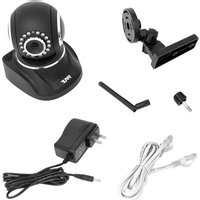
| Package Contents | Camera, USB cable, power adapter, mounting bracket, manual |
Frequently Asked Questions - PIPCAM5 Pyle
How do I reset the Pyle PIPCAM5 camera?
Locate the reset button on the bottom of the camera. Use a paperclip to press and hold it for 10 seconds until the power LED blinks rapidly. The camera will restart and be restored to factory defaults.
What is the maximum SD card capacity supported?
The PIPCAM5 supports MicroSD cards up to 128 GB. Ensure the card is formatted to FAT32 before use.
How do I connect the camera to Wi-Fi?
Download the Pyle Connect app from your app store. Power on the camera and wait for the LED to flash red. Open the app, create an account, then tap 'Add Device'. Follow the in-app instructions to connect to your 2.4 GHz Wi-Fi network.
Does the camera support two-way audio?
Yes, the PIPCAM5 has a built-in microphone and speaker for two-way audio. You can communicate through the app in real time.
What is the night vision range?
The infrared LEDs provide night vision up to 30 feet (9 meters) in complete darkness. The camera automatically switches to night mode in low light.
Can I pan and tilt the camera remotely?
Yes, the PIPCAM5 supports pan (355°) and tilt (120°) via the app. You can adjust the viewing angle from anywhere.
How do I set up motion detection alerts?
In the Pyle Connect app, go to Device Settings and enable Motion Detection. You can adjust sensitivity and schedule. When motion is detected, the app will send a push notification.
Is the camera weatherproof for outdoor use?
No, the PIPCAM5 is designed for indoor use only. It does not have an IP rating for water or dust resistance.
What power adapter does the camera use?
The camera requires a 5V/2A DC adapter via a standard USB-A port. A compatible adapter is included in the box. Using a higher voltage may damage the device.
How do I clean the camera lens?
Use a soft, lint-free cloth to gently wipe the lens. Do not use any liquids or abrasive cleaners. For stubborn dirt, slightly dampen the cloth with water.
User questions about PIPCAM5 Pyle
0 question about this device. Answer the ones you know or ask your own.
Ask a new question about this device
No questions yet. Be the first to ask one.
Download the instructions for your Security Camera in PDF format for free! Find your manual PIPCAM5 - Pyle and take your electronic device back in hand. On this page are published all the documents necessary for the use of your device. PIPCAM5 by Pyle.
USER MANUAL PIPCAM5 Pyle

Manual assistant
Powered by Anthropic
Waiting for your message
Product information
Brand : Pyle
Model : PIPCAM5
Category : Security Camera