PIPCAM15 - Security Camera Pyle - Free user manual and instructions
Find the device manual for free PIPCAM15 Pyle in PDF.


Pick your language and provide your email: we'll send you a specifically translated version.
| Type | Security Camera |
| Brand | Pyle |
| Model | PIPCAM15 |
| Dimensions (approx.) | 2.5 x 2.5 x 4.5 inches |
| Weight | 0.5 lbs |
| Power Supply | DC 5V adapter (included) |
| Resolution | 1080p Full HD |
| Field of View | 90° diagonal |
| Night Vision | IR LEDs, up to 30 feet |
| Connectivity | Wi-Fi 802.11 b/g/n |
| Audio | Built-in microphone and speaker |
| Motion Detection | Yes, with push notifications |
| Storage | MicroSD card slot (up to 32GB), cloud support |
| Weather Resistance | Indoor use only |
| Mounting Type | Desk stand or wall mount |
| Compatibility | iOS and Android app |
| Cleaning | Wipe with dry cloth; avoid liquid cleaners |
| Maintenance | Check cable connections regularly |
| Safety | Do not disassemble; keep away from water |
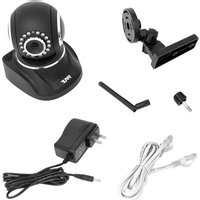
| Spare Parts | Power adapter and mount available separately |
Frequently Asked Questions - PIPCAM15 Pyle
How do I set up the Pyle PIPCAM15 camera?
Download the Pyle Security app from the App Store or Google Play. Connect the camera to power, then follow the in-app instructions to connect to your Wi-Fi network.
Can I view the camera remotely?
Yes, the PIPCAM15 supports remote viewing via the mobile app from anywhere with an internet connection.
What is the maximum SD card capacity?
The camera supports microSD cards up to 32GB for local storage.
Does the camera have night vision?
Yes, it has built-in IR LEDs for night vision up to 30 feet in complete darkness.
How do I reset the camera to factory settings?
Press and hold the reset button on the back of the camera for about 10 seconds until the LED blinks red.
Can I use the camera outdoors?
The PIPCAM15 is designed for indoor use only and is not weather-resistant.
How do I enable motion detection alerts?
In the app, go to Settings > Motion Detection and toggle it on. You can adjust sensitivity and set active zones.
Is the camera compatible with Alexa or Google Assistant?
No, the PIPCAM15 does not support voice assistant integration at this time.
What is the warranty period?
Pyle offers a 1-year limited warranty against defects in materials and workmanship.
Can I share camera access with family members?
Yes, the app allows you to invite other users by email to view the camera feed.
User questions about PIPCAM15 Pyle
0 question about this device. Answer the ones you know or ask your own.
Ask a new question about this device
No questions yet. Be the first to ask one.
Download the instructions for your Security Camera in PDF format for free! Find your manual PIPCAM15 - Pyle and take your electronic device back in hand. On this page are published all the documents necessary for the use of your device. PIPCAM15 by Pyle.
USER MANUAL PIPCAM15 Pyle

Manual assistant
Powered by Anthropic
Waiting for your message
Product information
Brand : Pyle
Model : PIPCAM15
Category : Security Camera