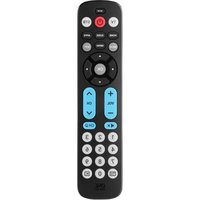
URC 6419 - Remote control ONE FOR ALL - Free user manual and instructions
Find the device manual for free URC 6419 ONE FOR ALL in PDF.


Pick your language and provide your email: we'll send you a specifically translated version.
| Product Type | Universal Remote Control |
| Brand | ONE FOR ALL |
| Model | URC 6419 |
| Compatibility | TV, DVD, Satellite, Audio, VCR (multibrand) |
| Dimensions (approx) | 20.0 x 5.0 x 2.0 cm |
| Weight | 100 g |
| Power Source | 2 x AAA batteries (not included) |
| Number of Keys | 25 |
| Control Range | Up to 10 meters |
| Programming Method | Auto-search or manual code entry |
| Setup | Easy code setup or learning from original remote |
| Battery Life (typical) | Up to 6 months |
| Color | Black |
| Material | Plastic |
| Operating Temperature | 0°C to 40°C |
| Storage Temperature | -10°C to 60°C |
| Cleaning Instructions | Wipe with soft dry cloth; do not use solvents |
| Safety Precautions | Keep away from moisture and extreme heat; remove batteries if not used for long periods |
| Repairability | No user-serviceable parts; contact support for issues |
| Warranty | 1 year (check manufacturer for details) |
Frequently Asked Questions - URC 6419 ONE FOR ALL
How do I program the ONE FOR ALL URC 6419 remote?
To program, use the auto-search method: press and hold the SETUP key until the LED blinks, then press the device key (e.g., TV), point remote at device, and press POWER repeatedly until device turns off. Press SETUP to store the code.
What if my device is not responding after programming?
Try the manual code entry method: find your device brand code from the manual, press SETUP + device key, enter the 4-digit code, then press POWER to test. Repeat with next codes if needed.
How do I reset the remote to factory settings?
Press and hold the SETUP key until the LED blinks twice (about 3 seconds). Then press the 0 key twice. The LED will blink twice to confirm reset.
Can I use this remote with my Samsung TV?
Yes, the ONE FOR ALL URC 6419 is compatible with Samsung and many other brands. Use the auto-search or code entry method with Samsung codes (e.g., 10812, 12051).
How do I replace the batteries?
Slide the battery cover off on the back, remove old batteries, and insert two AAA fresh batteries with correct polarity. Replace cover.
Why is the remote not working at all?
First, check if batteries are inserted correctly or need replacement. Ensure no obstructions between remote and device. Try resetting the remote as described.
Can I use the URC 6419 to control my soundbar?
Yes, it can control audio devices like soundbars. Press the AUX or AUDIO key, then program using the code for your soundbar brand.
What does the LEARN button do?
The LEARN function allows the remote to copy functions from your original remote. Press SETUP + LEARN, then point the remotes head-to-head and press the key you want to learn.
How long does the battery last?
Battery life is typically 6 months with normal use. However, heavy usage or learning functions may reduce it. Replace batteries when the LED dims.
Is the remote damaged if it gets wet?
Yes, moisture can damage internal components. If it gets wet, remove batteries immediately, dry with cloth, and let air dry fully before reuse. Do not use heat.
User questions about URC 6419 ONE FOR ALL
0 question about this device. Answer the ones you know or ask your own.
Ask a new question about this device
No questions yet. Be the first to ask one.
Download the instructions for your Remote control in PDF format for free! Find your manual URC 6419 - ONE FOR ALL and take your electronic device back in hand. On this page are published all the documents necessary for the use of your device. URC 6419 by ONE FOR ALL.
USER MANUAL URC 6419 ONE FOR ALL
Manual assistant
Powered by Anthropic
Waiting for your message
Product information
Brand : ONE FOR ALL
Model : URC 6419
Category : Remote control