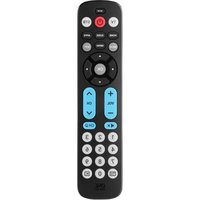
URC 1917 - Remote control ONE FOR ALL - Free user manual and instructions
Find the device manual for free URC 1917 ONE FOR ALL in PDF.


Pick your language and provide your email: we'll send you a specifically translated version.
| Product Type | Universal Remote Control |
| Brand | One for All |
| Model | URC 1917 |
| Dimensions (approx.) | 200 x 50 x 25 mm |
| Weight (approx.) | 120 g (including batteries) |
| Power Source | 2 x AAA batteries (not included) |
| Battery Life | Up to 12 months under normal use |
| Compatible Devices | TV, DVD, STB, Audio, and more |
| Number of Keys | 40+ keys including volume, channel, and navigation |
| Programming Method | Direct code entry or auto-search |
| Code Library | Preloaded with thousands of brands |
| Range | Up to 10 meters (30 feet) |
| Frequency | Infrared (IR) |
| Learning Capability | Yes, can learn from original remotes |
| Macro Functions | Yes, programmable for one-touch activities |
| Display | None (traditional keypad) |
| Backlit Keys | No |
| Construction Material | ABS plastic |
| Operating Temperature | 0°C to 40°C |
| Storage Temperature | -20°C to 60°C |
| Warranty | 1 year limited |
| Included Accessories | User manual, code list |
| Cleaning Instructions | Wipe with a dry, soft cloth. Avoid liquids. |
| Repair / Spare Parts | Contact One for All customer service; no user-serviceable parts |
Frequently Asked Questions - URC 1917 ONE FOR ALL
How do I set up the One for All URC 1917 remote for my TV?
Turn on your TV. Press and hold the SETUP button until the LED blinks twice. Use the numeric keypad to enter the code from the code list. Point the remote at the TV and press POWER. If the TV turns off, programming is complete.
What batteries does the URC 1917 require?
It requires 2 AAA alkaline batteries (not included). Insert them into the battery compartment, matching the polarity (+/-) markings.
How can I find the correct code for my device?
Refer to the included code list or use the auto-search feature. The remote has thousands of preloaded codes covering most brands.
Can I use this remote for multiple devices?
Yes, it can control up to 5 devices (TV, DVD, STB, Audio, etc.). Use the DEVICE buttons to switch between them.
How do I reset the remote to factory settings?
Press and hold SETUP until the LED blinks twice. Then press 9, 8, 7 in sequence. The LED will blink four times to confirm reset.
The remote doesn't control my device even after entering code. What should I do?
Try using the auto-search method: press SETUP until LED blinks twice, then press POWER repeatedly until the device turns off. Press OK to save.
How do I learn a function from my original remote?
Place the remotes head-to-head. On the URC 1917, press SETUP until LED blinks twice. Then press the key you want to learn, followed by OK. Wait for LED to blink twice.
What is the range of the IR signal?
The remote works up to 10 meters (30 feet) in a direct line of sight. Obstacles may reduce range.
How do I clean the remote control?
Use a dry, soft cloth to wipe the surface. Do not use water, solvents, or abrasive cleaners.
Is the remote backlit?
No, the URC 1917 does not have backlit keys. Keys are printed for visibility in normal lighting.
User questions about URC 1917 ONE FOR ALL
0 question about this device. Answer the ones you know or ask your own.
Ask a new question about this device
No questions yet. Be the first to ask one.
Download the instructions for your Remote control in PDF format for free! Find your manual URC 1917 - ONE FOR ALL and take your electronic device back in hand. On this page are published all the documents necessary for the use of your device. URC 1917 by ONE FOR ALL.
USER MANUAL URC 1917 ONE FOR ALL
Manual assistant
Powered by Anthropic
Waiting for your message
Product information
Brand : ONE FOR ALL
Model : URC 1917
Category : Remote control