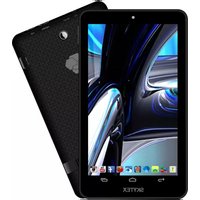
Skypad Alpha SX-SP700A - Tablet Skytex - Free user manual and instructions
Find the device manual for free Skypad Alpha SX-SP700A Skytex in PDF.


Pick your language and provide your email: we'll send you a specifically translated version.
| Product Type | Tablet |
| Brand | Skytex |
| Model | Skypad Alpha SX-SP700A |
| Operating System | Android |
| Display Size | 7 inches |
| Display Resolution | 1024 x 600 pixels |
| Processor | Quad-core 1.3 GHz |
| RAM | 1 GB |
| Internal Storage | 8 GB |
| Expandable Storage | microSD up to 32 GB |
| Battery Capacity | 3000 mAh |
| Front Camera | 0.3 MP |
| Rear Camera | 2 MP |
| Connectivity | Wi-Fi 802.11 b/g/n, Bluetooth 4.0 |
| Ports | micro USB, 3.5 mm headphone jack |
| Weight | 320 g |
| Dimensions | 192 x 117 x 10 mm |
| Color | Black |
| Battery Life | Up to 5 hours of video playback |
| Warranty | 1 year |
Frequently Asked Questions - Skypad Alpha SX-SP700A Skytex
How can I improve the battery life of my Skypad Alpha tablet?
Reduce screen brightness, turn off Wi-Fi and Bluetooth when not in use, close unused apps, and disable background data. You can also enable power saving mode in settings.
Does the Skypad Alpha SX-SP700A support a SIM card?
No, this tablet is Wi-Fi only and does not have a SIM card slot.
Can I expand the storage on this tablet?
Yes, the tablet has a microSD card slot supporting cards up to 32 GB.
How do I perform a factory reset on the Skypad Alpha?
Go to Settings > Backup & Reset > Factory Data Reset. Confirm the reset. This will erase all data, so back up important files first.
What is the screen resolution of the Skypad Alpha SX-SP700A?
The tablet features a 7-inch display with a resolution of 1024 x 600 pixels.
How do I connect the tablet to a TV?
This tablet has a micro HDMI port (or you may need an adapter). Connect via HDMI cable to your TV. Alternatively, use screen mirroring over Wi-Fi if supported.
Why is my tablet running slowly?
Clear cache and unused apps, restart the device, check for software updates, or consider a factory reset. Limited RAM (1 GB) may cause lag with heavy apps.
Is the Skypad Alpha SX-SP700A suitable for kids?
Yes, it can be used for basic educational apps and games. Enable parental controls and install a sturdy case to protect the device.
How do I take a screenshot on this tablet?
Press and hold the Power button and Volume Down button simultaneously for 2 seconds. The screenshot will be saved in the gallery.
Where can I download the user manual for the Skypad Alpha?
You can download the manual for free from notice-facile.com or the Skytex support website. It is available in PDF format.
User questions about Skypad Alpha SX-SP700A Skytex
0 question about this device. Answer the ones you know or ask your own.
Ask a new question about this device
No questions yet. Be the first to ask one.
Download the instructions for your Tablet in PDF format for free! Find your manual Skypad Alpha SX-SP700A - Skytex and take your electronic device back in hand. On this page are published all the documents necessary for the use of your device. Skypad Alpha SX-SP700A by Skytex.
USER MANUAL Skypad Alpha SX-SP700A Skytex
Manual assistant
Powered by Anthropic
Waiting for your message
Product information
Brand : Skytex
Model : Skypad Alpha SX-SP700A
Category : Tablet