B114LPBT - Detector System Sensor - Free user manual and instructions
Find the device manual for free B114LPBT System Sensor in PDF.


Pick your language and provide your email: we'll send you a specifically translated version.
| Product Type | Photoelectric Smoke Detector |
| Model | B114LPBT |
| Brand | System Sensor |
| Power Source | 9V Alkaline Battery (included) |
| Battery Life | Up to 1 year under normal conditions |
| Sensor Type | Photoelectric |
| Operating Voltage | 9V DC |
| Alarm Sound Level | 85 dB at 10 feet |
| Test Button | Yes, for functional testing |
| Alarm Indicator | Red LED flashes during alarm |
| Operating Temperature Range | 40°F to 100°F (4°C to 38°C) |
| Humidity Range | 10% to 95% non-condensing |
| Mounting | Ceiling or wall mount |
| Dimensions (Diameter x Height) | 5.6 inches x 2.0 inches |
| Weight | 5.3 oz (150 g) without battery |
| Material | Flame-retardant ABS plastic |
| Certifications | UL 217 Listed |
| Warranty | 5 years limited |
| Maintenance | Vacuum dust monthly; replace battery annually |
| Spare Parts | Replaceable 9V battery; detector unit non-serviceable |
| Replacement Date | Replace every 10 years from manufacture date |
Frequently Asked Questions - B114LPBT System Sensor
How do I install the B114LPBT detector?
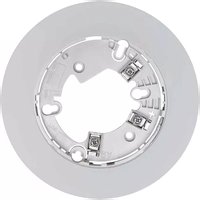
Remove the mounting bracket by twisting it counterclockwise. Attach the bracket to the ceiling or wall with screws (included). Insert the 9V battery, align the detector with the bracket, and twist clockwise until it locks. Press the test button to confirm operation.
What does the test button do and how often should I test?
The test button simulates smoke to verify alarm circuitry and horn function. Test weekly by pressing and holding the button until the alarm sounds (3-5 seconds). Release and silence.
How do I silence a nuisance alarm (e.g., from cooking)?
Press the test/silence button to temporarily silence the alarm for about 15 minutes. If the alarm persists, it may indicate a real hazard. Improve ventilation or move the detector away from kitchens.
When should I replace the battery and how?
Replace the 9V battery at least once a year or when the low-battery chirp (every 30-60 seconds) begins. Open the battery compartment (side or back), remove old battery, connect new one, and close compartment.
How long does the detector itself last?
The B114LPBT has a service life of 10 years from the date of manufacture (printed on the unit). Replace the entire detector after 10 years for optimal safety.
Can I paint the detector?
No, painting the detector can block the sensor vents and cause false alarms or failure to detect smoke. Keep it unpainted and clean.
What should I do if the alarm sounds continuously?
Evacuate immediately and call emergency services. Do not assume it is a false alarm. If it is a false alarm (e.g., steam), press the silence button. If it does not stop, remove the battery to hush, then investigate the cause.
How do I clean the detector?
Vacuum the exterior and slots with a soft brush attachment monthly to remove dust and debris. Do not use water, solvents, or cleaners. A clean detector reduces false alarms.
The detector chirps even after replacing the battery. What now?
If chirping continues, check that the battery is fresh and properly connected. If still chirping, the detector may be at end of life (10 years) or defective. Replace the entire detector.
Is the B114LPBT compatible with smart home systems?
This model is a stand-alone battery-powered detector and does not interconnect with other detectors or smart home systems. It operates independently with its own alarm.
User questions about B114LPBT System Sensor
0 question about this device. Answer the ones you know or ask your own.
Ask a new question about this device
No questions yet. Be the first to ask one.
Download the instructions for your Detector in PDF format for free! Find your manual B114LPBT - System Sensor and take your electronic device back in hand. On this page are published all the documents necessary for the use of your device. B114LPBT by System Sensor.
USER MANUAL B114LPBT System Sensor

Manual assistant
Powered by Anthropic
Waiting for your message
Product information
Brand : System Sensor
Model : B114LPBT
Category : Detector