
WARIO WARE SMOOTH MOVES - Video game NINTENDO - Free user manual and instructions
Find the device manual for free WARIO WARE SMOOTH MOVES NINTENDO in PDF.


| Product type | Video game for Wii console |
| Brand | Nintendo |
| Model | Wario Ware Smooth Moves |
| Platform | Wii |
| Case dimensions | 13.5 x 19 x 1.5 cm (standard DVD case) |
| Weight | Approximately 100 g |
| Power supply | None (runs on Wii console) |
| Number of players | 1 to 12 |
| Main features | Over 200 micro-games, use of Wii Remote with different positions (remote, umbrella, driver, elephant, etc.), single-player and multiplayer modes |
| Save | Automatic on Wii system memory |
| Available languages | French, English, Spanish |
| Safety | Warnings about epilepsy, repetitive motion, nausea. Mandatory use of wrist strap. Play standing, at least 1 m from the screen, in a well-lit room, with regular breaks. |
| Maintenance and cleaning | Clean the disc with a soft, dry cloth from the center outward. Avoid solvents. |
| Spare parts and repairability | Not applicable (disc-based game) |
| Customer service | Nintendo of America Inc., www.nintendo.com, 1-800-255-3700 |
| Warranty | 12 months for the console, 3 months for the game |
Frequently Asked Questions - WARIO WARE SMOOTH MOVES NINTENDO
User questions about WARIO WARE SMOOTH MOVES NINTENDO
0 question about this device. Answer the ones you know or ask your own.
Ask a new question about this device
Download the instructions for your Video game in PDF format for free! Find your manual WARIO WARE SMOOTH MOVES - NINTENDO and take your electronic device back in hand. On this page are published all the documents necessary for the use of your device. WARIO WARE SMOOTH MOVES by NINTENDO.
USER MANUAL WARIO WARE SMOOTH MOVES NINTENDO
NEED HELP WITH INSTALLATION, MAINTENANCE OR SERVICE?
Nintendo Customer Service
WWW.NINTENDO.COM
or call 1-800-255-3700
Nintendo's game pages, at
www.nintendo.com/games, feature walkthroughs, frequently-asked questions, and codes for many of our games. If your answer isn't there, check out our forums where you can exchange tips with other gamers online.
For more information about our forums, visit www.nintendo.com/community.
If you don't have access to the web-site, recorded tips for many titles are available on Nintendo's Power Line at (425) 885-7529. This may be a long-distance call, so please ask permission from whoever pays the phone bill.
BESOIN D'AIDE POUR L'INSTALLATION, L'ENTRETIEN OU LA RÉPARATION?
The Official Seal is your assurance that this product is licensed or manufactured by Nintendo. Always look for this seal when buying video game systems, accessories, games and related products.
Treasure FOUND in TEMPLE of Form!
Mysteries Surrounding
Investigative Report
Starting a Game
Life-Changing Article!
A Special Report on Saving
INSTRUCTION BOOKLET
MODED'EMPLOI
- Some people (about 1 in 4000) may have seizures or blackouts triggered by light flashes or patterns, and this may occur while they are watching TV or playing video games, even if they have never had a seizure before.
- Anyone who has had a seizure, loss of awareness, or other symptom linked to an epileptic condition, should consult a doctor before playing a video game.
- Parents should watch their children play video games. Stop playing and consult a doctor if you or your child has any of the following symptoms:
Convulsions
Eye or muscle twitching
Altered vision
Loss of awareness
Involuntary movements
Disorientation
-
To reduce the likelihood of a seizure when playing video games:
-
Sit or stand as far from the screen as possible.
- Play video games on the smallest available television screen.
- Do not play if you are tired or need sleep.
-
Play in a well-lit room.
-
Take a 10 to 15 minute break every hour.
WARNING - Repetitive Motion Injuries and Eyestrain
Playing video games can make your muscles, joints, skin or eyes hurt. Follow these instructions to avoid problems such as tendonitis, carpal tunnel syndrome, skin irritation or eyestrain:
- Avoid excessive play. Parents should monitor their children for appropriate play.
Take a 10 to 15 minute break every hour, even if you don't think you need it. - If your hands, wrists, arms or eyes become tired or sore while playing or if you feel symptoms such
as tingling, numbness, burning or stiffness, stop and rest for several hours before playing again. - If you continue to have any of the above symptoms or other discomfort during or after play, stop playing and see a doctor.
WARNING - Motion Sickness
Playing video games can cause motion sickness in some players. If you or your child feels dizzy or nauseous when playing video games, stop playing and rest. Do not drive or engage in other demanding activity until you feel better.
IMPORTANT LEGAL INFORMATION
This Nintendo game is not designed for use with
any unauthorized device. Use of any such device will invalidate your Nintendo product warranty.
Copyright of any Nintendo game is illegal and is strictly prohibited by domestic and international
intellectual property laws. "Back-up" or "archival" copies are not authorized and are not necessary to
protect your software. Violators will be prosecuted.
REV-E
WARRANTY & SERVICE INFORMATION
You may need only simple instructions to correct a problem with your product. Try our website at www.nintendo.com or call our Consumer Assistance Hotline at 1-800-255-3700, rather than going to your retailer. Hours of operation are 6 a.m. to 7 p.m., Pacific Time, Monday - Sunday (times subject to change). If the problem cannot be solved with the troubleshooting information available online or over the telephone, you will be offered express factory service through Nintendo. Please do not send any products to Nintendo without contacting us first.
HARDWARE WARRANTY
Nintendo of America Inc. ("Nintendo") warrants to the original purchaser that the hardware product shall be free from defects in material and workmanship for twelve (12) months from the date of purchase. If a defect covered by this warranty occurs during this warranty period, Nintendo will repair or replace the defective hardware product or component, free of charge. The original purchaser is entitled to this warranty only if the date of purchase is registered at point of sale or the consumer can demonstrate, to Nintendo's satisfaction, that the product was purchased within the last 12 months.
GAME & ACCESSORY WARRANTY
Nintendo warrants to the original purchaser that the product (games and accessories) shall be free from defects in material and workmanship for a period of three (3) months from the date of purchase. If a defect covered by this warranty occurs during this three (3) month warranty period, Nintendo will repair or replace the defective product, free of charge.
SERVICE AFTER EXPIRATION OF WARRANTY
Please try our website at www.nintendo.com or call the Consumer Assistance Hotline at 1-800-255-3700 for troubleshooting information and repair or replacement options and pricing. In some instances, it may be necessary for you to ship the complete product, FREIGHT PREPAID AND INSURED FOR LOSS OR DAMAGE, to Nintendo. Please do not send any products to Nintendo without contacting us first.
WARRANTY LIMITATIONS
THIS WARRANTY SHALL NOT APPLY IF THIS PRODUCT: (a) IS USED WITH PRODUCTS NOT SOLD OR LICENSED BY NINTENDO (INCLUDING, BUT NOT LIMITED TO, NON-Licensed GAME ENHANCEMENT AND COPIER DEVICES, ADAPTERS, AND POWER SUPPLIES); (b) IS USED FOR COMMERCIAL PURPOSES (INCLUDING RENTAL); (c) IS MODIFIED OR TAMPERED WITH; (d) IS DAMAGED BY NEGLIGENCE, ACCIDENT, UNREASONABLE USE, OR BY OTHER CAUSES UNRELATED TO DEFECTIVE MATERIALS OR WORKMANSHIP; OR (e) HAS HAD THE SERIAL NUMBER ALTERED, DEFACED OR REMOVED.
ANY APPLICABLE IMPLIED WARRANTYES, INCLUDING WARRANTY OF MERCHANTABILITY AND FITNESS FOR A PARTICULAR PURPOSE, ARE HEREBY LIMITED IN DURATION TO THE WARRANTY PERIODS DESCRIBED ABOVE (12 MONTHS OR 3 MONTHS, AS APPLICABLE). IN NO EVENT SHALL NINTENDO BE LIABLE FOR CONSEQUENTIAL OR INCIDENTAL DAMAGES RESULTING FROM THE BREACH OF ANY IMPLIED OR EXPRESS WARRANTY. SOME STATES DO NOT ALLOW LIMITATIONS ON HOW LONG AN IMPLIED WARRANTY LASTS OR EXCLUSION OF CONSEQUENTIAL OR INCIDENTAL DAMAGES, SO THE ABOVE LIMITATIONS MAY NOT APPLY TO YOU.
This warranty gives you specific legal rights. You may also have other rights which vary from state to state or province to province.
Nintendo's address is: Nintendo of America Inc., P.O. Box 957, Redmond, WA 98073-0957 U.S.A.
This warranty is only valid in the United States and Canada.

© 2006-2007 Nintendo. Co-developed by INTELLIGENT SYSTEMS. All rights, including the copyrights of game, scenario, music and program, reserved by Nintendo. TM, ® and the Wii logo are trademarks of Nintendo. © 2007 Nintendo. All rights reserved.
Message from the Editor in Chief, Wario
Have I got a story for you! It all started this morning. Just as I sat down
in my snacking chair, a freakish little creature appeared out of nowhere
and snatched my food away!
NO ONE MESSES WITH ME LIKE THAT!

I started running after the little weirdo, but he was pretty fast! Before I knew it,
we were in this rickety old shack on the other side of town. Apparently, the
shack was a temple for some ancient civilization!
Wha-what-WHAT?! Talk about FREAKY!
Anyway, inside the shack, I found this stick and picked it up. Nothing about the
stick screamed "TREASURE!" or "GET RICH QUICK!" but I've got a nose for that
kinda thing. Plus, I noticed that, depending on how I moved and held the
stick-thing, different things would happen.
Suddenly, I had one of my patented great ideas: I would share the wisdom of
the ancients with the people of Diamond City. And what better way to share
information than by creating a magazine?
So, TA DA! Here it is.
I know what you're thinkin', but really, I'm not trying to turn a profit by selling
my magazine! But it's not like I'm gonna turn away donations or anything!
Because I'm the Editor in Chief, the magazine is called...
"THE WEEKLY WARIO!" WHAT ELSE?!
WARIO!
TABLEof
CONTENTS
THE WEEKLY
WARIO!
Read It Here First!
TREASURE FOUND IN ANCIENT RUINS!
3
Hear an Expert's Opinion!
The Mysterious FORM BATON
C5
HOW TO START A GAME AND OTHER ESSENTIALS
C6
DRIBBLE&SPITZ

DIAMOND CITY MAP
with FRIENDS
ABOUT TOWN!
Special Report!
Separating the Lies from the Truth: The Form Lowdown
with KAT & ANA
C9
Bae
From the
EDITOR'S Desk
华美点

NNE
SMOOTH MOVES
The MYSTERIOUS Form Baton
Ciao! Mona here, your staff Form Baton expert. Wario's already bored
with writing, so I guess I'm taking over his duties as report
word is that as soon as you hold the Form Baton, you can't
help but dance! What will those ancient civilizations think of next!
MONA

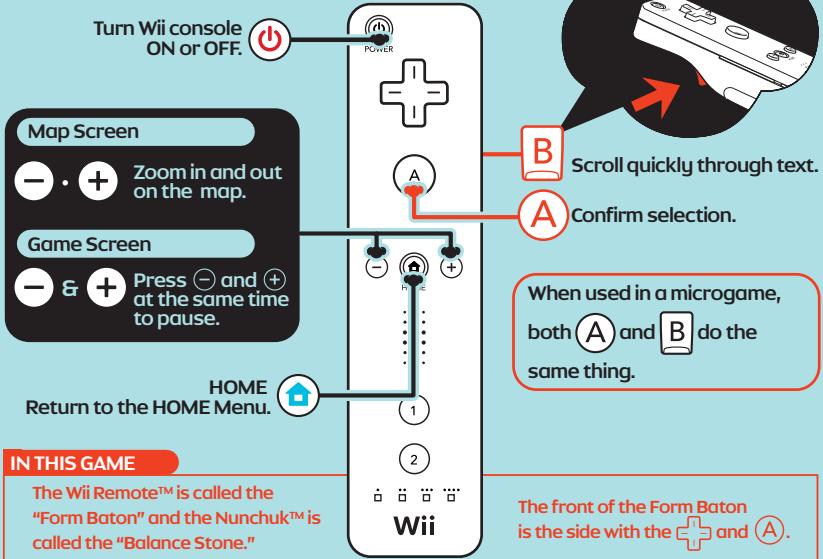
The Form Baton and the Forms (→ p. (9))
THE WAY of the FORM BAFON
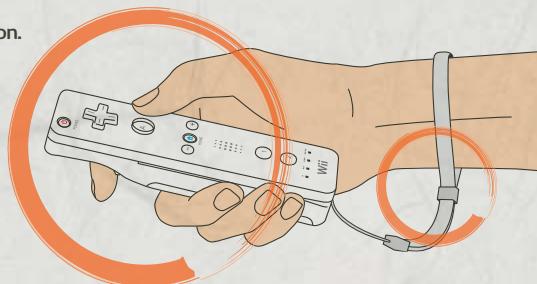
1) ALWAYS USE THE WRIST STRAP.
When using the Form Baton, always use the wrist strap. Throwing the Form Baton is forbidden.
2) PLAY STANDING IN AN OPEN AREA. Forms are always performed standing. Before performing the forms, tidy up the space around you.
3] LET GO OF YOUR INHIBITIONS. The secret to performing the forms with grace and beauty is to relax. Don't forget to take breaks as needed.

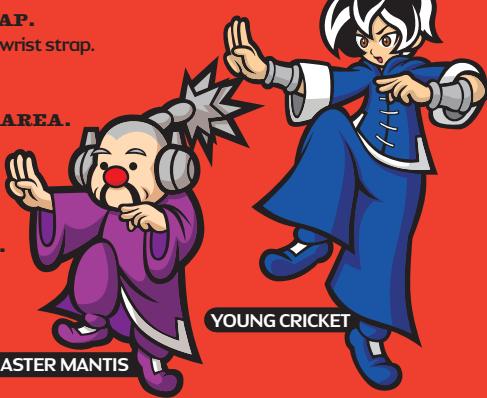
MASTER MANTIS
Howto STARTa GAME
Hi there! I'm Penny!
You probably know my grandpa, Dr. Crygor. People tell us all the time that we look nothing alike. Say, did you just start the game without thinking about what you're doing? I bet you did, and that's no way to do things. Let's take a closer look at how to start a game, OK?

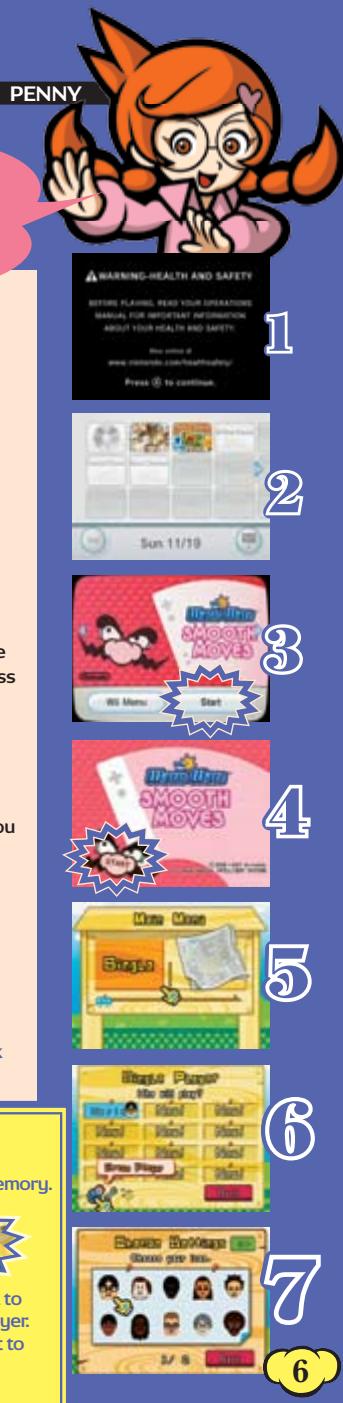
All righty then, first things first. Put the WarioWare: Smooth Moves Game Disc in the Disc Slot, and the power will turn on. Oh, and you can also insert a disc when the power is already on. When you see the screen to the right, read the message and then press (A). Got it?

From the Wii Menu, point to the Disc Channel on the upper left and press A.

The Channel Preview Screen will appear, so choose Start by pressing

A screen will appear that shows you how to attach the wrist strap, and then the opening movie will start. Press a button to skip the movie and go to the title screen.

When the Main Menu appears, choose Single for single-player mode. Obvious, I know.

When you're playing for the first time, choose NEW! You can have saved data for up to 12 people. Follow the directions on the screen to enter your name.

Pick your Mii™. Choose a Mii from six default Miis and any Mii you created in the Mii Channel. Then all you have to do is select your dominant hand and you're done!
For more info on creating Miis in the Mii Channel, check out the Wii Operations Manual.

This game AUTO-SAVES! WOW!
- You'll need one block of open memory in the Wii System Memory.
- For info on how to delete files in the memory, check out the Wii Operations Manual.

How to erase saved data
When you already have 12 players registered and you want to register someone new, select to erase an existing player. Erased players are gone for good, so watch out! If you want to change someone's name or Mii, select
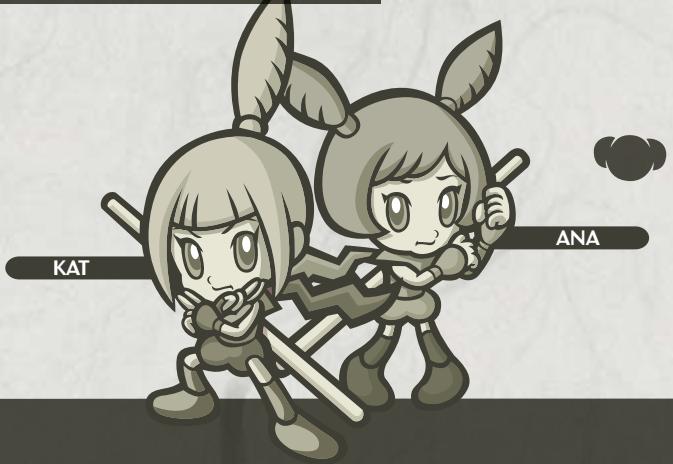
SPECIAL REPORT with KAT & ANA
THE FORM LOWDOWN
The Emergence of Forms
The form craze has taken Diamond City by storm! The forms' exact origins are shrouded in mystery, but rumor has it that they have their roots in an ancient civilization. This ancient civilization used the Form Baton to perform a variety of dance rituals. As they were passed down from generation to generation, these rituals evolved to become the forms they are today.
The Power of Forms
The people of Diamond City already know the urgency one experiences when enduring lightning-fast microgames... The pressure of five seconds! The four-loss limit! After Wario's discovery, residents across town can be seen moving their bodies as though possessed by the Form Baton. Only recently has this been acknowledged as the true power of forms.
CAUTION: Wrist STRAP USE
This game can involve vigorous motion while using the Wii Remote. Please use the wrist strap to help prevent injury to other people or damage to surrounding objects or the Wii Remote in case you accidentally let go of the Wii Remote during game play.
Also remember the following:
- Make sure all players put on the wrist strap properly when it is their turn.
- Do not let go of the Wii Remote during game play.
- Dry your hands if they become moist.
- Allow adequate room around you during game play and make sure that all areas that you might move into are clear of other people and objects.
Stay at least three feet from the television.
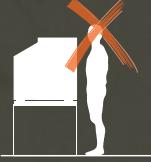
THE WRONG WAY TO PLAY
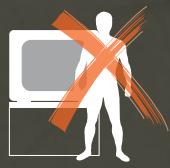
Not standing in front of the television.
Standing too close or too far away from the television.
Twisting your hand.
Fidgeting like you've got bugs all over you.
Standing in front of the television.
Standing the proper distance from the television.
Wearing the wrist strap.
Starting with the next page, we'll explain some of the forms.
The Remote Control
The Remote Control
Difficulty
★☆☆☆☆
The Remote Control is the most fundamental of all the forms. It looks easy, but it's actually quite profound and complex. From this starting position, you'll need to move up, down, left, right, and even forward.
Explanation
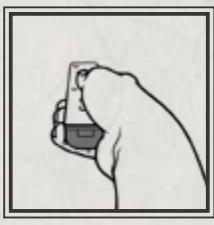
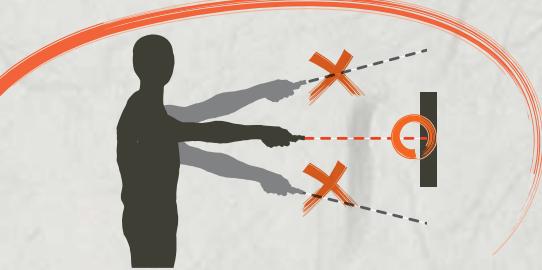
Hold the Form Baton straight in your dominant hand with the tip pointing forward. Place your thumb on A and your index finger on B. With your body facing the television, use the Form Baton to point at areas on the screen.
An area on the screen will flash when the Form Baton isn't pointing at the screen properly. The key to success in all forms that use the pointer is to keep the pointer on the screen.
Example
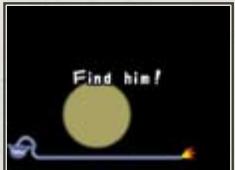
Use a flashlight to find the little guy hiding in the dark.

Umbrella
Difficulty
★★☆☆☆
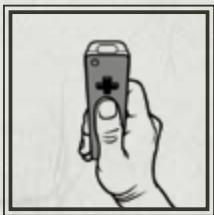
This form provides the user with a sense of quiet dignity. From this stance, you will perform a myriad of actions, including swatting forward and even shaking the Form Baton from side to side.
Explanation
Hold the Form Baton vertically in your dominant hand with the tip pointing up and your thumb resting on . The Umbrella is similar to the Remote Control, but instead of holding it straight, hold it vertically. Think of it as a natural extension of your hand and become one with the Form Baton.
Example
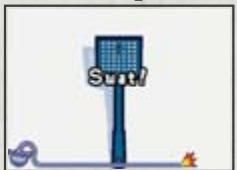
Swat that pesky fly!
The Chauffeur
The Chantieur
Difficulty
★★★☆☆
m = 311 ;
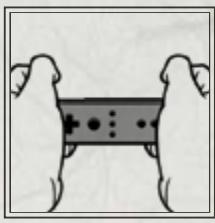
This dual-handed form is for slightly more experienced players. From this stance, you will do things like pressing the Form Baton forward and turning it like a steering wheel. Remember, when switching forms, don't rush, as rushing can lead to disharmony.
Explanation
Turn the Form Baton's face to your body and hold each end in your right and left hands.
Example
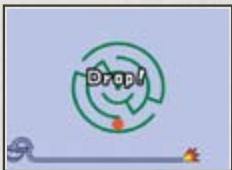
Tilt the Form Baton right and left to move the ball out of the maze.
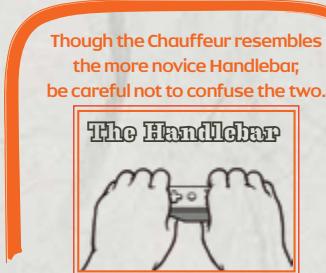
In the Handlebar, the Form Baton faces up and is held horizontally from the top.

Elephant
Difficulty
★★★★☆
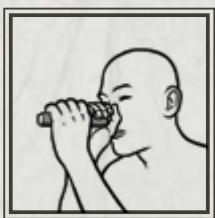
The Elephant is one of the most challenging forms. In this form, the Form Baton resembles a nose, so when playing Elephant microgames, move your head along with the baton. It's good for neck health as well.
Explanation
With the tip of the Form Baton facing the screen, hold it in both hands and place the base at the tip of your nose. This form is most beautiful when the performer loses all inhibitions.
Example
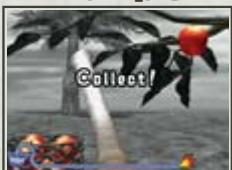
Stretch your trunk to
grab the apple.
VEUILLEZ LIRE ATTENTIVEMENT L'INTÉGRAlité DU MODE D'EMPLOI DE LA WII AVANT D'UTILISER VOTRE SYSTème, VOTRE DISQUE DE JEU, OU VOS ACCESSOIRS WII. CE MODE D'EMPLOI COMPRED D'IMPORTANTES INFORMATIONS SUR VOTRE SANTÉ ET VOTRE SECURITÉ.
INFORMATIONS IMPORTANTES CONCERNANT VOTRE SECURITE: VEUILLEZ LIRE LES PRECAUTIONS SUIVANTES AVANT QUE VOUS OU VOTRE ENFANT NE JOUIEZ À VOS JEUX VIDEO.
WARNING-HEALTH AND SAFETY
m = 311
m = 311
m = 311 ;
m = 311
4
m = 311
m = 311
m = 311
m = 311 ;
1
A
m = 311
13/14
m = 311
②
51
11
中
m = 311
m = 311
m = 311
13/14
2 : x^ ( x) = 10 , 2 : x^ ( x) = - 4,10( x) :
m = 311
m = 311 ;
9
12 =
5
m = 311 ;
m = 311 ;
m = 311
2 : x^ ( x) = 10 , x^ = - 4; 2 : x^ ( x) = 9 x^ = - 3
m - 1 0 ;
3^x = - 2 + 22
m = 311
m = 311
m = 311
m = 311
m = 311 ;
m = 311 ;
m = 311
A
m = 311
F
1
5
C
1
m = 311
m = 311 ;
m = 311 ;
m = 311
引
10
m = 311
m = 311 ;
m = 311 ;
13/14
13/14
图
V
1
(1)
1
m = 311
G
(1)
m = 311
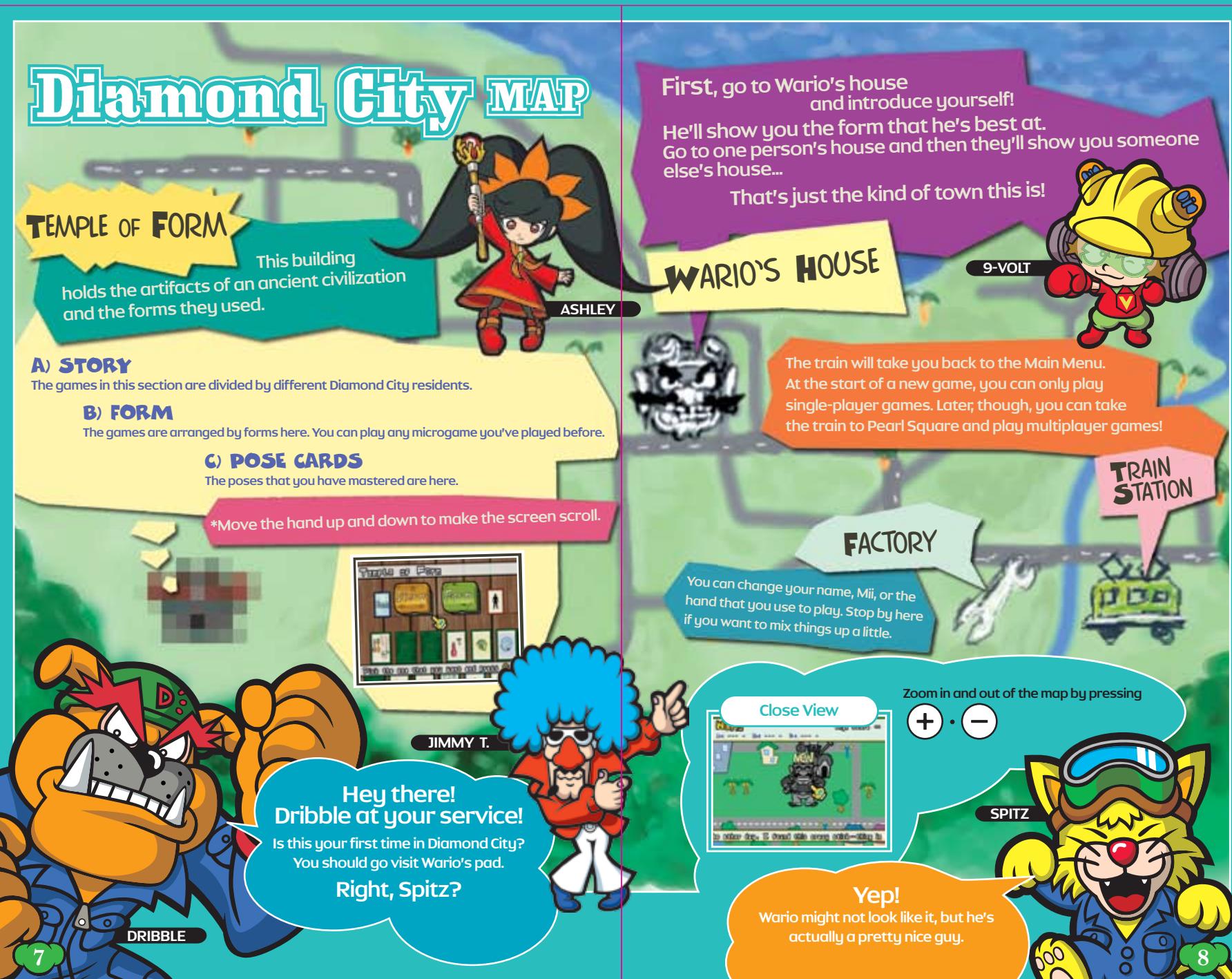
CARFE DE Diamond City
LE TEMPLE DES FORMES
Ce bâtiment
Example
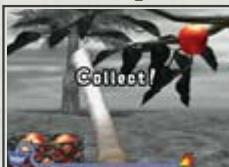
Stretch your trunk to
grab the apple.
22
RENSEIGNEMENTS SUR L'ENTRETIEN ET LA GARANTIE
m = 311 ;
m = 311 ;
2 : x^ ( x) = y^ ( x) : 2 : x^ ( x) = y^ ( x) : y = 10( x)
+
2 : x^ ( x) = y^ ( x) : 2 : x^ ( x) = y^ ( x) : x > 0 y > 0 x < y.
ente
2 : x^ ( x) = y^ ( x) : 2 : x^ ( x) = y^ ( x) : x > 0 y > 0 x < y.
enter
HOME
Regresa al menu
de HOME
PARA ESTE JUEGO
m = 311

WARNING-HEALTH AND SAFETY
· = 0
m = 311
1
m = 311 ;
m = 311
2 : x^ ( x) = 10y^ ( y)
1 + 2( 1 + u) u1 - ( 1 + u) ^2 + 1 + 21 T =
1,2,3 1,3,4 2,3,4 3,4,5 4,5,6 5,6 6,7 7,8 .
1 + 2( 1 + u) u1 - ( 1 + u) ^2 + 1 + 21 T =
13/14
13/14
m = 311 ;
12 =
4
2 : x^ ( x) = 10 , x^ = - 4; 2 : x^ ( x) = 9 x^ = - 3
m = 311
m = 311 ;
1
2 : x^ ( x) = 10 , 2 : y^ ( y) = 4 x^2 + y^2 = 1 4x + 5y = 4 . .
5
m = 311
m = 311 ;
13/14
m = 311
1 + u7 = 70%
(2)
图 1
m = 311
m = 311 ;
m = 311
m = 311
(1)
C
m = 311
9
4
MAPA de la
Guidad Diamante
TEMPLO DE FORMA
m = 311 ;
m = 311
1 + u7 = 7019
m = 311
m = 311
2 : x^ ( x) = y^ ( x) : 2 : x^ ( x) = y^ ( x) : y = x
m = 311
( \left{ {2 : {x}^{\prime }\left( x\right) = {y}^{\prime }\left( x\right) }\right} \text{. 故 ( {y}^{\prime } = {x}^{\prime }\left( x\right) = 0}\right. )
19
12
1
A
1
1
1
m = 311
m = 311
multiplesjugadores!
ECT
DE
m = 311
一
m = 311
1 + u7 = 70%
A
第
1
1
m = 311 ;
m = 311
12x - 1 > 0
( \left{ {2 : {x}^{\prime }\left( x\right) = {y}^{\prime }\left( x\right) }\right} \text{. 故 ( {y}^{\prime } = {2x} )
12/12
nir
12/12
12/12
m = 311
12 =
m = 311
16 × 12 = 48
m = 311
。
C
D.
3
m = 311
② DNA
m = 311
m = 311
1
m = 311
28
A HISTORIA
m = 311
m = 311
(1)
m = 311
D.
1
W
m = 311
m : x = 1 或 3x + 4y + 1 = 0
[\text{解得}A\text{是}]
1 2
A
m = 311 ;
1
m = 311
28
m = 311
jYasel