DGIPOD-630 docking speaker - Docking Station DREAMGEAR - Free user manual and instructions
Find the device manual for free DGIPOD-630 docking speaker DREAMGEAR in PDF.


| Product Type | Docking Speaker Station |
| Brand | dreamGEAR |
| Model | DGIPOD-630 |
| Compatibility | iPod models with 30-pin connector, iPhone models up to iPhone 4S |
| Dimensions (W x D x H) | 12 x 6 x 4 inches (30.5 x 15.2 x 10.2 cm) |
| Weight | 2.0 lbs (0.9 kg) |
| Power Source | AC adapter (included) or 4 x AA batteries (not included) |
| Power Output | 10W (stereo) |
| Speaker Configuration | Built-in stereo speakers with passive subwoofer |
| Audio Input | 30-pin dock, auxiliary 3.5mm line-in |
| Audio Output | None (no auxiliary output) |
| Controls | Volume up/down, play/pause, next/previous track, power on/off |
| Remote Control | Included infrared remote |
| Additional Features | Alarm clock with snooze, dual alarms, adjustable EQ presets |
| Display | Blue LCD display with clock and track info |
| Charging | Charges connected iPod/iPhone via dock |
| Maintenance | Wipe with a soft, dry cloth. Do not use liquids or abrasive cleaners. |
| Safety | Keep away from water, heat sources, and direct sunlight. Do not open unit. |
| Spare Parts | None available. Unit is not user-serviceable. |
| Reparability | Contact dreamGEAR support for repair options. |
| Package Contents | DGIPOD-630 unit, AC adapter, remote control, user manual |
Frequently Asked Questions - DGIPOD-630 docking speaker DREAMGEAR
User questions about DGIPOD-630 docking speaker DREAMGEAR
0 question about this device. Answer the ones you know or ask your own.
Ask a new question about this device
Download the instructions for your Docking Station in PDF format for free! Find your manual DGIPOD-630 docking speaker - DREAMGEAR and take your electronic device back in hand. On this page are published all the documents necessary for the use of your device. DGIPOD-630 docking speaker by DREAMGEAR.
USER MANUAL DGIPOD-630 docking speaker DREAMGEAR

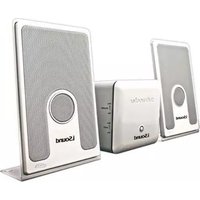


Brand : DREAMGEAR
Model : DGIPOD-630 docking speaker
Category : Docking Station