DGUN-946 - Docking Station DREAMGEAR - Free user manual and instructions
Find the device manual for free DGUN-946 DREAMGEAR in PDF.


| Product Type | Docking Station |
| Brand | dreamGEAR |
| Model | DGUN-946 |
| Compatible Devices | Nintendo Switch, Nintendo Switch OLED |
| Dimensions (L x W x H) | 4.5 x 2.0 x 1.2 inches (11.4 x 5.1 x 3.0 cm) |
| Weight | 5.3 oz (150 g) |
| Input Power | USB-C PD 15V/2.6A (39W) |
| Output Ports | 1x HDMI 4K@60Hz, 3x USB-A 3.0, 1x USB-C PD (charging only) |
| Charging Capability | Supports pass-through charging for Nintendo Switch |
| Video Output | HDMI up to 4K resolution at 60Hz |
| LED Indicator | Blue LED when powered on |
| Material | ABS plastic with non-slip base |
| Color | Black |
| Warranty | 1 year limited warranty |
| Package Contents | Docking station, USB-C cable, power adapter, user manual |
| Special Features | Compact design, heat dissipation vents, overcurrent protection |
| Maintenance and Cleaning | Wipe with dry cloth; avoid liquids |
| Safety | CE, FCC certified; built-in surge protection |
| Spare Parts and Repairability | Contact dreamGEAR support for replacement parts |
Frequently Asked Questions - DGUN-946 DREAMGEAR
User questions about DGUN-946 DREAMGEAR
0 question about this device. Answer the ones you know or ask your own.
Ask a new question about this device
Download the instructions for your Docking Station in PDF format for free! Find your manual DGUN-946 - DREAMGEAR and take your electronic device back in hand. On this page are published all the documents necessary for the use of your device. DGUN-946 by DREAMGEAR.
USER MANUAL DGUN-946 DREAMGEAR
natural_image
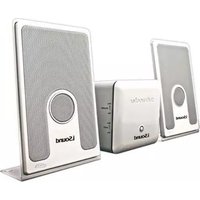
Exterior view of three LSound audio speakers with visible sound waves and speaker covers (no text or symbols on devices)i.Sound™ Harmony Instructions:
The i.Sound™ Harmony 2.1 Speakers are designed to provide you with a sound experience like nothing you have heard before. Utilizing flat speaker technology, the Harmony 2.1 Speakers are able to create full size speaker sound quality in a wafer thin design.
Box Contents
\~ 2 Flat Speakers
\~ 1 Subwoofer
\~ 2 Speaker Connection Cables
\~ iPod® Stand (with multiple iPod® brackets)
\~ i.Sound™ 2X Portable Speaker System
i.Sound™ Harmony Set-Up:
- Remove the speakers and subwoofer from the packaging.
- Connect the speakers to the subwoofer by plugging in the white and red connection cables to the rear of the subwoofer. Make sure to connect the red cable to the red input on both the subwoofer and the speaker. Follow the same procedure for the white connection cable.
- Locate the power plug on the back of the subwoofer and plug it in to any standard wall outlet.
- When using the Harmony Speakers with iPod, you can use the included iPod stand for displaying your iPod. The iPod stand features different brackets to fit the iPod model you are using.
- To connect an iPod or any other audio device that features a standard headphone output, simply locate the audio out cable on the back of the Harmony subwoofer and connect it to your audio device of choice.
- Power on the Harmony Speaker by pressing the power button located on the back of the subwoofer to the on position.
- Power on your audio device and you are ready to experience a new level in sound quality.
- Volume and bass settings can be adjusted using the volume and bass controls located on the side of the Harmony subwoofer. Make sure the volume on your audio device is turned up.
i.Sound™ 2X Instructions:
- Open the battery compartment located on the back of the speaker and insert 4 "AAA" batteries.
- The i.Sound™ 2X Speakers feature brackets for different models of iPod®. Locate the bracket that matches your iPod® model and connect to the front bottom of the 2X speakers by simply pressing it into the 2 holes located at the front bottom of the 2X Speaker system.
- Move the power switch located on the top of the speaker to the on position. The LED will confirm the speaker is powered on.
- Unwind the audio cable located around the 2X speaker.
- With your iPod® in place simply connect the audio cable from the 2X speaker to your iPod® headphone jack.
- The volume is controlled by adjusting the volume on your iPod.
- The i.Sound™ 2X Speakers are also compatible with any other audio device that features a standard headphone jack output.
- For connecting other audio devices, follow the same procedures for connecting an iPod.
Note: Although the 2X Speaker System is designed to work with all audio devices with a standard headphone jack output, audio devices other than iPod ® may not fit in the 2X iPod ® bracket.
FOR TECHNICAL SUPPORT
PLEASE CONTACT: 1-877-999-DREAM
or visit us on the web @
www.dreamgear.net
www.isoundusa.com

Trademark of New Transducers Limited
iSound: The New Sound

iSound: The New Sound


Brand : DREAMGEAR
Model : DGUN-946
Category : Docking Station