Cinema VISION CVR700 - Soundbar JBL - Free user manual and instructions
Find the device manual for free Cinema VISION CVR700 JBL in PDF.


Pick your language and provide your email: we'll send you a specifically translated version.
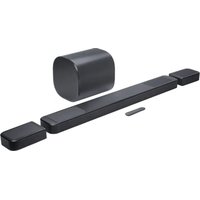
| Product Type | Soundbar with wireless subwoofer |
| Brand | JBL |
| Model | Cinema VISION CVR700 |
| Dimensions (Soundbar) | Approximately 965 x 58 x 92 mm (38 x 2.3 x 3.6 in) |
| Dimensions (Subwoofer) | Approximately 240 x 240 x 270 mm (9.4 x 9.4 x 10.6 in) |
| Weight (Soundbar) | Approximately 2.0 kg (4.4 lbs) |
| Weight (Subwoofer) | Approximately 4.5 kg (9.9 lbs) |
| Power Supply | AC 100-240 V, 50/60 Hz |
| Power Consumption | Soundbar: 50 W, Subwoofer: 30 W, Standby: < 0.5 W |
| Frequency Response | 40 Hz - 20 kHz |
| Audio Channels | 2.1 channel |
| Total Power Output | 300 W RMS |
| Connectivity | Bluetooth 4.2, HDMI ARC, Optical, AUX, USB |
| Supported Audio Formats | Dolby Digital, DTS |
| Driver Configuration | 2 x 50 mm full-range drivers, 6.5 inch subwoofer |
| Remote Control | Included (battery type: CR2025) |
| Wall Mountable | Yes (with included brackets) |
| Networking | No Ethernet, Bluetooth only |
| Smart Features | None (basic soundbar) |
| Cleaning Instructions | Wipe with soft dry cloth. Do not use liquids. |
| Safety Notices | Keep away from moisture. Use only provided power cord. |
| Spare Parts Availability | Remote control and power adapter available from JBL service |
| Reparability | Non-user serviceable. Contact authorized service center. |
| Warranty | 1 year limited warranty |
Frequently Asked Questions - Cinema VISION CVR700 JBL
How do I connect the soundbar to my TV?
Use the included HDMI cable to connect the HDMI ARC port on the soundbar to the HDMI ARC port on your TV. Alternatively, use optical or AUX cables.
Can I control the soundbar with my TV remote?
Yes, if your TV supports HDMI-CEC, you can control volume and power with your TV remote after connecting via HDMI ARC.
How do I pair the subwoofer wirelessly?
The subwoofer automatically pairs with the soundbar when both are powered on. If not, press the Pair button on the subwoofer and the Connect button on the soundbar.
How do I reset the soundbar to factory settings?
Press and hold the Power and Source buttons simultaneously for 5 seconds until the LED flashes. The soundbar will restart.
What should I do if there is no sound?
Check that the soundbar is set to the correct input source. Ensure the TV audio output is set to External Speaker or HDMI ARC. Also verify cables are securely connected.
Can I use Bluetooth to stream music?
Yes, press the Bluetooth button on the remote, then select 'JBL CVR700' from your device's Bluetooth list. Range is approximately 10 meters.
How do I mount the soundbar on the wall?
Use the included wall brackets. Mark the holes, drill, insert anchors, and screw the brackets. Then slide the soundbar onto the brackets until it clicks.
What are the dimensions and weight?
The soundbar is approx. 965x58x92 mm and weighs 2.0 kg. The subwoofer is approx. 240x240x270 mm and weighs 4.5 kg.
How do I clean the soundbar?
Use a soft, dry cloth to wipe the surface. Do not use any liquids or cleaning sprays, as they may damage the electronics.
Where can I find replacement parts?
Contact JBL customer support or visit the official JBL website for spare parts like remote control or power adapter.
User questions about Cinema VISION CVR700 JBL
0 question about this device. Answer the ones you know or ask your own.
Ask a new question about this device
No questions yet. Be the first to ask one.
Download the instructions for your Soundbar in PDF format for free! Find your manual Cinema VISION CVR700 - JBL and take your electronic device back in hand. On this page are published all the documents necessary for the use of your device. Cinema VISION CVR700 by JBL.
USER MANUAL Cinema VISION CVR700 JBL


Manual assistant
Powered by Anthropic
Waiting for your message
Product information
Brand : JBL
Model : Cinema VISION CVR700
Category : Soundbar