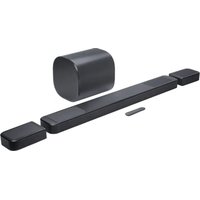
Bar 1300MK2 - Soundbar JBL - Free user manual and instructions
Find the device manual for free Bar 1300MK2 JBL in PDF.


Pick your language and provide your email: we'll send you a specifically translated version.
| Product Type | Soundbar with wireless subwoofer |
| Model | Bar 1300MK2 |
| Brand | JBL |
| Dimensions (Soundbar) | 1050 x 60 x 100 mm |
| Weight (Soundbar) | 3.8 kg |
| Dimensions (Subwoofer) | 305 x 440 x 305 mm |
| Weight (Subwoofer) | 8.5 kg |
| Power Supply | AC 100-240V, 50/60Hz |
| Total Power Output | 300W RMS |
| Audio Technology | MultiBeam, Dolby Atmos, DTS:X |
| Wireless Connectivity | Bluetooth 5.1, Wi-Fi |
| HDMI Ports | HDMI eARC, HDMI Input |
| Remote Control | Included |
| Voice Assistant Support | Built-in microphone for Alexa, Google Assistant |
| Care and Cleaning | Wipe with dry cloth; avoid liquids |
| Safety Features | Auto power-off, overheat protection |
| Spare Parts and Repairability | Contact JBL support for replacement parts |
| General Information | Supports 4K pass-through, HDR10, Dolby Vision |
Frequently Asked Questions - Bar 1300MK2 JBL
How do I connect the Bar 1300MK2 to my TV?
Use the provided HDMI cable and connect to the HDMI eARC port on your TV. Alternatively, use optical cable or Bluetooth.
How can I pair the subwoofer wirelessly?
Plug in the subwoofer and soundbar, they should automatically pair. If not, press the Connect button on the subwoofer and Pair button on the soundbar.
Does this soundbar support Dolby Atmos?
Yes, the JBL Bar 1300MK2 supports Dolby Atmos and DTS:X for immersive sound.
How do I adjust the bass level?
Use the remote control to press the Bass button, then adjust using the volume buttons. You can also use the JBL One app.
Can I control the soundbar with my voice?
Yes, the built-in microphone allows you to use Amazon Alexa or Google Assistant for hands-free control.
What should I do if the soundbar does not turn on?
Check the power cable connection and try a different outlet. If still not working, press and hold the Power button for 10 seconds to reset.
How do I clean the soundbar?
Use a soft, dry cloth to wipe the surface. Avoid using any liquids or abrasive cleaners that could damage the finish.
Is the Bar 1300MK2 wall-mountable?
Yes, it comes with a wall-mount bracket and template. Ensure the wall can support its weight and use appropriate screws.
Can I stream music via Wi-Fi?
Yes, you can stream via AirPlay 2, Chromecast, or the JBL One app over your home Wi-Fi network.
How do I update the firmware?
Download the JBL One app and follow the prompts to check for firmware updates. Ensure the soundbar is connected to Wi-Fi.
User questions about Bar 1300MK2 JBL
0 question about this device. Answer the ones you know or ask your own.
Ask a new question about this device
No questions yet. Be the first to ask one.
Download the instructions for your Soundbar in PDF format for free! Find your manual Bar 1300MK2 - JBL and take your electronic device back in hand. On this page are published all the documents necessary for the use of your device. Bar 1300MK2 by JBL.
USER MANUAL Bar 1300MK2 JBL


Manual assistant
Powered by Anthropic
Waiting for your message
Product information
Brand : JBL
Model : Bar 1300MK2
Category : Soundbar