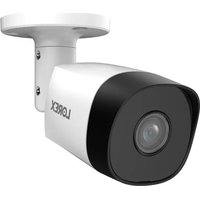
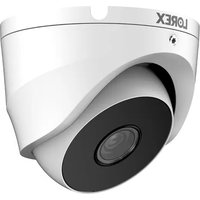
ACJNCD3BKB - Surveillance Camera Lorex - Free user manual and instructions
Find the device manual for free ACJNCD3BKB Lorex in PDF.


Pick your language and provide your email: we'll send you a specifically translated version.
| Product Type | Surveillance Camera |
| Brand | Lorex |
| Model | ACJNCD3BKB |
| Image Sensor | 1/2.8" CMOS |
| Resolution | 1920 x 1080 (Full HD) |
| Field of View | 90° (Horizontal) |
| Night Vision | Infrared LEDs, up to 100 ft (30 m) |
| Video Compression | H.265 |
| Frame Rate | Up to 30 fps |
| Connectivity | Wired (BNC/RJ45) or Wi-Fi (802.11 b/g/n) |
| Power Supply | 12V DC, 1A (power adapter included) |
| Weatherproof Rating | IP66 (Outdoor rated) |
| Dimensions | 3.2 x 2.8 x 6.5 inches (8.1 x 7.1 x 16.5 cm) |
| Weight | 0.9 lbs (0.4 kg) |
| Mounting | Wall or ceiling mount (bracket included) |
| Motion Detection | Yes, with adjustable sensitivity |
| Audio | Built-in microphone |
| Storage | MicroSD card slot (up to 128 GB) or NVR compatible |
| Compatibility | Works with Lorex NVR systems and Lorex Home app |
| Operating Temperature | -30°C to 60°C (-22°F to 140°F) |
| Warranty | 1-year limited warranty |
Frequently Asked Questions - ACJNCD3BKB Lorex
How do I connect the camera to my Wi-Fi?
Use the Lorex Home app to scan the QR code on the camera. Ensure your phone is on the same 2.4 GHz network and follow the in-app instructions.
Can I use this camera without an NVR?
Yes, you can use a microSD card (up to 128 GB) for local recording. However, an NVR provides more storage and advanced features.
What is the maximum night vision distance?
The camera has infrared LEDs that provide visibility up to 100 ft (30 m) in complete darkness.
How do I reset the camera to factory settings?
Press and hold the reset button on the camera for 10 seconds until you hear a click. The camera will reboot and reset.
Is the camera weatherproof?
Yes, it has an IP66 rating, making it suitable for outdoor use in rain, snow, and extreme temperatures.
Can I view the camera feed on my computer?
Yes, you can view the feed via the Lorex Home app on your computer using an emulator or by connecting to an NVR with a monitor.
What type of power adapter does it use?
It uses a 12V DC, 1A power adapter. The included adapter has a barrel connector.
Does the camera support two-way audio?
Yes, it has a built-in microphone and speaker, allowing you to talk and listen through the app.
How do I mount the camera?
Use the included mounting bracket. Drill holes for the screws, attach the bracket to the wall or ceiling, and then slide the camera onto the bracket.
Can I use the camera with other brands of NVR?
It is optimized for Lorex NVRs. Compatibility with other brands is not guaranteed, but it may work if they support ONVIF protocols.
User questions about ACJNCD3BKB Lorex
0 question about this device. Answer the ones you know or ask your own.
Ask a new question about this device
No questions yet. Be the first to ask one.
Download the instructions for your Surveillance Camera in PDF format for free! Find your manual ACJNCD3BKB - Lorex and take your electronic device back in hand. On this page are published all the documents necessary for the use of your device. ACJNCD3BKB by Lorex.
USER MANUAL ACJNCD3BKB Lorex

Manual assistant
Powered by Anthropic
Waiting for your message
Product information
Brand : Lorex
Model : ACJNCD3BKB
Category : Surveillance Camera