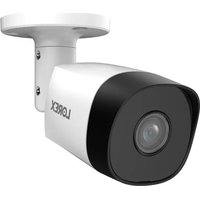
C221NA - Surveillance Camera Lorex - Free user manual and instructions
Find the device manual for free C221NA Lorex in PDF.


Pick your language and provide your email: we'll send you a specifically translated version.
| Product Type | Surveillance Camera |
| Model | C221NA |
| Brand | Lorex |
| Dimensions | 2.8 x 2.8 x 5.5 inches (71 x 71 x 140 mm) |
| Weight | 0.5 lbs (227 g) |
| Power Supply | DC 12V / PoE (Power over Ethernet) |
| Video Resolution | 1080p Full HD (1920 x 1080) |
| Night Vision | Up to 65 feet (20 meters) with IR LEDs |
| Field of View | 90° diagonal |
| Motion Detection | Yes, configurable zones and sensitivity |
| Weather Rating | IP65 (indoor/outdoor) |
| Mounting | Wall or ceiling mount included |
| Connectivity | Ethernet (RJ45) |
| Audio | Built-in microphone (one-way audio) |
| Storage | Compatible with Lorex NVR or cloud subscription |
| Operating Temperature | -22°F to 140°F (-30°C to 60°C) |
| Maintenance | Clean lens with soft, dry cloth; keep vents clear |
| Safety | Use only supplied power adapter; do not expose to water |
| Spare Parts | Mounting kit, power adapter (optional PoE injector) |
| Repairability | Refer to manual for troubleshooting; professional repair recommended |
Frequently Asked Questions - C221NA Lorex
How do I reset the Lorex C221NA camera to factory defaults?
Press and hold the reset button on the camera for 10 seconds using a paperclip. The camera will reboot with all settings restored to factory defaults.
What power adapter does the C221NA require?
The camera requires a 12V DC power adapter with at least 1A output, or you can use a PoE switch/injector (802.3af) for both power and data.
Can I use the C221NA without a Lorex NVR?
Yes, the camera supports ONVIF, so it can be used with third-party NVRs or software. However, some advanced features may require a Lorex NVR.
How do I mount the C221NA camera outdoors?
Use the included mounting bracket and screws. Ensure the mount is secured to a wall or eave. For optimal weather protection, apply silicone sealant around the mount base and cable connections.
Why is my camera not displaying night vision?
Check if the IR LEDs are enabled in the camera settings. Also ensure there is no reflective surface in front of the lens and the camera is not pointed at a window.
How do I access the camera remotely?
Install the Lorex Home app on your smartphone, create an account, and add the camera by scanning its QR code or entering its serial number. Ensure the camera is connected to your network via Ethernet.
What should I do if the camera loses connection frequently?
Check the Ethernet cable connection and ensure it is securely plugged in. Verify the router is working and try a different cable. If using PoE, ensure the switch provides sufficient power.
Can the C221NA record audio?
Yes, the camera has a built-in microphone that records one-way audio. You can enable audio recording in the camera settings within the Lorex NVR or app.
How do I clean the camera lens?
Use a soft, lint-free microfiber cloth slightly dampened (not wet) with water or lens cleaner. Gently wipe the lens in a circular motion. Do not use abrasive cleaners.
Is the C221NA compatible with 5GHz Wi-Fi?
No, the C221NA is a wired Ethernet camera and does not support Wi-Fi. It must be connected via an Ethernet cable to a network router or PoE switch.
User questions about C221NA Lorex
0 question about this device. Answer the ones you know or ask your own.
Ask a new question about this device
No questions yet. Be the first to ask one.
Download the instructions for your Surveillance Camera in PDF format for free! Find your manual C221NA - Lorex and take your electronic device back in hand. On this page are published all the documents necessary for the use of your device. C221NA by Lorex.
USER MANUAL C221NA Lorex

Manual assistant
Powered by Anthropic
Waiting for your message
Product information
Brand : Lorex
Model : C221NA
Category : Surveillance Camera