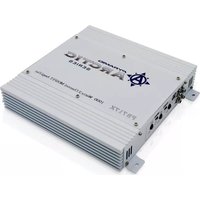
PB715X - Receiver Pyramid - Free user manual and instructions
Find the device manual for free PB715X Pyramid in PDF.


Pick your language and provide your email: we'll send you a specifically translated version.
| Type of Product | Audio/Video Receiver |
| Brand | Pyramid |
| Model | PB715X |
| Dimensions (W x H x D) | 430 x 140 x 310 mm |
| Weight | 8.5 kg |
| Power Supply | AC 230V, 50Hz |
| Power Consumption | 350 W (max) |
| Supported Audio Formats | MP3, WMA, AAC |
| Tuner Bands | AM, FM |
| Number of Channels | 5.1 |
| Inputs | 3x HDMI, 2x RCA, 1x Optical, 1x Coaxial |
| Outputs | 1x HDMI (ARC), Speaker terminals, Subwoofer pre-out |
| Remote Control | Included |
| Main Functions | AM/FM radio, Bluetooth streaming, USB playback, multi-room audio |
| Cleaning Instructions | Wipe with a dry soft cloth. Do not use liquids or solvents. |
| Safety Precautions | Do not expose to moisture. Disconnect during storms. Use only supplied power cord. |
| Spare Parts and Repairability | Contact Pyramid support for spare parts. Designed for professional repair only. |
| General Information | Manufactured under ISO 9001 standards. RoHS compliant. |
Frequently Asked Questions - PB715X Pyramid
How do I connect my speakers to the Pyramid PB715X?
Connect speakers to the corresponding binding posts on the back panel. Ensure the impedance matches the receiver's specifications (typically 4-8 ohms). Use banana plugs or bare wire for best connection.
How can I reset the receiver to factory settings?
Press and hold the 'Setup' button on the front panel for 5 seconds until 'Factory Reset' appears on the display. Confirm with the 'Enter' button.
Why is there no sound from the speakers?
Check if the speakers are properly connected and the receiver is set to the correct input. Also ensure the volume is not muted and the speaker terminals are not shorted. Try a different source to isolate the issue.
Can I control the PB715X with my smartphone?
Yes, download the 'Pyramid Remote' app from the App Store or Google Play. Connect your phone to the same Wi-Fi network as the receiver and follow the app instructions.
How do I set up the AM/FM radio?
Connect the provided AM loop antenna and FM wire antenna. Press the 'Tuner' button on the remote, then use the 'Scan' function to auto-search stations. You can save presets by pressing and holding the numeric buttons.
What should I do if the remote control stops working?
Replace the batteries with fresh ones (CR2025). Ensure there is no obstacle between the remote and the receiver's sensor. If still not working, try resetting the remote by removing batteries and pressing all buttons for 5 seconds.
How do I clean the receiver?
Unplug the unit. Use a soft, dry cloth to gently wipe the exterior. Do not use any liquids or chemicals as they may damage the finish. For ventilation grilles, use a soft brush.
Can I connect the PB715X to a subwoofer?
Yes, connect your powered subwoofer to the 'Subwoofer Pre-Out' jack on the back panel. Use a standard RCA cable. Adjust the crossover and volume on the subwoofer itself.
Is the PB715X compatible with 4K video?
Yes, the HDMI inputs support 4K (60Hz) pass-through with HDR10. Make sure your source and TV are also 4K-compatible. The receiver does not upscale video.
What is the warranty period for this product?
The Pyramid PB715X comes with a 2-year limited warranty against manufacturing defects. Register your product on the Pyramid website for warranty support.
User questions about PB715X Pyramid
0 question about this device. Answer the ones you know or ask your own.
Ask a new question about this device
No questions yet. Be the first to ask one.
Download the instructions for your Receiver in PDF format for free! Find your manual PB715X - Pyramid and take your electronic device back in hand. On this page are published all the documents necessary for the use of your device. PB715X by Pyramid.
USER MANUAL PB715X Pyramid


Manual assistant
Powered by Anthropic
Waiting for your message
Product information
Brand : Pyramid
Model : PB715X
Category : Receiver