Webcam V2 - Webcam PTZ Optics - Free user manual and instructions
Find the device manual for free Webcam V2 PTZ Optics in PDF.


Pick your language and provide your email: we'll send you a specifically translated version.
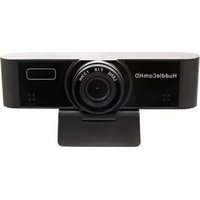
| Product Type | PTZ Webcam |
| Image Sensor | 1/2.8-inch CMOS |
| Resolution | 1920 x 1080 at 30 fps |
| Optical Zoom | 3x |
| Field of View | 70° (horizontal) |
| Pan Range | ±170° |
| Tilt Range | -30° to +90° |
| Connectivity | USB 2.0 (Type-A) |
| Video Output | UVC 1.1, MJPEG and YUY2 |
| Audio | Built-in microphone |
| Power Supply | USB bus power (5V, 500mA) |
| Dimensions (W x H x D) | 120 x 110 x 140 mm |
| Weight | 450 g |
| Mounting | 1/4-inch tripod thread, table stand |
| Operating Temperature | 0°C to 40°C |
| Compatibility | Windows, macOS, Linux (UVC) |
| Control Software | PTZOptics Webcam Control App |
| Cleaning | Use a soft, dry lens cloth |
| Safety | Do not expose to moisture or direct sunlight |
| Spare Parts | USB cable, mounting bracket available |
Frequently Asked Questions - Webcam V2 PTZ Optics
How do I set up the PTZ Optics Webcam V2?
Connect the camera to your computer via USB. The camera is UVC compliant, so no driver installation is required. It will appear as a video source in your conferencing software. Install the PTZOptics Webcam Control App for pan, tilt, and zoom adjustments.
Which operating systems are supported?
The Webcam V2 works with Windows 7 or later, macOS 10.10 or later, and most Linux distributions with UVC support. It is plug-and-play.
Can I use this camera with Zoom, Teams, or Skype?
Yes, the camera is recognized as a standard UVC webcam and is compatible with Zoom, Microsoft Teams, Skype, Google Meet, and other video conferencing apps.
How do I control the pan, tilt, and zoom?
You can use the PTZOptics Webcam Control App (available for Windows and macOS) or the included infrared remote control. The camera can also be controlled via USB using VISCA commands.
What is the maximum resolution and frame rate?
The camera supports up to 1920x1080 at 30 frames per second. Lower resolutions such as 720p are also available.
Does the camera have a built-in microphone?
Yes, it has a built-in omnidirectional microphone. For better audio quality, an external microphone can be connected to your computer.
How do I mount the camera?
The camera comes with a table stand and has a 1/4-inch tripod thread on the bottom. You can mount it on a tripod, wall mount, or ceiling mount using standard hardware.
What is the pan and tilt range?
Pan range is 340° (±170° from center) and tilt range is 120° (-30° to +90°). This provides extensive coverage for meetings and presentations.
How do I clean the camera lens?
Use a soft, dry microfiber cloth to gently wipe the lens. Avoid using liquids or abrasive materials. Do not touch the lens with fingers.
Where can I find spare parts or accessories?
Spare parts such as USB cables, mounting brackets, and remote controls are available from PTZOptics official website or authorized resellers. Contact support for specific inquiries.
User questions about Webcam V2 PTZ Optics
0 question about this device. Answer the ones you know or ask your own.
Ask a new question about this device
No questions yet. Be the first to ask one.
Download the instructions for your Webcam in PDF format for free! Find your manual Webcam V2 - PTZ Optics and take your electronic device back in hand. On this page are published all the documents necessary for the use of your device. Webcam V2 by PTZ Optics.
USER MANUAL Webcam V2 PTZ Optics

Manual assistant
Powered by Anthropic
Waiting for your message
Product information
Brand : PTZ Optics
Model : Webcam V2
Category : Webcam