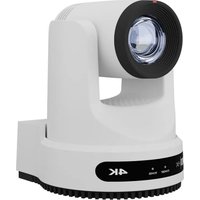
Move 4K - Camera PTZ Optics - Free user manual and instructions
Find the device manual for free Move 4K PTZ Optics in PDF.


Pick your language and provide your email: we'll send you a specifically translated version.
| Product Type | PTZ Camera |
| Brand | PTZ Optics |
| Model | Move 4K |
| Resolution | 4K (3840x2160) |
| Optical Zoom | 20x |
| Digital Zoom | 16x |
| Video Outputs | HDMI, 3G-SDI, USB-C |
| Control Interface | RS-232, RS-485, IP (VISCA over IP) |
| Pan Range | 360° |
| Tilt Range | -30° to +90° |
| Pan/Tilt Speed | 0.5° to 60°/s |
| Preset Positions | 256 |
| Dimensions (W×H×D) | 200×250×200 mm |
| Weight | 2.5 kg |
| Power Supply | PoE+ (IEEE 802.3at) or DC 12V, 2A |
| Power Consumption | 15W (typical) |
| Cleaning Instructions | Wipe gently with a soft dry cloth; do not use liquid cleaners. |
| Safety Precautions | Keep away from moisture and extreme temperatures; do not disassemble. |
| Spare Parts & Repairability | Contact PTZ Optics support for authorized service centers. |
| Warranty | 2 years limited warranty |
Frequently Asked Questions - Move 4K PTZ Optics
How do I reset the PTZ Optics Move 4K to factory defaults?
Press and hold the Reset button (located on the back panel) for 10 seconds using a paperclip until the LED blinks rapidly. Alternatively, access the web interface and navigate to System > Factory Reset.
What video formats does the Move 4K support?
The camera supports 4K@30fps, 1080p@60fps, and lower resolutions via HDMI and SDI outputs. USB output supports up to 1080p@30fps.
Can I control the camera via a smartphone app?
Yes, use the PTZ Optics Control app (available for iOS and Android) over the same network. Ensure the camera is connected via Ethernet and the app discovers it automatically.
How do I update the firmware on the Move 4K?
Download the latest firmware from the PTZ Optics website. Access the camera's web interface, go to System > Firmware Update, upload the file, and follow on-screen instructions. Do not power off during update.
Does the camera support PoE?
Yes, it supports PoE+ (Power over Ethernet, IEEE 802.3at). Use a PoE+ switch or injector for both power and data over a single cable.
What is the maximum number of presets?
You can store up to 256 presets for quick pan/tilt/zoom positions. Presets are accessible via remote control, software, or serial commands.
How do I clean the camera lens?
Use a soft, lint-free cloth slightly dampened with lens cleaning solution. Wipe gently in a circular motion. Avoid applying pressure to the lens surface.
Can I use the camera outdoors?
The Move 4K is designed for indoor use only. It is not waterproof. For outdoor applications, use a weatherproof housing (sold separately).
What is the warranty period?
PTZ Optics offers a 2-year limited warranty covering manufacturing defects. Register your product on their website to activate warranty.
How do I mount the camera on a tripod?
The camera has a 1/4-20 threaded insert on the bottom. Use a standard tripod head with a 1/4-20 screw. Ensure the camera is securely tightened.
User questions about Move 4K PTZ Optics
0 question about this device. Answer the ones you know or ask your own.
Ask a new question about this device
No questions yet. Be the first to ask one.
Download the instructions for your Camera in PDF format for free! Find your manual Move 4K - PTZ Optics and take your electronic device back in hand. On this page are published all the documents necessary for the use of your device. Move 4K by PTZ Optics.
USER MANUAL Move 4K PTZ Optics


Manual assistant
Powered by Anthropic
Waiting for your message
Product information
Brand : PTZ Optics
Model : Move 4K
Category : Camera