
KB28 - Camera KODAK - Free user manual and instructions
Find the device manual for free KB28 KODAK in PDF.



| Product Type | Compact Analog Camera |
| Brand | KODAK |
| Model | KB28 |
| Dimensions | 117 x 41 x 63 mm |
| Weight | 150 g (without batteries) |
| Power Supply | 2 AAA alkaline batteries 1.5V |
| Lens | 30 mm aspherical 2-element lens |
| Shutter Speed | Fixed, 1/100 second |
| Aperture | f/8.0 (flash or daylight) |
| Film Speed | ISO 100, 200 or 400 (DX coding) |
| Focus Range | From 1.2 m to infinity (daylight) |
| Viewfinder | Galilean type |
| Built-in Flash | Fires on every shot; recycle time 5 s (fresh batteries) |
| Frame Counter | Yes, 0 to 36 |
| Auto Power Off | After 1 minute of inactivity (lens cover open) |
| Film Format | 35 mm |
| Film Advance | Motorized, automatic |
| Rewind | Motorized, by rewind button |
| Lens Care | Blow off dust then wipe with a soft lint-free cloth |
| Usage Precautions | Avoid dust, moisture, shocks and excessive heat |
| Included Accessories | Wrist strap |
| Warranty | Keep the receipt as proof of purchase |
Frequently Asked Questions - KB28 KODAK
User questions about KB28 KODAK
0 question about this device. Answer the ones you know or ask your own.
Ask a new question about this device
Download the instructions for your Camera in PDF format for free! Find your manual KB28 - KODAK and take your electronic device back in hand. On this page are published all the documents necessary for the use of your device. KB28 by KODAK.
USER MANUAL KB28 KODAK
Camera Identification
Unfold front cover flaps of manual to view camera diagrams.
KODAK KB28 Camera
NEED HELP WITH YOUR CAMERA?
Visit our Web sites at http://www.kodak.com (for US) or
http://www.kodak.ca (for Canada) or call:
Kodak (USA only) from 9:00 a.m. to 7:00 p.m. (Eastern time) Monday through Friday at 1-800-242-2424.
Kodak (Canada only) from 8:00 a.m. to 5:00 p.m. (Eastern time) Monday through Friday at 1-800-465-6325, ext. 36100; for the Toronto area, call 416-766-8233, ext. 36100.
When you call, please have your camera available.
For warranty purposes, please keep your sales receipt as proof of the date of purchase.
CONTENTS
CAMERA IDENTIFICATION 2
LOADING THE BATTERIES 3
Power shutdown 4
Battery tips 4
LOADING THE FILM 5
TAKING PICTURES 9
Tips for better pictures 11
TAKING FLASH PICTURES 12
UNLOADING THE FILM 14
CARING FOR YOUR CAMERA 15
TROUBLESHOOTING 16
SPECIFICATIONS 18
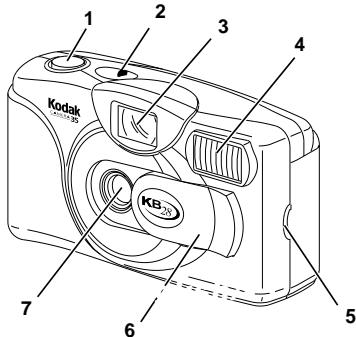
CAMERA IDENTIFICATION
Unfold cover flaps of manual to view camera diagrams.
1 SHUTTER BUTTON
2 PICTURE COUNTER
3 VIEWFINDER
4 FLASH
5 BATTERY DOOR
6 LENS COVER
7 LENS
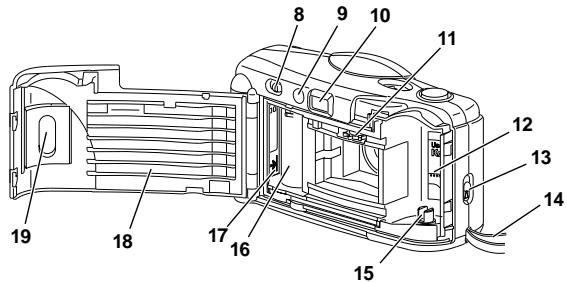
8 FILM-REWIND BUTTON
9 FLASH-READY LIGHT
10 VIEWFINDER EYEPIECE
11 FILM-SPROCKET TEETH
12 FILM CHAMBER
13 FILM-DOOR LATCH
14CAMERA STRAP
15 FILM SPINDLE
16 FILM TAKE-UP SPOOL
17 FILM-LOAD MARK
18 FILM DOOR
19 FILM WINDOW
LOADING THE BATTERIES
This camera uses 2 AAA-size alkaline 1.5V batteries.
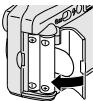
- Load the batteries as shown.
Make sure you tuck the battery pull strap into the battery chamber before inserting the batteries.
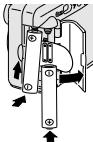
- Replace the batteries with fresh alkaline batteries when the FLASH-READY LIGHT (9) takes more than 30 seconds to come on.
Power shutdown
To reduce battery power, the camera will go into a sleep mode when it is not operated for more than 1 minute with the lens cover opened. You can still take a picture while the FLASH-READY LIGHT (9) is on. When the light turns off, gently press the SHUTTER BUTTON (1) or close and open the LENS COVER (6) to turn the camera back on.
- Close the lens cover when the camera is not going to be used for an extended length of time to further conserve the batteries' life.
Battery tips
- Dispose of batteries according to local and national regulations.
- Keep spare batteries with you at all times.
- Read and follow all warnings and instructions supplied by the battery manufacturer.
- Keep batteries away from children.
- Do not try to take apart, recharge or short circuit the batteries, or subject them to high temperature or fire.
- Store batteries in their original packaging prior to use.
LOADING THE FILM
For excellent all-around results for indoor and outdoor picture-taking, use ISO 400-speed film. For use in bright daylight, you can use ISO 100- or ISO 200-speed film. If in sunlight, turn your back to the sun and load the film in the shade of your body.
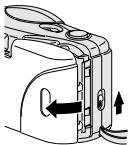
- Push up on the FILM-DOOR LATCH (13) to open the FILM DOOR (18).
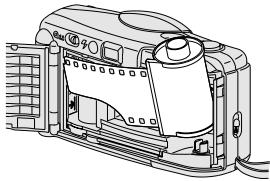
- Insert the flat end of the film cartridge over the FILM SPINDLE (15). Push the other end of the film cartridge down into the FILM CHAMBER (12) until it fits securely into place.
-
Do not force it into the film chamber.
-
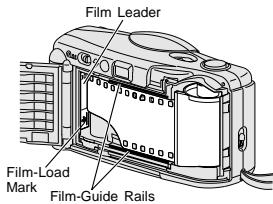
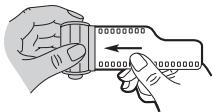
Pull out the film leader until the tip reaches the FILM-LOAD MARK (17).
-
Lay the film flat between the filmguide rails rotating the film cartridge in the direction of the FILM-SPROCKET TEETH (11).
-
Make sure the sprocket teeth show through the holes on the upper side of the film.
- If the end of the film extends past the film-load mark, gently push the excess back into the cartridge.
- Close the film door and check the FILM WINDOW (19).
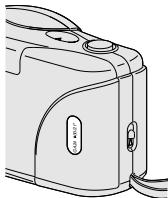
- You should see the film information through the window.
-
Do not open the film door after you start taking pictures or you will ruin the film.
-
Slide the LENS COVER (6) completely open to uncover the LENS (7) and to turn on the camera.
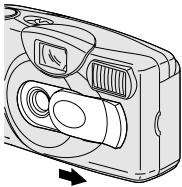
-
Press the SHUTTER BUTTON (1) several times until the PICTURE COUNTER (2) shows "1."
-
If the picture counter does not move, reload the film into the camera and repeat the film-loa
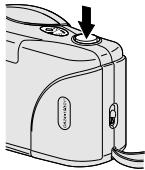
- The picture counter starts at "0" and each mark within the increments of 5 represents one picture.
TAKING PICTURES
This camera features a flash that, when the flash-ready light glows, will fire every time you take a picture. This all-the-time flash feature provides consistently brighter pictures by acting as a fill flash in hazy outdoor pictures or in bright-light conditions where shadows may exist.
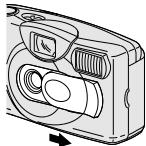
- Slide the LENS COVER (6) completely
open to uncover the LENS (7) and to turn on the camera.
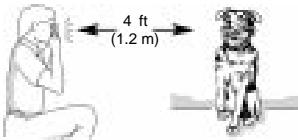
- For a sharp picture, stand at least 4 ft (1.2 m) from your subject.
The flash-recycle time is approximately 5 seconds with fresh batteries.
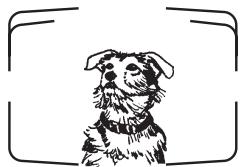
- Look through the VIEWFINDER EYEPIECE (10) to see your subject.
- Hold the camera steady and gently press the SHUTTER BUTTON (1) to take the picture.
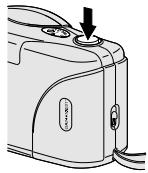
After you take the picture, the film automatically advances to the next picture.
- Close the lens cover when you are done taking pictures.
Tips for better pictures
- To avoid blurry pictures, hold your camera steady by keeping your elbows close to your body when you press the shutter button
- Stand close enough to your subject so that it fills the viewfinder but not closer than 4 ft (1.2 m).
Take pictures at the subject's level. Kneel down to take pictures of children and pets. -
Hold your camera vertically to capture tall, narrow subjects, such as a waterfall, skyscraper, or a single person.
-
Add interest to your picture by framing it with a tree branch, a window, or even the rails of a fence.
- Keep the sun behind you. This provides the best subject illumination.
- Keep your hand, fingers, or object away from the flash and picture-taking lens.
- Stand at an angle to shiny surfaces like windows or mirrors to avoid flash reflection and bright spots in your pictures.
TAKING FLASH PICTURES
In dim light, such as indoors or outdoors in heavy shade, or on dark overcast days, you need flash. This camera simplifies your picture-taking because the flash fires every time you take a picture.
-
Slide the LENS COVER (6) completely open to uncover the LENS (7) and to turn on the camera.
-
Wait for the FLASH- READY LIGHT (9) to glow.
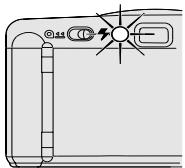
-
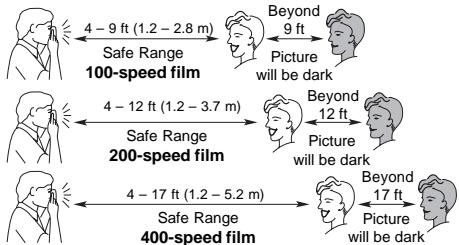
Keep the subject within the distance range for the speed of film in your camera.
-
Don't take pictures beyond the maximum distance or your pictures will be dark.
-
Hold the camera steady and gently press the SHUTTER BUTTON (1) to take the picture.
-
To prevent battery drain, turn the flash off by closing the lens cover when you are done taking pictures.
UNLOADING THE FILM
The film will not advance when you reach the end of the roll. You must rewind the film before you open the film door or you will ruin the film. This camera features full rewind of film into the film cartridge which prevents the end of the film from sticking out of the film cartridge.
- Slide the FILM-REWIND BUTTON (8)
until it latches to start the motorized film rewind.
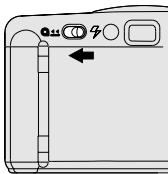
-
Wait until the motor stops before you open the film door.
-
Open the FILM DOOR (18) to remove the film and reload with fresh KODAK Film.
CARING FOR YOUR CAMERA
- Protect the camera from dust, moisture, sudden impact, and excessive heat.
CAUTION: Do not use solvents or harsh or abrasive cleaners on the camera body. - If the lens appears dirty, breathe on it to form a mist and wipe the surface gently with a soft, lintless cloth or camera lens-cleaning tissue. Never wipe a dry lens.
CAUTION: Use solvents or solutions designed for cleaning camera lenses. Do not use chemically treated tissues intended for cleaning eyeglasses.
- Remove the batteries when you store the camera for an extended time.
CAUTION: To prevent possible damage and electrical shock, do not attempt to disassemble or repair the camera or flash unit by yourself.
TROUBLESHOOTING
| What happened | Probable cause | Solution |
| Camera will not operate | Lens cover closed | Open lens cover completely |
| Batteries dead or improperly loaded in camera | Replace batteries and insert as shown on battery door | |
| Flash not ready | Wait for flash-ready light to glow | |
| Film not properly loaded in camera | Reload the film. See LOADING THE FILM | |
| Film needs to be rewound/removed | See UNLOADING THE FILM | |
| Flash-ready light fails to glow within 30 seconds | Lens cover not fully opened | Open lens cover |
| Batteries weak or dead | Replace with 2 fresh AAA-size alkaline batteries | |
| Batteries improperly loaded in camera | Insert batteries as shown on battery door | |
| No film in camera | Load film into camera | |
| Camera in sleep mode | See Power shutdown on page 4 | |
| Shutter button cannot be released | Lens cover closed | Open lens cover |
SPECIFICATIONS
Lens: 30 mm, 2-element aspheric lens
Shutter speed: Fixed at 1/100 second
Aperture: f/8.0 for flash/daylight
Film speed: DX (ISO) 100, 200, or 400 print film
Focus range: Daylight: 4 ft (1.2 m) to infinity
Viewfinder: Reverse galilean
Flash unit: Built-in, flash every time
Flash-recycle time: 5 seconds with fresh batteries
Power source: 2-AAA alkaline 1.5V batteries
Dimensions: 117 × 41 × 63 mm
Weight: 5.3 oz (150 g)
Cámara KODAK KB28
No的方式来拍摄 - No的方式来拍摄 - No way to get a good look at the camera
EASTMAN KODAK COMPANY
Rochester, NY 14650
Brand : KODAK
Model : KB28
Category : Camera