
ADVANTIX 1600 - Film camera KODAK - Free user manual and instructions
Find the device manual for free ADVANTIX 1600 KODAK in PDF.


| Product type | Film camera |
| Brand | KODAK |
| Model | ADVANTIX 1600 |
| Film type | KODAK ADVANTIX (color, negative) |
| Lens | KODAK EKTANAR 23 mm, 3 all-glass elements |
| Aperture | f/6.6 |
| Shutter speed | 1/100 second (fixed) |
| Built-in flash | Automatic with red-eye reduction |
| Flash range (ISO 200) | 1.2 m to 4.3 m |
| Supported film speed | ISO 100, 200, 400 (color) |
| Viewfinder | Reverse Galilean viewfinder with C, H, P format display |
| Print formats | Classic (C), HDTV (H), Panoramic (P) |
| Power source | 2 AAA alkaline batteries |
| Dimensions (W x H x D) | 115 x 58 x 35 mm |
| Weight (without film or batteries) | 130 g |
| Minimum focusing distance | 1.2 m |
| LCD display | Frame counter, battery status indicator |
| Film status indicator | On the cassette: unexposed, partially exposed, exposed, processed |
| Care and cleaning | Clean the lens with a soft, dry cloth. Avoid moisture. |
| Safety | Do not disassemble, recharge, or short-circuit the batteries. Keep out of reach of children. |
Frequently Asked Questions - ADVANTIX 1600 KODAK
User questions about ADVANTIX 1600 KODAK
0 question about this device. Answer the ones you know or ask your own.
Ask a new question about this device
Download the instructions for your Film camera in PDF format for free! Find your manual ADVANTIX 1600 - KODAK and take your electronic device back in hand. On this page are published all the documents necessary for the use of your device. ADVANTIX 1600 by KODAK.
USER MANUAL ADVANTIX 1600 KODAK
A highlighted indicator advances from one symbol to another to identify the status of the film inside the cassette.
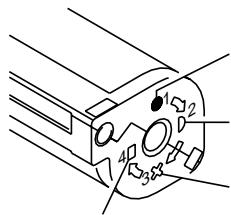
Unexposed
Partially
Exposed
Fully
Exposed
Processed Negatives
This device complies with part 15 of the FCC Rules. Operation is subject to the following two conditions: (1) This device may not cause harmful interference, and (2) this device must accept any interference received, including interference that may cause undesired operation.
NOTE: Your model camera has been tested and found to comply with the limits for a Class B digital device, pursuant to Part 15 of the FCC Rules. These limits provide reasonable protection against interference in residential use. The camera generates, uses and can radiate radio frequency energy and, if not used in accordance with the instructions, may cause interference to radio communications. There is no guarantee that interference will not occur. If this camera does cause interference to radio or television reception, which can be determined by turning the camera off and on, you may reduce the interference by the following:
- Reorient or relocate the receiving antenna.
- Increase the separation between the camera and the receiver.
- Consult the dealer or an experienced radio/television technician for help.
Changes or modifications not approved by the party responsible for compliance could void the user's authority to operate the equipment.
This Class B digital apparatus meets all requirements of the Canadian Interference-Caising Equipment Regulations.

Look for this logo to be sure that the film you buy is made for this camera.

Look for this logo to select a certified photofinisher for developing your film and to assure that you get all the features of the Advanced Photo System.
Contents
Need Help with Your Camera or
More Information About the Advanced Photo System? 7
Camera Identification 10
Batteries 11
Loading the Film 14
Taking Pictures 15
Taking Flash Pictures 18
Unloading the Film 20
Troubleshooting 21
Specifications 23
HSITONE
Need Help with Your Camera or
More Information About the Advanced Photo System?
Call:
Kodak (United States only) toll free from 9:00 a.m. to 7:00 p.m. (Eastern time) Monday through Friday at 1 (800) 242-2424.
Kodak (Canada only) from 8:30 a.m. to 5:00 p.m. (Eastern time) Monday through Friday at 1 (800) 465-6325, ext. 36100; for the Toronto area, call (416) 766-8233, ext. 36100.
Visit our web site at http://www.Kodak.com
For warranty purposes, please keep your sales receipt as proof of the date of purchase.
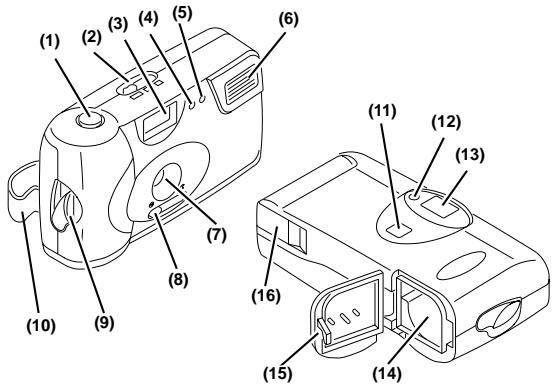
Camera Identification (see inside cover flaps of manual for camera diagrams)
(1) Shutter Button
(2) Print-Size Selector
(3) Viewfinder
(4) Red-Eye-Reduction Indicator
(5) Flash Sensor
(6) Flash
(7) Lens
(8) Lens-Cover Switch
(9) Film-Door Lever
(10) Camera Strap
(11) LCD Panel
(12) Camera-/Flash-Ready Indicator
(13) Viewfinder Eyepiece
(14) Film Chamber
(15) Film Door
(16) Battery Door
Batteries
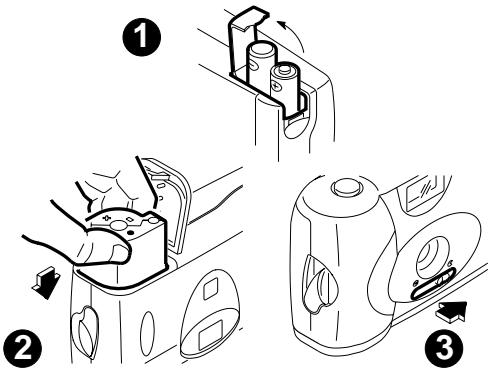
This camera uses 2 AAA-size alkaline batteries that supply power for all camera operations.
- Turn camera upside down.
- Pull out and lift open the Battery Door (16) located on the side of the camera.
- Load the batteries in the battery chamber with the + and - ends in the positions shown inside the battery door .
NOTE: Insert the batteries into the camera before you load the film.
Low-Batteries Warning
It's time to replace the batteries when
- the Camera-/Flash-Ready Indicator (12) takes longer than 30 seconds to turn off,
- the LCD panel displays "LO,"
the film doesn't rewind, or - the camera will not operate.
NOTE: If you "replace" the batteries with film in the camera, the picture counter on the LCD panel will reset to "1."
Battery Tips:
- Remember to keep spare batteries with you at all times.
- Read and follow all warnings and instructions supplied by the battery manufacturer.
- Keep batteries away from children.
- Do not attempt to disassemble, recharge or short circuit the batteries, or subject them to high temperature or fire.
- Store batteries in original packaging prior to use.
Loading the Film
For excellent all-around results for indoor and outdoor picture-taking, use KODAK ADVANTIX 200-speed Film.
- Turn the Film-Door Lever (9) to the "open" position and insert the film cassette completely into the Film Chamber (14) .
- Close the Film Door (15). The film will automatically advance to the first picture and the LCD Panel (11) will display "1." The display stays on for 5 minutes, then the camera turns off to save battery power.
NOTE: After you close the safety-interlocked film door, you cannot open the film door until the film is completely rewound into the film cassette (see Unloading The Film).
Taking Pictures
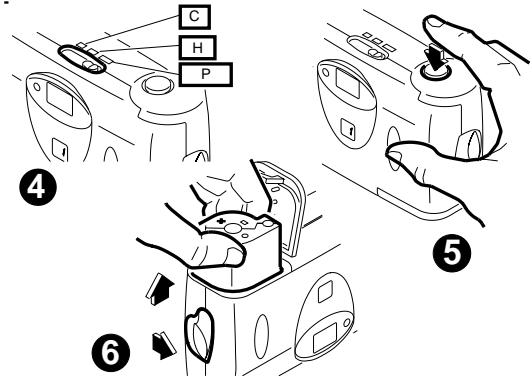
You can take Classic (C), HDTV (H), and Panoramic (P) pictures on the same film cassette. Your photo-processing cost will be based on the format size(s) that you use to expose the film.
- Slide the Lens-Cover Switch (8) to the "open" position to uncover the Lens (7), .
- Move the Print-Size Selector (2) to desired format .
- Frame your subject in the Viewfinder Eyepiece (13). For a sharp picture, stand at least 4 ft (1.2 m) from your subject. Make sure the Camera-/ Flash-Ready Indicator (12) is off before you take a picture.
- Press the Shutter Button (1) completely down to take the picture
Typical Print Sizes (Formats)
| C | H | P |
| Classic | Group (HDTV) | Panoramic |
| 3 1/2 x 5" or 4 x 6" | 3 1/2 x 6" or 4 x 7" | 3 1/2 x 8 1/2" to 4 x 11 1/2" |
| (88.9 x 127 mm | (88.9 x 152 mm | (88.9 x 216 mm |
| or | or | thru |
| 102 x 152 mm) | 102 x 178 mm) | 102 x 292.7 mm) |
Tips for Better Pictures
- Hold the camera steady when taking pictures.
- Keep your pictures simple. Move close enough to your subject so it fills the viewfinder but not closer than 4 ft (1.2 m).
- Take pictures at the subject's level. Kneel down to take pictures of children and pets.
- Hold your camera vertically to capture tall, narrow subjects, such as a waterfall, skyscraper, or a single person.
- Add interest to your picture by framing it with a tree branch, window, or even the rails of a fence.
- Keep the sun behind you for best subject illumination.
Taking Flash Pictures
In dim light, such as indoors or outdoors in heavy shade or on dark overcast days, you need flash. Your camera has a built-in flash with automatic red-eye reduction which fires when needed. When the Camera-/Flash-Ready Indicator (12) turns off, the camera is fully charged and ready for picture-taking.
Flash-to-Subject Distance
| ISO Film Speed | Flash-to-Subject Distance |
| 100 | 4 to 10 ft (1.2 to 3.0 m) |
| 200 | 4 to 14 ft (1.2 to 4.3 m) |
| 400 | 4 to 20 ft (1.2 to 6.1 m) |
Flash Tips
- Turn on room lights and have the subject face the lights to minimize red eyes in pictures.
- Stand at an angle to shiny surfaces like windows or mirrors to avoid flash reflection and bright spots in your pictures.
- Keep your fingers and other objects away from the picture-taking lens and flash to avoid dark or light pictures.
Unloading the Film
After you take the last picture on the film cassette, the film automatically starts to rewind. When the film is fully rewound, the LCD Panel (11) will display "0" and "E" will appear when you remove the film from the camera.
IMPORTANT: Do not remove the film cassette from the camera until the motor completely stops and "0" appears on the LCD panel.
Troubleshooting
| What happened | Probable cause | Solution |
| Camera will not operate | There are no more pictures remaining Batteries weak, dead, missing, or im-properly inserted Film inserted before the batteries | Remove the film Replace or reload the batteries Re-insert the film after inserting the batteries |
| Film does not advance or rewind | Batteries weak, dead, missing, or im-properly inserted | Replace or reload the batteries |
| Shutter button will not depress | Lens cover closed | Open the lens cover |
| Film cassette does not fit completely into film chamber; film door does not close | Loaded exposed, partially exposed, or processed film into the camera | Load only unexposed film into the camera |
| LCD displays “0” after loading batteries | Film loaded before batteries | Load batteries first |
Specifications
Film Type:
KODAK ADVANTIX Film for color prints; slide, chrome, or color reversal film not for use in this camera
Lens:
23 mm, 3-element all-glass KODAK EKTANAR Lens with protective lens cover
Viewfinder:
Reverse Galilean with C, H, & P format display
Film-Speed Range:
DXIX (ISO) 100, 200, or 400 for color print films
Flash Unit:
Automatic flash
Focus Range:
Daylight: 4 ft (1.2 m) to infinity
Lens Aperture:
f/6.6
Shutter:
Fixed at 1/100 seconds
Power Source:
2 AAA-size alkaline batteries
Dimensions:
4.5 × 2.3 × 1.4 in. (115 x 58 x 35 mm)
Weight:
4.6 oz (130 g) without film & batteries

Consumer Imaging
EASTMAN KODAK COMPANY
Rochester, NY 14650
© Eastman Kodak Company, 1997
Pt. No. 916 3502
24
5-97
Printed in U.S.A.