XeRun XR14 - Remote control toy Hobbywing - Free user manual and instructions
Find the device manual for free XeRun XR14 Hobbywing in PDF.


Pick your language and provide your email: we'll send you a specifically translated version.
| Product Type | Electronic Speed Controller (ESC) |
| Brand | Hobbywing |
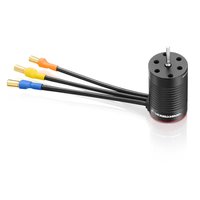
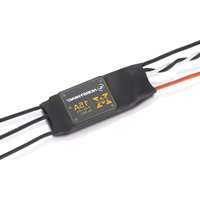
| Model | XeRun XR14 |
| Category | Remote Control Toy |
| Dimensions (L x W x H) | 30 x 25 x 15 mm |
| Weight | 20 g |
| Input Voltage | 2S LiPo (7.4V nominal) |
| Continuous Current | 35 A |
| Peak Current | 70 A (10 sec) |
| BEC Output | 6V / 3A (switch mode) |
| Motor Limitation | Suitable for 1/14 scale brushed or brushless motors (540 size) |
| Brake Function | Yes, adjustable drag brake |
| Programmable | Yes, via programming card or PC link |
| Protection Features | Low voltage cutoff, thermal protection, throttle signal loss protection |
| Maintenance & Cleaning | Clean with dry cloth; avoid water and solvents. Check connectors periodically. |
| Safety | Disconnect battery when not in use. Do not expose to moisture. Use correct gauge wires. |
| Spare Parts | Includes mounting tape, connectors, and wires. Additional spares available separately. |
| General Information | Designed for 1/14 scale RC cars. Requires soldering for battery and motor connections. |
Frequently Asked Questions - XeRun XR14 Hobbywing
What battery types are compatible with the XeRun XR14?
The XeRun XR14 is designed for 2S LiPo batteries (7.4V). Do not use higher voltage as it may damage the ESC.
Can I use the XeRun XR14 with a brushed motor?
Yes, the XR14 supports both brushed and brushless motors. For brushed mode, ensure the motor is within 540 size and 35A continuous rating.
How do I calibrate the ESC?
Calibration: Turn on transmitter with throttle at neutral. Connect battery to ESC. Press and hold the set button. The LED will blink. Keep throttle at neutral, press set again. Full throttle, press set. Full brake, press set. Done.
What does the LED flashing pattern mean?
Solid red = armed. Flashing green = low voltage cutoff. Red/green alternating = programming mode. Slow red flash = thermal protection. Refer to manual for detailed codes.
Can I change the drag brake force?
Yes, drag brake force is adjustable via the programming card or PC software. Default is 10%, can be set from 0% to 100%.
What is the BEC output voltage and current?
The built-in BEC provides 6V at 3A (switch mode), sufficient for most standard servos and receivers.
Does the XR14 have low voltage cutoff (LVC)?
Yes, it has a programmable LVC. Default cutoff is 3.2V per cell (for 2S LiPo). It will reduce power and then stop to protect the battery.
How do I change the ESC settings?
Use the optional Hobbywing program card (LCD or LED) or the PC link software with an interface. Connect the ESC to the programming device and select desired parameters.
What size motor wires should I use?
Use 14–16 AWG silicone wire for battery and motor connections. Ensure solid soldering to prevent resistance or failure.
Is the ESC waterproof?
No, the XeRun XR14 is not waterproof. Avoid driving through water, snow, or mud. If exposed, dry immediately.
User questions about XeRun XR14 Hobbywing
0 question about this device. Answer the ones you know or ask your own.
Ask a new question about this device
No questions yet. Be the first to ask one.
Download the instructions for your Remote control toy in PDF format for free! Find your manual XeRun XR14 - Hobbywing and take your electronic device back in hand. On this page are published all the documents necessary for the use of your device. XeRun XR14 by Hobbywing.
USER MANUAL XeRun XR14 Hobbywing

Manual assistant
Powered by Anthropic
Waiting for your message
Product information
Brand : Hobbywing
Model : XeRun XR14
Category : Remote control toy