DGA512 - Grinder MAKITA - Free user manual and instructions
Find the device manual for free DGA512 MAKITA in PDF.


Pick your language and provide your email: we'll send you a specifically translated version.
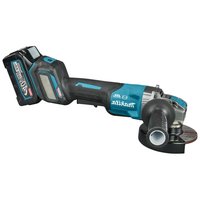
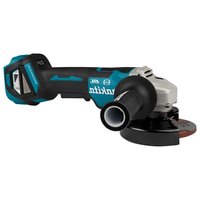
| Product Type | Angle Grinder |
| Brand | Makita |
| Model | DGA512 |
| Rated voltage | 18 V |
| Battery type | Lithium-ion (LXT) |
| Disc diameter | 125 mm |
| No-load speed | 8,500 rpm |
| Weight (without battery) | 1.2 kg |
| Weight (with battery) | ~2.0 kg |
| Dimensions (LxWxH) | 270 x 80 x 150 mm |
| Shaft diameter | M14 |
| Motor type | Brushless |
| Overload protection | Yes (electronic) |
| Disc brake | Yes (electric) |
| Soft start | Yes |
| Variable speed | No |
| Switch | Slide switch with lock |
| Disc guard | Yes (adjustable) |
| Maintenance | Clean ventilation slots regularly |
| Cleaning | With a dry, soft cloth |
| Manufacturer warranty | 2 years |
| Country of manufacture | China / Japan |
Frequently Asked Questions - DGA512 MAKITA
Which battery to use with Makita DGA512?
Use a Makita 18V LXT battery from the BL18xx series (BL1815, BL1820, BL1830, BL1840, BL1850, etc.). Capacity affects runtime.
What is the maximum disc diameter?
The maximum disc diameter is 125 mm (5 inches). Never use a larger disc.
Does the DGA512 have variable speed?
No, the DGA512 is a single speed grinder at 8,500 rpm. It does not have electronic speed control.
How to change the disc on the DGA512?
Disconnect the battery. Press the shaft lock button, then use the supplied wrench to loosen the nut. Replace the disc and tighten the nut in reverse.
Is the DGA512 suitable for cutting metal?
Yes, with an appropriate cutting disc (cut-off wheel), it can cut metal, stone, or tile.
How to clean the grinder?
Disconnect the battery. Clean the housing with a damp, soft cloth. Never use solvents. The ventilation slots can be dusted with a brush.
What to do if the grinder overheats?
The electronic protection automatically cuts off power in case of overload. Let the tool cool down for at least 10 minutes before using it again.
Can I use a 115 mm disc on the DGA512?
Yes, you can use 115 mm discs, but the disc guard must be adjusted accordingly. Using smaller discs is possible with an adapter.
How to lock the switch for continuous use?
The DGA512 is equipped with a slide switch with lock. Push the latch forward, then slide the switch. To turn off, slide the switch back.
Where can I find spare parts?
Spare parts are available from authorized Makita dealers or online. Use model number DGA512 to identify compatible parts.
User questions about DGA512 MAKITA
0 question about this device. Answer the ones you know or ask your own.
Ask a new question about this device
No questions yet. Be the first to ask one.
Download the instructions for your Grinder in PDF format for free! Find your manual DGA512 - MAKITA and take your electronic device back in hand. On this page are published all the documents necessary for the use of your device. DGA512 by MAKITA.
USER MANUAL DGA512 MAKITA
Manual assistant
Powered by Anthropic
Waiting for your message
Product information
Brand : MAKITA
Model : DGA512
Category : Grinder