DGA514 - Grinder MAKITA - Free user manual and instructions
Find the device manual for free DGA514 MAKITA in PDF.


Pick your language and provide your email: we'll send you a specifically translated version.
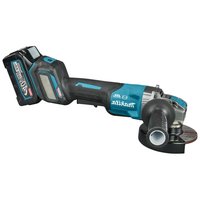
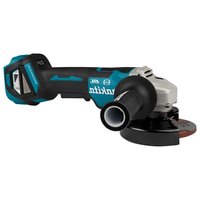
| Product type | Cordless angle grinder |
| Brand | Makita |
| Model | DGA514 |
| Disc diameter | 125 mm |
| Power supply | 18 V Li-ion battery (LXT compatible) |
| No-load speed | 8,500 rpm |
| Dimensions (L x W x H) | 354 x 140 x 165 mm |
| Weight (without battery) | 2.6 kg |
| Disc brake | Yes, electric brake |
| Lock-off switch | Yes, with safety function |
| Anti-restart protection | Integrated |
| Spindle capacity | M14 |
| Sound pressure level | 82 dB(A) |
| Sound power level | 93 dB(A) |
| Vibration (grinding) | 5.0 m/s² |
| Main functions | Grinding, cutting, stripping, deburring |
| Maintenance and cleaning | Regularly clean ventilation slots and housing |
| Spare parts | Discs, carbon brushes, protective guard |
| Repairability | Repairability score of 8.4/10 |
| Warranty | 2 years (according to conditions) |
Frequently Asked Questions - DGA514 MAKITA
How to install and change the disc on the Makita DGA514?
Unscrew the locking nut using the provided wrench, insert the disc (pay attention to the direction of rotation), then retighten firmly. Always tighten the disc with the wrench to prevent loosening during use.
Which battery to use with the DGA514?
It uses Makita 18 V LXT series batteries, such as the BL1815, BL1830, BL1850. Make sure the battery is fully charged before use.
How to activate the anti-restart protection?
The anti-restart protection is integrated: after a power cut or battery change, the tool does not restart automatically. You must release the switch and then re-engage it to restart.
What to do if the disc brake no longer works?
Check the condition of the carbon brushes and clean the brake tracks. If the problem persists, consult an authorized Makita service center for a brake replacement.
Can I use 150 mm discs on this grinder?
No, the Makita DGA514 is designed for 125 mm diameter discs. Using larger discs is dangerous and would damage the tool.
How to clean the grinder after use?
Use a dry cloth to wipe off dust and residues. Clean the ventilation slots with a soft brush. Never use water or aggressive solvents.
Is the DGA514 compatible with 14.4 V batteries?
No, it works exclusively with 18 V batteries from the LXT range. 14.4 V batteries will not fit and could cause damage.
How to change the carbon brushes?
Unscrew the brush caps on either side of the motor, remove the old brushes, insert the new ones (same model) and screw back. Check condition every 50 hours of use.
What is the recommended tightening torque for the disc nut?
Tighten firmly by hand using the wrench, without excessive force. A tightening torque of about 10-15 Nm is sufficient to prevent loosening.
Why does my grinder vibrate abnormally?
Excessive vibration may come from an unbalanced disc, a bent spindle, or worn bearings. Stop the tool immediately, check the disc, and if the problem persists, have the tool serviced.
User questions about DGA514 MAKITA
0 question about this device. Answer the ones you know or ask your own.
Ask a new question about this device
No questions yet. Be the first to ask one.
Download the instructions for your Grinder in PDF format for free! Find your manual DGA514 - MAKITA and take your electronic device back in hand. On this page are published all the documents necessary for the use of your device. DGA514 by MAKITA.
USER MANUAL DGA514 MAKITA
Manual assistant
Powered by Anthropic
Waiting for your message
Product information
Brand : MAKITA
Model : DGA514
Category : Grinder