CECP701FSA - Hob CONTINENTAL EDISON - Free user manual and instructions
Find the device manual for free CECP701FSA CONTINENTAL EDISON in PDF.


| Product type | Induction hob |
| Brand | CONTINENTAL EDISON |
| Model | CECP701FSA |
| Number of cooking zones | 4 |
| Zone types | Induction |
| Zone diameters | Zone 1: 220 mm, Zone 2: 140 mm, Zone 3: 180 mm, Zone 4: 140 mm |
| Maximum power per zone | Zone 1: 2200 W (boost 2900 W), Zone 2: 1500 W (boost 2000 W), Zone 3: 2000 W (boost 2800 W), Zone 4: 1500 W (boost 2000 W) |
| Power supply | 220-240 V ~ 50/60 Hz |
| Booster function | Yes, on all zones (duration 5 min) |
| Timer function | Yes, from 0 to 9h59 per zone |
| Child safety function | Yes, key lock |
| Keep warm function | Yes (zones 2 and 3) |
| Fry function (F fire) | Yes |
| Automatic shut-off safety | Yes, depending on power level (8h to 1h) |
| Residual heat indication | H indicator light |
| Pan detection | Yes, display U if incompatible |
| Cooking surface | Ceramic glass |
| Cleaning | Hot water, specific ceramic glass sponge, scraper for stubborn residues |
| Recessed dimensions | See diagram in manual (minimum spacing 50 mm from walls, worktop thickness ≥ 30 mm) |
| Included accessories | User manual, fixing screws |
| Repairability | Error codes F0-FE, E1-E6; contact customer service |
Frequently Asked Questions - CECP701FSA CONTINENTAL EDISON
User questions about CECP701FSA CONTINENTAL EDISON
0 question about this device. Answer the ones you know or ask your own.
Ask a new question about this device
Download the instructions for your Hob in PDF format for free! Find your manual CECP701FSA - CONTINENTAL EDISON and take your electronic device back in hand. On this page are published all the documents necessary for the use of your device. CECP701FSA by CONTINENTAL EDISON.
USER MANUAL CECP701FSA CONTINENTAL EDISON
Thank you for purchasing the induction hotplate our product can serve you many years to your satisfaction.
Please read this instructions manual carefully before using and installation, keep it cautiously after reading for future reference.
Thank you for your purchase of the induction hotplate again, and wish you to enjoy the pleasure by it.
Product Introduction
The induction hotplate can meet various demands of cuisine by electromagnetic heating, with micro-computerized control and multifunction, really the optimal choice for modern families.
The induction hotplate centers on customers and adopts personalized design, and which will make your life comfortable and enabling to fully enjoy the pleasure of life.
We have designed this hob for private use in home.
Working Principle
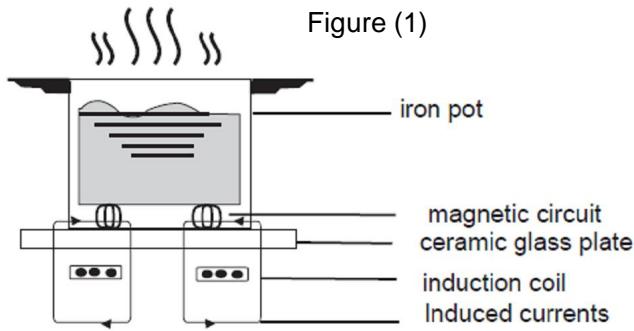
The induction hotplate is mainly composed of an induced heating coil, hotplate made of ferromagnetic materials and control system.
In principle, current generates a powerful magnetic field via the coil. Large numbers of vortexes are produced in the way that the magnetic lines in the field contact the bottom containing iron or stainless steel substances. The tremendous energy generated by the vortexes can heat the food directly by converting efficiency heat energy penetrating through the bottom.
Over- Temperature Protection
A temperature sensor equipped can monitor the temperature inside the hotplate. When an excessive temperature is monitored, the induction hotplate will stop operation automatically.
Pot Detection
When an unsuitable size or non-magnetic pot (e.g. Aluminum), or some other small item (e.g. knife, fork, key) has been left on the hob, or the pot has been removed, the hob can stop heating immediately. If there is no suitable pan put on the right hob in one minute, the hob will go automatically into the standby state, and the buzzer will sound for warning at one time.
Heat Indication
When the hotplate is used for a long time, waste heat remains in the heating zone in a few minutes. The code "H" appears, warning to be away from the heating zone.
Protection of Shutting Down Automatic
Shutting down Automatic is a safety protection function for your induction hotplate. It will shut down automatically if you forget to turn off your cooker. The default working times for various power levels are shown in the following table:
| Power level | The heating zone shut down automatically after |
| 1~5 | 8 hours |
| 6~10 | 4 hours |
| 11~14 | 2 hours |
| 15 | 1 hours |
*Remind:
The patient with a heart pacemaker shall use this product under the guidance of the doctor.
Selection of installation equipment
Drill holes on the table surface according to the sizes shown in the drawing. For the purpose of installation and use, a minimum of 50~mm space shall be preserved around the hole.
Be sure the thickness of the table surface is at least 30mm . Please select heat-resistant table material to avoid larger deformation caused by the heat radiation from the hotplate.
As shown in Figure (2)
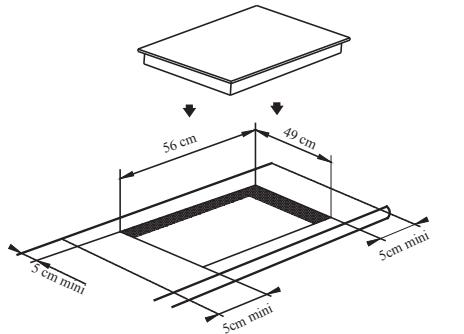
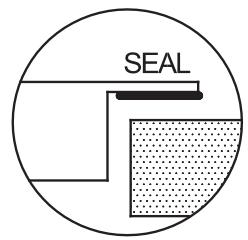
Figure (2)
Under any circumstances, make sure the induction hotplate is well ventilated and the air inlet and outlet are not blocked.
Ensure the induction hotplate is in good work state.
As shown in Figure (3)
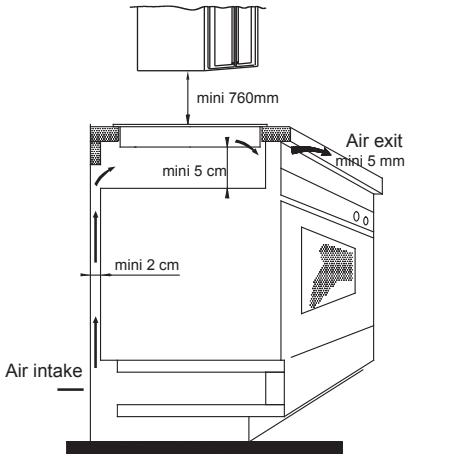
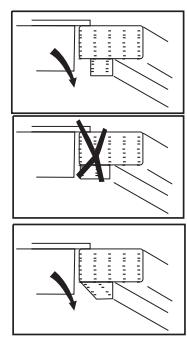
Figure (3)
Note: The safety distance between the hotplate and the cupboard above the hotplate should be at least 760mm.
Fix the hob on the table by screw four brackets on the bottom of hob (as shown in figure (4)) after installation. Adjust the bracket position to suit for different table top thickness.
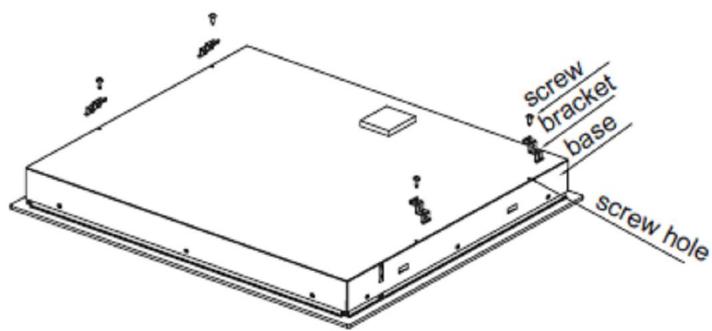
Figure (4)
Cautions:
- The induction hotplate must be installed by qualified personnel or technicians. We have professionals at your service. Please never conduct the operation by yourself.
- The induction hotplate shall not be mounted to cooling equipment, dishwashers and rotary dryers.
- The induction hotplate shall be installed such that better heat radiation can be ensured to enhance its reliability.
- The wall and induced heating zone above the table surface shall withstand heat.
- To avoid any damage, the sandwich layer and adhesive must be resistant to heat.
ELECTRICAL CONNECTION
"The installation must conform to the standard directives."
The manufacturer declines all responsibility for any damage that may be caused by unsuitable or unreasonable use.
Power line connection
The socket shall be connected according to the relevant standard or connected to a single-pole breaker.
The method of connection is shown in Figure (5):
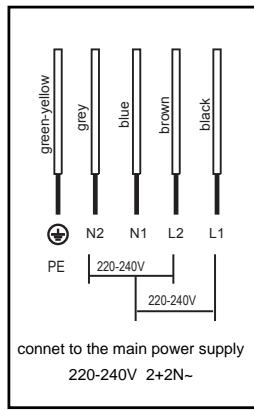
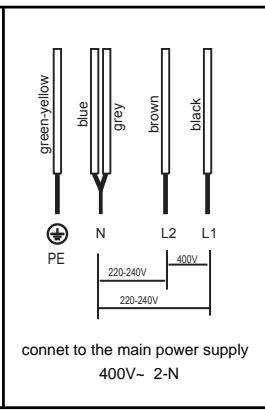
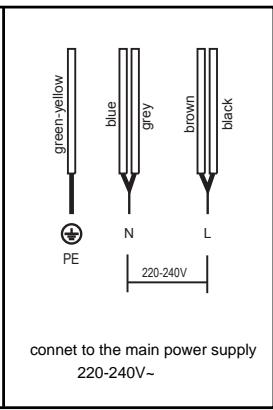
Figure (5)
If the cable is damaged or needed to be replaced, the operation must be carried out by the after-sale agent with dedicated tools to avoid any accidents. If the appliance is being connected directly to the mains an Omni-polar circuit-breaker must be installed with a minimum opening of 3mm between contacts.
The installer must ensure that the correct electrical connection has been made and that it is compliant with safety regulations.
The cable must not be bent or compressed.
The cable must be checked regularly and replaced by authorized technicians only.
Induction Hotplate Appearance
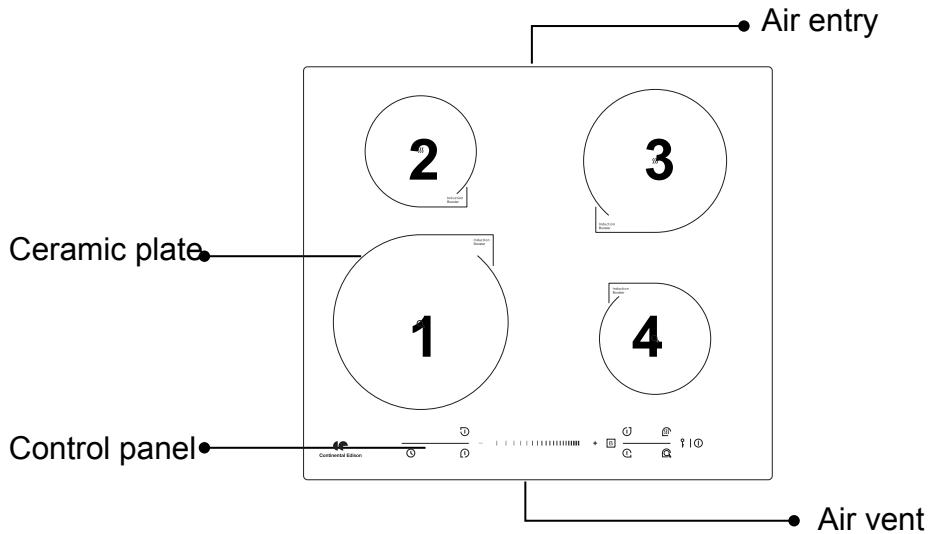
Figure (6)
Schematic Diagram of The Control Panel
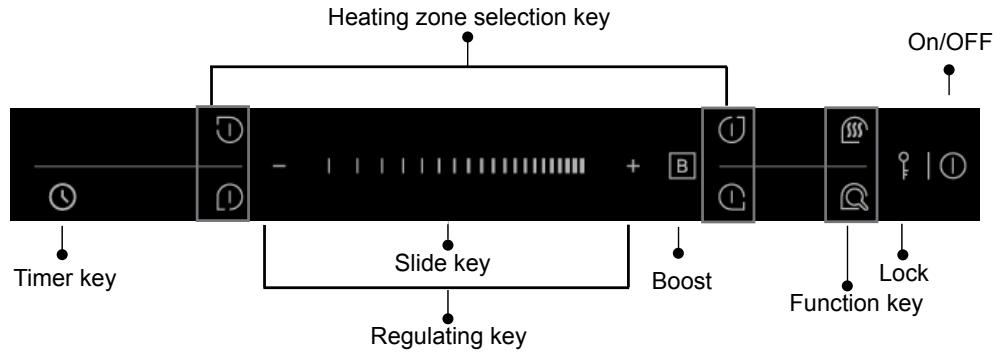
Figure (7)
Instructions For Use
Preparation Before Using:
After power on, the buzzer beep once, all the indicators light up for 1 second and then go out, which indicates the induction hotplate enters the state of standby.
Put the pot in the center of the heating zone.
Operation Instructions:
When the "ON / OFF" button is pressed, all the indicators show "--" or "--"


OR

According to the heating zone where the pot is placed, select a relevant zone selection (e.g. select zone 1), with a corresponding power level indicator flashing.


At the moment, press the "+" button, the indicator displays "8", or press the "-" button, the indicator displays "1", then adjust the power u levels sing the "+" , "-" button or the slider | | | | | | | | | | |
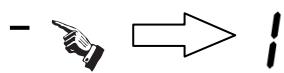


Or press the "+" and "-" buttons simultaneously, the power setting immediately chang to 0, and the relevant cooking zone switches off.

See the attached table "the max power of each heating zone" for the power specific to each heating zone.
Note: 1. After the "ON/OFF" button is pressed, the induction hotplate will restore to its standby state if no any operation is carried out within one minute.
Boost function
To get a quicker heating speed, there is a function named "Boost" will satisfy your requirement.
Directly press the "Boost" button after selecting the heating zone, with the power level indicator showing "P. ", and the heating power can reach up to the max. (e.g. select zone 1)

Note:1. The boost function only operates for 5 minutes, after which the cooking zone returns to its original setting.
- The boost function works on the all cooking zones.
- As the boost function is activated, the other cooking zone of the same side is limited under level 2 automatically (for example, when the 2nd cooking zone's boost function is activated, the 1st cooking zone which is of the same left side will be limited under level 2 automatically).
Cancellation of "Boost" function
When in the "Boost" function, select the relevant heating zone with the "Boost" function, and press the "Boost" button or the "-" button to cancel the Boost function, then the cooking zone will revert to its original setting.

Or press the "+" and "-" buttons simultaneously when the relevant heating zone has been selected, the "Boost" function will be cancelled automatically. The power setting immediately chang to 0, and this heating zone switch off at the same time.

Timing function
Select the relevant cooking zone, and set the power level with the "+" or "-" button. (e.g. the cooking zone 1 with power level 6)

Press the "Timing" button, the timing indicator flashes, and you can set the timer at this point.

Using the "+" and "-" buttons, you can realize the setting of timing from 0 to 9:59 minutes.

Press the "+" key once increases the time by one minute ; hold down the "+" key increases the time by 10 minutes . When the time exceeds 1 hour, hold down the " + " key increases the time by 30 minutes .
Press the "-" key once decreases the time by one minute ; hold down the "-" key decreases the time by 10 minutes . When the time exceeds 2 hours, hold down the the "-" key decreases the time by 30 minutes .
Timing confirmation:
After selecting a set time, once the timing indicator flashes for 5 seconds, or press the "Timing" button, the set time will be confirmed to be valid automatically.
Timing cancellation:
If press the "+" and "-" simultaneously, the timing can be cancelled automatically, with the timing indicator showing "0".

Note: 1. In the timing state, the power level of the relevant cooking zone can be changed, and the time set is still valid.
- Press the timing button without select one cooking zone when the induction hotplate is working, the time-warning function will operate. And the warning time can be set just like the timing function. The buzzer will be beeping for 30 seconds when the time is reached. The function will be cancelled when the time is set to.
- the time-warning function will be cancelled when the induction hotplate is switched off.
- Timer can be set on all 4 cooking zones. When you set the time for several cooking zones simultaneously, decimal dots of the relevant cooking zones are on.
- on the timer display will be shown the timer than will expire first. The dot of the corresponding zone will be on but flashing. Once the countdown timer expires the corresponding zone will be switch off. Then it will be shown the new first expiring timer and the corresponding zone will have the dot flashing.
Interlock Function:
To ensure the safety of children, the induction hotplate is provided with the function of interlock.
Interlock:
Press the "Interlock" button, then the induction hotplate enters the locking state, with the timing indicator showing "Loc".

Unlock:
Holding the "Interlock" button for about 3 seconds, the locking state will be removed.
Note:
- The rest buttons disabled except the "ON/OFF" and "Interlock" button when the induction hotplate is in the locking state. Only unlocking the buttons or else the induction hotplate won't be operated.
- If the induction hotplate enters the locking state in the off mode, the timing indicator showing "Loc" for one minute. And it will be shown for one minute again when the "ON/OFF" or "Interlock" button is pressed.
Warm Function:
This function is designed for keeping food warm automatically.
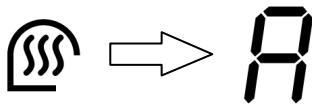
Select the relevant cooking zone, press the "Warm" button, the indicator shows "A", then this relevant cooking zone starts warm function mode.
Note:
Warm function only works on the 2nd and 3rd cooking zone.
Fry Function:
This function is designed for frying food automatically.
Select the relevant cooking zone, press the "Fry" button, the indicator shows "F", then this relevant cooking zone starts fry function mode

The max. power of each heating zone are as follows:
| Heating Zone | Max. Power(W) | Dia. Of the Heating Zone | |
| Normal | Boost | ||
| 1 | 2200 | 2900 | 220mm |
| 2 | 1500 | 2000 | 140mm |
| 3 | 2000 | 2800 | 180mm |
| 4 | 1500 | 2000 | 140mm |
The above power may vary if the material or the size of pot is differet.
Selection of heating appliances
| Iron oil frying pan | Stainless steel pot | Iron pan | Iron kettle |
| Enamel stainless steel kettle | Enamel cooking utensil | Iron plate |
You may have multiple appliances suitable for heating.
This induction hotplate is able to identify multiple heating appliances, and you can test them according to one of the following methods:
- Place the appliance in the heating zone. If the corresponding heating zone displays a power level, it shows the suitability of the appliance; if “ ” flashes, it shows the appliance does not fit in the induction cooking.
- Have a magnet to contact the appliance. If there is attraction between them, it shows the appliance also fits in the induction cooking.
Requirement for pot material: the bottom contains materials of magnetic conductivity.
Requirement for shape: flat bottom.
Safety Reminding and Maintenance:
| Please use a dedicated power protection air switch; | Indoor use only. | Never directly wash the induction hotplate with water so as to avoid dangers. |
| Never have the induction hotplate to work without food inside, otherwise its operational performance may be affected and danger may happen. | For sealed food such as canned goods, please do not heat them before opening their covers so as to avoid any dangers of explosion due to heating expansion. | After being used for a long time, the corresponding heating zone of the induction hotplate is till hot. Never touch the ceramic surface to avoid burning. |
| We suggest that you should periodically check that there are no object (glass, paper, etc) that could obstruct the inlet under your induction hotplate. | Metallic objects such as knives, forks, spoons and lids should not be placed on the hotplate since they can get hot. | Never use the induction hotplate in high temperature environments such as near a gas stove or kerosene stove. |
| Do not put any detergents or flammable materials in the equipment installed under the induction hotplate. | If the surface is cracked, swith off the appliance to avoid the possibility of electric shock. | Do not place rough or uneven appliances, which may damage the ceramic surface. |
| Clean the induction hotplate on a regular basis to prevent foreign matters from entering the fan thus influencing the normal operation. | Keep electrical appliance out of reach from children or inform person. Do not let them use the appliances without supervision. | If the supply cord is damaged, it must be replaced by the manufacturer, its service agent or similarly qualified persons in order to avoid a hazard. |
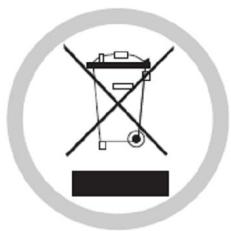
DISPOSAL: Do not dispose this product as unsorted municipal waste. Collection of such waste separately for special treatment is necessary.
This appliance is labeled in compliance with European directive 2002/96/EC for Waste Electrical and Electronic Equipment (WEEE). By ensuring that this appliance is disposed of correctly, you will help prevent any possible damage to the environment and to human health, which might otherwise be caused if it were disposed of in the wrong way.
The symbol on the product indicates that it may not be treated as normal household waste. It should be taken to a collection point for the recycling of electrical and electronic goods.
This appliance requires specialist waste disposal. For further information regarding the treatment, recover and recycling of this product please contact your local council, your household waste disposal service, or the shop where you purchased it.
For more detailed information about treatment, recovery and recycling of this product, please contact your local city office, your household waste disposal service or the shop where you purchased the product.
Cleanness and Maintenance
You can easily clean the surface of the induction hotplate if following the methods given in the table.
| Type of contamination | Method of cleaning | Articles used forcleaning |
| Light | Immerse in hot water then wipe it dry | Cleaning sponge |
| Accumulation of dirt | Immerse in hot water then wipe it dry with abrasive sponge | Special cleaning sponge for ceramic glass |
| Rings and lime crumbles | Apply white vinegar to the polluted zone, then wipe it dry with soft cloth or a special article available in local markets | Special adhesive for ceramic glass |
| Sweetmeat, melt aluminum or plastics | Use a scraper suitable for ceramic glass (to protect glass, a silicon product is preferred) to remove residuals | Special adhesive for ceramic glass |
Hint: please disconnect power before the cleaning.
Failure Display and Inspection
If an abnormality comes up, the induction hotplate will enter the protective state automatically and display corresponding protective codes:
| Troubles | Possible reasons | Solutions |
| F0-F2 | Fan failure. | Please contact the supplier |
| F3-F8 | Thermistor component failure. | Power on, and then restart after the temperature around returns to be normal. |
| Please contact the supplier. | ||
| F9-FE | Temperature sensor of the IGBT failure. | Power on, and then restart after the temperature around returns to be normal. |
| Please contact the supplier. | ||
| E1-E2 | Abnormal supply voltage. | Please inspect whether power supply is normal. |
| Please contact the supplier. | ||
| E3-E4 | Abnormal temperature. | Please inspect the pot. |
| Please restart after the hotplate cools down. | ||
| Please contact the supplier. | ||
| E5-E6 | Bad hotplate heat radiation. | Please restart after the hotplate cools down. |
| Please contact the supplier. |
The above are the judgment and inspection of common failures. Please do not disassemble the unit by yourself to avoid any dangers and damages to the induction hotplate.
Customer Care Service
Before calling the After Sales Service
In case the appliance should not work correctly we suggest to:
-verify if the plug is correctly inserted in the socket
-read the Failure and Display table above
In case it is not possible to establish the reason for the bad functioning of the appliance, switch it off, do not try to manumit it and call the After Sales Service.
Special Declaration
All the contents in this material have been subjected to careful check. For any mistake and omission in printing or misunderstanding of the contents, the company keeps the right of interpretation.
With a view to constantly improving our products, we reserve the right to make any changes to the technical, program or aesthetic features connected with the technical evolution.
Addition: any technical improvement will be placed in the revised manual without notice; for product appearance and color is according to the actual one.
| Cooking Hob | CECP701FSA |
| Cooking Zones | Plaque de cuisson induction 4 zones et 4 booster |
| Supply Voltage | 220-240V 50/60 Hz 400 V 50/60 Hz |
| Installed Electric Power (W) | 7200 |
| Product Size D×W×H(mm) | 590×520×55 |
| Building-in Dimensions A×B (mm) | 560×490 |
| A B | |
| Induction Hotplate Appearance |