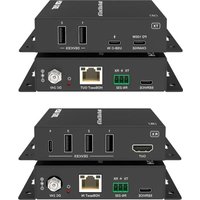
USB-PAIR-2 - Audio/video converter DVDO - Free user manual and instructions
Find the device manual for free USB-PAIR-2 DVDO in PDF.


Pick your language and provide your email: we'll send you a specifically translated version.
| Product Type | Audio/Video Converter |
| Model | USB-PAIR-2 |
| Brand | DVDO |
| Dimensions (approx.) | 80 x 60 x 20 mm (3.15 x 2.36 x 0.79 in) |
| Weight (approx.) | 50 g (1.76 oz) |
| Power Supply | USB powered (5V, 500mA) |
| Input Interface | USB-A (x2) |
| Output Interface | HDMI (Type A) |
| Supported Audio Formats | PCM, AAC, MP3 (up to 48kHz) |
| Supported Video Resolutions | Up to 1080p @60Hz |
| Main Function | Convert USB audio/video signals to HDMI for display |
| Compatibility | Windows, macOS, Linux (USB UVC/UAC compliant) |
| Maintenance | Clean with a soft, dry cloth. Avoid liquids. |
| Safety | Low voltage device; use with USB port only. No user-serviceable parts. |
| Spare Parts | Not available; device is not user-repairable. |
| Repairability | Non-repairable; replace device if defective. |
| Environmental | Operating temperature: 0°C to 45°C. Storage: -20°C to 60°C. |
| Accessories Included | USB-PAIR-2 adapter, user manual (PDF) |
Frequently Asked Questions - USB-PAIR-2 DVDO
How do I connect the DVDO USB-PAIR-2?
Connect the USB-A inputs to your source devices (e.g., laptop, camera) and the HDMI output to a display or projector. No drivers needed; it's plug-and-play if the source supports USB Video Class (UVC) and USB Audio Class (UAC).
What devices are compatible with this converter?
It works with computers (Windows, macOS, Linux) and some Android devices that support USB host mode with UVC/UAC. Check your device's specifications for USB Video/Audio class support.
Why is there no video output?
Ensure the source device is outputting video via USB. Try a different USB port or cable. Verify that the display is set to the correct HDMI input. The converter supports up to 1080p; lower resolutions may also work.
Can I use this converter for audio only?
Yes, if your source sends audio over USB, it will be passed through to the HDMI output. However, the converter primarily handles audio and video together.
Does the converter require external power?
No, it is powered entirely via the USB connection from the source device. Make sure the USB port can supply at least 500mA.
How do I clean the converter?
Use a soft, dry microfiber cloth to gently wipe the exterior. Do not use water, solvents, or abrasive cleaners. Avoid getting moisture into the ports.
Can I connect multiple USB sources at once?
The USB-PAIR-2 has two USB-A inputs, but they are not designed for simultaneous use. Typically, one source is active at a time. Refer to the manual for specific pairing instructions.
Is the converter compatible with game consoles?
Only if the console supports USB Video/Audio class output via its USB port. Many consoles do not support this, so it may not work. Check your console's specifications.
What should I do if there is audio but no video?
Try a different USB cable. Ensure the source device is set to output video over USB. Some devices require enabling USB video output in settings. Also test with another display.
Can I use a USB hub with this converter?
A powered USB hub is recommended if needed. Passive hubs may not provide enough power. Ensure the hub supports UVC/UAC pass-through.
User questions about USB-PAIR-2 DVDO
0 question about this device. Answer the ones you know or ask your own.
Ask a new question about this device
No questions yet. Be the first to ask one.
Download the instructions for your Audio/video converter in PDF format for free! Find your manual USB-PAIR-2 - DVDO and take your electronic device back in hand. On this page are published all the documents necessary for the use of your device. USB-PAIR-2 by DVDO.
USER MANUAL USB-PAIR-2 DVDO


Manual assistant
Powered by Anthropic
Waiting for your message
Product information
Brand : DVDO
Model : USB-PAIR-2
Category : Audio/video converter