
RS-3 - Audio/video converter DVDO - Free user manual and instructions
Find the device manual for free RS-3 DVDO in PDF.


| Product Type | HDBaseT Wall-Plate Transmitter |
| Model | RS-3 |
| Brand | DVDO |
| Video Inputs | 1x HDMI (Type A), 1x VGA (15-pin), 1x Audio (3.5mm) |
| Video Output | 1x HDBaseT (RJ45) |
| HDMI Compliance | HDMI 2.0b, HDCP 2.2 |
| Max Video Resolution | 4K2K@60Hz 4:4:4 (18Gbps) |
| VGA Resolution Support | Up to 1080p@60Hz |
| Audio Formats | LPCM, Dolby Digital/Plus/EX, TrueHD, DTS, DTS-HD Master, DSD |
| Transmission Distance | 4K@60Hz: up to 40m (131ft); 1080p: up to 70m (230ft) over CAT6/6a/7 |
| Control Interfaces | Two-way IR (Phoenix), RS-232 (Phoenix), USB (USB-B) |
| Power Supply | DC 24V/1A via Phoenix connector; POC supported |
| Power Consumption | 6W (Max) |
| Dimensions (W x D x H) | 91.8mm x 104.8mm x 43mm |
| Weight | 212.5g |
| Housing Material | Plastic |
| Color | White |
| Form Factor | 2-Gang US Decora wall plate |
| Switching Modes | Automatic and manual (SOURCE button) |
| Firmware Update | Via Micro-USB port |
| ESD Protection | Human body model: ±8kV air, ±4kV contact |
| Operating Temperature | 0°C to 40°C (32°F to 104°F) |
| Package Contents | Transmitter, Phoenix connectors (3-pin, 2-pin), IR RX, IR TX, manual |
Frequently Asked Questions - RS-3 DVDO
User questions about RS-3 DVDO
0 question about this device. Answer the ones you know or ask your own.
Ask a new question about this device
Download the instructions for your Audio/video converter in PDF format for free! Find your manual RS-3 - DVDO and take your electronic device back in hand. On this page are published all the documents necessary for the use of your device. RS-3 by DVDO.
USER MANUAL RS-3 DVDO
natural_image
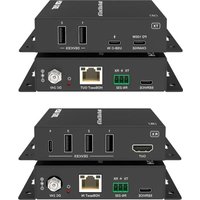
Two white electronic device units with ports and connectors, no visible text or symbols on the surfaces.DVDO-RS-3
HDBaseT Wall-Plate Transmitter
User Manual
Version 1.0.0
Thank you for purchasing this product
For optimum performance and safety, please read these instructions carefully before connecting, operating or adjusting this product. Please keep this manual for future reference.
Surge protection device recommended
This product contains sensitive electrical components that may be damaged by electrical spikes, surges, electric shock, lighting str kes, etc. Use of surge protection systems is highly recommended in order to protect and extend the life of your equipment.
Table of Contents
- Introduction......2
- Features ...... 2
- Package Contents......2
- Specifications....3
- Operation Controls and Functions....4
5.1. Front Panel....4
5.2. Rear Panel .... 5
5.3. Side Panel....5
5.4. Dimension of Panel 6 - Application Example......8
1. Introduction
The HDBaseT Wall-plate Transmitter supports HDMI and VGA with audio inputs within a standard 2-Gang US Decora wall box. It can transmit HDMI signal over CAT6/6a/7 to the distance up to 131ft/40m for 4K2K@60Hz(4:4:4) or 1080p60Hz up to 230ft/70m. Auto-switching allows user to plug-in and play. Built-in two-way IR, RS-232 and USB transmissions for easy device control.
2. Features
☆ HDMI 2.0b 18Gbps, HDCP 2.2 compliant
☆ Up to 4K2K@60Hz(4:4:4), 4K2K@30Hz, 1080p@120Hz
☆ Up to 7.1 channel HD audio
HDBaseT™ over a single CAT6/6a/7 cable up to 230ft/40m distance for 4K2K@60Hz(4:4:4) or up to 230ft/70m distance for 1080p60Hz
☆ Built-in scaling for VGA input
☆ Automatic and manual switching modes
☆ Two-way IR, RS-232 and USB supported
☆ 2-Gang US Decora wall plate
☆ 24V POC is supported
3. Package Contents
① 1× 18G HDMI Wall Plate Transmitter
② 1× Phoenix connector(3 pins)
③ 1× Phoenix connector(2 pins)
④ 1× Wideband IR RX
⑤ 1× Wideband IR TX
⑥ 1× User Manual
4. Specifications
| Technical | |
| HDMI Compliance | HDMI 2.0b |
| HDCP Compliance | HDCP 2 2 |
| Video Bandwidth | 18 Gbps |
| HDMI Video Resolution | 4K2K@50/60Hz 4:4:4 (max) |
| Color Space | RGB/YCbCr 4:4:4, YCbCr 4:2:2 |
| Color Depth | 10-bit, 12-bit |
| HDMI Audio Formats | LPCM, Dolby Digital/Plus/EX, Dolby True HD, DTS, DTS-EX, DTS-96/24, DTS High Res, DTS-HD Master Audio, DSD |
| VGA Video Resolution | 1080P@50/60Hz 4:4:4 (max) |
| ESD Protection | Human body model—±8kV (Air-gap discharge) &±4kV (Contact discharge) |
| Connections | |
| Transmitter | Inputs: 1x HDMI Type A [19-pin female]1x VGA [15-pin female]1x USB [USB-B]1x IR IN [Phoenix jack]1x RS-232 [Phoenix jack]1xAUDIO N [3.5mm Stereo Mini-jack]Outputs:1x HDBaseT Out [RJ45]1x IR OUT [Phoenix jack] |
| Mechanical | |
| Housing | Plastic Enclosure |
| Color | White |
| Dimensions | 91 8mm [W] x 104.8mm [D] x 43mm [H] |
| Weight | 212.5g |
| Power Supply | Input: AC100 - 240V 50/60HzOutput: DC 24V/1A (US/EU standards, CE/FCC/UL certified) |
| Power Consumption | 6W (Max) |
| Operating Temperature | 32 - 104°F / 0 - 40°C |
| Storage Temperature | -4 - 140°F / -20 - 60°C |
| Relative Humidity | 20 - 90% RH (no condensation) |
5. Operation Controls and Functions
5.1 Front panel
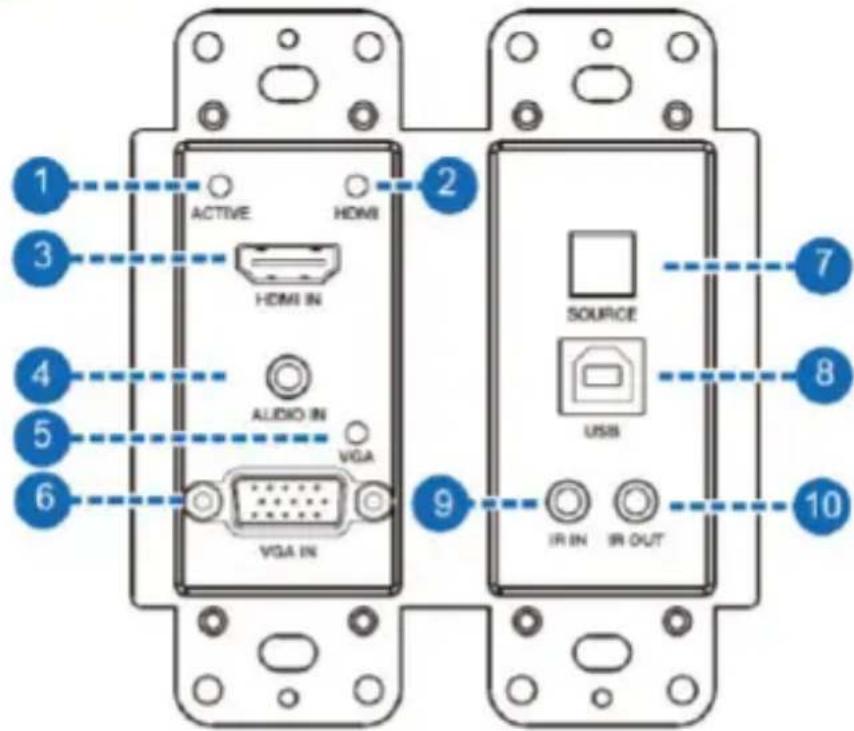
| Number | Name | Function description |
| 1 | ACTIVE | Signal status indicator. The LED will illuminate green when the HDMI port or the VGA port have signal source input. |
| 2 | HDMI LED | The HDMI input signal indicator. The LED will illuminate green when the SOURCE button have selected input signal from the HDMI port. |
| 3 | HDMI N | Connect to HDMI source devices such as Blu-ray or PS4 player. |
| 4 | AUDIO IN | The VGA audio input port. |
| 5 | VGA LED | The VGA input signal indicator. The LED will illuminate green when the SOURCE button have selected input signal from the VGA port. |
| 6 | VGA N | The VGA input port. |
| 7 | SOURCE | Manual switching button. |
| 8 | USB | USB host port. |
| 9 | R IN | Receiving the remote control signal and sending it to receiver side |
| 10 | R OUT | Sending the remote control signal from receiver side. |
5.2 Rear panel
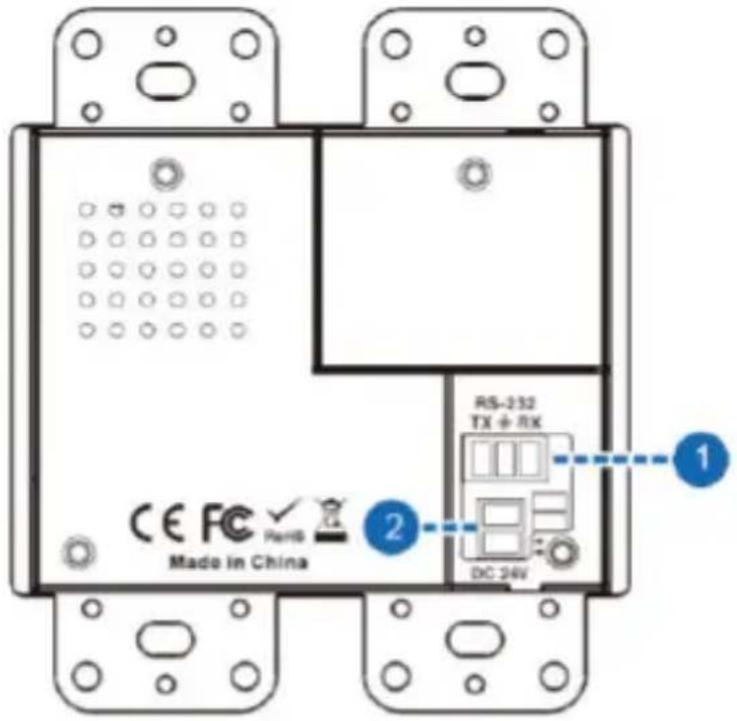
| Number | Name | Function description |
| 1 | RS-232 | Use the phoenix jack for connect PC or control system to transmit RS-232 commands. |
| 2 | DC 24V | Use the phoenix jack for connect power supply. |
5.3 Side panel

| Number | Name | Function description |
| 1 | HDBaseT OUT | HDBaseT output port. Connect HDBaseT receiver with a UTP cable. |
| 2 | Micro-USB | For firmware update. |
5.4 Dimension of Panel

Figure 1 Front panel

Figure 2 Rear panel

Figure 3 Side panel
POC (Power over Cable) Application Example
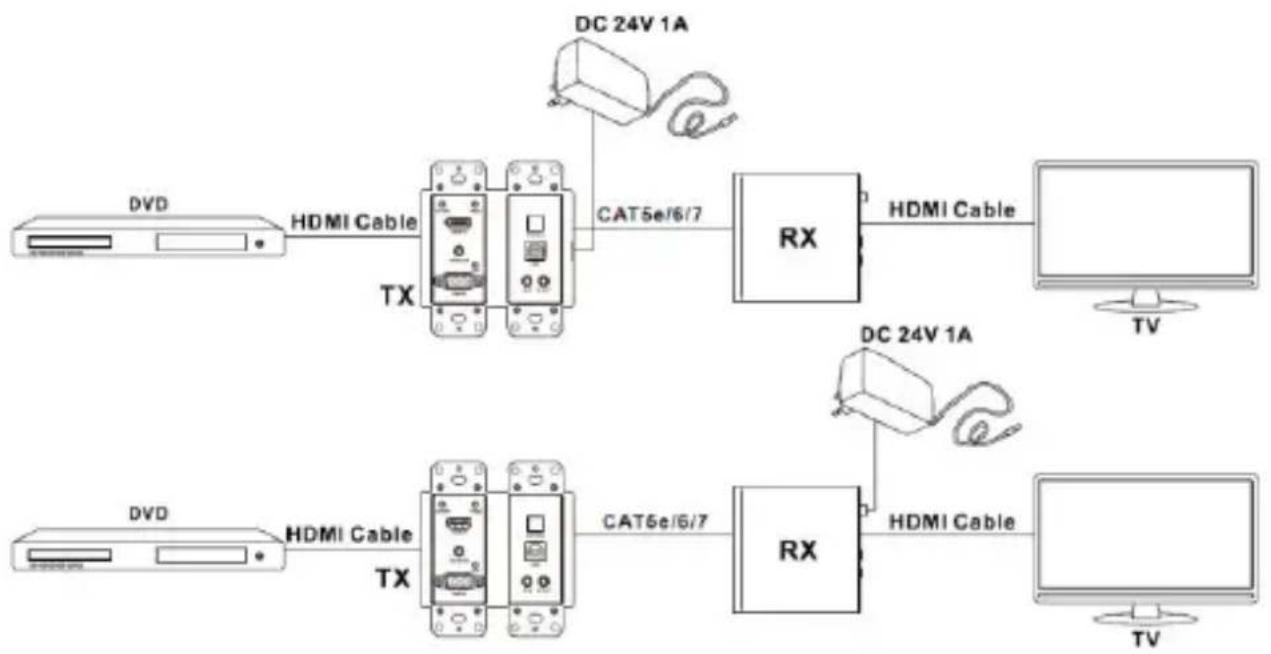
flowchart
graph LR
    A["HDVI Cable"] --> B["DC 24V 1A"]
    B --> C["TV"]
    D["HDVI Cable"] --> E["DC 24V 1A"]
    E --> F["TV"]
    G["HDVI Cable"] --> H["DC 24V 1A"]
    H --> I["TV"]
    J["HDVI Cable"] --> K["DC 24V 1A"]
    K --> L["TV"]
    M["HDVI Cable"] --> N["DC 24V 1A"]
    N --> O["TV"]
Bidirectional Infrared control Application Example

flowchart
graph LR
    A["Monitor"] -->|TX 1| B["DVD"]
    B -->|HDMI Cable TX| C["TV Remote"]
    C --> D["UTP Cable"]
    D --> E["RX"]
    E --> F["HDMI Cable TX 2"]
    F --> G["TV"]
    C --> H["DV0 Remote"]
    H --> I["Rx1"]
    I --> E
Bidirectional RS-232 control Application Example

flowchart
graph LR
    A["PC"] -->|Rs232 Cable| B["RS-232 Equipped HDMI Matrix"]
    C["DVD"] -->|HDMI Cable| D["TX"]
    D --> E["UTP Cable"]
    E --> F["RX"]
    F --> G["HDMI Cable"]
    G --> H["TV"]
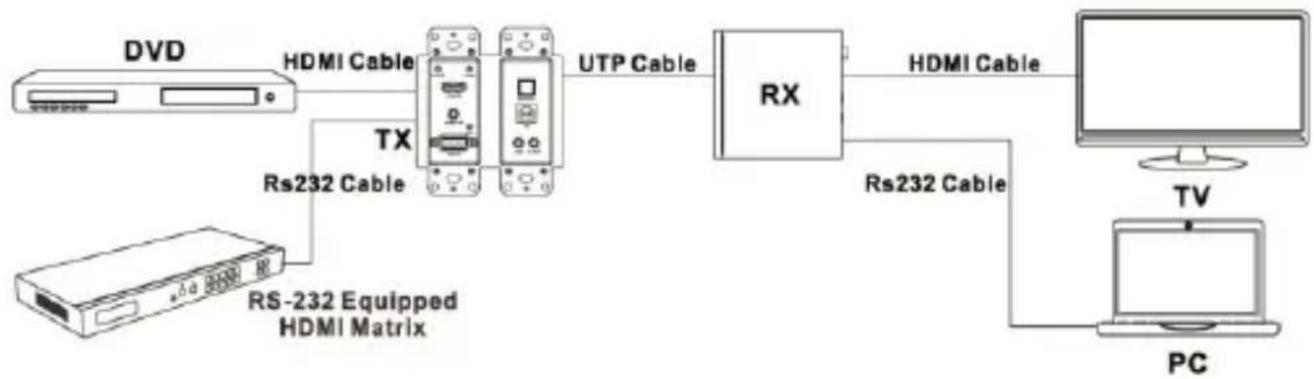
flowchart
graph LR
    A[" DVD "] -->|HDMI Cable| B[" TX "]
    B -->|UTP Cable| C[" RX "]
    C -->|HDMI Cable| D[" PC "]
    E[" RS-232 Equipped HDMI Matrix "] --> B
    F[" TV "] --> D
6. Application Example

flowchart
graph TD
    A["DVD or Blu-ray Player"] --> B["Transmitter"]
    B --> C["USB Keyboard"]
    B --> D["Projector"]
    B --> E["Device 1"]
    B --> F["Device 2"]
    B --> G["Device 3"]
    B --> H["Device 4"]
    B --> I["Device 5"]
    B --> J["Device 6"]
    B --> K["Device 7"]
    B --> L["Device 8"]
    B --> M["Device 9"]
    B --> N["Device 10"]
    B --> O["Device 11"]
    B --> P["Device 12"]
    B --> Q["Device 13"]
    B --> R["Device 14"]
    B --> S["Device 15"]
    B --> T["Device 16"]
    B --> U["Device 17"]
    B --> V["Device 18"]
    B --> W["Device 19"]
    B --> X["Device 20"]
    B --> Y["Device 21"]
    B --> Z["Device 22"]
    B --> AA["Device 23"]
    B --> AB["Device 24"]
    B --> AC["Device 25"]
    B --> AD["Device 26"]
    B --> AE["Device 27"]
    B --> AF["Device 28"]
    B --> AG["Device 29"]
    B --> AH["Device 30"]
    B --> AI["Device 31"]
    B --> AJ["Device 32"]
    B --> AK["Device 33"]
    B --> AL["Device 34"]
    B --> AM["Device 35"]
    B --> AN["Device 36"]
    B --> AO["Device 37"]
    B --> AP["Device 38"]
    B --> AQ["Device 39"]
    B --> AR["Device 40"]
    B --> AS["Device 41"]
    B --> AT["Device 42"]
    B --> AU["Device 43"]
    B --> AV["Device 44"]
    B --> AW["Device 45"]
    B --> AX["Device 46"]
    B --> AY["Device 47"]
    B --> AZ["Device 48"]
    B --> BA["Device 49"]
    B --> BB["Device 50"]
    B --> BC["Device 51"]
    B --> BD["Device 52"]
    B --> BE["Device 53"]
    B --> BF["Device 54"]
    B --> BG["Device 55"]
    B --> BH["Device 56"]
    B --> BI["Device 57"]
    B --> BJ["Device 58"]
    B --> BK["Device 59"]
    B --> BL["Device 60"]
    B --> BM["Device 61"]
    B --> BN["Device 62"]
    B --> BO["Device 63"]
    B --> BP["Device 64"]
    B --> BQ["Device 65"]
    B --> BR["Device 66"]
    B --> BS["Device 67"]
    B --> BT["Device 68"]
    B --> BU["Device 69"]
    B --> BV["Device 70"]
    B --> BW["Device 71"]
    B --> BX["Device 72"]
    B --> BY["Device 73"]
    B --> BZ["Device 74"]
    B --> CA["Device 75"]
    B --> CB["Device 76"]
    B --> CC["Device 77"]
    B --> CD["Device 78"]
    B --> CE["Device 79"]
    B --> CF["Device 80"]

Brand : DVDO
Model : RS-3
Category : Audio/video converter