DDL610LKCKB - Lock PHILIPS - Free user manual and instructions
Find the device manual for free DDL610LKCKB PHILIPS in PDF.


Pick your language and provide your email: we'll send you a specifically translated version.
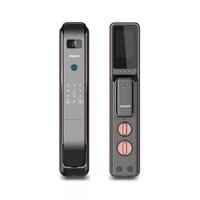
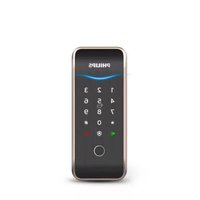
| Product Type | Smart Lock |
| Brand | Philips |
| Model | DDL610LKCKB |
| Dimensions (approx.) | Front panel: 160 x 70 x 20 mm; back panel: 160 x 70 x 40 mm |
| Weight (approx.) | 1.5 kg (including accessories) |
| Power Supply | 4 AA batteries (1.5V each) |
| Battery Life (approx.) | Up to 12 months with normal use |
| Unlock Methods | Fingerprint, PIN code, RFID card, Mechanical key |
| Fingerprint Capacity | Up to 50 fingerprints |
| PIN Code Capacity | Up to 50 PIN codes |
| Card Capacity | Up to 50 RFID cards |
| Security Features | Anti-peep PIN, privacy lock, low battery warning, tamper alarm |
| Material | Zinc alloy body, stainless steel latch |
| Finish | Black / Silver (depending on variant) |
| Communication | No Wi-Fi or Bluetooth (standalone) |
| Operating Temperature | -20°C to +55°C |
| Door Thickness | 38-60 mm (1.5-2.4 inches) |
| Installation | Backset: 60 mm / 70 mm, latch type: deadbolt |
| Maintenance | Clean with a soft, dry cloth. Avoid chemicals. |
| Spare Parts | Batteries, screws, mechanical keys (2 included) |
| Warranty | 2 years from purchase date |
Frequently Asked Questions - DDL610LKCKB PHILIPS
How do I install the Philips DDL610LKCKB lock?
Follow the included manual. Measure door thickness (38-60 mm), set backset (60/70 mm), and install the latch and panels. For details, refer to installation guide.
What batteries does the lock use?
It requires 4 AA alkaline batteries (1.5V). Batteries are not included.
How long do the batteries last?
Typically up to 12 months under normal usage. Low battery warning will alert you.
Can I unlock the lock with my smartphone?
No, this model does not have Bluetooth or Wi-Fi. It uses fingerprint, PIN, card, or mechanical key.
How many fingerprints can I store?
You can store up to 50 fingerprints. Each fingerprint is stored securely.
What is the anti-peep PIN feature?
Enter random digits before the actual PIN to prevent onlookers from seeing your code. Example: 1234 [PIN] 5678.
Does the lock have a tamper alarm?
Yes, if someone tries to force the lock or remove it, a tamper alarm will sound.
Can I use the lock on a metal door?
Yes, but ensure the door thickness is within range (38-60 mm). For metal doors, use the provided mounting screws.
How do I reset the lock to factory settings?
Press and hold the reset button inside the back panel for 5 seconds until you hear a beep. This deletes all user data.
What should I do if the lock stops working?
First, check batteries. If dead, replace with fresh AA batteries. If still not working, use mechanical key emergency unlock and contact support.
User questions about DDL610LKCKB PHILIPS
0 question about this device. Answer the ones you know or ask your own.
Ask a new question about this device
No questions yet. Be the first to ask one.
Download the instructions for your Lock in PDF format for free! Find your manual DDL610LKCKB - PHILIPS and take your electronic device back in hand. On this page are published all the documents necessary for the use of your device. DDL610LKCKB by PHILIPS.
USER MANUAL DDL610LKCKB PHILIPS
Manual assistant
Powered by Anthropic
Waiting for your message
Product information
Brand : PHILIPS
Model : DDL610LKCKB
Category : Lock