DDL702FACBW - Lock PHILIPS - Free user manual and instructions
Find the device manual for free DDL702FACBW PHILIPS in PDF.


Pick your language and provide your email: we'll send you a specifically translated version.
| Product Type | Smart Lock |
| Model | DDL702FACBW |
| Brand | Philips |
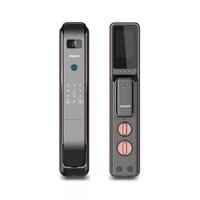
| Dimensions | Approx. 33 x 7 x 8 cm (exterior) |
| Weight | Approx. 1.5 kg |
| Power Supply | 4 AA batteries (alkaline) |
| Battery Life | Up to 12 months (typical usage) |
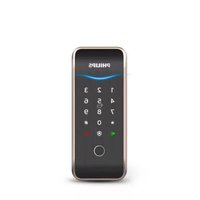
| Unlocking Methods | Fingerprint, PIN code, Mechanical key, Mobile app (Bluetooth) |
| Fingerprint Capacity | Up to 100 fingerprints |
| PIN Code Capacity | Up to 100 codes |
| Material | Zinc alloy (front), Stainless steel (back) |
| Color | Matte Black |
| Door Thickness Compatibility | 35-60 mm |
| Connectivity | Bluetooth 5.0 |
| App Compatibility | Philips EasyKey App (iOS/Android) |
| Security Features | Anti-peep password, false PIN code, tamper alarm |
| Water Resistance | IPX4 (splash proof) |
| Operating Temperature | -10°C to 55°C |
| Included Accessories | Mechanical keys (2), mounting screws, user manual |
| Warranty | 2 years |
| Spare Parts Availability | Batteries, mechanical keys, faceplate (sold separately) |
| Repairability Index | 7/10 (user replaceable parts: batteries, key cylinder) |
| Cleaning Instructions | Wipe with dry soft cloth; avoid abrasive cleaners |
Frequently Asked Questions - DDL702FACBW PHILIPS
How do I install the Philips DDL702FACBW lock?
Installation is straightforward. Follow the user manual provided. Typically, you need to measure door thickness, drill holes if necessary, attach the exterior and interior assemblies, and pair with the app.
Can I use the lock without the app?
Yes, you can use the lock with fingerprint, PIN code, or mechanical key without the app. The app adds features like remote access logs and guest codes.
How do I change the batteries?
Open the interior cover, replace the 4 AA batteries with new ones. The lock will beep when batteries are low. Use alkaline batteries for best performance.
What happens if the batteries die and I don't have a key?
The lock has a USB emergency power port on the exterior (type-C) to temporarily power it with a power bank. Alternatively, use the mechanical key.
How many fingerprints can I store?
You can store up to 100 fingerprints. It's recommended to register multiple fingers for convenience.
Can I share access with family members?
Yes, you can assign PIN codes and fingerprints for up to 100 users through the app or directly on the lock.
Is the lock weather resistant?
It is rated IPX4, meaning it can withstand splashing water. It is suitable for covered outdoor use, but not fully waterproof.
How do I reset the lock to factory settings?
Press and hold the reset button (inside the battery compartment) for 5 seconds until you hear a confirmation beep. This deletes all user data.
Does the lock work with smart home systems?
It works with Philips EasyKey app only. It does not natively support HomeKit, Alexa, or Google Home.
What should I do if the fingerprint sensor is not responding?
Clean the sensor with a dry soft cloth. Ensure your finger is dry and clean. If issues persist, try re-registering your fingerprint.
User questions about DDL702FACBW PHILIPS
0 question about this device. Answer the ones you know or ask your own.
Ask a new question about this device
No questions yet. Be the first to ask one.
Download the instructions for your Lock in PDF format for free! Find your manual DDL702FACBW - PHILIPS and take your electronic device back in hand. On this page are published all the documents necessary for the use of your device. DDL702FACBW by PHILIPS.
USER MANUAL DDL702FACBW PHILIPS
Manual assistant
Powered by Anthropic
Waiting for your message
Product information
Brand : PHILIPS
Model : DDL702FACBW
Category : Lock