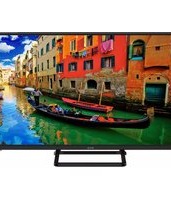
20 H01T2S2 - Television ECG - Free user manual and instructions
Find the device manual for free 20 H01T2S2 ECG in PDF.


Pick your language and provide your email: we'll send you a specifically translated version.
| Product Type | Television |
| Screen Size | 20 inches (50.8 cm) |
| Resolution | 1366 x 768 pixels (HD) |
| Power Supply | AC 100-240V, 50/60Hz |
| Power Consumption | 30W (typical) |
| Weight (with stand) | 3.2 kg |
| Dimensions (with stand) | 455 x 280 x 150 mm |
| Dimensions (without stand) | 455 x 280 x 80 mm |
| Tuner | DVB-T/T2/C |
| Connectivity | HDMI, USB, VGA, AV, Headphone |
| Audio Output | 2 x 3W |
| Remote Control | Included (batteries: 2 x AAA) |
| Stand | Included |
| VESA Mount | 100 x 100 mm |
| Safety Features | Overload protection, auto power-off |
| Cleaning Instructions | Use a soft, dry cloth; avoid liquids |
| Spare Parts Available | Remote control, stand, power cord |
| Repair Service | Serviceable by authorized technicians |
| General Information | User manual available at notice-facile.com |
Frequently Asked Questions - 20 H01T2S2 ECG
How do I connect an external device to my ECG 20 H01T2S2 TV?
Use the HDMI port for high-quality video/audio, or the USB port for media playback. Alternatively, connect via VGA or AV for older devices.
What should I do if the remote control is not working?
First, check the batteries (2 x AAA) and replace if needed. Ensure there are no obstacles between the remote and the TV sensor, and point directly at the TV.
Why is there no signal on my TV?
Check that the antenna cable is securely connected. Then run an auto-scan for channels from the menu. If using an external device, ensure it is powered on and set to the correct input.
How can I clean the TV screen safely?
Use a soft, dry microfiber cloth to gently wipe the screen. Do not use water, chemicals, or paper towels, as they may damage the display.
Can I mount the TV on a wall?
Yes, this TV supports VESA 100 x 100 mm wall mounts. Use a compatible mount and follow the instructions provided with the mount.
What should I do if there is no sound?
Check that the volume is not muted and is turned up. Verify the audio settings in the menu. If using external speakers or headphones, ensure they are properly connected.
How do I update the TV software?
Download the latest firmware from the ECG support website onto a USB drive, then insert it into the TV's USB port and follow the on-screen update instructions.
Why does my TV turn off automatically?
This may be due to the auto power-off or sleep timer settings. Navigate to the settings menu to adjust or disable these features.
What is the warranty period for this TV?
The standard warranty is typically 2 years from the date of purchase. Check your receipt or the manufacturer's website for specific terms.
Where can I find the user manual?
The full user manual is available for free download on notice-facile.com. You can also request a translated version by email.
User questions about 20 H01T2S2 ECG
0 question about this device. Answer the ones you know or ask your own.
Ask a new question about this device
No questions yet. Be the first to ask one.
Download the instructions for your Television in PDF format for free! Find your manual 20 H01T2S2 - ECG and take your electronic device back in hand. On this page are published all the documents necessary for the use of your device. 20 H01T2S2 by ECG.
USER MANUAL 20 H01T2S2 ECG


Manual assistant
Powered by Anthropic
Waiting for your message
Product information
Brand : ECG
Model : 20 H01T2S2
Category : Television