
WDLT165 - Water dispenser HAIER - Free user manual and instructions
Find the device manual for free WDLT165 HAIER in PDF.

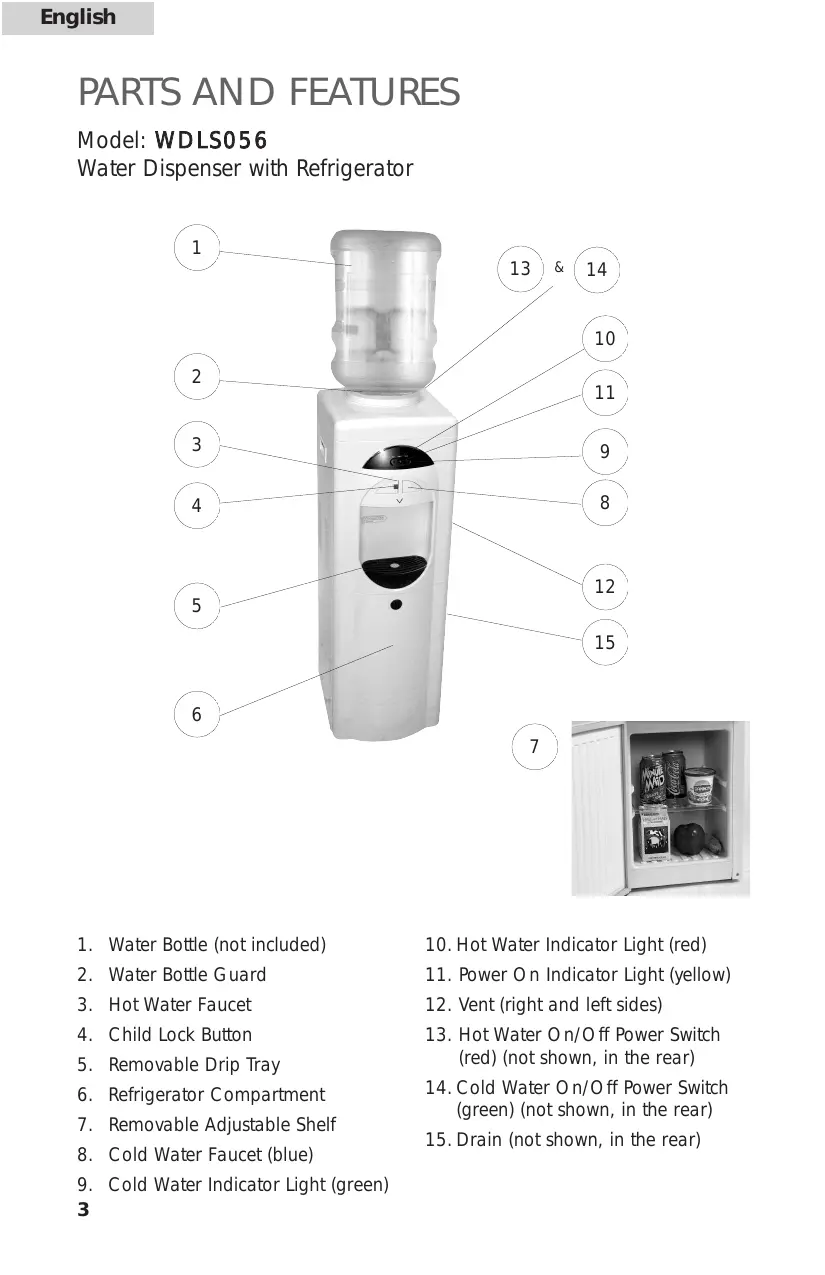

| Product type | Water dispenser |
| Brand | HAIER |
| Model | WDLT165 |
| Cooling type | Compression |
| Cold water tank capacity | Approximately 2 liters |
| Hot water tank capacity | Approximately 1 liter |
| Dimensions (W x D x H) | Approximately 30 x 30 x 90 cm |
| Net weight | Approximately 10 kg |
| Power supply | 220-240 V, 50 Hz |
| Cooling power | Approximately 100 W |
| Heating power | Approximately 500 W |
| Energy consumption | Approximately 0.5 kWh/24h |
| Cold water temperature | 5 to 15 °C |
| Hot water temperature | 85 to 95 °C |
| Compatible bottle capacity | 18.9 liters (standard) |
| Main functions | Hot water, cold water, room temperature water |
| Safety | Child lock |
| Maintenance and cleaning | Clean the tank and spouts regularly |
| Available spare parts | Faucet, tank, heating element, thermostat |
| Repairability | Repairable by an authorized professional |
Frequently Asked Questions - WDLT165 HAIER
User questions about WDLT165 HAIER
0 question about this device. Answer the ones you know or ask your own.
Ask a new question about this device
Download the instructions for your Water dispenser in PDF format for free! Find your manual WDLT165 - HAIER and take your electronic device back in hand. On this page are published all the documents necessary for the use of your device. WDLT165 by HAIER.
USER MANUAL WDLT165 HAIER
natural_image
White water dispenser with clear lid and control panel (no visible text or symbols)WDLS056
natural_image
Exterior view of a modern water dispenser with control panel (no visible text or symbols)WDLT165
Installation Manual
Read all of the instructions before using this appliance. When using this appliance, always exercise basic safety precautions, including the following:
- Use this appliance only for its intended purpose as described in this use and care guide.
- This water dispenser must be properly installed in accordance with the installation instructions before it is used. See the grounding instructions in the installation section.
- Never unplug your water dispenser by pulling on the power cord. Always grasp the plug firmly and pull straight out from the outlet.
- Repair or replace immediately, all electric service cords that have become frayed or otherwise damaged. Do not use a cord that shows cracks or abrasion damage along its length, on the plug or at the connector end.
- Unplug your water dispenser before cleaning and making any repairs. Note: If for any reason this product requires service, we strongly recommend that a certified technician perform the service.
- This water dispenser should not be recessed or built into an enclosed cabinet. It is designed for freestanding installation only.
- This appliance is designed for INDOOR USE ONLY and should not be used outdoors.
- Do not operate your water dispenser in the presence of explosive fumes.
- Close supervision is necessary when any appliance is used by or near children.
- To protect against electric shock, do not immerse the cord, plug, or any other part of the water dispenser in water or other liquids.
SAVE THESE INSTRUCTIONS
For Future Use
Thank you for purchasing our Haier product. This easy-to-use manual will guide you in getting the best use of your water dispenser.
Remember to record the model and serial number. They are on a label in back of the unit.
Model number
Serial number
Date of purchase
Staple your receipt to your manual. You will need it to obtain warranty service.
TABLE OF CONTENTS
PAGE
SAFETY PRECAUTIONS....1
UNPACKING....2
PARTS AND FEATURES 3-4
PROPER LOCATION ....5
ASSEMBLY INSTRUCTIONS ....5
Installing Your Water Dispenser 5
ELECTRICAL CONNECTIONS 6
Grounding Instructions 6
Wiring Requirements 6
Extension Cords 6
Power Interruptions 6
OPERATING YOUR WATER DISPENSER 7
Cold/Hot Water Faucets 7
Cold/Hot Water Switches 7
Cold/Hot Water Indicator Lights....7
Using the Refrigerator Compartment 7
PROPER CARE AND CLEANING....8-9
General 8
Cleaning the Condenser Coils 9
For Long Vacations or Absences / Moving 9
TROUBLESHOOTING GUIDE....10
WARRANTY....11
UNPACKING
- Remove all packing materials. This includes the foam base and all adhesive tape holding the accessories inside and outside.
- Inspect and remove any remaining packaging, tape and printed materials before turning on the water dispenser.
Note: Allow the water dispenser to stand in an upright position for at least 8 hours before turning on the power.
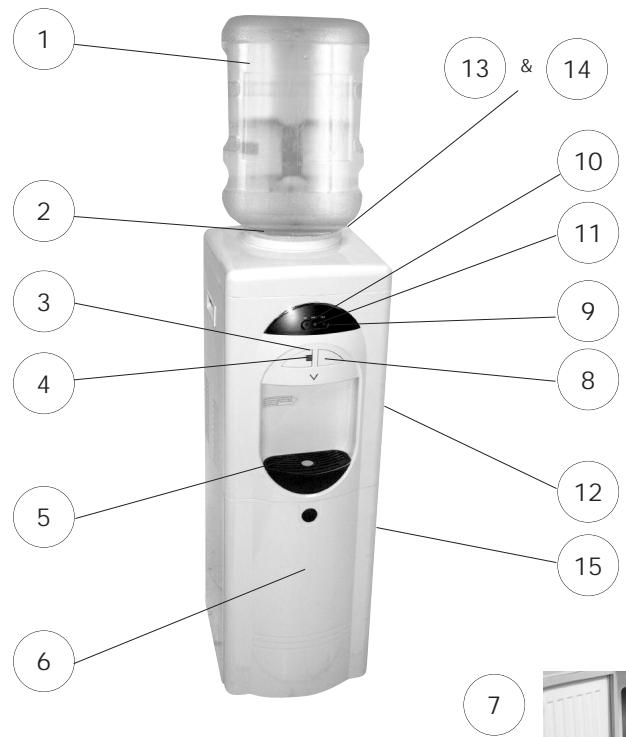
PARTS AND FEATURES
Model: WDLS056
Water Dispenser with Refrigerator
text_image
1 2 3 4 5 6 7 8 9 10 11 12 13 & 14 15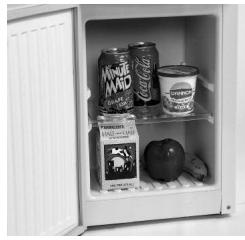
natural_image
Black and white photo of an open refrigerator with canned beverage cans, a milk can, and scattered food items (no visible text or labels)- Water Bottle (not included)
- Water Bottle Guard
- Hot Water Faucet
- Child Lock Button
- Removable Drip Tray
- Refrigerator Compartment
- Removable Adjustable Shelf
- Cold Water Faucet (blue)
-
Cold Water Indicator Light (green)
-
Hot Water Indicator Light (red)
-
Power On Indicator Light (yellow)
-
Vent (right and left sides)
-
Hot Water On/Off Power Switch (red) (not shown, in the rear)
-
Cold Water On/Off Power Switch (green) (not shown, in the rear)
-
Drain (not shown, in the rear)
PARTS AND FEATURES
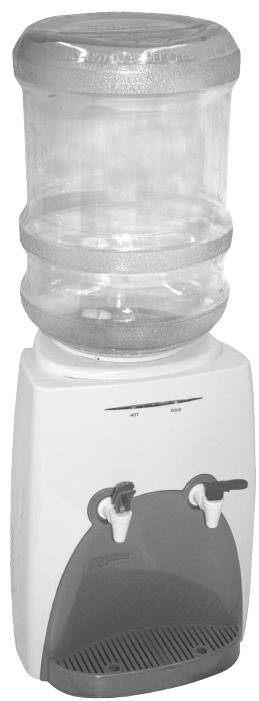
Model: WDLT165
Water Dispenser with Refrigerator
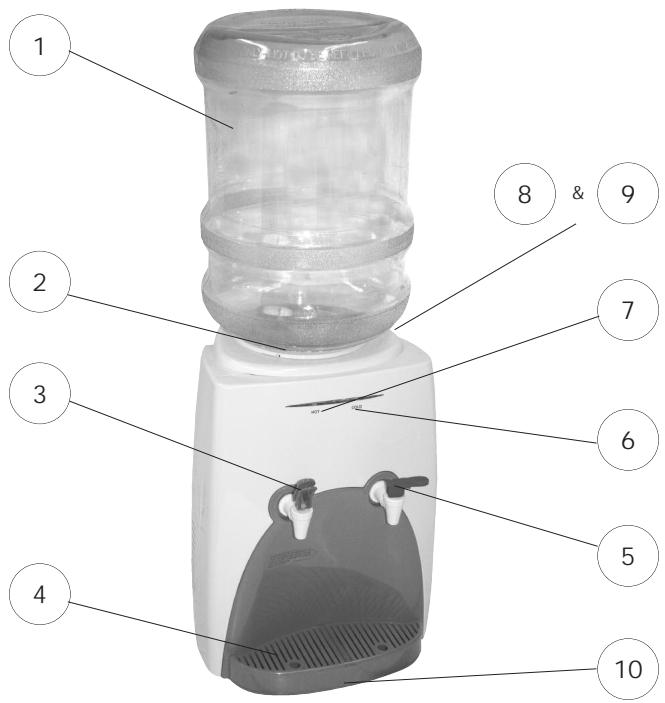
text_image
1 2 3 4 5 6 7 8 & 9 10- Water Bottle (not included)
- Water Bottle Guard
- Hot Water Faucet (red)
- Removable Drip Tray
- Cold Water Faucet (blue)
-
Cold Water Indicator Light (green)
-
Hot Water Indicator Light (red)
- Cold Water On/Off Power Switch (green) (not shown, in the rear)
- Hot Water On/Off Power Switch (red) (not shown, in the rear)
- Drain (not shown - located under the unit)
PROPER LOCATION
- To ensure that your water dispenser works at the maximum efficiency it was designed for, you should install it in a location where there is proper air circulation and electrical connections.
- The following are the recommended clearances around the water dispenser.
Sides 3/4" (19mm)
Back 2" (50mm)
- Do not install your water dispenser in any location that is not properly insulated or heated because the unit is not designed to operate in temperature settings below 55^ F / 13^ C.
Note: The built-in thermostat maintains the hot and cold temperatures automatically. On the compressor cooled water coolers the hot water temperature will be between 185°-197° F/ 85°-92° C and the cold water temperature will be between 42.8°-50° F/ 6°-10° C. On the thermal electric cooled water coolers the hot water temperature will be between 185°-197° F/85°-92° C and the cold water temperature will be between 50°-59° F/ 10°-15° C.
- Select a suitable location for the unit on a hard even surface away from direct sunlight and heat sources (e.g., radiators, baseboard heaters, cooking appliances, etc).

Note: Hot and cold water will not be instantly available as the unit will need time to heat up and cool down the water.
CAUTION: DO NOT plug in the water dispenser until water flows through both Hot and Cold water faucets.
ASSEMBLY INSTRUCTIONS
Read carefully and understand all installation instructions before installing the water dispenser.
Installing Your Water Dispenser
Follow the steps below to install the water dispenser.
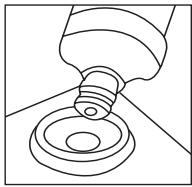
- Remove the cap from the water bottle first. Lift up the water bottle and quickly place it into the water guard. Make sure it is standing in an upright position. (The water bottle is not included.)
natural_image
Line drawing of a mechanical component with a bulb and ring (no text or symbols)- DO NOT plug in the water dispenser until you have checked that water flows out when either of the faucets are pressed. Never turn on the water dispenser without water in it. Doing so may cause the unit to catch fire or malfunction.
- Check that water flows out by pressing both the Hot and Cold faucets one at a time.
- Plug the power cord into an 115Volt / 60Hz outlet.
- To activate the water heater and cooler, turn ON the red and green switches on the back of the unit. The hot & cold indicators in the front will be lit.
ELECTRICAL CONNECTIONS
GROUNDING INSTRUCTIONS
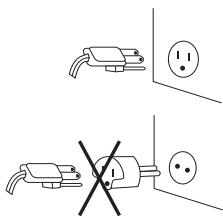
This appliance must be grounded. In the event of an electrical short circuit, grounding reduces the risk of electric shock by providing an escape wire for the electric current. This appliance is equipped with a cord containing a grounding wire and a grounded plug. The plug must be inserted into an outlet that is properly installed and grounded.

- Improper use of the plug may result in the risk of electric shock.
- Consult a qualified electrician or service technician if the grounding instructions are not completely understood or if in doubt as to whether the appliance has been properly grounded.
WIRING REQUIREMENTS
This appliance must be plugged into a 15Amp, 115 Volt, 60Hz GROUNDED OUTLET.
Note: Where a standard two-prong outlet is encountered, it is the personal responsibility and obligation of the consumer to have it replaced with a properly grounded three-prong outlet.
EXTENSION CORDS
We DO NOT recommend the use of an extension cord with this unit.
text_image
Diagram showing two electrical plug connections with a cross symbol indicating disconnection or prohibition.
POWER INTERRUPTIONS
Occasionally, there may be power interruptions due to thunderstorms or other causes. Remove the power cord from wall outlet when a power outage occurs. When power has been restored, re-plug the power cord into wall outlet.
OPERATING YOUR WATER DISPENSER
This water dispenser maintains instant hot and cold water for your cooking and drinking needs. It accepts 2, 3 or 5-gallon water bottles.
Cold (blue) / Hot (red) Water Faucets (WDLT165)
- Press the tap lever down to release the water flow.
- Pull the tap lever up to stop the water flow.
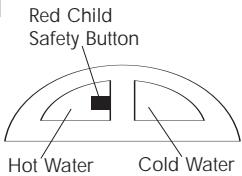
Note: The hot (red) water faucet is equipped with a child safety lock to prevent accidental spilling of hot water. To release the hot water flow, the tap lever must be squeezed and then pushed down.
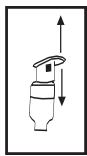
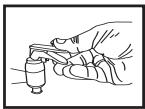
- In the case of WDLT165 press in the hot water safety child lock and then push down. Release the lever to stop the water flow.
- In case of WDLS056 push the red child safety button to the left and press in the button for hot water. For cold water just push the right button in.
text_image
Red Child Safety Button Hot Water Cold WaterCold (green) / Hot (red) Water Switches (located on the rear of the unit)
Cold Water Switch (green):
The cold water switch activates the cooling process when turned ON.
- Press the switch to the ON position. The switch should become lit.
Note: When turning on the unit for the first time, it will take some time to chill the water.
Hot Water Switch (red):
The hot water switch activates the heating process when turned ON.
- Press the switch to the ON position. The switch should become lit.
Caution! Be careful when carrying hot water in your cup or container to avoid any injury or harm from spills.


Cold (green) / Hot (red) Water Indicator Lights
When the green and red lights are illuminated on the front of the unit, the heating and cooling process is in progress. When the cold and hot water has reached their proper temperatures, both lights will turn off automatically. Normally, hot water reaches proper temperature first.
USING THE REFRIGERATOR COMPARTMENT (Not in all models)
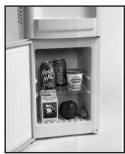
The convenient refrigerator compartment can be very useful in storing beverages and other perishable food items.
- When the dispenser is turned on for the first time, avoid food spoilage by waiting at least 8 hours before putting any food or beverages into the compartment, as the compartment may not be cool enough to store foods.
- The refrigerator is frost free. During the automatic defrost cycle, ice build-up on the rear interior wall of the compartment will melt and drip into the water-collecting tray and then evaporate naturally.
natural_image
Interior view of a refrigerator with open door and side shelves filled with food items (no visible text or symbols)PROPER CARE AND CLEANING
Caution! Before using any cleaning product, always read and follow the manufacturer's instructions and warnings to avoid personal injury and/or product damage.
Note: It is best to clean the dispenser and its surrounding area in between replacing the empty bottle with a new one. This way you can move the unit easily without the weight of the bottle.
WARNING!
Always unplug the unit before cleaning to avoid electric shock. Failure to do so may result in death or injury.
GENERAL
- Before cleaning, place the dust cover on top of the water guard to prevent dust and debris from going into the dispenser while cleaning.
- Prepare a cleaning solution of 3-4 tablespoons of baking soda mixed with warm water. Use a sponge or a soft cloth dampened with the cleaning solution to wipe down the unit.
- Wipe with clean warm water and dry with a soft cloth.
- Do not use harsh chemicals, abrasives, ammonia, chlorine bleach, concentrated detergents, solvents or metal scouring pads. Some of these chemicals may dissolve, damage and/or discolor the unit.
- The spilled water in the drip tray must be removed regularly and cleaned properly to avoid any bacteria and residue build-up.
- We recommend that you clean the water dispenser at least twice a year. When cleaning, you do not need to take anything apart. Simply pour the baking soda/water solution through the water guard. Then rinse with plenty of water and allow the water to drain.
CLEANING THE CONDENSER COILS (Not in all models)
- We recommend that you move the dispenser away from the wall and vacuum or brush the coils on the rear of the unit at least 4 times a year. Some operating environments may require more frequent cleaning.
FOR LONG VACATIONS OR ABSENCES / MOVING
- Turn OFF the cold and hot water switches.
- Unplug the unit.
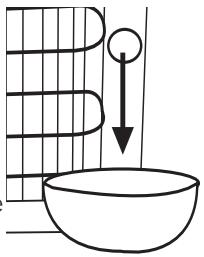
- Drain the unit completely and remove the empty water bottle. Put a container or bucket on the floor under the drain on the back of the unit to catch the water released from the drain tube.
Note: The location of the drain may vary depending on the model type.
text_image
Diagram showing a bowl with a downward arrow and a circular object above it, possibly illustrating a physics or math concept.- Remove the drain plug to release the water.
- After completing the drain process, replace the drain plug to its original position.
- You must store the unit at room temperature.
- Avoid storing the unit where the temperature is at or below freezing.
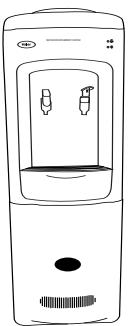
- When moving, the unit must be moved vertically. DO NOT move the unit in horizontal position as this may cause possible damage to internal parts.
- You must cover the unit to avoid dust and debris from entering the water guard.
natural_image
Line drawing of a water dispenser with two valves and a handle (no text or symbols)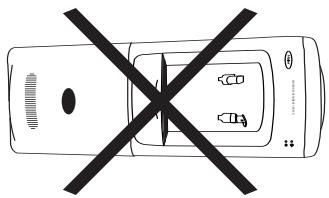
natural_image
Top-down line drawing of a car with a black X symbol crossed out, indicating no text or symbols present.TROUBLESHOOTING GUIDE
The unit does not operate.
- Check if your water dispenser is plugged in.
- Check the circuit breaker and the fuse to make sure there is power at the outlet.
There is no water from the faucet.
This is due to an improper setting of the water bottle or from blocked airflow.
- Adjust the position of the bottle properly on the water bottle guard so the air opening is not blocked.
There is no hot water coming from the faucet.
- Too much hot water was used in too short a period of time.
- You may need to wait awhile for more water to be heated.
- Check if the hot water switch is in the ON position.
The water is not cool.
This is due to either a compressor malfunction (for units with compressor) or the cold water switch may be in the OFF position.
- Check if the cold water button is in the ON position.
Compressor runs too frequently.
This may be necessary to maintain a constant temperature during hot and humid days.
- Clean the condenser coils on the back of the unit. (not in all units)
The water is leaking from the drip tray.
This is due to over-spilling of the water in the drip tray.
- You must remove the drip tray from the dispenser and empty out the water.
- Replace it once you have emptied the water.
What happens if the water dispenser is running dry (without the water)?
- You must never let the water dispenser run dry as this may cause damage to the unit and create a fire. DO NOT let the dispenser run without water.
- You must replace the empty bottle immediately.
What size of water bottle can I use with this water dispenser?
- You can use 2, 3 or 5-gallon bottles with our water dispenser.
LIMITED WARRANTY
What is covered and for how long?
This warranty covers all defects in workmanship or materials for a period of:
12 months labor (carry-in only)
12 months parts
The warranty commences on the date the item was purchased and the original purchase receipt must be presented to the authorized service center before warranty repairs are rendered.
EXCEPTIONS: Commercial or Rental Use warranty
90 days labor (carry-in only)
90 days parts
No other warranty applies
What is covered.
- The mechanical and electrical parts, which serve as a functional purpose of this appliance, for a period of 12 months. This includes all parts except finish, and trim.
What will be done?
-
We will repair or replace, at our discretion, any mechanical or electrical part which proves to be defective in normal usage during the warranty period so specified.
-
There will be no charge to the purchaser for parts and labor on any covered items during the initial 12 month period. Beyond this period, only parts are covered in the remaining warranty. Labor is not provided and must be paid by the customer.
-
Contact your nearest authorized service center. For the name of the nearest service center please visit our website at
www.HaierAmerica.com or call 1-877-337-3639 for more information.
THIS WARRANTY COVERS APPLIANCES WITHIN THE CONTINENTAL UNITED STATES, PUERTO RICO AND CANADA. IT DOES NOT COVER THE FOLLOWING:
Damages from improper installation.
Damages in shipping.
Defects other than manufacturing.
Damage from misuse, abuse, accident, alteration, lack of proper care and maintenance or incorrect current or voltage.
Damage from other than household use.
Damage from service by other than an authorized dealer or service center.
Decorative trims or replaceable light bulbs.
Transportation and shipping.
Labor (after the initial 12 months).
THIS LIMITED WARRANTY IS GIVEN IN LIEU OF ALL OTHER WARRANTIES, EXPRESSED OR, INCLUDING THE WARRANTIES OF MERCHANTABILITY AND FITNESS FOR A PARTICULAR PURPOSE.
The remedy provided in this warranty is exclusive and is granted in lieu of all other remedies.
This warranty does not cover incidental or consequential damages, so the above limitations may not apply to you. Some States do not allow limitations on how long an implied warranty lasts, so the above limitations may not apply to you.
This warranty gives you specific legal rights, and you may have other rights, which vary, from state to state.
Haier America
New York, NY 10018
IMPORTANT
Do Not Return This Product To The Store
If you have a problem with this product, please contact the
"Haier Customer Satisfaction Center" at 1-877-337-3639.
DATED PROOF OF PURCHASE REQUIRED FOR WARRANTY SERVICE