
HLF11PC - Tumble dryer HAIER - Free user manual and instructions
Find the device manual for free HLF11PC HAIER in PDF.


| Product type | Condenser dryer |
| Brand | HAIER |
| Model | HLF11PC |
| Drying capacity | 11 kg |
| Dimensions (H x W x D) | 85 x 60 x 60 cm |
| Net weight | 50 kg |
| Power supply | 220-240 V, 50 Hz |
| Nominal power | 2500 W |
| Energy class | A++ |
| Sensor type | Electronic humidity sensor |
| Drying programs | 16 programs including cotton, synthetics, delicates, quick, refresh |
| Delayed start | Up to 24 hours |
| Anti-crease protection | Yes, with cooling phase |
| Noise level | 65 dB |
| Maintenance and cleaning | Clean the lint filter after each cycle; empty the water tank after each use |
| Safety | Child lock, automatic shut-off in case of overheating, overload protection |
| Spare parts | Lint filter, door seal, drum belt, heating element |
| Repairability | Repairability index: 7.5/10 (estimated) |
| General information | Made in China; 2-year warranty; Haier customer service at 1-877-337-3639 |
Frequently Asked Questions - HLF11PC HAIER
User questions about HLF11PC HAIER
0 question about this device. Answer the ones you know or ask your own.
Ask a new question about this device
Download the instructions for your Tumble dryer in PDF format for free! Find your manual HLF11PC - HAIER and take your electronic device back in hand. On this page are published all the documents necessary for the use of your device. HLF11PC by HAIER.
USER MANUAL HLF11PC HAIER
Warning – To reduce the risk of fire, electric shock, or injury to persons when using your appliance, follow basic precautions, including the following:
- Read all instructions before using the appliance.
- Do not dry articles that have been previously cleaned in, washed in, soaked in, or spotted with gasoline, dry-cleaning solvents, or other flammable or explosive substances, as they give off vapors that could ignite or explode.
- Do not allow children to play on or in the appliance. Close supervision of children is necessary when the appliance is used near children.
- Before the appliance is removed from service or discarded, remove the door to the drying compartment.
- Do not reach into the appliance if the drum is moving.
- Do not install or store this appliance where it will be exposed to water and/or to the weather.
- Do not tamper with controls.
- Do not repair or replace any part of the appliance or attempt any servicing unless specifically recommended in the user-maintenance instructions or in published user-repair instructions that you understand and have skills to carry out.
- Do not use fabric softeners or products to eliminate static unless recommended by the manufacturer of the fabric softener or product.
- Do not use heat to dry articles containing foam rubber or similarly textured rubber-like materials.
- Clean lint screen before or after each load.
- Keep area around the exhaust opening and adjacent surrounding areas free from the accumulation of lint, dust and dirt.
- The interior of the appliance and the exhaust duct should be cleaned periodically by qualified service personnel.
- Do not place items exposed to cooking oils in your dryer. Items contaminated with cooking oils may contribute to a chemical reaction that could cause a load to catch fire.
-
If material has been used with any flammable liquids or solids it should not be used in the dryer until all traces of the flammable liquids and its fumes have been removed.
-
This dryer must be properly installed in accordance with the installation instructions before it is used. See grounding instructions in the installation section.
- Proper grounding must be ensured to reduce the risk of electric shock and fire. Check with a qualified electrician or service personnel if you are in doubt as to whether the dryer is properly grounded.
- Use the dryer only for its intended purpose, drying clothes.
- Always disconnect dryer from electrical supply before attempting any service. Disconnect power cord by grasping the plug, not the cord.
- Replace worn power cords and/or loose plugs.
- To reduce the risk of electric shock or fire, do not use extension cords or adapters to connect dryer to electrical power source.
SAVE THESE INSTRUCTIONS
DANGER
Risk of child entrapment. Before you throw away your old appliance, take off the doors. Leave the shelves in place so that children may not easily climb inside.
Table Of Contents
PAGE
IMPORTANT SAFEGUARDS 1
OPERATING INSTRUCTIONS 4-12
Understanding the Control Panel 4
Preparations before Drying 6
Load Clothes into Dryer 7
Auto Dry Cycle 7
Timed Dry Cycle 10
Rack Dry Cycle 11
Other Features 11
Normal Operating Sounds 12
Tips 12
CARE AND CLEANING GUIDE 13
TROUBLESHOOTING 14
INSTALLATION INSTRUCTIONS 9-10
Unpacking your Dryer 16
Tools and Materials Required 16
EXHAUST SYSTEM CONNECTIONS 17
Requirements and Instructions 17
Materials 18
Location of your Dryer 20
Installation in Mobile Home 21
WARRANTY 22
Thank you for using our Haier product. This easy-to-use manual will guide you in getting the best use of your dryer.
Remember to record the model and serial number. They are on a label in back of the dryer.
Staple your receipt to your manual.
You will need it to obtain warranty service.
Model number
Serial number
Date of purchase
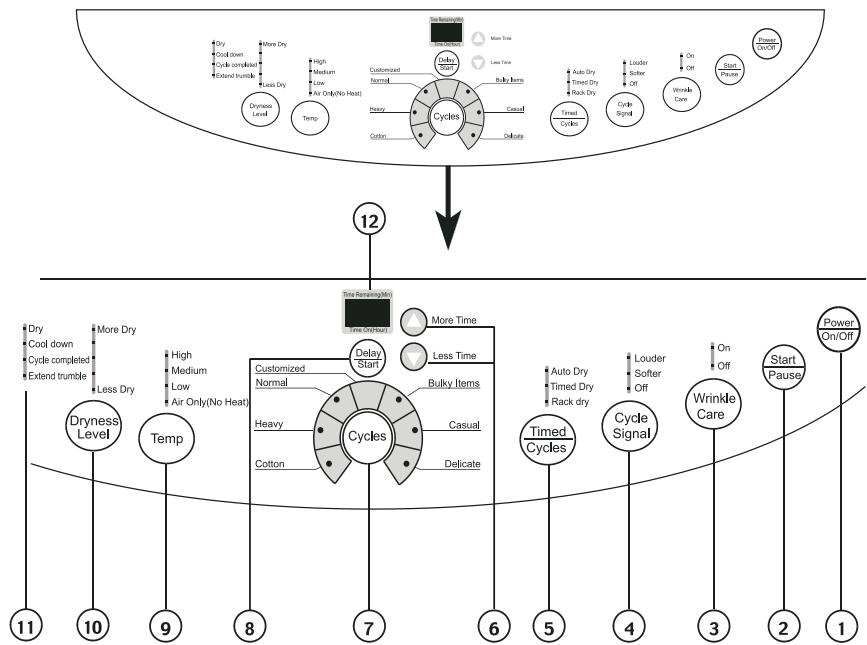
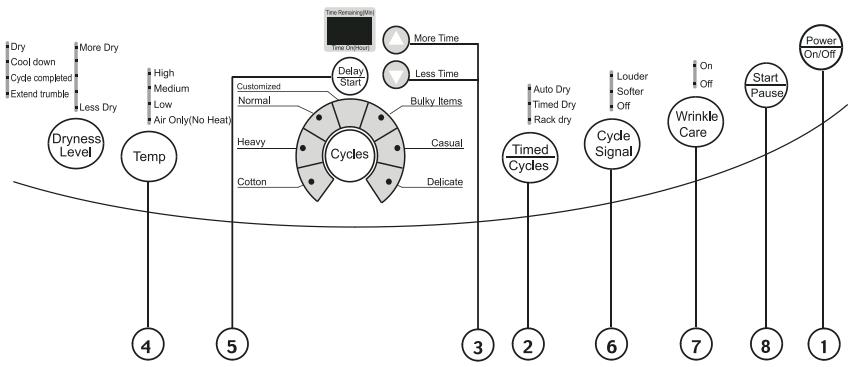
Power On/Off Button: (1)
- Press the button once to operate the dryer. Press the button once again to turn the dryer "OFF".
Start/Pause Button: (2)
- Press this button once to start the dry process. Press this button once again to pause during the dry cycle.
Wrinkle Care Button: (3)
- Used to select wrinkle-proof function. Automatically sets as off after powering on. This function is used together with delay start function.
Cycle Signal Button: (4)
- Used to select buzzing volume or to turn off the buzzer.
Timed/Cycles Button: (5)
- "Timed/Cycles" button will let you select your desired dry mode. Auto Dry: automatically set "Dryness Level," "Temp," "Cycle Signal," "Wrinkle Care" buttons status according to clothes loaded. Timed Dry: You can set status of "Temp," "Cycle Signal" and "Wrinkle Care" buttons and dry time with "More Time" and "Less Time" buttons by yourself. Rack Dry: the program used to dry articles like sports shoes.
More Time & Less Time Button: (6)
- Set time from 0 to 180 minute when Timed Dry or Rack Dry selected.
Cycle Buttons: (7)
- "Cycle" button will let you select your desired dry cycles. For your convenience, there are seven fabric care dry cycles programmed in this mode: Customized, Normal, Heavy, Cotton, Delicate, Casual and Bulky Items.
| Customized | The drying program is defined by the user and stored. |
| Normal | Normal drying |
| Heavy | Heavy clothes drying like jeans |
| Cotton | Special drying for cotton clothes |
| Delicate | Drying small quantity clothes and delicates |
| Casual | Drying casual everyday clothes |
| Bulky Items | Drying bulky clothing |
Delay Start Button: (8)
- This convenient feature lets you delay the start of the dry cycle between 3 to 24 hours. Press the "Delay Start" to choose the number of hours you want to delay the start of the cycle.
- If "Delay Start" is not selected, the digital display indicates remaining time of selected program.
- If setting "Delay Start" is in standby status, the digital display indicates 3 hr, which will increase by 1 hr with each pressing (until 24 and return to 3) of the button. If it is pressed for 1.5 seconds, the display indicated value will increase continuously.
Temp Button: (9)
- Used to set drying temperature, There are 4 available drying temperatures: High, Medium, Low, and Air only (no heat).
Dryness Level Button: (10)
- Used to set drying time of auto-programs.
Status lights: (11)
- Status lights give notification of which part of the cycle the machine is in.
Digital Display: (12)
- Indicates remaining time (min) during cycle operation. Indicates remaining delay time (hr) during delay.
Note: If door opened during cycle running, indicator displays a code "E2" and an alarm will sound.
Function Light Indicator:
- The function "display light" indicates selected feature is "ON" or the cycle is about to begin.
- During the dry cycle, "flashing light" indicates current running program.
- Rapidly flashing light indicates that the dryer is not operating properly.
Preparations Before Drying
- Group the clothes of the same kind (cotton, synthetics, woolen) to dry.
- Dark and light colored clothes should be separately dried. Fabrics prone to falling lint should be turned inside out before putting into the dryer.
- Make sure buttons and ornaments on the clothes are high temperature resistant and won't damage drum surface. Before loading, the clothes should have their zippers zipped up, buttons and hooks done up and belts tied so as to avoid entanglement or other obstacles.
- If possible, turn out the clothes pockets for uniform drying.
- Check if clothes remain soiled. If yes, wash it again, otherwise the soils after drying may stain permanently.
- Small articles should be collected in a mesh bag before loading and drying, so as to avoid entanglement and ensure easy removal.
- Make sure power socket is reliably grounded. The grounding terminal should not be connected to gas or tap water pipelines.
- Make sure exhaust duct has been connected with extension pipe.
- Make sure lint filter is clean and then assemble it properly. If lint filter is not in place, tumbling items could enter the exhaust system and cause damage to the dryer.
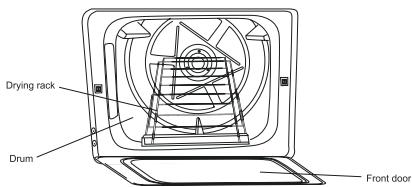
Note: It applies to Auto Dry cycle and Timed Dry cycle. For Rack Dry cycle, remove the lint filter and assemble the drying rack. Raise the front end and lock it into the lint filter slot. The assemble is as shown in the following figure:
Load Clothes into Dryer
Auto Dry Cycle and Timed Dry Cycle
- The appropriate load is 1/3 to 1/2 of the drum volume. Avoid to overload the dryer, as space is needed to allow clothes to tumble for uniform and wrinkle proof drying.
- When drying big articles, only 2-3 pieces should be loaded at a time and supplemented with medium and small articles.
- Avoid excessive drying of clothes to prevent wrinkles, shrinkage, roughness, electrostatic charge accumulation and lint.
- Avoid high temperature drying on delicate and synthetic clothes.
Rack Dry cycle:
WARNING: In Rack Drying mode, remember the drum is still rotating. If drying rack is not in place, rotating inner tub could collide with drying rack and causes damage to the dryer and drying rack.
- This program is designed specially for articles like sports shoes. During drying please make sure the items stay on the rack with no risk of entanglement while the drum is rotating.
Auto Dry Cycle
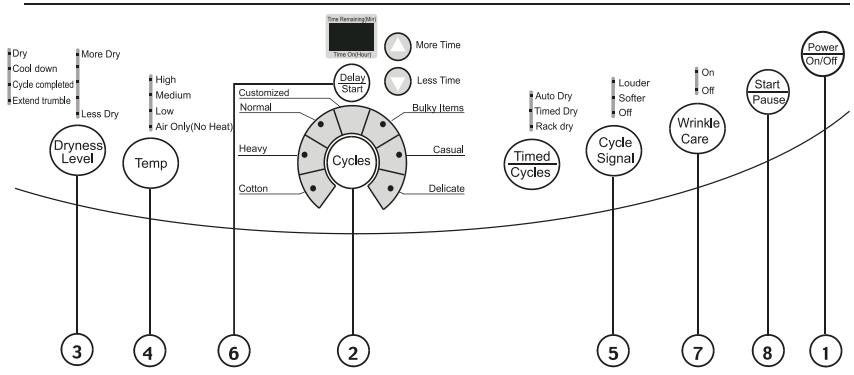
- Press "Power On/Off" button to power on
- Turn on the power, the computer board beeps once and the dryer transfers from off status to the stand by status (Normal program).
- If no "Start/Pause" button is pressed in 5 min after powering on, it automatically cuts off power and returns to off status.
-
It returns to off status immediately upon end of a cycle; Whatever status the computer board is (start, pause, alarm, etc.), pressing "Power On/Off" button will stop all operations and it enters off status.
-
Various button initial status for "Normal program."
| Cycle Signal | Softer |
| Wrinkle Care | Off |
| Cycles | Normal |
| Digital Display | Indicate current program remaining time |
| Temp | High |
| Dryness Level | More Dry |
| Timed/Cycles | Auto Program |
-
Press "Cycles" button to select a suitable full automatic cycle
-
The Normal program will be automatically selected after powering the unit "ON". If other full automatic program is desired, press "Cycle" button until corresponding indicator turns on.
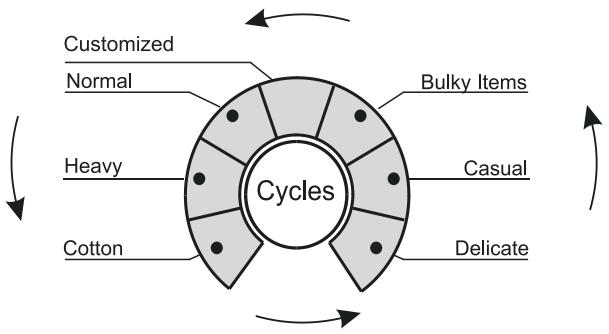
- To select your desired settings the "Customized" function should be chosen.
- It can memorize programs defined by user and display the previous program upon next application of this function.
Use details are as follows:
After powering on, press "Cycles" until "Customized" status, then set
"Timed/Cycles" to Timed Dry or Rack Dry, and set status of other buttons.
Press "Start/Pause" button or after half a minute, the program defined by user will be stored and will be directly displayed upon next use.
Note: Pressing "Dryness Level" button will be inactive during use of
"Customized" function.
-
Press "Dryness Level" button to select a suitable drying time
-
After powering on, the clothes dryer automatically sets dryness at "More Dry." If other drying time is desired, press "Dryness Level" button to select a shorter time.
-
Press "Temp" button to set a suitable drying temperature
-
After switching on, the dryer sets corresponding temperature adapting to different program selected. If other drying temperature is required, press "Temp" button to enable such a selection.
-
Press "Cycle Signal" button, you will be reminded up upon end of a cycle.
-
After switching on, the dryer automatically sets a buzzer at "Softer," while the user may choose from three prompt sound conditions "Louder," "Softer" and "Off."
-
Press "Delay Start" button to select a suitable delay drying program
-
When "Delay Start" is enabled, your selected program indicator turns off while "Delay Start" indicator and remaining delay time indication turn on. During delay period, pressing "Delay Start" button can indicate delay status.
-
To change operating program or cancel delay, you should power off the dryer and re-select.
-
Press "Wrinkle Care" button to select wrinkle-proof drying mode
-
Wrinkle Care automatically sets "Off" upon powering on. Press "Wrinkle Care" button, it sets wrinkle care drying mode.
Note: "Wrinkle Care" function is provided to match "Delay Start" program. When a "Delay Start" drying cycle ends, clothes remained in hot drum is prone to creasing. "Wrinkle Care" function operates in tumbling clothes by intermittently rotating drum to avoid clothes wrinkling.
-
Press "Start/Pause" button
-
If starting the machine, first close the front door and then press this button.
- If pause is needed during machine operating, press this button. Pressing again will resume operation.
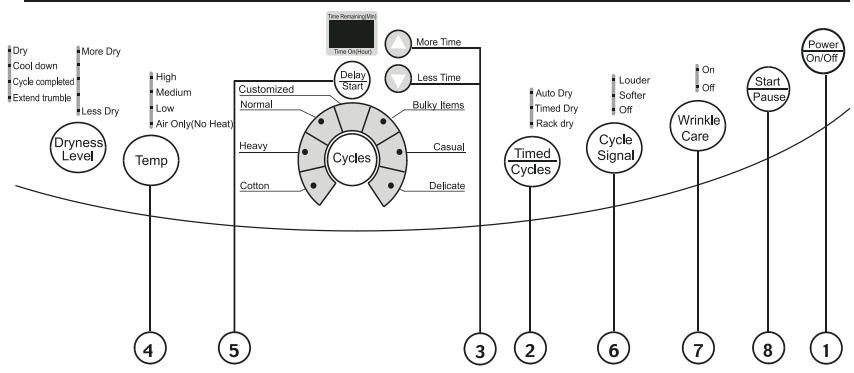
- Press "Power On/Off" button to power on.
- Press "Timed/Cycles" button and select "Timed Dry" cycle.
- Press "More Time" and "Less Time" buttons to set a suitable dry time.
4-7. Press buttons "Temp," "Cycle Signal," "Delay Start," and "Wrinkle Care," to define your desired program.
Note: For "Timed Dry" program, use of buttons "Temp," "Cycle Signal," "Delay Start," and "Wrinkle Care" is the same as for auto-programs. "Dryness Level" is here inactive, pressing of which will get alarms.
- Press "Start/Pause" button
Rack Dry Cycle
- Press "Power On/Off" button to power on.
- Press "Timed/Cycles" button and select "Rack Dry" cycle.
- Press "More Time" and "Less Time" buttons to set a suitable dry time.
4-7. Press buttons "Temp," "Cycle Signal," "Delay Start," and "Wrinkle Care," to define your desired program.
Note: For "Rack Dry" program, use of buttons "Temp," "Cycle Signal," "Delay Start," and "Wrinkle Care" is the same as for auto-programs. "Dryness Level" is here inactive, pressing of which will get alarms.
- Press "Start/Pause" button
Other Features
Your dryer also has the following features for your convenience:
Lint Filter:
- All dryers come with a lint filter that needs to be cleaned before or after every use (read Care and Cleaning Guide Section).
Leveling Legs:
- Your dryer has four leveling legs which are located in the front and rear corners of your dryer. After installing your dryer in its final position, you can level your dryer.
- Leveling legs can be adjusted by turning them clockwise to lower your dryer or by turning them counterclockwise to raise your dryer.
Note: It is very important that you level your dryer to prevent it from moving during operation.
Normal Operating Sounds
Following sounds are normally heard during the operation of the dryer.
- Tumbling sounds. This is normal as the heavy wet clothes in the dryer are continuously being tossed around.
- Air rushing noise. This happens as the dryer drum spins at very high RPM and the air is rushing through the dryer drum.
- Timer clicks may be heard.
Tips
- For best drying results, clean the lint filter before every use.
- Do not overload the dryer.
- Balance the dryer load evenly throughout the dryer for the best results.
- Drying time depends on many variables: load size, type of fabric and moisture in it, heat and moisture in the room, electric voltage, length of the exhaust duct, etc.
- To eliminate guessing and conserve energy, we recommend for certain clothes to choose and Auto Drying setting.
- Always follow the fabric care instructions supplied by the garment manufacturer.
CARE AND CLEANING
- Lint filter needs to be cleaned before or after each use for your unit to operate at optimum efficiency. The filter can be slid out, by pulling on the tab located on the inside of the dryer door. The filter may be washed or vacuumed. Remove the excess water from the filter by gently shaking the filter. This will remove dust and particles trapped in the filter. Lint build-up in screen restricts air flow, which causes longer drying times. After cleaning, slide the filter back in place.
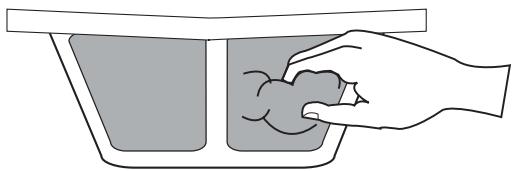
DO NOT USE YOUR DRYER WITHOUT THE LINT FILTER.
WARNING: Unplug the dryer before cleaning.
- Do not use any type of spray cleaner when cleaning the interior. Hazardous fumes or electric shock could occur.
- Clean cabinet with mild soap and water. Do not use harsh or abrasive cleaners, as this could damage the dryer.
- Clean the duct and the vent on a regular basis to avoid clogging which could affect the efficiency of the dryer.
Dryer does not operate:
- Check if unit is plugged in. The plug may have come loose.
- Check if the electrical wall receptacle is of proper voltage.
- Check if the circuit breaker needs to be reset or if the fuse needs to be replaced.
- Check if the unit is in "Off" mode. Press Start button again after powering on the dryer.
- Check if door is open.
Dryer is working but not drying the clothes:
- Unit may be over loaded. The dryer drum should only be half full.
- Check exhaust ducts and vent. Vent should be free of all obstructions.
- Duct should be lint and dust free. Ducts should be cleaned regularly.
- Dryer load needs to be resorted. Heavy clothes may need to be separated from regular clothes.
- Bulky clothes may require repositioning.
- If clothes dry unevenly a higher dry setting may be required or clothes in the dryer may need to be resorted.
Dryer making noise when drying:
- Coins, loose change, buttons and other heavy objects could make noise.
- Dryer may need to be leveled evenly. Read Operating Guide – Normal Operating Sounds.
Static:
- Caused by over drying. Adjust for shorter drying time.
- Mixed with synthetic fabric. Sort and separate different fabrics.
- Use a fabric softener.
ELECTRICAL REQUIREMENTS
WARNING
Electrical Shock Hazard
Plug into a grounded 4 prong outlet.
Failure to do so can result in death or electrical shock.
It is your responsibility
- To contact a qualified electrical installer.
- To be sure that the electrical connection is adequate and in conformance with CAN 1-B149 (.1 or .2) installation codes and/or local codes.
- A 4 wore. somg;e [jase. 115/230-volt. 60 Hz., AC-only electrical supply is required on a separate 30-amp circuit, fused on both sides of the line. A time-delay fuse or circuit breaker is recommended. Connect to an individual branch circuit.
- This dryer is equipped with a CSA International Certified Power Cord intended to be plugged into a standard 14-30R wall receptacle. The cord is 5ft (1.52) in length. Be sure wall receptacle is within reach of dryer's final location.

4-Wire receptacle 14-30R
If using a replacement power supply cord, it is recommended that you use Power Supply Cord Replacement. For further information, please reference the service numbers located in the "Assistance or Service" section of this manual.
Replacement Power Supply Cord must be:
- UI listed or CSA International Certified
- Marked for use with Clothes dryer.
- Rated 115/230 volt minimum
- 30 amp
- Type SRD or SRDT
4 conductors - At least 5 ft (1.52m) long
GROUNDING INSTRUCTIONS
- For a grounded, cord-connected dryer:
This dryer must be grounded. In the event of malfunction or breakdown, grounding will reduce the risk of electric current. This dryer is equipped with a cord having an equipment grounding conductor and a grounding plug. The plug must be plugged into an appropriate outlet that is properly installed and grounded in accordance with all local codes and ordinances.
WARNING: Improper connection of the equipment grounding conductor can result in a risk of electric shock. Check with a qualified electrician or service representative or personnel if you are in doubt as to whether the dryer is properly groused. Do not modify the plug provided with the dryer: if it will not fit the outlet, have a proper outlet installed byu a qualified electrician.
SAVE THESE INSTRUCTIONS
INSTALLATION INSTRUCTIONS
Select a suitable location for the dryer on a hard even surface away from direct sunlight or heat source e.g. radiators, baseboard heaters, cooking appliances etc. Any floor unevenness should be corrected with the leveling legs located on the
bottom of the dryer.
Unpacking Your Dryer
- Remove all packaging material. This includes the foam base and all adhesive tape holding the dryer accessories inside and outside.
- Inspect and remove any remains of packaging, tape or printed materials before using the dryer.
Tools and Materials Required
- Phillips head and flathead screwdrivers
- Channel-lock adjustable pliers
- 1 / 2 inch open end wrench
- Carpenter's level
- Measuring tape
- Duct tape
- Rigid or flexible metal 4 inch (10.2 cm) duct
Requirements and Instructions
WARNING

The following are specific requirements for proper and safe operation of your dryer. Failure to follow these instructions can create excessive drying times and fire hazards.
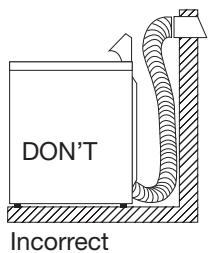
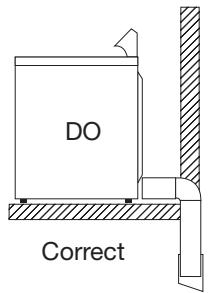
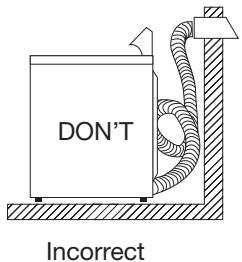
- Do not use plastic flexible duct to exhaust the dryer. Excessive lint can build up inside exhaust system and create a fire hazard and restrict air flow. Restricted air flow will increase dryer times. If your present system is made up of plastic duct or metal foil duct, replace it with a rigid or flexible metal duct. Ensure present duct is free of any lint prior to installing dryer duct.
- If the dryer is not exhausted out doors, some fine lint will be expelled into the laundry area. An accumulation of lint in any area of the home can create a health and fire hazard. To reduce risk of fire, dryer MUST BE EXHAUSTED OUTDOORS.
- Do not allow combustible material (for example: clothing, draperies/curtains, paper) to come in contact with exhaust system. The dryer must not be exhausted into a chimney, a wall, a ceiling, or any concealed space of a building which can accumulate lint, resulting in a fire hazard.
- Exceeding the length of duct pipe or number of elbows allowed in the "Maximum Length" charts can cause an accumulation of lint in the exhaust system. Plugging the system could create a fire hazard, as well as increase drying times.
- Do not screen the exhaust ends of the vent system, nor use any screws or rivets to assemble the exhaust system. Lint can become caught in the screen, on the screws or rivets, clogging the duct work and creating a fire hazard as well as increasing drying times. Use an approved vent hood to terminate the duct outdoors, and seal all joints with duct tape. All male duct pipe fittings must be installed downstream with the flow of air.
Explosion hazard:

Do not install the dryer where gasoline or other flammables are kept or stored. If the dryer is installed in a garage, it must be minimum of 18 inches (45.7 cm) above the floor. Failure to do so can result in death, explosion, fire or burns.
Materials
Use only 4 inch (10.2 cm) diameter (minimum) rigid or flexible metal duct and approved vent hood which has a swing-out damper hat open when the dryer is in operation. When the dryer stops, the dampers automatically close to prevent drafts and the entrance of insects and rodents. To avoid restricting the outlet, maintain a minimum of 12 inches (30.5 cm) clearance between the vent hood and the ground or any other obstruction. The vent flap should be able to move freely.
MAXIMUM EXHAUST LENGTH
| Number of 90° elbows | Rigid Metal Duct | ||
| VENT HOOD TYPE (preferred) | |||
| →4" (10.2 cm) | Louvered | →21/2" (6.35 cm) | |
| 0 | 60ft. (18.28 m) | 48ft. (14.63 m) | |
| 1 | 52ft. (15.84 m) | 40ft. (12.19 m) | |
| 2 | 44ft. (13.41 m) | 32ft. (9.75 m) | |
| 3 | 32ft. (9.75 m) | 24ft. (7.31 m) | |
| 4 | 28ft. (8.53 m) | 16ft. (4.87 m) | |
| Number of 90° elbows | Flexible Metal Duct | ||
| VENT HOOD TYPE (preferred) | |||
| →4" (10.2 cm) | Louvered | →21/2" (6.35 cm) | |
| 0 | 30ft. (9.14 m) | 18ft. (5.49 m) | |
| 1 | 22ft. (6.71 m) | 14ft. (4.27 m) | |
| 2 | 14ft. (4.27 m) | 10ft. (3.05 m) | |
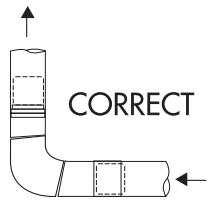
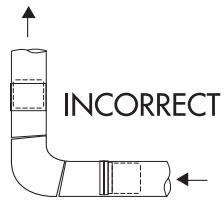
INSTALL MALE FITTINGS IN THE CORRECT DIRECTION
After installation is completed, the following method must be used to determine if the exhaust system is acceptable:
- Connect an inclined or digital manometer between the dryer and the point the exhaust connects to the dryer.
- Set the dryer timer and temperature to air fluff (cool down) and start the dryer.
- Read the measurement on the manometer.
- The system back pressure must not be higher than 0.75 inches of water column. If the system back pressure is less than 0.75 inches of water column, the system is acceptable. If the manometer reading is higher than 0.75 inches of water column, the system is too restrictive and the installation is unacceptable.
Although vertical orientation of the exhaust system is acceptable, certain extenuating circumstances could affect the performance of the dryer:
- Only the rigid metal duct work should be used.
- Venting vertically through a roof may expose the exhaust system to down drafts causing an increase in vent restriction.
- Running the exhaust system through an area not insulated may cause condensation and faster accumulation of lint.
- Compression or crimping of the exhaust system will cause an increase in vent restriction.
The exhaust system should be inspected and cleaned a minimum of every 18 months with normal usage. The more the dryer is used, the more often you should check the exhaust system and vent hood for proper operation.
Location of Your Dryer
Do Not Install Your Dryer:
- In an area exposed to dripping water or outside weather conditions.
- In an area where it will come in contact with curtains, drapes, or anything that will obstruct the flow of combustion and ventilation air.
- On carpet. Floor must be solid with a maximum slope of 1 inch (2.54 cm).
Installation in Recess or Closet:
- A dryer installed in a bedroom, bathroom, recess or closet, must be exhausted outdoors.
- Your dryer needs the space around it for proper ventilation.
- A minimum of 120 square inches (774.2 square cm) of opening, equally divided at the top and bottom of the door, is required. Air openings are required to be unobstructed when a door is installed. A louvered door with equivalent air openings for the full length of the door is acceptable.
ROUGH-IN DIMENSIONS
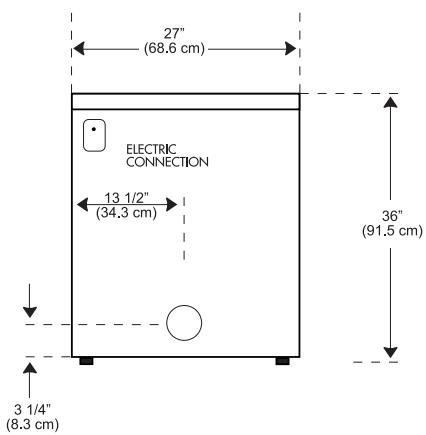
REAR VIEW
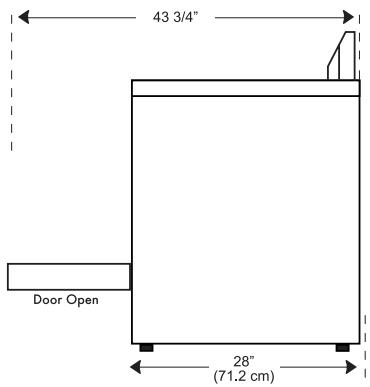
SIDE VIEW
Installation in Mobile Home
- Dryer must be exhausted outside (outdoors, not beneath the mobile home) using metal ducting that will not support combustion.
Metal ducting must be 4 inches (10.16 cm) in diameter with no obstructions. Rigid metal duct is preferred. - If dryer is exhausted through the floor and area beneath the mobile home is enclosed, the exhaust system must terminate outside the enclosure with the termination securely fastened to the mobile home structure.
- Refer to previous pages for other important venting requirements.
- Installation must conform to current Manufactured Home Construction & Safety Standard (which is a Federal Regulation Title 24 CFR-Part 32-80) or when such standard is not applicable, with American National Standard for Mobile Homes.

Warning: The dryer is designed under ANSI z 21.5.1 for home use only.
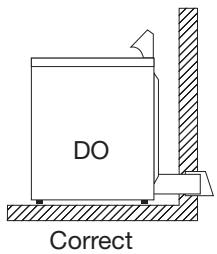
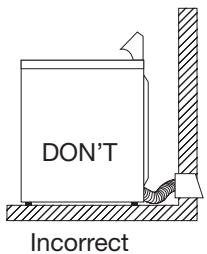
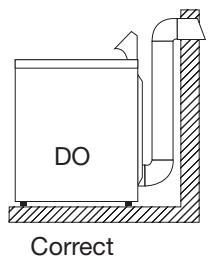
Limited Warranty
Full ONE Year In-Home Warranty
For 12 months from the date of original retail purchase, Haier will repair or replace any part free of charge including labor that fails due to a defect in materials or workmanship.
Limited Warranty
After one year from the original retail purchase date, Haier will provide a part at no cost, as indicated below, to replace said part as a result of a defect in materials or workmanship. Haier is responsible solely for the cost of the part. All other costs such as labor, trip charge, etc are the responsibility of the owner.
Second Year
Haier will provide All Parts.
Third through Fifth Year
Haier will provide the drive motor or timer.
Haier will provide the dryer drum should the drum rust through.
Third through Tenth Year
Haier will provide the cabinet assembly should the cabinet rust through.
NOTE: This warranty commences on the date the item was purchased and the original purchase receipt must be presented to the authorized service representative before
warranty repairs are rendered.
Exceptions: Commercial or Rental Use Warranty
90 days labor from date of original purchase. Excludes in-home trip charge. 90 days parts from date of original purchaseNo other warranty applies
For Warranty Service Contact your nearest authorized service center. All service must be performed by a Haier authorized service center. For the name and telephone number of the nearest authorized service center please call 1-877-337-3639.
Before calling please have available the following information:
Model number and serial number of your appliance (found on the rear of the unit on the upper left hand side).
The name and address of the dealer you purchased the unit from and the date of purchase.
A clear description of the problem.
A proof of purchase (sales receipt).
This warranty covers appliances within the continental United States, Puerto Rico and Canada. What is not covered by this warranty:
Replacement or repair of household fuses, circuit breakers, wiring or plumbing.
A product whose original serial number has been removed or altered.
Premium service charges not specifically identified as normal, such as outside normal service area or hours.
Damage to clothing
Damage incurred in shipping
Damage caused by improper installation or maintenance
Damage from misuse, abuse accident, fire, flood, or acts of nature
Damage from service other than an authorized Haier dealer or service center Damage from incorrect electrical current, voltage or supply
Damage resulting from any product modification, alteration or adjustment not authorized by Haier.
Adjustment of consumer operated controls as identified in the owners manual Hoses, knobs, lint trays and all attachments, accessories and disposable parts Labor, service transportation, and shipping charges for the removal and replacement of defective parts beyond the initial 12-month period.
Damage from other than normal household use.
Any transportation and shipping charges.
THIS LIMITED WARRANTY IS GIVEN IN LIEU OF ALL OTHER WARRANTYES, EXPRESSED OR, INCLUDING THE WARRANTY OF MERCHANTABILITY AND FITNESS FOR A PARTICULAR PURPOSE
The remedy provided in this warranty is exclusive and is granted in lieu of all other remedies.
This warranty does not cover incidental or consequential damages, so the above limitations may not apply to you. Some states do not allow limitations on how long an implied warranty lasts, so the above limitations may not apply to you.
This warranty gives you specific legal rights, and you may have other rights, which vary, from state to state.
Haier America
New York, NY 10018
IMPORTANT
Do Not Return This Product To The Store
If you have a problem with this product, please contact
the "Haier Customer Satisfaction Center" at 877.337.3639.
DATED PROOF OF PURCHASE REQUIRED FOR WARRANTY SERVICE
IMPORTANT
- SAVE THESE INSTRUCTIONS
- DANGER
- Table Of Contents
- IMPORTANT SAFEGUARDS 1
- OPERATING INSTRUCTIONS 4-12
- CARE AND CLEANING GUIDE 13
- TROUBLESHOOTING 14
- INSTALLATION INSTRUCTIONS 9-10
- EXHAUST SYSTEM CONNECTIONS 17
- WARRANTY 22
- Start/Pause Button: (2)
- Wrinkle Care Button: (3)
- Cycle Signal Button: (4)
- Timed/Cycles Button: (5)
- Cycle Buttons: (7)
- Delay Start Button: (8)
- Temp Button: (9)
- Dryness Level Button: (10)
- Status lights: (11)
- Digital Display: (12)
- Preparations Before Drying
- Load Clothes into Dryer
- Rack Dry cycle:
- Auto Dry Cycle
- Rack Dry Cycle
- Other Features
- Lint Filter:
- Leveling Legs:
- Normal Operating Sounds
- Tips
- CARE AND CLEANING
- Static:
- ELECTRICAL REQUIREMENTS
- WARNING
- It is your responsibility
- Replacement Power Supply Cord must be:
- GROUNDING INSTRUCTIONS
- INSTALLATION INSTRUCTIONS
- Unpacking Your Dryer
- Tools and Materials Required
- Requirements and Instructions
- Explosion hazard:
- Materials
- Location of Your Dryer
- Do Not Install Your Dryer:
- Installation in Recess or Closet:
- ROUGH-IN DIMENSIONS
- Installation in Mobile Home
- Limited Warranty
- IMPORTANT
- Do Not Return This Product To The Store
Brand : HAIER
Model : HLF11PC
Category : Tumble dryer