ORA-70D - Portable air conditioner OPTIMEA - Free user manual and instructions
Find the device manual for free ORA-70D OPTIMEA in PDF.


| Product type | Portable air conditioner |
| Brand | Optimea |
| Model | ManuelORA 70D |
| Dimensions (H x W x D) | 70 x 35 x 35 cm |
| Weight | 20 kg |
| Power supply | 230 V / 50 Hz |
| Cooling power | 2.1 kW (7,000 BTU/h) |
| Power consumption | 1,200 W |
| Energy class | A |
| Main functions | Cooling, ventilation, dehumidification |
| Water tank capacity | 0.5 L |
| Noise level | 65 dB(A) |
| Refrigerant | R290 |
| Airflow | 320 m³/h |
| Control | Touch panel and remote control |
| Air filter | Washable, foam |
| Maintenance and cleaning | Clean the filter every 2 weeks, empty the water tank regularly |
| Safety | Automatic shut-off in case of overheating, frost protection |
| Spare parts and repairability | Filters, remote control, exhaust kit available as spare parts |
| Warranty | 2 years |
Frequently Asked Questions - ORA-70D OPTIMEA
User questions about ORA-70D OPTIMEA
0 question about this device. Answer the ones you know or ask your own.
Ask a new question about this device
Download the instructions for your Portable air conditioner in PDF format for free! Find your manual ORA-70D - OPTIMEA and take your electronic device back in hand. On this page are published all the documents necessary for the use of your device. ORA-70D by OPTIMEA.
USER MANUAL ORA-70D OPTIMEA

Plus d'infos




Plus d'infos
Air cooler
User manual
Model : ORA-70D


More info

Thank you for choosing our product.
For proper operation of the device, please read carefully and store these Instructions for Use.
If you lose this User Guide, please contact your reseller, or send an e-mail to info@optimea.fr to obtain the electronic version.
Content
- Structure diagram ____ 1
1.1 Functions 2
-
Operating guide 3
-
Cautions 3
-
Operating instruction ____ 4
4.1 Filling water 4
4.2 How to use the functions 4
4.2.1 Power 4
4.2.2 Swing ____ 4
4.2.3 Fan speed ____ 4
4.2.4 Mosquito 5
4.2.5 Timer ____ 5
4.2.6 Cool 5
-
Cleaning and maintenance 6
-
Troubleshooting ____ 7
-
Technical Information 8
-
Product appearance ____ 8
Please read these operating instructions through carefully before connecting your device to the mains, in order to avoid damage due to incorrect use. Please pay particular attention to the safety information. If you pass the device on to a third party, these operating instructions must also be handed over.

More info
1. Structure diagram
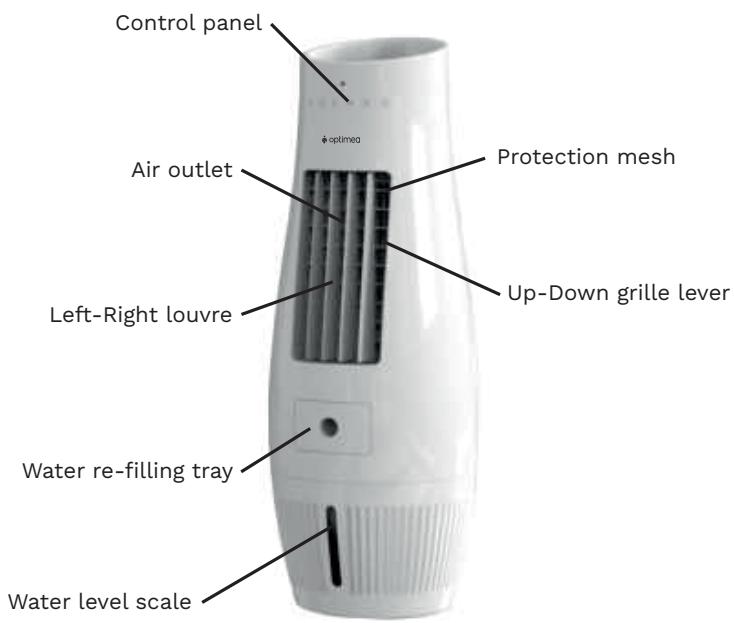

1.1 Functions
Control panel

- TIMER
- MOSQUITO
-
SWING (Left-Right)
-
COOL
- SPEED (Low/Mid/High)
- ON/OFF (Power)
Remote Control

2. Operating guide
- The air cooler is designed and controlled by capacitive sensor therefore, the system will start operating only when finger touch on each sign of the control panel.
- Avoid using the evaporative air cooler in a closed area. The unit should be used in well-ventilated areas only.
- Before turning the unit on, fill the tank with water to ensure efficient operation of the evaporative air cooler. Avoid operating Cool function while the water tank is empty.
Remarks
Water level must not exceed the limit of water level scale.
- Drain the water tank and clean the tank frequently.
- Fill the tank with clean water only, do not put any other liquid into the tank.
- Make sure that the operating voltage is not lower than regular voltage (220V) or exceed than 5% of regular voltage. If the voltage is lower than the limit, the air cooler cannot be operated smoothly or even turned on. If the voltage is higher than the limit, it can cause the damage to the machine.
- Remove the plug from the socket when the machine is not being used.
3. Cautions
- Be careful the water spilled out while moving the unit.
- Do not put anything on top of this air cooler or obstruct the air inlet and outlet.
- Do not insert any object into the vent while the machine is operating.
- Unplug the machine before cleaning to prevent the electric shock.
- Stop operating this air cooler immediately if it functions abnormally for example the power cord damaged, electricity leaks, and contact our service center for further instruction. User is not recommended to unassembled and repair the machine.
4. Operating instruction
4.1 Filling water
By pulling the water refilling tray at the front of air cooler, then use the water container or water pipe to fill up the water tank up to "MAX" level which appear at the water level scale.

Caution
Do not fill up the water exceed "MAX" level to avoid the water spilling out while moving the air.
4.2 How to use the functions
4.2.1 POWER ⏻
Press ⏻ icon on the control panel or the remote control to turn on the air cooler and its light is illuminated. Press this icon again to turn it off and its light is off.
4.2.2 SWING
Press Ⓞ icon on the control panel or the remote control to let the vertical front grille swing automatically and its light is illuminated. Press this Ⓞ icon again to stop the swing mode, then its light is off.
4.2.3 FAN SPEED
Press Ⓧ icon then the fan will start operating at the lowest speed (1). Press Ⓧ icon on the control panel or the remote control to adjust wind speed to low (1), medium (2), high (3). 3 speed lights (1, 2, 3) indicates selected current wind speed. The wind speeds change on rotating basis. (from low-mid-high).
4.2.4 MOSQUITO
Press Ⓧ icon on the control panel or the remote control to enter mosquito repellent mode and the machine emits ultrasonic wave to repel mosquito. Press Ⓧ icon again to stop mosquito repellent mode.
4.2.5 TIMER
Press Ⓐ icon on the control panel or the remote control to set the timer. Each time that the icon is pressed, it will change from 1H to 2H, 4H, 8H, 10H and from 10H to non-setting mode. (The timer can be set from 1 - 10 hours).
4.2.6 COOL
Enter the cool mode by pressing the ⚙️ icon on the control panel or the remote control. To turn off the cool mode, press ⚙️ icon again. The system will automatically exit the cool mode.
Remarks
When the cool mode is activated, the pump inside the water tank will pump water to saturate the cooling pads. Heat that flows through the cooling pads will exchange with the water and cool the air flowing through the cooling pads to lower the temperature. Therefore, a decrease in temperature depends on relative humidity and air temperature when the unit is in cool mode. In the case where the fan speed is high, when the icon is pressed, the fan will drop to the lowest speed for 30 seconds before resuming the speed previously set.
5. Cleaning and maintenance

Unscrew back cover.
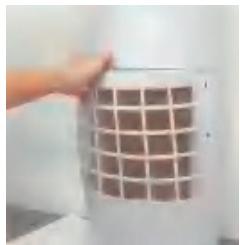

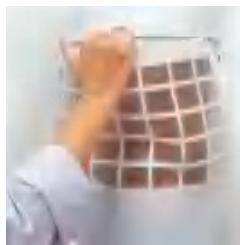
Hold the unit firmly and grasp only the top center of the dust filter then pull it out hardly in one time (see above image).
Remark : The dust filter is flexible and not easy to be broken.

Pull the cooling pads out in the same direction as the arrow identify above.



Clean the cooling pad with normal water and wipe the dirt with soft brush.

Remove the silicone seal at the bottom of the water tank to drain the water.
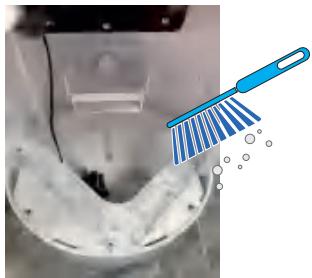
Clean the water tank and dust filter with soft brush.

How to put the dust filter back to the unit :

1) Insert below tongues to the back grooves completely.

2) Insert upper tongues to the holes on the upper grooves.
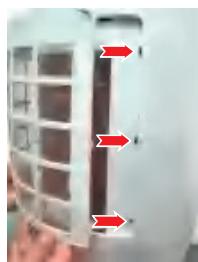
3) Slightly adjust the dust filter to fit the tongues into Left & Right grooves. All will fit the position automatically.
- Troubleshooting
| Problem | Possible cause | Corrective action | Remarks |
| The evaporative air cooler is not functioning and does not respond when buttons are pressed. | Blackout or faulty power connection. | Measure the input voltage and connect to a designated power supply. | Recommended to use voltage meter to get the right voltage. |
| AC fuse is damaged or the circuit stops functioning in order to prevent power overload. | Replace the fuse or restart the unit. | If the problem remains unsolved, please contact service center. | |
| Remote control batteries have run out. | Change the batteries. | Change the batteries. | |
| Remote control or control panel is damaged. | Repair or replace the control panel with another of the same model. | ||
| No air flows from the unit while the machine is operating. | Damaged motor. | Repair or replace the motor with another of the same model. | Change the batteries. |
| Incorrect motor connection or loose motor connection. | Determine whether or not the motor with connections are in order. | ||
| Thermal protection inside the motor is working. | Leave the unit off until the fan motor is cool enough to be used as usual. | ||
| The pump functions but it is not cool enough. | The dust filters clogged or dirty clogged. | Clean or replace the dust filters. | |
| The cooling pads clogged. | Clean or replace the cooling pads. | ||
| The cooling pads are dry or contain insufficient water while the evaporative air cooling is working. | Check the top water distribution tray to determine whether or not there is a clog. Determine if the pump is functioning correctly. | ||
| Excessively high relative humidity. | When the evaporative air cooler is used for a long period of time the room humidity will be very high, so the evaporative cooler will be unable to lower temperature as much as when the room's humidity is lower. Turn the cool mode off. Turn off the cooler. | ||
| The pump fails to function and provide cooling. | Damaged pump. | Repair or replace the pump with a pump of the same model. | |
| Loose pump motor connection. | Tighten connection. | ||
| The pump functions but does not circulate water, or the cooling pads contain too little water. | Clogged top water distribution tray. | Clean the top water distribution tray. | |
| Clogged water supply hose or pump strainer. | Clean the water hose or remove the particles clogged at the pump strainer. | ||
| Water spitting from the unit. | Cooling pad stay out of the position. | Place cooling pad in the right position. | |
| Clogged top water distribution tray. | Clean the top water distribution tray. | ||
| Undesirable odor. | The unit is placed in an area where undesirable odors are present, or algae are present in the water tank. | Clean the water tank and the cooling pads. | |
| White sediments in the water tank. | Water has a high content of salt. | Drain the tank and clean the cooling pads more frequently. |
- Technical Information
| Model name | ORA-70D |
| Air volume | 480 m3 /hr |
| Area coverage | 10 m2 |
| Power | 50 W |
| Imput electricity | 220-240V 50/60Hz |
| Current | 0.24A |
| Water tank capacity | 7 liters |
| Water continuous usage | 10-12 hours |
| Water evaporation rate | 0.5-0.7 liter/hour |
| Fan speed | 3 speeds |
| Vent size | 13x26 cm. |
| Cooling Pad Type | 5090 |
| Overall dimension | 300x300x807 mm. |
| Net weight | 4.15 kg. |
| Operating weight | 11.2 kg. |
| Timer | 1-10 hours |
| Remote control | √ |
- Product appearance

Optimea
Please find our product range on our website www.optimea.fr :


Brand : OPTIMEA
Model : ORA-70D
Category : Portable air conditioner