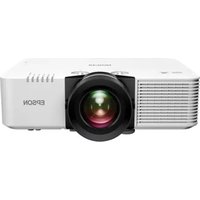
PowerLite EB-L690E - Projector EPSON - Free user manual and instructions
Find the device manual for free PowerLite EB-L690E EPSON in PDF.


Pick your language and provide your email: we'll send you a specifically translated version.
| Product Type | Projector |
| Brand | Epson |
| Model | PowerLite EB-L690E |
| Display Technology | 3LCD |
| Resolution | WUXGA (1920 x 1200) |
| Brightness | 6,000 lumens |
| Contrast Ratio | 2,500,000:1 |
| Light Source | Laser diode |
| Lamp Life | Up to 20,000 hours (normal mode) |
| Keystone Correction | Vertical and horizontal (±30 degrees) |
| Zoom | 1.6x optical zoom |
| Lens Shift | Vertical (up to ±50%) and horizontal (up to ±20%) |
| Inputs | HDMI (x2), VGA, Composite Video, Audio |
| Network | Ethernet (RJ45), Wi-Fi (optional), RS-232C |
| Dimensions (W x D x H) | 440 x 340 x 135 mm (17.3 x 13.4 x 5.3 in) |
| Weight | 8.5 kg (18.7 lbs) |
| Power Consumption | 330 W (normal mode), < 0.5 W (standby) |
| Noise Level | 37 dB (normal mode), 27 dB (eco mode) |
| Maintenance | Filter cleaning every 10,000 hours, no lamp replacement |
| Safety | Laser Class 1, overheat protection, Kensington lock slot |
| Spare Parts / Repairability | Filter, fan, power supply; user-replaceable filter |
Frequently Asked Questions - PowerLite EB-L690E EPSON
What is the typical brightness of the Epson PowerLite EB-L690E?
The projector delivers 6,000 lumens of white and color brightness, suitable for well-lit rooms.
How do I clean the air filter?
Turn off the projector, unplug it, then remove the filter cover and wash the filter with mild detergent and water. Rinse, dry, and reinstall. Clean every 10,000 hours.
Does this projector support 4K input?
It accepts 4K signals but downscales them to WUXGA. For native 4K, consider the Epson EH-LS12000B.
Can I project from a USB drive?
No, it does not have USB playback. Use HDMI or VGA to connect a laptop or media player.
What is the lamp life for the laser source?
The laser light source lasts up to 20,000 hours in normal mode, reducing maintenance.
How do I adjust keystone correction?
Press the Keystone button on the remote or control panel, then use the arrow keys to adjust vertical and horizontal distortion up to ±30 degrees.
Is this projector suitable for outdoor use?
It is designed for indoor use. Outdoor use requires a dry, shaded area and protection from dust and moisture.
How heavy is the EB-L690E?
It weighs approximately 8.5 kg (18.7 lbs), so a sturdy mount or cart is recommended.
Can I connect it wirelessly?
Yes, with an optional Wi-Fi adapter (not included). Alternatively, use the Ethernet port for wired network projection.
What safety certifications does it have?
It is Laser Class 1 (safe for eyes), has overheat protection, and a Kensington lock slot for theft prevention.
User questions about PowerLite EB-L690E EPSON
0 question about this device. Answer the ones you know or ask your own.
Ask a new question about this device
No questions yet. Be the first to ask one.
Download the instructions for your Projector in PDF format for free! Find your manual PowerLite EB-L690E - EPSON and take your electronic device back in hand. On this page are published all the documents necessary for the use of your device. PowerLite EB-L690E by EPSON.
USER MANUAL PowerLite EB-L690E EPSON
Manual assistant
Powered by Anthropic
Waiting for your message
Product information
Brand : EPSON
Model : PowerLite EB-L690E
Category : Projector