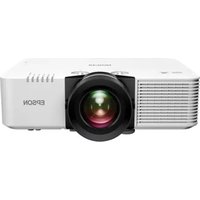
EB-E24 - Projector EPSON - Free user manual and instructions
Find the device manual for free EB-E24 EPSON in PDF.


Pick your language and provide your email: we'll send you a specifically translated version.
| Product Type | Projector |
| Brand | Epson |
| Model | EB-E24 |
| Display Technology | 3LCD |
| Native Resolution | XGA (1024 x 768) |
| Brightness | 3,300 lumens |
| Contrast Ratio | 15,000:1 |
| Light Source | UHE Lamp, 200 W |
| Lamp Life (Normal/Eco) | 5,000 / 6,000 hours |
| Projection Size | 30" to 300" |
| Dimensions (W x H x D) | 302 x 82 x 237 mm |
| Weight | 2.4 kg |
| Power Consumption | 277 W (Normal), 200 W (Eco) |
| Inputs | HDMI, VGA, Composite, USB-A, USB-B |
| Outputs | Audio Out (3.5 mm) |
| Built-in Speaker | 2 W mono |
| Keystone Correction | Vertical ±30° |
| Noise Level (Normal/Eco) | 37 / 28 dB |
| Additional Features | Auto Setup, Sleep Mode, Direct Power Off |
| Maintenance | Filter cleaning every 5,000 hours; lamp replacement |
| Safety | Overheat protection, Kensington lock slot |
| Spare Parts | Replacement lamp (ELPLP96), air filter (ELPAF61) |
| General Information | Designed for education and business presentations |
Frequently Asked Questions - EB-E24 EPSON
How do I connect my laptop to the Epson EB-E24 projector?
Use an HDMI or VGA cable to connect your laptop to the projector. Ensure the projector is turned on and select the correct input source using the 'Source Search' button on the remote or control panel.
How do I clean the air filter?
Turn off the projector and unplug it. Remove the filter cover, take out the filter, and gently vacuum or wash it with water. Let it dry completely before reinstalling. Clean every 5,000 hours of use.
How do I replace the lamp?
Switch off the projector and unplug it. Wait for the lamp to cool. Open the lamp cover, unscrew the lamp module, and replace it with a new ELPLP96 lamp. Tighten screws and replace the cover. Reset the lamp timer in the menu.
What should I do if no image appears?
Check that the projector is on and the lens cap is removed. Verify the correct input source is selected. Ensure cables are securely connected. Restart the projector.
How do I adjust the keystone correction?
Press the 'Keystone' button on the remote or navigate to the Settings menu. Use the arrow keys to adjust vertical keystone until the image is rectangular.
What is the optimal projection distance for a 100-inch screen?
For a 100-inch diagonal screen, the projector should be positioned approximately 2.5 to 3.0 meters from the screen. Refer to the manual for exact distances.
How do I use the remote control?
Insert two AAA batteries (not included) into the remote. Point it at the projector's IR receiver. The remote controls power, source, menu, keystone, and volume.
Can I connect external speakers to the Epson EB-E24?
Yes, use the Audio Out port to connect external speakers or a sound system. The projector only has a 2W built-in speaker, so external speakers are recommended for larger rooms.
How do I reset the lamp timer?
After replacing the lamp, go to the 'Info' or 'Settings' menu, select 'Lamp Hours' or 'Reset Lamp Timer', and confirm. This ensures accurate lamp life tracking.
What does the 'Direct Power Off' feature do?
Direct Power Off allows you to unplug the projector immediately after turning it off without waiting for the cooling fan. It is enabled by default and convenient for quick moves.
User questions about EB-E24 EPSON
0 question about this device. Answer the ones you know or ask your own.
Ask a new question about this device
No questions yet. Be the first to ask one.
Download the instructions for your Projector in PDF format for free! Find your manual EB-E24 - EPSON and take your electronic device back in hand. On this page are published all the documents necessary for the use of your device. EB-E24 by EPSON.
USER MANUAL EB-E24 EPSON
Manual assistant
Powered by Anthropic
Waiting for your message
Product information
Brand : EPSON
Model : EB-E24
Category : Projector