OPTIMEA Wallbox AC - Portable air conditioner

Wallbox AC - Portable air conditioner OPTIMEA - Free user manual and instructions

Find the device manual for free Wallbox AC OPTIMEA in PDF.

📄 55 pages English EN Download 💬 AI Question 10 questions ⚙️ Specs
Notice OPTIMEA Wallbox AC - page 51
View the manual : Français FR English EN
Pick your language and provide your email: we'll send you a specifically translated version.
Product type Portable air conditioner
Brand Optimea
Model Wallbox AC
Dimensions (W x D x H) 35 x 35 x 70 cm
Net weight 25 kg
Power supply 220-240 V, 50 Hz
Cooling capacity 9000 BTU/h
Energy class A
Noise level 65 dB
Water tank capacity 1 L
Main functions Cooling, dehumidification, ventilation
Maintenance and cleaning Regular cleaning of the air filter
Safety Anti-freeze protection, automatic shutdown in case of overheating
Available spare parts Filters, remote control, drainage hose
Repairability Repairability index not communicated - parts available
General information Manual free to download at notice-facile.com

Frequently Asked Questions - Wallbox AC OPTIMEA

How to install the Wallbox AC portable air conditioner?
Place the unit near a window or door, attach the provided exhaust kit and plug it into a 220-240 V outlet. Follow the installation guide in the manual.
What is the cooling power of the Optimea Wallbox AC?
The cooling capacity is 9000 BTU/h, suitable for a room up to about 25 m².
How to clean the appliance filter?
Turn off and unplug the unit. Open the air intake grille, remove the filter and wash it with warm soapy water. Dry it completely before putting it back.
What to do if the air conditioner does not cool enough?
Check that the filter is clean, the air outlet is not blocked, and the set temperature is lower than the room temperature. Also ensure the room is well insulated.
The water tank fills quickly, is this normal?
Yes, in dehumidification mode or in high humidity, the 1 L tank can fill quickly. Empty it regularly or install a continuous drainage hose if available.
Can I use an extension cord?
It is not recommended to use an extension cord as it may cause overheating. Always plug the unit directly into a wall outlet.
How to use the remote control?
Insert two AAA batteries (not included) into the remote control. Point it at the unit's receiver to change mode, adjust temperature or fan speed.
The appliance makes noise, is this normal?
A noise level of 65 dB is normal for a portable air conditioner. If the noise is unusual, check that the unit is level and moving parts are not obstructed.
Where can I find spare parts?
Spare parts such as filters, remote control or drainage hose are available on the manufacturer's website or from authorized dealers. Contact Optimea customer service.
How to download the manual in French?
Go to notice-facile.com, search for 'Optimea Wallbox AC' and click 'Download' to get the manual in PDF format for free.

User questions about Wallbox AC OPTIMEA

0 question about this device. Answer the ones you know or ask your own.

Ask a new question about this device

The email remains private: it is only used to notify you if someone responds to your question.

No questions yet. Be the first to ask one.

Download the instructions for your Portable air conditioner in PDF format for free! Find your manual Wallbox AC - OPTIMEA and take your electronic device back in hand. On this page are published all the documents necessary for the use of your device. Wallbox AC by OPTIMEA.

USER MANUAL Wallbox AC OPTIMEA

OPTIMEA Wallbox AC - 1

OPTIMEA Wallbox AC - 2

OPTIMEA Wallbox AC - 3

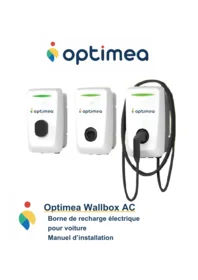
Optimea Wallbox AC

3 Installation....15

Charge Plug&Charge 38

Interruption de la charge Plug&Charge....39

S = Câbles de communication

P = Cordon T2

OPTIMEA Wallbox AC - Installation....15 - 1

Caractéristiques

TechnologieOptoMOS
Tension maximale48 VDC / 48 VAC-peak
Intensité maximale1.3 Amps
Connecteur2 x PHOENIX CONTACT 1843622

Broches

J1-1OUT1_IN
J1-2OUT1_NO
J1-3OUT2_IN
J1-4OUT2_NO
J2-1OUT3_IN
J2-2OUT3_NO
J2-3OUT4_IN
J2-4OUT4_NO

Entrées numériques
OPTIMEA Wallbox AC - Installation....15 - 2

OPTIMEA Wallbox AC - Installation....15 - 3

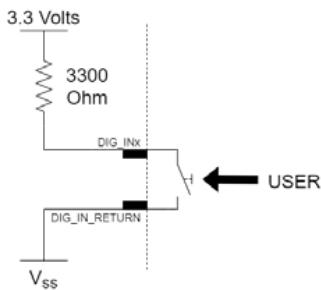
Type / scheme d'application: Digital input
OPTIMEA Wallbox AC - Installation....15 - 4

Caractéristiques

Pull-up interne3300 Ohm
Tension maximale plicable3.3 VDC
ConnecteurPHOENIX CONTACT 1843635

Broches

1DIG_IN_RETURN
2DIG_IN1
3DIG_IN2
4DIG_IN3
5DIG_IN4

AC Relay OUT
OPTIMEA Wallbox AC - Installation....15 - 5

OPTIMEA Wallbox AC - Installation....15 - 6

OPTIMEA Wallbox AC - Installation....15 - 7

Caractéristiques

Caractéristiques

ConnecteurPHOENIX CONTACT 1803426
Broches
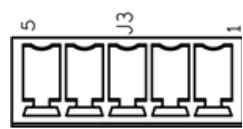
1INA
2INB

Ethernet Gigabit
OPTIMEA Wallbox AC - Installation....15 - 8

Caractéristiques

OPTIMEA Wallbox AC - Installation....15 - 9

OPTIMEA Wallbox AC - Installation....15 - 10

Connection requirements

OPTIMEA Wallbox AC - Installation....15 - 11

Socket

OPTIMEA Wallbox AC - Installation....15 - 12

Cable

Prise

OPTIMEA Wallbox AC - Installation....15 - 13

Cable

Prise

OPTIMEA Wallbox AC - Installation....15 - 14

Cable

OPTIMEA Wallbox AC - Installation....15 - 15

Interruption de la charge Plug&Charge

Prise

OPTIMEA Wallbox AC - Interruption de la charge Plug&Charge - 1

Cable

Prise

OPTIMEA Wallbox AC - Interruption de la charge Plug&Charge - 2

Cable

Prise

OPTIMEA Wallbox AC - Interruption de la charge Plug&Charge - 3

Cable

Prise

OPTIMEA Wallbox AC - Interruption de la charge Plug&Charge - 4

Cable

Prise

OPTIMEA Wallbox AC - Interruption de la charge Plug&Charge - 5

Cable

Prise

OPTIMEA Wallbox AC - Interruption de la charge Plug&Charge - 6

Cable

Prise

OPTIMEA Wallbox AC - Interruption de la charge Plug&Charge - 7

Cable

Socket

OPTIMEA Wallbox AC - Interruption de la charge Plug&Charge - 8

Cable

OPTIMEA Wallbox AC - Interruption de la charge Plug&Charge - 9

OPTIMEA Wallbox AC - Interruption de la charge Plug&Charge - 10

Adresse ModbusSignificationCode erreurMessage
1246U16SCKxW_PPHIGHTHRESHOLDW150SCK Proximity cable resistor upper threshold Warning
1247U16SCKxW_PPLOWTHRESHOLDW151SCK Proximity cable resistor lower threshold Warning
1248U16SCKxW_SIMP_NOT_AVAILW152SCK Simple mode not enabled
1249U16SCKxW_VENT_NOT_AVAILW153SCK Ventilation not enabled
1250U16SCKxW_SIMP_STOPPEDW154Simple mode stopped
1251U16SCKxW_VENT_STOPPEDW155Ventilation stopped
1252U16SCKxW_SIMP_IEND HALTW156Simple mode end
1253U16SCKxW_I_Lx_OL HALTW157OL Halt
1254U16SCKxW_FULL_IEND HALTW160SCK Full mode halted cause lend
1255U16SCKxW_WAKEUP_IS_RUNNINGW199Wakeup running

Maintenance

OPTIMEA Wallbox AC - Maintenance - 1

OPTIMEA Wallbox AC - Maintenance - 2

Table of contents Click a title to access it
Manual assistant
Powered by Anthropic
Waiting for your message
Product information

Brand : OPTIMEA

Model : Wallbox AC

Category : Portable air conditioner