OVP-AR40N - Portable air conditioner OPTIMEA - Free user manual and instructions
Find the device manual for free OVP-AR40N OPTIMEA in PDF.


| Product type | Pedestal fan |
| Brand | Optimea |
| Model | OVP-AR40N |
| Blade diameter | 40 cm |
| Height | 135 cm |
| Weight | 4.5 kg |
| Power supply | 220-240 V ~ 50 Hz |
| Power | 50 W |
| Main material | Plastic |
| Main functions | 2 in 1 (pedestal fan + additional function), vertical and horizontal oscillation, multiple speeds |
| Control | Buttons on the body |
| Safety | Fixed safety grille, automatic shut-off not specified |
| Maintenance and cleaning | Unplug before cleaning; wipe with a soft cloth soaked in mild detergent; do not use solvents |
| Spare parts and repairability | Contact after-sales service; do not repair yourself |
| General information | Domestic use only; do not use outdoors |
Frequently Asked Questions - OVP-AR40N OPTIMEA
User questions about OVP-AR40N OPTIMEA
0 question about this device. Answer the ones you know or ask your own.
Ask a new question about this device
Download the instructions for your Portable air conditioner in PDF format for free! Find your manual OVP-AR40N - OPTIMEA and take your electronic device back in hand. On this page are published all the documents necessary for the use of your device. OVP-AR40N by OPTIMEA.
USER MANUAL OVP-AR40N OPTIMEA

Plus d'infos

Plus d'infos
Avertissement

Optimea

Plus d'infos
Stand fan
User manual
Item : OVP-AR40N


More info

Thank you for choosing our product.
For proper operation of the device, please read carefully and store these Instructions for Use.
If you lose this User Guide, please contact your reseller, or send an e-mail to info@optimea.fr to obtain the electronic version.
Content
- Installation instructions ____ 1
- Instructions for use ____ 3
- Maintenance instruction ____ 4
- Cleaning ____ 4
Please read these operating instructions through carefully before connecting your device to the mains, in order to avoid damage due to incorrect use. Please pay particular attention to the safety information. If you pass the device on to a third party, these operating instructions must also be handed over.


More info
Caution
Read Rules for Safe Operation and Instructions Carefully.
Warning
- If the supply cord is damaged, it must be replaced by manufacturer or its service agent or a similarly qualified person in order to avoid a hazard.
- To protect against the risk of electrical shock, do not immerse the unit, cord or plug in water or other liquid.
- This appliance is not intended for use by persons (including children) with reduced physical, sensory or mental capabilities, or lack of experience and knowledge, unless they have been given supervision or instruction concerning use of the appliance by a person responsible for their safety. Young children should be supervised to ensure that they do not play with the appliance.
- When the appliance is not in use and before cleaning, unplug the appliance from the outlet.
- Keep electrical appliances out of reach from Children or infirm persons. Do not let them use the appliances without supervision.
- When the fan was assembled, the rotor blade guard shall not be taken off anymore.
- Prior cleaning unplug the fan.
- The rotor guard shall not be dissembled/opened to clean the rotor blades.
- Wipe the fan enclosure and rotor blade guard with a slightly damp cloth.
Rules for safe operation
- Never insert fingers, pencils, or any other object through the grille when fan is running.
- Disconnect fan when moving from one location to another.
- Be sure fan is on a stable surface when operating to avoid overturning.
- DO NOT use fan in window, rain may create electrical hazard.
- Indoor use only.
1. Installation instructions
Name of components

Front and Rear Guard Installation
Align Catch of the Front Guard with the illustrated position of the Rear Guard.
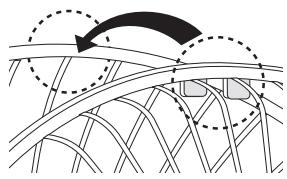
Press guards sequentially with both hands.

Self-Catch Installation.

![graph TD A["4 Pinning"] --> B["5 Blade"] B --> C["6 Lock nut of blade"] C --> D["7 Front grill"] style A fill:#f9f,stroke:#333 style B fill:#ccf,stroke:#333 style C fill:#cfc,stroke:#333 style D fill:#fcc,stroke:#333](/content/2026/07/1492774/images/b5126733236d0635bd2b65deaf225a2a821d07e180469d6ee9a2800152f36357.jpg)
Blade
- Pull the blade to rotate after installing, so as to ensure that the blade can be normally rotated.
Lock nut of grill
- Screw the lock nut of grill clockwise, and in the meantime, fix the rear grill.
2. Instructions for use
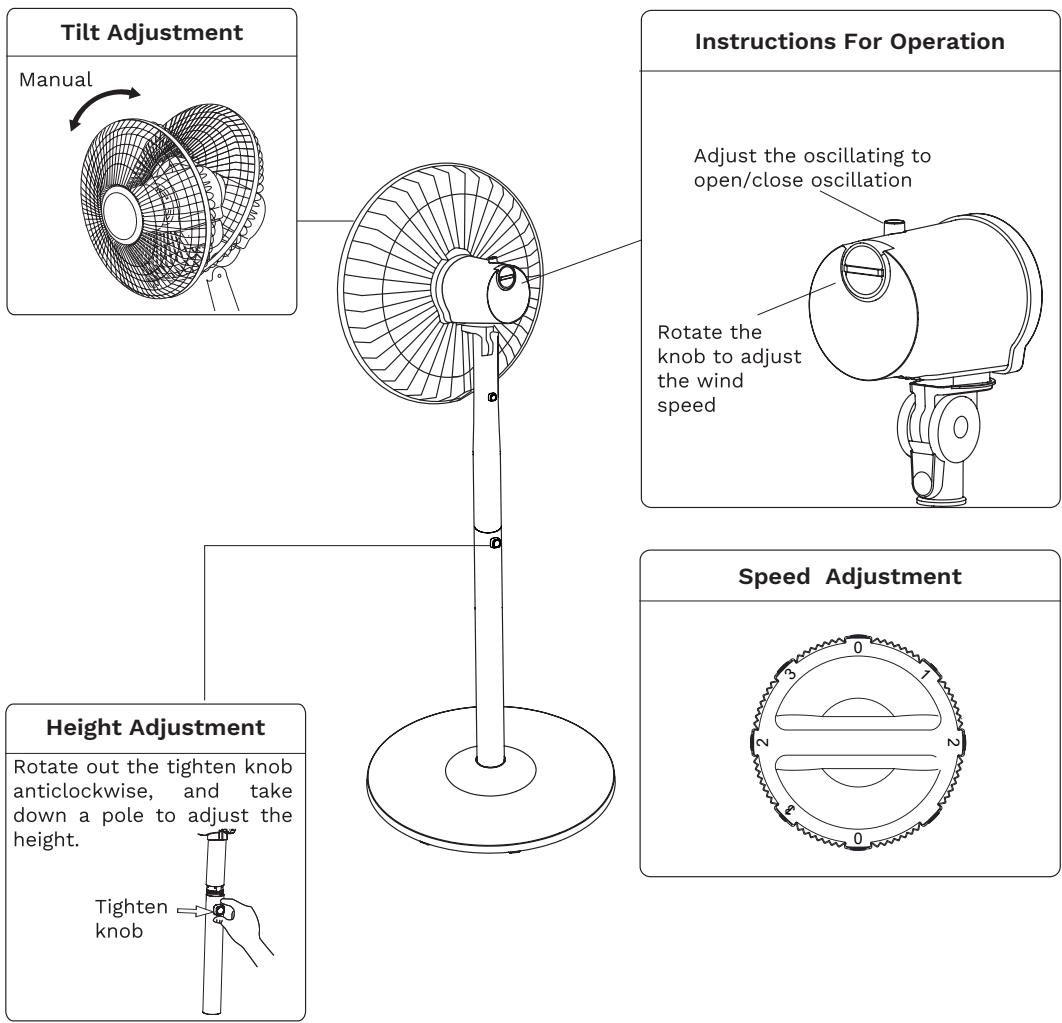
Instructions for operation of body
3. Maintenance instruction
The fan requires little maintenance. Do not try to fix it by yourself. Refer it to qualified service personnel if service is needed.
- Before cleaning and assembling, fan must be unplugged.
- To ensure adequate air circulation to the motor, keep vents at the rear of the motor free of dust. Do not disassemble the fan to remove dust.
- Please wipe the exterior parts with a soft cloth soaking a mild detergent.
- Do not use any abrasive detergent or solvents to avoid scratching the surface. Do not use any of the following as a cleaner: gasoline, thinner.
- Do not allow water or any other liquid into the motor housing or interior parts.
4. Cleaning
- Be sure to unplug from the electrical supply source before cleaning.
- Plastic parts should be cleaned with a soft cloth moisten with mild soap. Thoroughly remove soap film with dry cloth.
Optimea
Please find our product range on our website www.optimea.fr :


More info


Brand : OPTIMEA
Model : OVP-AR40N
Category : Portable air conditioner