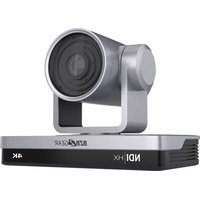
BG-COMMANDER-ULTRA - Surveillance Camera BZBGear - Free user manual and instructions
Find the device manual for free BG-COMMANDER-ULTRA BZBGear in PDF.


Pick your language and provide your email: we'll send you a specifically translated version.
| Product Type | Surveillance Camera |
| Brand | BZBGear |
| Model | BG-COMMANDER-ULTRA |
| Dimensions | Approximately 4.5 x 3.2 x 5.6 inches (115 x 80 x 142 mm) |
| Weight | Approximately 1.2 lbs (550 g) |
| Power Supply | DC 12V, 1A adapter (included) |
| Video Resolution | Full HD 1080p (1920 x 1080 pixels) |
| Night Vision | Infrared LEDs with up to 65 ft (20 m) range |
| Motion Detection | Yes, with adjustable sensitivity and push notifications |
| Two-Way Audio | Built-in microphone and speaker |
| Connectivity | Wi-Fi 802.11 b/g/n, 2.4 GHz; Ethernet port available |
| Storage | MicroSD card up to 128 GB (not included); Cloud storage optional |
| Remote Access | Via mobile app (iOS/Android) |
| Pan/Tilt | Pan 355° / Tilt 60° |
| Weather Resistance | IP65 rated (indoor/outdoor use) |
| Maintenance & Cleaning | Wipe with dry cloth; avoid liquids and harsh chemicals |
| Safety Precautions | Use only supplied adapter; install away from water and direct sunlight |
| Spare Parts & Repairability | Contact BZBGear customer support for spare parts |
Frequently Asked Questions - BG-COMMANDER-ULTRA BZBGear
How do I set up the BG-COMMANDER-ULTRA camera?
Download the BZBGear app from the App Store or Google Play. Follow the in-app instructions to connect the camera to your Wi-Fi network. Ensure the camera is powered on and the LED is flashing before pairing.
What is the maximum resolution of the camera?
The camera records in Full HD 1080p (1920x1080) for clear and detailed video.
Can I use the camera outdoors?
Yes, the BG-COMMANDER-ULTRA has an IP65 weatherproof rating, making it suitable for outdoor use under rain or dust conditions.
How does night vision work?
The camera uses built-in infrared LEDs to provide night vision up to 65 feet (20 meters) in complete darkness, automatically switching when ambient light drops.
Does the camera support two-way audio?
Yes, it has a built-in microphone and speaker, allowing you to listen and talk through the BZBGear app.
Can I record continuously?
Yes, you can insert a MicroSD card (up to 128GB) for 24/7 continuous recording or subscribe to cloud storage for backup.
How do I reset the camera to factory settings?
Press and hold the reset button (located on the back) for about 10 seconds until you hear a beep. The camera will restart and be ready for setup.
What should I do if the camera loses Wi-Fi connection?
Check your router and ensure the camera is within range. Restart the camera by unplugging it for 10 seconds. If the issue persists, re-pair the camera through the app.
Is there a privacy mode?
Yes, you can disable the camera manually through the app or schedule a privacy mode to turn off the lens and microphone during specific hours.
Can I share access with family members?
Yes, the app allows you to invite up to 5 users to view the camera feed simultaneously. Each user needs their own account.
User questions about BG-COMMANDER-ULTRA BZBGear
0 question about this device. Answer the ones you know or ask your own.
Ask a new question about this device
No questions yet. Be the first to ask one.
Download the instructions for your Surveillance Camera in PDF format for free! Find your manual BG-COMMANDER-ULTRA - BZBGear and take your electronic device back in hand. On this page are published all the documents necessary for the use of your device. BG-COMMANDER-ULTRA by BZBGear.
USER MANUAL BG-COMMANDER-ULTRA BZBGear


Manual assistant
Powered by Anthropic
Waiting for your message
Product information
Brand : BZBGear
Model : BG-COMMANDER-ULTRA
Category : Surveillance Camera