
BG-8K-HS41 - Surveillance Camera BZBGear - Free user manual and instructions
Find the device manual for free BG-8K-HS41 BZBGear in PDF.


| Product Type | 8K HDMI 4x1 Switcher |
| Model | BG-8K-HS41 |
| Input Ports | 4 x HDMI (Type A, 19-pin female) |
| Output Port | 1 x HDMI (Type A, 19-pin female) |
| Video Bandwidth | 48 Gbps |
| Max Resolution | 8K@60Hz 4:4:4 8/10/12-bit, 4K@120Hz 4:4:4 10-bit |
| HDR Support | HDR, HDR10, HDR10+, Dolby Vision, HLG |
| Audio Formats | LPCM 7.1CH, Dolby TrueHD, DTS-HD Master Audio |
| HDMI Compliance | HDMI 2.1 |
| HDCP Compliance | HDCP 2.3 |
| Switching Method | Manual (front button) and auto switching |
| Remote Control | IR remote with dedicated input buttons |
| Power Supply | DC 5V/1A (included) |
| Power Consumption | 3.4W (max) |
| Dimensions (W x D x H) | 122 mm x 65 mm x 19 mm |
| Weight | 88 g |
| Housing Material | Plastic |
| Operation Temperature | 0°C to 40°C / 32°F to 104°F |
| Storage Temperature | -20°C to 60°C / -4°F to 140°F |
| Relative Humidity | 20% to 90% RH (non-condensing) |
| Warranty | 3 years (extended available upon registration) |
Frequently Asked Questions - BG-8K-HS41 BZBGear
User questions about BG-8K-HS41 BZBGear
0 question about this device. Answer the ones you know or ask your own.
Ask a new question about this device
Download the instructions for your Surveillance Camera in PDF format for free! Find your manual BG-8K-HS41 - BZBGear and take your electronic device back in hand. On this page are published all the documents necessary for the use of your device. BG-8K-HS41 by BZBGear.
USER MANUAL BG-8K-HS41 BZBGear
Operation Controls and Functions 7
IR Remote 8
Application Diagram 9
Tech Support 10
Warranty 10
Mission Statement 11
Copyright 12
Statement
Please read these instructions carefully before connecting, operating, or configuring this product. Please save this manual for future reference.
Safety Precaution
- To prevent damaging this product, avoid heavy pressure, strong vibration, or immersion during transportation, storage, and installation.
- The housing of this product is made of organic materials. Do not expose to any liquid, gas, or solids which may corrode the shell.
- Do not expose the product to rain or moisture.
- To prevent the risk of electric shock, do not open the case. Installation and maintenance should only be carried out by qualified technicians.
- Do not use the product beyond the specified temperature, humidity, or power supply specifications.
- This product does not contain parts that can be maintained or repaired by users. Damage caused by dismantling the product without authorization from BZBGEAR is not covered under the warranty policy.
- Installation and use of this product must strictly comply with local electrical safety standards.
Introduction
This 8K HDMI 4x1 Switcher can switch any of 4 HDMI sources to 1 HDMI display. It supports video resolution up to 8K@60Hz 4:4:4, 48Gbps video bandwidth. It is suitable for outdoor display, video conference, security monitoring, home theater and other applications.
By using this HDMI 8K switcher, you are allowed to connect from four HDMI INPUT ports to four HDMI source devices via an individual HDMI cable, then connect from HDMI OUTPUT port to your external monitor (such as HDMI projector, HDMI TV or HDMI ordinary display). You can switch between four sources by pressing the switch button on the front panel of the switcher.
Please pay attention that this switcher is not a bi-directional switcher, you can only use from four sources to one display (only 4 in 1 out, not 1 in 4 out).
It can work well with xbox or PS5 to achieve 4K@120hz on your TVs or relative monitors.
Features
●HDMI 2.1 and HDCP 2.3 compliant
●Support 48Gbps video bandwidth
- 8K@60Hz 4:4:4 8/10/12bit, 8K@60Hz 4:2:0 12-bit, 8K@30Hz 4:4:4 10-bit, 4K@120Hz 4:4:4 10-bit video support
●Support HDR, HDR10, HDR10+, Dolby Vision, HLG pass through
•VRR, FVA, ALLM support
●Support HDMI audio formats: LPCM 7.1CH, Dolby TrueHD, and DTS-HD Master Audio
- 4x1 switch output, auto switch is supported
●Built-in Equalizer and Driver
●Auto EDID management
- Compact design for easy and flexible installation
Packing List
- 1x 8K HDMI 4x1 switcher
- 1x 5V/1A Power Supply
- 1x IR Remote
- 1x User Manual
Specifications
| Technical | |
| HDMI Compliance | HDMI 2.1 |
| HDCP Compliance | HDCP 2.3 |
| Video Bandwidth | 48Gbps |
| Video Resolution | Up to 8K@60Hz 4:4:4 8/10/12bit, 8K@60Hz 4:2:0 12-bit, 8K@30Hz 4:4:4 10-bit, 4K@120Hz 4:4:4 10-bit |
| Color Depth | 8-bit,10-bit,12-bit |
| Color Space | RGB, YCbCr 4:4:4 / 4:2:2 / 4:2:0 |
| HDMI Audio Formats | LPCM, Dolby Digital/Plus/EX, Dolby True HD, DTS, DTS-EX, DTS-96/24, DTS High Res, DTS-HD Master Audio, DSD |
| Connection | |
| Input | 4×HDMI INPUT [Type A, 19-pin female] |
| Output | 1×HDMI OUTPUT [Type A, 19-pin female] |
| Mechanical | |
| Housing | Plastic Enclosure |
| Silkscreen Color | Black |
| Dimensions | 122mm (W) × 65mm (D) × 19mm (H) |
| Weight | 88g |
| Power Supply | Input: AC100 - 240V 50/60Hz, Output: DC 5V/1A (US/EU standards, CE/FCC/UL certified) |
| Power Consumption | 3.4W (Max) |
| Operation Temperature | 0°C ~ 40°C / 32°F ~ 104°F |
| Storage Temperature | -20°C ~ 60°C / -4°F ~ 140°F |
| Relative Humidity | 20~90% RH (non-condensing) |
Operation Controls and Functions
Front Panel

Rear Panel
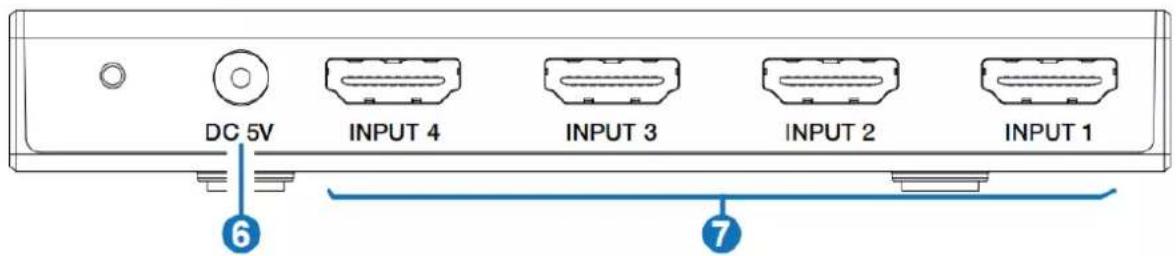
Side Panel

| No. | Name | Function Description |
| 1 | POWER LED | When the device is powered on, the white power LED is on. |
| 2 | INPUT LED (1~4) | When the INPUT 1/2/3/4 port is selected as the signal source input channel, the corresponding white LED will be on. |
| 3 | AUTO LED | When the auto switching mode is enabled, the corresponding white LED will be on. |
| 4 | IR Window | IR input signal receiving window. |
| 5 | INPUT button | • Short press this button to circularly select signal source.• Long press this button for 3 seconds to enable the auto switching mode. |
| 6 | DC 5V | DC 5V/1A Power input port. |
| 7 | INPUT port (1~4) | HDMI signal input ports, connected to HDMI source device such as DVD or PS5 with an HDMI cable. |
| 8 | OUTPUT port | HDMI signal output port, connected to HDMI display device such as TV or Monitor with an HDMI cable. |
Notes:
- If you need to use the switcher to output signals of 4K@120Hz or 8K@60Hz, please make sure that your HDMI cable, HDMI signal source and HDMI display all support the above resolution.
- The length of the HDMI cables connected to both ends of the switcher should not be too long, otherwise, it will easily cause the screen to flicker. The following HDMI cables are suggested.
8K60, 8K30, 4K120: Ultra HDMI 2.1 cable, IN/OUT 2 meters.
4K60 4:4:4: HDMI 2.0 cable, IN/OUT 3 meters.
4K60 4:2:0, 4K30, 1080P: HDMI cable, IN/OUT 5 meters.
IR Remote

IN1/2/3/4 : Press IN1/2/3/4 button to select HDMI signal source INPUT 1/2/3/4 to the OUTPUT port.
: Press this button to circularly switch HDMI signal source INPUT 1/2/3/4 to the OUTPUT port.
Application Diagram

Tech Support
Have technical questions? We may have answered them already!
Please visit BZBGEAR's support page (bzbgear.com/support) for helpful information and tips regarding our products. Here you will find our Knowledge Base (bzbgear.com/knowledge-base) with detailed tutorials, quick start guides, and step-by-step troubleshooting instructions. Or explore our YouTube channel, BZB TV (youtube.com/c/BZBTVchannel), for help setting up, configuring, and other helpful how-to videos about our gear.
Need more in-depth support? Connect with one of our technical specialists directly:
Phone
1.888.499.9906
support@bzbgear.com
Live Chat
bzbgear.com
Warranty
BZBGEAR Pro AV products and cameras come with a three-year warranty. An extended two-year warranty is available for our cameras upon registration for a total of five years.
For complete warranty information, please visit bzbgear.com/warranty.
For questions, please call 1.888.499.9906 or email support@bzbgear.com.
Mission Statement
BZBGEAR is a breakthrough manufacturer of high-quality, innovative audiovisual equipment ranging from AVoIP, professional broadcasting, conferencing, home theater, to live streaming solutions. We pride ourselves on unparalleled customer support and services. Our team offers system design consultation, and highly reviewed technical support for all the products in our catalog. BZBGEAR delivers quality products designed with users in mind.
Copyright
All the contents in this manual and its copyright are owned by BZBGEAR. No one is allowed to imitate, copy, or translate this manual without BZBGEAR's permission. This manual contains no guarantee, standpoint expression or other implies in any form. Product specification and information in this manual is for reference only and subject to change without notice.
All rights reserved. No reproducing is allowed without acknowledgement.


Brand : BZBGear
Model : BG-8K-HS41
Category : Surveillance Camera