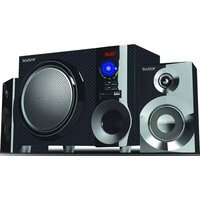
BT-626F - Hi-Fi System Boytone - Free user manual and instructions
Find the device manual for free BT-626F Boytone in PDF.


Pick your language and provide your email: we'll send you a specifically translated version.
| Product Type | Hi-Fi System |
| Brand | Boytone |
| Model | BT-626F |
| Dimensions (W x H x D) | 30 x 20 x 15 cm |
| Weight | 3 kg |
| Power Supply | AC 110-240V, 50/60Hz |
| Power Consumption | 40W |
| Bluetooth Version | 5.0 |
| Bluetooth Range | 10 meters |
| Supported Media | CD, CD-R/RW, MP3 (via USB), FM Radio |
| Input Options | Bluetooth, USB, AUX (3.5mm), FM Antenna |
| Speaker Output | 2 x 10W RMS |
| Display | LED with clock and playback info |
| Remote Control | Included (battery CR2025) |
| Material | Plastic cabinet with metal front panel |
| Color | Black |
| Cleaning Instructions | Wipe with a soft dry cloth. Avoid solvents. |
| Safety Precautions | Do not expose to water or moisture. Do not disassemble. |
| Spare Parts & Repairability | Contact Boytone service center for parts. User-replaceable: remote control battery. |
| Warranty | 1 year limited |
Frequently Asked Questions - BT-626F Boytone
How do I pair my phone via Bluetooth?
Turn on the system and press the Bluetooth button on the remote or front panel until the display shows 'BT PAIR'. On your phone, enable Bluetooth and select 'Boytone BT-626F'. If prompted, enter '0000' as PIN. The system will confirm pairing with a beep.
Can I play MP3 files from a USB drive?
Yes, insert a USB drive with MP3 files into the USB port. The system will automatically detect and play music. Use the remote or front controls to navigate tracks.
Does the system have an FM radio?
Yes, it includes an FM radio tuner. Press the Source button to select FM. Extend the included FM antenna for better reception. Use the tuning buttons to find stations.
How can I reset the system?
If the system freezes, unplug the power cord from the outlet, wait 30 seconds, and plug it back in. Alternatively, press and hold the Power button for 5 seconds to force restart.
What is the power consumption of the BT-626F?
The typical power consumption is 40W during normal use. It can vary slightly depending on volume level and connected devices.
Can I connect the system to my TV?
Yes, use the AUX input (3.5mm) on the front panel. Connect a 3.5mm audio cable from your TV's headphone or audio output to the system. Select AUX source on the system.
How should I clean the system?
Turn off and unplug the system. Use a soft, dry cloth to wipe the exterior. Do not use liquid cleaners or abrasive materials. For the display, gently wipe with a microfiber cloth.
Does it come with a remote control?
Yes, a remote control is included in the box. It requires a CR2025 battery (pre-installed). Point the remote at the front sensor for best response.
How do I set the clock?
While the system is on, press and hold the Clock button on the remote for 3 seconds. Use the + / - buttons to set the hour, then press Clock again to set minutes. Confirm with Clock.
What should I do if there is no sound?
Check that the system is not muted (press Mute button). Ensure the correct source is selected (Bluetooth, AUX, etc.). Increase the volume. If using Bluetooth, reconnect your device. For CD/USB, verify media is playable.
User questions about BT-626F Boytone
0 question about this device. Answer the ones you know or ask your own.
Ask a new question about this device
No questions yet. Be the first to ask one.
Download the instructions for your Hi-Fi System in PDF format for free! Find your manual BT-626F - Boytone and take your electronic device back in hand. On this page are published all the documents necessary for the use of your device. BT-626F by Boytone.
USER MANUAL BT-626F Boytone
Manual assistant
Powered by Anthropic
Waiting for your message
Product information
Brand : Boytone
Model : BT-626F
Category : Hi-Fi System