BT-326F - Hi-Fi System Boytone - Free user manual and instructions
Find the device manual for free BT-326F Boytone in PDF.


| Product Type | Hi-Fi System |
| Model | BT-326F |
| Brand | Boytone |
| Dimensions (W x D x H) | 400 x 250 x 300 mm |
| Weight | 5.5 kg |
| Power Supply | AC 110-240V, 50/60Hz |
| Power Output | 2 x 15W RMS |
| Connectivity | Bluetooth, AUX input, USB port, SD card slot, FM radio |
| Playback Formats | CD, CD-R/RW, MP3 (via USB/SD) |
| Tuner | FM with digital tuning, up to 30 presets |
| Speaker System | 2-way bass reflex |
| Display | LED display with clock |
| Remote Control | Included |
| Functions | CD player, FM radio, Bluetooth streaming, USB/SD playback, AUX input, alarm clock |
| Cabinet Material | MDF with wood grain finish |
| Additional Features | Headphone jack, microphone input, volume/bass/treble controls |
| Maintenance & Cleaning | Wipe with a soft dry cloth. Do not use abrasive cleaners or liquids. |
| Safety Precautions | Do not expose to moisture or extreme temperatures. Unplug during storms. |
| Spare Parts & Repairability | Contact Boytone support for replacement parts and service. |
Frequently Asked Questions - BT-326F Boytone
User questions about BT-326F Boytone
0 question about this device. Answer the ones you know or ask your own.
Ask a new question about this device
Download the instructions for your Hi-Fi System in PDF format for free! Find your manual BT-326F - Boytone and take your electronic device back in hand. On this page are published all the documents necessary for the use of your device. BT-326F by Boytone.
USER MANUAL BT-326F Boytone
natural_image
Black audio/video audio equipment with speakers and a control panel (no visible text or symbols)Thank you for your purchase of an authentic BOYTONE® product. Prior to first use, please read this manual carefully.
Front panel
- ST-BY/
- SOURCE
- VOLUME+
- VOLUME-
- TUNING-
- TUNING→I

ST-BY/PLAY/PAUSE----Press to turn on speaker, long press into stand-by. PLAY/PAUSE in USB/SD/BT mode.
SOURCE----Change the input mode.
VOLUME-/+ ----Volume down/up.
TUNING+/NEXT ----Press to increase FM frequency 0.1Mhz,
long press to start seek mode for radio.
In USB/SD/BT mode, press "NEXT" for next song.
TUNING-/PREVIOUS ----Press to decrease FM frequency 0.1Mhz,
long press to start search mode for FM Radio. In USB/SD/BT mode, press “PREVIOUS” for previous song.
NO.2:
Operation explanation:
SPECIFICATIONS
Output Power: 20W+10Wx2(RMS)
Drive Units: 3" x2 full range magnetically shielded +5" subwoofer
Frequency Response: Satellites: 120Hz-20KHz
Subwoofer:20Hz-170Hz
Separation: ≥40 dB
S/N: ≥60dB
Distortion: ≤0.5%(1K, 1W)
Power Supply: 120V60Hz
Dimensions: Subwoofer: W160xH277xD302(mm)
Satellite: W105xH170xD92(mm)
Features:
• Quality 2.1 speaker system with built-in amplifier
• Full audio spectrum performances, ideal for your favourite entertainment
from Mp3, Mp4, CD/DVD movies and digital playbacks
• Specially designed woofer cabinet for bass and resolution
- Comes with remote control and 3.5mm stereo connection
Package contents:
subwoofer cabinet 1 pc
satellite speakers 2 pcs
remote control 1-pc
User manual 1-pc
Audio input cord 1 pc
FM ANT 1 pc
NO.1
Using the Remote Control

- STAND-BY
- MUTE
- SOURCE
- TONE
- MEMORY
6.0\~9 - VOL+/-
- TUNE+/-
- LED EFFECT
- PREV/|<<
- NEXT/>>|
-
PLAY/PAUSE
-
"ST-BY" - standby mode
- "MUTE" - activates or deactivates mute.
- “SOURCE” - select the AUX, DVD, USB/SD, FM, BL input modes and the LED display will show “Au18” for AUX mode, “Du18” for DVD mode, “87.5” for FM mode and “BL” for Bluetooth mode.
- “TONE” to adjust “TREBLE” and “BASS” Use “VOL+/-” to increase or decrease “TREBLE” or “BASS” levels.
- When in FM Radio mode, press "MEMORY" and the station displayed will flash/blink. The machine is in station memorization mode. You can change the station by pressing "NEXT" or "PREV" and pressing "PLAY/PAUSE" will save that station for that station number. Automatic seek and save can be done by pressing "MEMORY" for 3-5 seconds
(Note: Previous saved channels will be deleted when you press
"MEMORY" for 3-5 seconds.
NO.3
- When in USB/SD mode. "NEXT/>>" for next song; "PREV/<<" for previous song; "PLAY/>/PAUSE/||" for play/pause; pressing "0-9" on the remote will play the corresponding song.
- VOL+/- to increase or decrease volume.
- “TUNING-/TUNING+ to adjust FM Radio frequency. Long press to fast scroll through frequencies without pause.
- “LED” effect - press to change effect. Long press to deactivate.
- "PREV" for previous song in USB/SD mode.
- "NEXT" for next song in USB/SD mode.
- "Play/Pause" to play and pause...but you definitely knew that
CONNECTING YOUR BLUETOOTH DEVICE:
- Press "SOURCE" until you are in "bL" mode. You will hear beeping.
- Activate Bluetooth and search for "BT Speaker" on your transmitting device (phone, tablet, pc, etc.)
NO.4
System connection diagram

SPEAKER TERMINALS
Connect the left & right channel satellite to 2.1 speaker output terminals.

NOTE
* Do not leave objects generating magnetism near the speakers.
NO.6
Rear panel

- ANTENNA
- AUX/DVD INPUT:
Connet to sound sources such as computer, CD Player, MP3, etc.
- Output: Connet the satellite speakers.
- AC IN: AC Power cord
NO.5
Please pay attention to the following items:
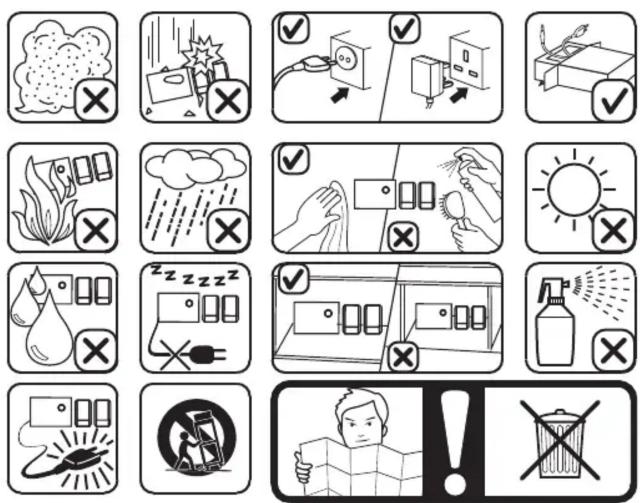

*if the remote control doesn't function, it is probably the battery of remote control being dead. Change 'em. Thank you.
NO.7
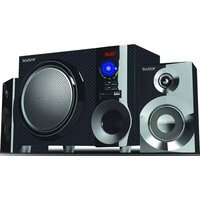
Brand : Boytone
Model : BT-326F
Category : Hi-Fi System